你当前正在访问 Microsoft Azure Global Edition 技术文档网站。 如果需要访问由世纪互联运营的 Microsoft Azure 中国技术文档网站,请访问 https://docs.azure.cn。
使用元数据安全协议(MSP),可以定义自定义基于角色的访问控制(RBAC)允许列表来帮助保护元数据服务终结点。 允许列表的内容来自审核日志。 Azure 计算图库中的InVMAccessControlProfile新资源类型启用允许列表。
若要详细了解 RBAC 和资源 InVMAccessControlProfile 类型,请参阅 MSP 的高级配置。
允许列表的结构
允许列表包括:
- 标识:计算机上的进程。
- 权限:身份可访问的终结点。
- 角色:特权分组。
- 角色分配:为这些角色授予访问权限的角色和标识列表。
收集审核日志
如果在audit或enforce模式下启用MSP,可以通过Azure Monitor从虚拟机客户端收集日志数据。
Windows: Azure 监视代理 通过自定义 XPath 收集 Windows 事件
Windows Azure!*[System[Provider[@Name=`GuestProxyAgent`]]]
查询审核日志
如上一节所述,收集审核日志后,可以验证这些日志:
Windows Kusto 查询: 转到 Log Analytics 并运行查询
/// Windows VMs
Event
| where TimeGenerated >ago(1d)
| where EventLog == "Windows Azure" and Source == "GuestProxyAgent"
| where _ResourceId startswith "/subscriptions/<your subscription id>/resourcegroups/<your recrouce group>"
| where RenderedDescription  has  "processFullPath" and RenderedDescription  has "runAsElevated" and RenderedDescription has "processCmdLine"
| extend json = parse_json(RenderedDescription)
| extend method = json.method, url = json.url, processFullPath = json.processFullPath, username = json.userName, runAsElevated = json.runAsElevated
| extend userGroups = json.userGroups, ip = json.ip, port = json.port, processCmdLine = json.processCmdLine
| project TimeGenerated, _ResourceId, url, ip, port, processFullPath, method, username, runAsElevated, processCmdLine
Linux Kusto 查询: 转到 Log Analytics 并运行查询
/// Linux VMs
Syslog
| where TimeGenerated >ago(1d)
| where  ProcessName == "azure-proxy-agent"
| where _ResourceId startswith "/subscriptions/<your subscription id>/resourcegroups/<your recrouce group>"
| where SyslogMessage  has  "processFullPath" and SyslogMessage  has "runAsElevated" and SyslogMessage has "processCmdLine"
| extend message = substring(SyslogMessage, indexof(SyslogMessage, "{"))
| extend json = parse_json(message)
| extend method = json.method, url = json.url, processFullPath = json.processFullPath, username = json.userName, runAsElevated = json.runAsElevated
| extend userGroups = json.userGroups, ip = json.ip, port = json.port, processCmdLine = json.processCmdLine
| project TimeGenerated, _ResourceId, url, ip, port, processFullPath, method, username, runAsElevated, processCmdLine
如果拥有 Azure VM,可以按照以下步骤在 Azure VM 中获取文件日志
找到代理代理程序的 json 配置文件:
- Windows VM:
GuestProxyAgent.json,位于GuestProxyAgent windows service服务所在的文件夹中 - Linux VM:
etc/azure/proxy-agent.json文件
- Windows VM:
通过在 json 配置文件中修改设置
logFolder来启用文件日志。 将其设置为-
%SYSTEMDRIVE%\\WindowsAzure\\ProxyAgent\\Logs适用于 Windows VM -
/var/log/azure-proxy-agent适用于 Linux VM。
-
重启服务
-
GuestProxyAgent适用于 Windows VM -
azure-proxy-agent适用于 Linux VMs4
- 在客户服务程序运行期间,等待
ProxyAgent.Connection.log写入。 - 从 Azure VM 拉取 ProxyAgent 连接文件日志
Windows:
C:\WindowsAzure\ProxyAgent\Logs\ProxyAgent.Connection.logLinux:
/var/log/azure-proxy-agent/ProxyAgent.Connection.log
将日志转换为规则
若要创建允许列表,可以使用自动化方法或手动方法。
自动生成允许列表
可以使用允许列表生成器工具生成访问控制规则。 该工具有助于分析审核日志,并提供用于生成规则的 UI。
下载并运行允许列表生成器工具。 在 最新版本页上的“资产”下,选择
allowListTool.exe。该工具分析
ProxyAgentConnection日志,并在 VM 上显示当前特权和标识。创建角色和角色分配:
- 若要创建角色,请选择一组特权,并为该角色指定描述性名称。
- 若要创建角色分配,请选择一个角色和一组标识。 这些身份标识可以访问在该角色中分组的权限。 为角色分配指定描述性名称。
手动创建允许列表
将虚拟机设置为 Audit 或 Enforce 模式并启用 MSP 功能后,代理程序会捕获所有发往主机终结点的请求。
在连接日志中,可以分析向 Azure 实例元数据服务或 WireServer 终结点发出请求的应用程序。

以下示例显示了捕获的 JSON 的格式。
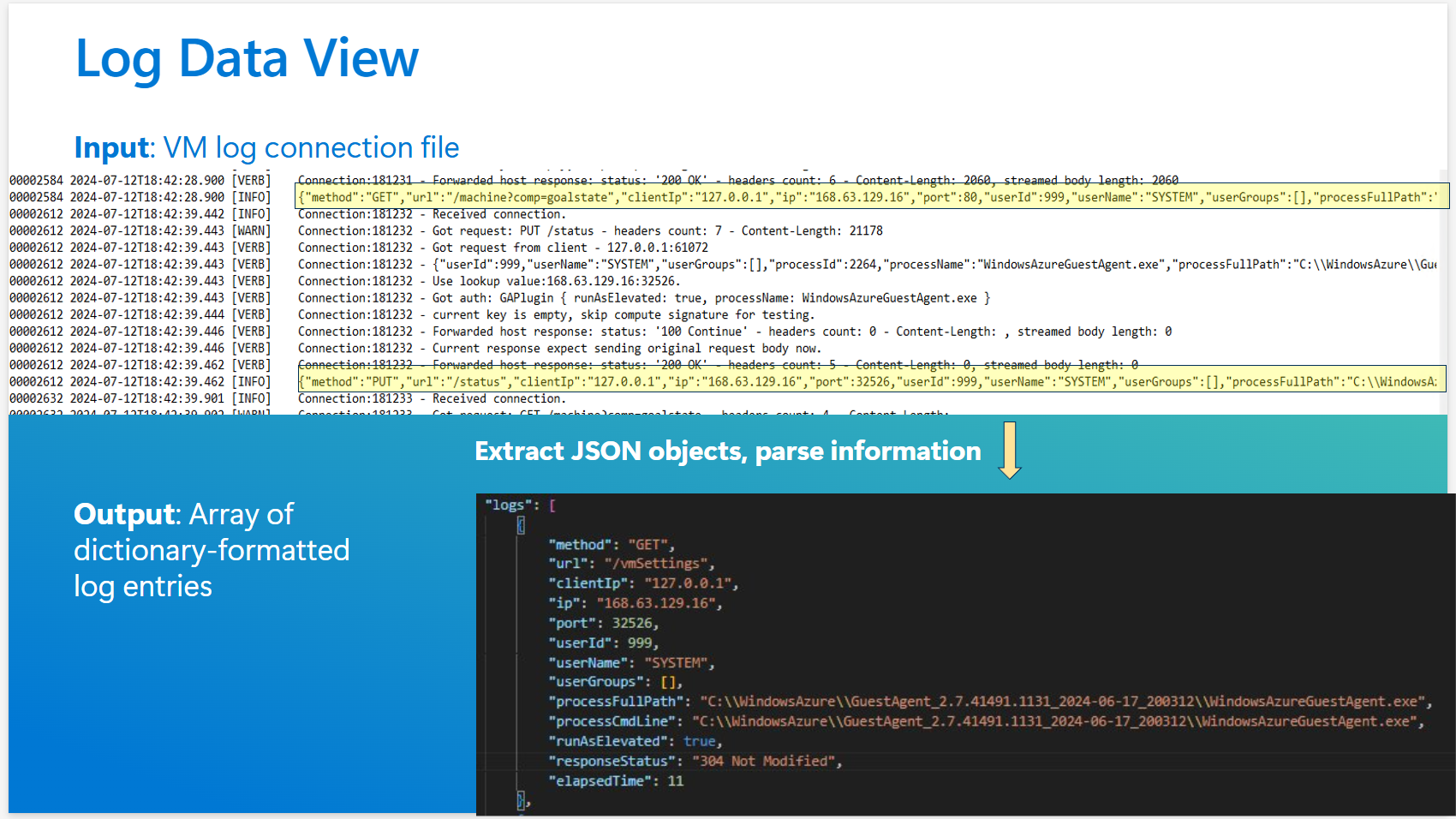
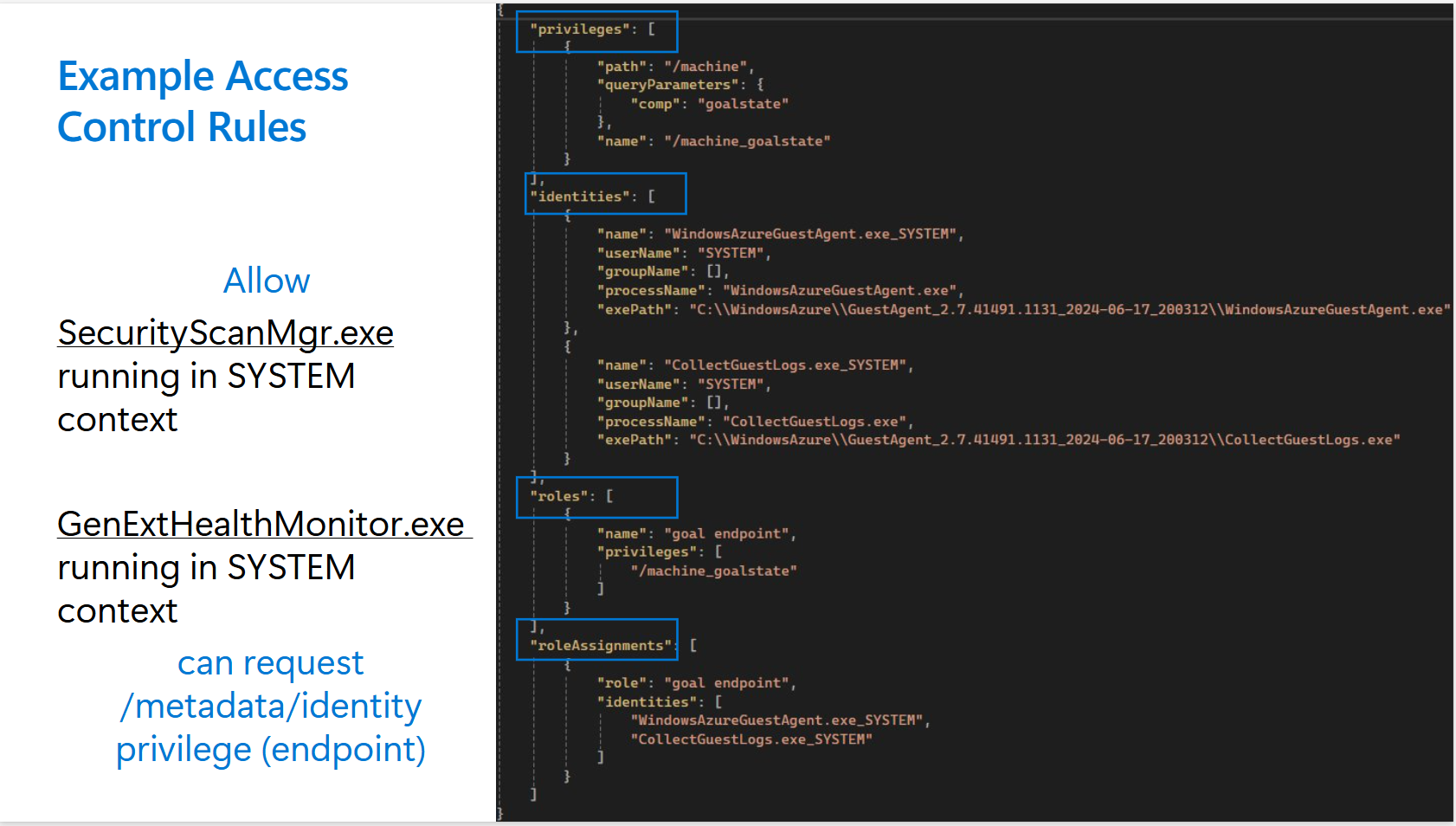
在日志文件中,可以标识要保护的终结点。 这些终结点显示在privileges最终实例InVMAccessControlProfile中。 还可以标识应具有访问权限的标识(identities)。
简单的规则架构可能如以下示例所示。
使用 ARM 模板创建 InVMAccessControlProfile 实例
在 Azure 计算库中创建新的私有库。
创建带有以下参数的
InVMAccessControlProfile定义:- 要存储到的库名称(请参阅步骤 1)
- 个人资料名称
- OS 类型
- 主机终结点类型(WireServer 或实例元数据服务)
创建特定版本。
示例 InVMAccessControlProfile
下面是一个示例 InVMAccessControlProfile 实例:
"properties": {
    "mode": "Enforce",
    "defaultAccess": "Allow",
    "rules": {
      "privileges": [
        {
          "name": "GoalState",
          "path": "/machine",
          "queryParameters": {
            "comp": "goalstate"
          }
        }
      ],
      "roles": [
        {
          "name": "Provisioning",
          "privileges": [
            "GoalState"
          ]
        },
        {
          "name": "ManageGuestExtensions",
          "privileges": [
            "GoalState"
          ]
        },
        {
          "name": "MonitoringAndSecret",
          "privileges": [
            "GoalState"
          ]
        }
      ],
      "identities": [
        {
          "name": "WinPA",
          "userName": "SYSTEM",
          "exePath": "C:\\Windows\\System32\\cscript.exe"
        },
        {
          "name": "GuestAgent",
          "userName": "SYSTEM",
          "processName": "WindowsAzureGuestAgent.exe"
        },
        {
          "name": "WaAppAgent",
          "userName": "SYSTEM",
          "processName": "WaAppAgent.exe"
        },
        {
          "name": "CollectGuestLogs",
          "userName": "SYSTEM",
          "processName": "CollectGuestLogs.exe"
        },
        {
          "name": "AzureProfileExtension",
          "userName": "SYSTEM",
          "processName": "AzureProfileExtension.exe"
        },
        {
          "name": "AzurePerfCollectorExtension",
          "userName": "SYSTEM",
          "processName": "AzurePerfCollectorExtension.exe"
        },
        {
          "name": "WaSecAgentProv",
          "userName": "SYSTEM",
          "processName": "WaSecAgentProv.exe"
        }
      ],
      "roleAssignments": [
        {
          "role": "Provisioning",
          "identities": [
            "WinPA"
          ]
        },
        {
          "role": "ManageGuestExtensions",
          "identities": [
            "GuestAgent",
            "WaAppAgent",
            "CollectGuestLogs"
          ]
        },
        {
          "role": "MonitoringAndSecret",
          "identities": [
            "AzureProfileExtension",
            "AzurePerfCollectorExtension",
            "WaSecAgentProv"
          ]
        }
      ]
    },
使用 PowerShell
如果使用 PowerShell 生成一个InVMAccessControlProfile,请确保 PowerShell 的最低版本为 10.1.0
请按照下面的分步指南生成InVMAccessControlProfile。
- 登录到 Azure 帐户
Connect-AzAccount
- 创建资源组,该资源组将用于创建专用库。 如果已创建资源组,则可以跳过此步骤。
$resourceGroup = "MyResourceGroup4"
$location = "EastUS2EUAP"
New-AzResourceGroup -Name $resourceGroup -Location $location
- 创建私人图库。 这个库用于存储
InVMAccessControlProfile项目
$galleryName = "MyGallery4"
New-AzGallery -ResourceGroupName $resourceGroup -GalleryName $galleryName -Location $location -Description "My custom image gallery"
- 在上一步中创建的专用库中创建
InVMAccessControlProfile项目。 单击此处 了解有关此项目的各种参数的详细信息。
$InVMAccessControlProfileName= "testInVMAccessControlProfileP"

New-AzGalleryInVMAccessControlProfile -ResourceGroupName  $resourceGroup  -GalleryName $galleryName   -GalleryInVMAccessControlProfileName $InVMAccessControlProfileName -Location $location -OsType "Windows" -ApplicableHostEndPoint "WireServer" -Description "this test1"
- 获取图库
InVMAccessControlProfile
$inVMAccessCP=Get-AzGalleryInVMAccessControlProfile -ResourceGroupName $resourceGroup -GalleryName $galleryName -GalleryInVMAccessControlProfileName $InVMAccessControlProfileName

7. 创建 InVMAccessControlProfileVersion
若要创建 InVMAccessControlProfileVersion,需要有效负载。 由于这些有效负载可能很大,尤其是由于规则属性,因此使用单个 PowerShell 命令一次性创建整个资源并不实用。 任何版本负载中的“规则”属性包含四个数组:privileges、roles、identities 和 roleAssignments。 这些数组可以使有效负载变得很大且复杂。 为了简化此过程,我们引入了 GalleryInVMAccessControlProfileVersionConfig PowerShell 对象。 可以在此处了解有关它的详细信息 。
此对象允许使用各种命令以增量方式生成配置,以添加或删除规则属性。
配置对象准备就绪后,可以使用它创建接下来几节中所述的一个 InVMAccessControlProfileVersion。
或者,如果已有规则属性作为 JSON 字符串,并且不想使用配置对象,则可以跳过这些步骤,并使用 ARM 模板部署创建 InVMAccessControlProfileVersion,该部署在本节的后面部分也介绍。
用于参考的数据负载:
{
  "name": "1.0.0",
  "location": "East US 2 EUAP",
  "properties": {
    "mode": "Audit",
    "defaultAccess": "Deny",
    "rules": {
      "privileges": [
        {
          "name": "GoalState",
          "path": "/machine",
          "queryParameters": {
            "comp": "goalstate"
          }
        }
      ],
      "roles": [
        {
          "name": "Provisioning",
          "privileges": [
            "GoalState"
          ]
        }
      ],
      "identities": [
        {
          "name": "WinPA",
          "userName": "SYSTEM",
          "groupName": "Administrators",
          "exePath": "C:\\Windows\\System32\\cscript.exe",
          "processName": "cscript"
        }
      ],
      "roleAssignments": [
        {
          "role": "Provisioning",
          "identities": [
            "WinPA"
          ]
        }
      ]
    },
    "targetLocations": [
      {
        "name": "East US 2 EUAP"
      }
    ],
    "excludeFromLatest": false
  }
}
- 创建
InVMAccessControlProfileVersion配置
$inVMAccessControlProfileVersionName= "1.0.0"
$targetRegions= @("EastUS2EUAP", "CentralUSEUAP")
$inVMAccessConrolProfileVersion = New-AzGalleryInVMAccessControlProfileVersionConfig `
 -Name $inVMAccessControlProfileVersionName  `
-Location $location  `
-Mode "Audit"  `
-DefaultAccess "Deny" -TargetLocation $targetRegions  -ExcludeFromLatest

运行以下命令以添加每个特权:
Add-AzGalleryInVMAccessControlProfileVersionRulesPrivilege `
  -GalleryInVmAccessControlProfileVersion $inVMAccessConrolProfileVersion `
  -PrivilegeName "GoalState" `
  -Path "/machine" `
  -QueryParameter @{ comp = "goalstate" }
若要删除权限,请按照以下步骤操作:
Remove-AzGalleryInVMAccessControlProfileVersionRulesPrivilege `
 -GalleryInVmAccessControlProfileVersion $inVMAccessConrolProfileVersion `
 -PrivilegeName "GoalState2"
运行以下命令以添加每个角色:
Add-AzGalleryInVMAccessControlProfileVersionRulesRole `
 -GalleryInVmAccessControlProfileVersion $inVMAccessConrolProfileVersion `
 -RoleName "Provisioning" `
 -Privilege @("GoalState")
运行以下命令以删除角色:
Remove-AzGalleryInVMAccessControlProfileVersionRulesRole `
 -GalleryInVmAccessControlProfileVersion $inVMAccessConrolProfileVersion `
 -RoleName "Provisioning2"
添加 RulesIdentity:
Add-AzGalleryInVMAccessControlProfileVersionRulesIdentity `
  -GalleryInVmAccessControlProfileVersion $inVMAccessConrolProfileVersion `
  -IdentityName "WinPA" `
  -UserName "SYSTEM" `
  -GroupName "Administrators" `
  -ExePath "C:\Windows\System32\cscript.exe" `
  -ProcessName "cscript"
删除 RulesIdentity:
Remove-AzGalleryInVMAccessControlProfileVersionRulesIdentity `
  -GalleryInVmAccessControlProfileVersion $inVMAccessConrolProfileVersion `
  -IdentityName "WinPA2"
运行以下命令以添加每个角色分配:
Add-AzGalleryInVMAccessControlProfileVersionRulesRoleAssignment `
  -GalleryInVmAccessControlProfileVersion $inVMAccessConrolProfileVersion `
  -Role "Provisioning" `
  -Identity @("WinPA")
删除角色分配:
Remove-AzGalleryInVMAccessControlProfileVersionRulesRoleAssignment `
  -GalleryInVmAccessControlProfileVersion $inVMAccessConrolProfileVersion `
  -Role "Provisioning2"
- 创建画廊
InVMAccessControlProfileVersion
New-AzGalleryInVMAccessControlProfileVersion -ResourceGroupName $resourceGroup -GalleryName $galleryName -GalleryInVMAccessControlProfileName $InVMAccessControlProfileName -GalleryInVmAccessControlProfileVersion $inVMAccessConrolProfileVersion

- Get
InVMAccessControlProfileVersion
$ver = Get-AzGalleryInVMAccessControlProfileVersion -ResourceGroupName $resourceGroup -GalleryName $galleryName -GalleryInVMAccessControlProfileName   $InVMAccessControlProfileName `
 -GalleryInVMAccessControlProfileVersionName  $inVMAccessControlProfileVersionName
 $ver | ConvertTo-Json -Depth 10
- 更新
InVMAccessControlProfileVersion
建议创建新的 InVMAccessControlProfileVersion 参数,因为大多数参数都无法更新。 下面是一个示例:
$targetRegions= @("EastUS2EUAP")

$ver = Get-AzGalleryInVMAccessControlProfileVersion -ResourceGroupName $resourceGroup -GalleryName $galleryName -GalleryInVMAccessControlProfileName   $InVMAccessControlProfileName `
 -GalleryInVMAccessControlProfileVersionName  $inVMAccessControlProfileVersionName


Update-AzGalleryInVMAccessControlProfileVersion `
  -GalleryInVmAccessControlProfileVersion $ver `
-TargetLocation $targetRegions -ExcludeFromLatest $true

- Delete
InVMAccessControlProfileVersion
Remove-AzGalleryInVMAccessControlProfileVersion -ResourceGroupName $resourceGroup -GalleryName $galleryName -GalleryInVMAccessControlProfileName   $InVMAccessControlProfileName `
 -GalleryInVMAccessControlProfileVersionName  $inVMAccessControlProfileVersionName

- 列出所有图库
InVMAccessControlProfile
Get-AzGalleryInVMAccessControlProfile -ResourceGroupName "myResourceGroup" -GalleryName "myGallery"

使用 CLI
请按照下面的分步指南生成InVMAccessControlProfile。
- 登录到 Azure 帐户
az login
- 在所需位置创建资源组
az group create --resource-group ResourceGroupForINVM --location eastus
- 创建一个用于存放
InVMAccessControlProfile资源的图库
az sig create --resource-group ResourceGroupForINVM --gallery-name MyGallery67 --location eastus
- 在上一步创建的库中创建一个
InVMAccessControlProfile。有关命令的其他详细信息,请参阅:az sig in-vm-access-control-profile | Microsoft Learn
az sig in-vm-access-control-profile create --resource-group ResourceGroupForINVM --gallery-name MyGallery67 --name myInVMAccessControlProfileName --location eastus --os-type Linux --applicable-host-endpoint WireServer
运行以下命令以查看有关命令和属性的其他详细信息
az sig in-vm-access-control-profile create --help

- 请更新
InVMAccessControlProfile。您只能更新InVMAccessControlProfile的说明。 如果需要其他更改,请删除当前的InVMAccessControlProfile并创建一个新的。
az sig in-vm-access-control-profile update --resource-group ResourceGroupForINVM --gallery-name MyGallery67 --name myInVMAccessControlProfileName --description test

- 针对
InVMAccessControlProfile的 get 操作
az sig in-vm-access-control-profile show --resource-group ResourceGroupForINVM --gallery-name MyGallery67 --name myInVMAccessControlProfileName

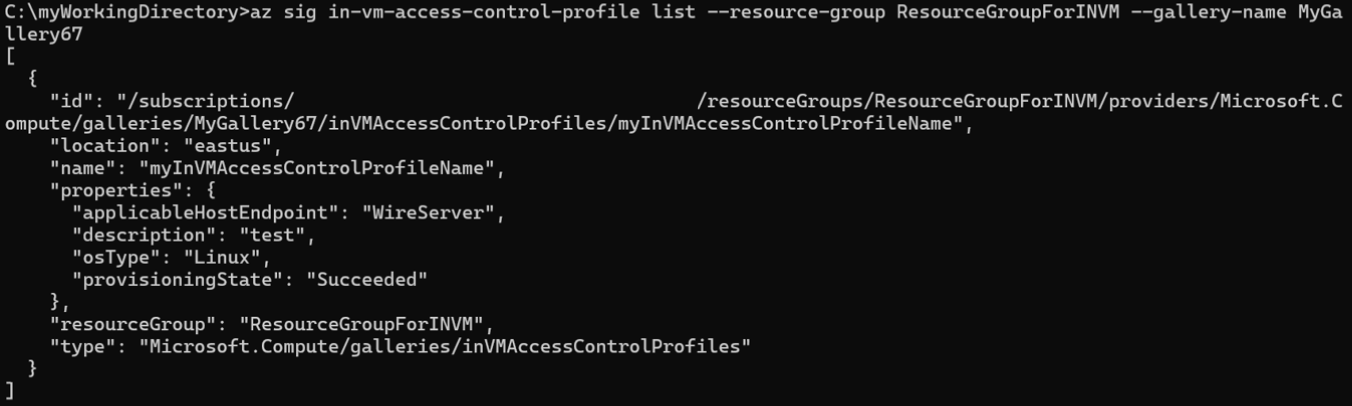
- 列出所有
InVMAccessControlProfile项目
此命令显示特定图库下的所有 InVMAccessControlProfile 列表
az sig in-vm-access-control-profile show --resource-group ResourceGroupForINVM --gallery-name MyGallery67
- 创造
InVMAccessControlProfileVersion
必须提供有效负载才能创建 InVMAccessControlProfileVersion。 这个数据包可能会很大,尤其是因为规则属性部分可能包含大量的配置信息。
我们引入了一个规则参数,该参数接受 JSON 文件作为输入,而不是直接传递规则属性的各个部分。 此方法简化了该过程,并使命令保持干净且易于管理。
下面是 rules.json 文件的示例:
 1. {
 2.   "privileges": [
 3. 	{
 4. 	  "name": "GoalState",
 5. 	  "path": "/machine",
 6. 	  "queryParameters": {
 7. 		"comp": "goalstate"
 8. 	  }
 9. 	}
10.   ],
11.   "roles": [
12. 	{
13. 	  "name": "Provisioning",
14. 	  "privileges": [
15. 		"GoalState"
16. 	  ]
17. 	}
18.   ],
19.   "identities": [
20. 	{
21. 	  "name": "WinPA",
22. 	  "userName": "SYSTEM",
23. 	  "groupName": "Administrators",
24. 	  "exePath": "C:\\Windows\\System32\\cscript.exe",
25. 	  "processName": "cscript"
26. 	}
27.   ],
28.   "roleAssignments": [
29. 	{
30. 	  "role": "Provisioning",
31. 	  "identities": [
32. 		"WinPA"
33. 	  ]
34. 	}
35.   ]
36. }
请在此处查看更多命令详细信息:az sig in-vm-access-control-profile-version | Microsoft Learn
创建完自己的 rules.json 文件版本后,使用以下命令来创建 InVMAccessControlProfileVersion
 az sig in-vm-access-control-profile-version create \
   --resource-group ResourceGroupForINVM  \
   --gallery-name MyGallery67  \
   --profile-name myInVMAccessControlProfileName \
   --version-name 1.0.0 \
   --mode Audit \
   --default-access Deny  \
   --target-regions EastUS2EUAP  \
   --exclude-from-latest true \
   --rules @rules.json
- Get
InVMAccessControlProfileVersion
az sig in-vm-access-control-profile-version show --resource-group ResourceGroupForINVM --gallery-name MyGallery67 --profile-name myInVMAccessControlProfileName --profile-version 1.0.0

- 列出所有
InVMAccessControlProfileVersion项目
az sig in-vm-access-control-profile-version list --resource-group ResourceGroupForINVM --gallery-name MyGallery67 --profile-name myInVMAccessControlProfileName
- Delete
InVMAccessControlProfileVersion
在删除任何 InVMAccessControlProfileVersion 之前,请确保该版本没有被任何虚拟机或虚拟机规模集上的 InVMAccessControlProfile 使用。
az sig in-vm-access-control-profile-version delete --resource-group ResourceGroupForINVM --gallery-name MyGallery67 --profile-name myInVMAccessControlProfileName --profile-version 1.0.0
- Delete
InVMAccessControlProfile
az sig in-vm-access-control-profile delete --resource-group ResourceGroupForINVM --gallery-name MyGallery67 --name myInVMAccessControlProfileName