重要
本文中的某些信息与预发行的产品有关,该产品在商业发布之前可能有重大修改。 Microsoft 对此处所提供的信息不作任何明示或默示的保证。
此示例指导你通过示例 YAML 创建代理,该示例使用全局Microsoft工具、GPT、API 和 KQL 工具 (技能) 。
整个过程如下:
- 步骤 1:创建并上传代理 YAML
- 步骤 2:在“管理源”中启用或切换代理
- 步骤 3:在 Security Copilot 中设置代理
- 步骤 4:运行代理
工具 (技能) 调用的明细
本部分可帮助你了解如何调用代理 YAML 工具 (技能) ,以及需要包含哪些插件。
DCA URL Geolocation 090925 Agent旨在帮助安全分析师了解给定 URL 的托管位置。 它遵循 YAML 清单中定义的结构化调用流,使用多种工具 (跨 GPT 和 KQL 格式) 技能。
触发器激活
代理每 300 秒通过默认触发器触发一次。
它首先调用 FetchSkill:
Contoso.SecurityCopilot.Samples-0909d.RecentUrlClicks_DCA-090925。 KQL 技能 (Format: KQL) 查询 Defender 日志中最近单击的 URL。然后,它调用 ProcessSkill:
Contoso.SecurityCopilot.Samples-090925.URL_Location_DCA_Agent_Entrypoint-090925。 代理技能 (Format:AGENT) 调查 URL 的托管位置。
运行代理时,将调用提取技能 Contoso.SecurityCopilot.Samples-0909d.RecentUrlClicks_DCA-090925
代理技能入口点
代理 URL_Location_DC_Agent_Entrypoint-090925 技能在 下 FORMAT:AGENT 定义,并执行以下步骤:
输入:需要单个输入:URL (URL 来调查) 。
说明:代理遵循一个三步过程来调用子技能:
ExtractHostname:使用 GPT 工具ExtractHostname_DCA-090925分析 URL 中的主机名。GetDnsResolutionsByIndicators:使用 Microsoft威胁情报 技能集检索与主机名关联的 IP 地址。 确保RequiredSkillsets: ThreatIntelligence.DTI必须添加,而不调用哪个GetDnsResolutionsByIndicators工具。lookupIpAddressGeolocation:OpenAPIoperationId规范中的 ,在 API 插件DCA_SampleAPIPlugin中引用它来查找每个 IP 地址的地理位置数据。 有关参考,请参阅 生成 API 示例。
步骤 1:创建并上传代理 YAML
代理 YAML 定义如下:
Descriptor:
  Name: Contoso.SecurityCopilot.Samples-090925_1b
  Description: DCA URL Geolocation 090925 Agent_1b
  DisplayName: DCA URL Geolocation 090925 Agent_1b

SkillGroups:
- Format: AGENT
  Skills:
  - Name: URL_Location_DCA_Agent_Entrypoint-090925_1b
    Description: The entrypoint into the URL Location Agent
    Interfaces:
    - Agent
    Inputs:
    - Required: true
      Name: URL
      Description: A URL the agent should investigate
    Settings:
      Model: gpt-4.1
      Instructions: |
            <|im_start|>system
            You are an AI agent that helps a security analyst understand the hosting situation of a URL (the input).
            You'll do this by following a three-step process:
            1) Use ExtractHostname to find the hostname from the URL provided as input
            2) Use GetDnsResolutionsByIndicators to extract IP Addresses that the hostname has been observed resolving to. This may produce a list of IP Addresses.
            3) One-at-a time, use lookupIpAddressGeolocation to look up the geolocation of an IP address.

            Produce a simply formatted response telling the security analyst which locations that URL is being served from.
            If you encounter an error share that.
            Always return something the user knows that something happened.

            <|im_end|>
            <|im_start|>user
            {{URL}}
            <|im_end|>

    ChildSkills:
    - lookupIpAddressGeolocation
    - ExtractHostname_DCA-090925_1b
    - GetDnsResolutionsByIndicators
- Format: GPT
  Skills:
  - Name: ExtractHostname_DCA-090925_1b
    DisplayName: ExtractHostname_DCA-090925_1b
    Description: ExtractHostname_DCA-090925_1b
    Inputs:
    - Name: URL
      Description: A URL string
    Settings:
      ModelName: gpt-4.1
      Template: |-
        <|im_start|>system
        Return the hostname component of the URL provided as input.  For example:
        - If the input is 'https://www.mlb.com/', return 'www.mlb.com'
        - If the input is 'http://dev.mycompany.co.uk/sign-up/blah?a=12&b=12&c=32#23', return 'dev.mycompany.co.uk'
        - If the input is 'ftp:/x.espon.com', return 'x.espon.com'
        <|im_end|>
        <|im_start|>user
        {{URL}}
        <|im_end|>
- Format: KQL
  Skills:
    - Name: RecentUrlClicks_DCA-090925_1b
      Description: Returns recently clicked URLs
      Inputs:
        - Name: LookbackMinutes
          Description: Number of minutes to lookback
          Required: false
      Settings:
        Target: Defender
        Template: UrlClickEvents | sort by TimeGenerated desc | limit 10 | project Url

AgentDefinitions:
  - Name:  URLLocationAgent-090925_1b
    DisplayName: URLLocationAgent 090925_1b
    Description: An agent to help an analyst understand URL hosting
    Publisher: Contoso
    Product: Security Copilot
    RequiredSkillsets:
      - SecurityCopilot
      - ThreatIntelligence.DTI
      - DCA_SampleAPIPlugin
    AgentSingleInstanceConstraint: None
    Settings:
      - Name: LookbackWindowMinutes
        Label: Max Lookback Window in minutes
        Description: The maximum number of minutes to find clicked URLs
        HintText: You should probably enter 5
        SettingType: String
        Required: true
    Triggers:
      - Name: Default
        DefaultPeriodSeconds: 300
        FetchSkill: Contoso.SecurityCopilot.Samples-090925_1b.RecentUrlClicks_DCA-090925_1b
        ProcessSkill: Contoso.SecurityCopilot.Samples-090925_1b.URL_Location_DCA_Agent_Entrypoint-090925_1b
        Settings:

Settings:
    HistoryPassDownMode: None
    IncludeSessionHistory: false
WorkspaceId: SecurityCopilot_Workspace
步骤 2:在“管理源”中启用或切换代理
检查是否已在提示栏中的 “管理源 > 自定义 ”中设置或切换上传的 YAML (插件) 。
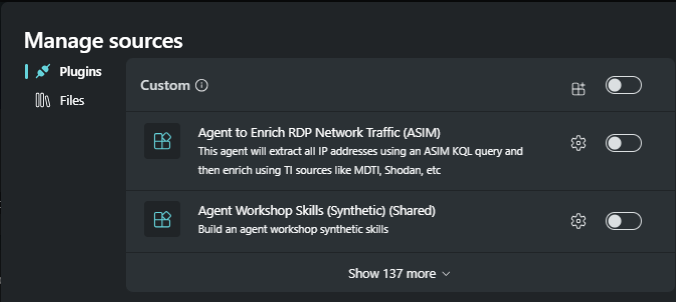
搜索
DCA URL Geolocation 090925 Agent,即Descriptor.DisplayName。
注意
通常,在设置代理时,可能有些插件需要设置某些配置。
步骤 3:在 Security Copilot 中设置代理
导航到 “家庭 > 代理”。
在代理库中搜索代理
URLLocationAgent-090925,这是AgentDefinitions.DisplayNameYAML 中的 。 如果搜索未显示代理,请刷新代理库中的屏幕。
在“代理卡上,选择”查看详细信息“以设置代理。

可以在“插件”部分看到已启用的插件。
提供设置代理所需的输入参数。

选择“ 登录” 进行身份验证。


步骤 4:运行代理
选择“ 完成” 以运行代理。 此时会显示代理运行屏幕。

选择“ 在不使用触发器的情况下运行一次 ”以运行代理。
代理运行的结果如下所示。

选择“ 查看活动 ”以查看每个代理结果。


