这些是反复报告的 NuGet 最常见的已知问题。 如果在安装 NuGet 或管理包时遇到问题,请查看这些已知问题及其解决方法。
注释
从 NuGet 4.0 开始,已知问题是相应发行说明的一部分。
在 Visual Studio 17.10 中使用 packages.config 的项目可能无法正确应用 NuGet 审核设置
从 NuGet 6.10 和 Visual Studio 17.10 开始,为 packages.config 项目添加了 NuGet 审核支持。 获取有关如何配置 NuGet 审核的信息,请参阅我们的审核包文档。
问题:
如果解决方案中使用 packages.config 的两个或多个项目使用相同的项目名称,则 NuGet Audit 将选择一个项目,并为这两个项目使用相同的 NuGet 审核设置。
GitHub 上提供了用于消除此限制的跟踪问题。
解决方法:
如果具有相同名称的所有项目都使用相同的配置值,则 NuGet 使用其他项目的配置还原一个项目时不会有任何功能差异。
NuGet.exe 没有此限制,因此可以 下载 NuGet.exe 并在 NuGet.exe restore 解决方案上运行,以查看 NuGet 审核警告在命令行中是否与 Visual Studio 报告的不同。
如果重命名项目以便具有不同的项目名称是可行的,则不会遇到此问题方案。
vSTS 中 NuGet 源的身份验证问题,nuget.exe v3.4.3
问题:
当我们使用以下命令存储凭据时,我们最终会双重加密个人访问令牌。
$PAT = “Your personal access token” $Feed = “Your url” .\nuget.exe 源添加 -Name 测试 -Source $Feed -UserName $UserName -Password $PAT
解决方法:
使用 -StorePasswordInClearText 选项以明文形式存储密码。
使用 NuGet 3.4、3.4.1 安装包时出错
问题:
在 NuGet 3.4 和 3.4.1 中,使用 NuGet 加载项时,不会报告任何源可用,并且无法在配置窗口中添加新源。 结果类似于下图:

%AppData%\NuGet\(Windows) 或 ~/.nuget/(Mac/Linux) 文件夹中的NuGet.Config文件意外被清空。 若要解决此问题:关闭 Visual Studio(在 Windows 上,如果适用),请删除 NuGet.Config 文件,然后重试该操作。 NuGet 生成了一个新 NuGet.Config 包,你应该能够继续进行。
使用 NuGet 2.7 安装包时出错
问题:
在 NuGet 2.7 或更高版本中,尝试安装包含程序集引用的任何包时,可能会收到错误消息 “输入字符串的格式不正确”。如下所示:
install-package log4net
    Installing 'log4net 2.0.0'.
    Successfully installed 'log4net 2.0.0'.
    Adding 'log4net 2.0.0' to Tyson.OperatorUpload.
    Install failed. Rolling back...
    install-package : Input string was not in a correct format.
    At line:1 char:1
        install-package log4net
        ~~~~~~~~~~~~~~~~~~~~~~~
        CategoryInfo : NotSpecified: (:) [Install-Package], FormatException
        FullyQualifiedErrorId : NuGetCmdletUnhandledException,NuGet.PowerShell.Commands.InstallPackageCommand
这是由于系统中未注册 VSLangProj.dll COM 组件的类型库导致的。 例如,如果已安装两个版本的 Visual Studio 并排安装,然后卸载旧版本,则可能会发生这种情况。 这样做可能会无意中注销上述 COM 库。
解决方案::
从 以管理员身份运行的命令提示符 运行此命令以重新注册类型库 VSLangProj.dll
regsvr32 "C:\Program Files (x86)\Common Files\microsoft shared\MSEnv\VsLangproj.olb"
如果该命令失败,请检查该文件是否存在于该位置。
有关此错误的详细信息,请参阅此[work item](https://nuget.codeplex.com/workitem/3609 "Work item 3609")。
VS 2012 中的包更新后生成失败
问题:你使用的是 VS 2012 RTM。 更新 NuGet 包时,会收到以下消息:“无法卸载一个或多个包。”系统会提示重启 Visual Studio。 VS 重启后,会出现奇怪的生成错误。
原因是旧包中的某些文件被后台 MSBuild 进程锁定。 即使在 VS 重启之后,后台 MSBuild 进程仍使用旧包中的文件,从而导致生成失败。
解决方法是安装 VS 2012 Update,例如 VS 2012 Update 2。
从旧版本升级到最新的 NuGet 会导致签名验证错误
如果运行的是 VS 2010 SP1,则尝试升级 NuGet(如果安装了较旧版本)时,可能会遇到以下错误消息。

查看日志时,您可能会看到提及SignatureMismatchException的内容。
若要防止发生这种情况,可以安装 Visual Studio 2010 SP1 修补程序 。 或者,解决方法是直接卸载 NuGet(以管理员身份运行 Visual Studio 时),然后从 VS 扩展库安装它。 有关详细信息,请参阅 https://support.microsoft.com/kb/2581019。
同时安装 Reflector Visual Studio 插件时,包管理器控制台会引发异常。
运行包管理器控制台时,如果已安装反射器 VS 外接程序,则可能会遇到以下异常消息。
The following error occurred while loading the extended type data file:
Microsoft.PowerShell.Core, C:\Windows\SysWOW64\WindowsPowerShell\v1.0\types.ps1xml(2950) :
Error in type "System.Security.AccessControl.ObjectSecurity":
Exception: Cannot convert the "Microsoft.PowerShell.Commands.SecurityDescriptorCommandsBase"
value of type "System.String" to type "System.Type".
System.Management.Automation.ActionPreferenceStopException:
Command execution stopped because the preference variable "ErrorActionPreference" or common parameter
is set to Stop: Unable to find type
或
System.Management.Automation.CmdletInvocationException: Could not load file or assembly 'Scripts\nuget.psm1' or one of its dependencies. <br />The parameter is incorrect. (Exception from HRESULT: 0x80070057 (E_INVALIDARG)) ---> System.IO.FileLoadException: Could not load file or <br />assembly 'Scripts\nuget.psm1' or one of its dependencies. The parameter is incorrect. (Exception from HRESULT: 0x80070057 (E_INVALIDARG)) <br />---> System.ArgumentException: Illegal characters in path.
at System.IO.Path.CheckInvalidPathChars(String path)
at System.IO.Path.Combine(String path1, String path2)
at Microsoft.VisualStudio.Platform.VsAppDomainManager.<AssemblyPaths>d__1.MoveNext()
at Microsoft.VisualStudio.Platform.VsAppDomainManager.InnerResolveHandler(String name)
at Microsoft.VisualStudio.Platform.VsAppDomainManager.ResolveHandler(Object sender, ResolveEventArgs args)
at System.AppDomain.OnAssemblyResolveEvent(RuntimeAssembly assembly, String assemblyFullName)
--- End of inner exception stack trace ---
at Microsoft.PowerShell.Commands.ModuleCmdletBase.LoadBinaryModule(Boolean trySnapInName, String moduleName, String fileName, <br />Assembly assemblyToLoad, String moduleBase, SessionState ss, String prefix, Boolean loadTypes, Boolean loadFormats, Boolean& found)
at Microsoft.PowerShell.Commands.ModuleCmdletBase.LoadModuleNamedInManifest(String moduleName, String moduleBase, <br />Boolean searchModulePath, <br />String prefix, SessionState ss, Boolean loadTypesFiles, Boolean loadFormatFiles, Boolean& found)
at Microsoft.PowerShell.Commands.ModuleCmdletBase.LoadModuleManifest(ExternalScriptInfo scriptInfo, ManifestProcessingFlags <br />manifestProcessingFlags, Version version)
at Microsoft.PowerShell.Commands.ModuleCmdletBase.LoadModule(String fileName, String moduleBase, String prefix, SessionState ss, <br />Boolean& found)
at Microsoft.PowerShell.Commands.ImportModuleCommand.ProcessRecord()
at System.Management.Automation.Cmdlet.DoProcessRecord()
at System.Management.Automation.CommandProcessor.ProcessRecord()
--- End of inner exception stack trace ---
at System.Management.Automation.Runspaces.PipelineBase.Invoke(IEnumerable input)
at System.Management.Automation.Runspaces.Pipeline.Invoke()
at NuGetConsole.Host.PowerShell.Implementation.PowerShellHost.Invoke(String command, Object input, Boolean outputResults)
at NuGetConsole.Host.PowerShell.Implementation.PowerShellHostExtensions.ImportModule(PowerShellHost host, String modulePath)
at NuGetConsole.Host.PowerShell.Implementation.PowerShellHost.LoadStartupScripts()
at NuGetConsole.Host.PowerShell.Implementation.PowerShellHost.Initialize()
at NuGetConsole.Implementation.Console.ConsoleDispatcher.Start()
at NuGetConsole.Implementation.PowerConsoleToolWindow.MoveFocus(FrameworkElement consolePane)
我们已联系加载项的作者,希望解决问题。
更新:我们已验证最新版本的反射器 6.5 不再会导致控制台中出现此异常。
打开包管理器控制台失败并出现 ObjectSecurity 异常
尝试打开包管理器控制台时,可能会看到以下错误:
The following error occurred while loading the extended type data file: Microsoft.PowerShell.Core, C:\Windows\SysWOW64\WindowsPowerShell\v1.0\types.ps1xml(2977) : Error in type "System.Security.AccessControl.ObjectSecurity": Exception: The getter method should be public, non void, static, and have one parameter of type PSObject.
The following error occurred while loading the extended type data file: Microsoft.PowerShell.Core, C:\Windows\SysWOW64\WindowsPowerShell\v1.0\types.ps1xml(2984) : Error in type "System.Security.AccessControl.ObjectSecurity": Exception: The getter method should be public, non void, static, and have one parameter of type PSObject.
The following error occurred while loading the extended type data file: Microsoft.PowerShell.Core, C:\Windows\SysWOW64\WindowsPowerShell\v1.0\types.ps1xml(2991) : Error in type "System.Security.AccessControl.ObjectSecurity": Exception: The getter method should be public, non void, static, and have one parameter of type PSObject.
The following error occurred while loading the extended type data file: Microsoft.PowerShell.Core, C:\Windows\SysWOW64\WindowsPowerShell\v1.0\types.ps1xml(2998) : Error in type "System.Security.AccessControl.ObjectSecurity": Exception: The getter method should be public, non void, static, and have one parameter of type PSObject.
The following error occurred while loading the extended type data file: Microsoft.PowerShell.Core, C:\Windows\SysWOW64\WindowsPowerShell\v1.0\types.ps1xml(3005) : Error in type "System.Security.AccessControl.ObjectSecurity": Exception: The getter method should be public, non void, static, and have one parameter of type PSObject.
The term 'Get-ExecutionPolicy' is not recognized as the name of a cmdlet, function, script file, or operable program. Check the spelling of the name, or if a path was included, verify that the path is correct and try again.
如果是这样,请按照 StackOverflow 上讨论 的解决方案进行修复。
如果解决方案包含 InstallShield Limited Edition 项目,“添加包库引用”对话框将引发异常
我们发现,如果解决方案包含一个或多个 InstallShield Limited Edition 项目,则打开 “添加包库引用 ”对话框将引发异常。 目前还没有解决方法,除非删除 InstallShield 项目或卸载它们。
卸载按钮变灰了吗? NuGet 需要管理员权限才能安装/卸载
如果尝试通过 Visual Studio 扩展管理器卸载 NuGet,你可能会注意到“卸载”按钮已禁用。 NuGet 需要管理员访问权限才能安装和卸载。 以管理员身份重新启动 Visual Studio 以卸载扩展。 NuGet 不需要管理员访问权限才能使用它。
在 Windows XP 中打开包管理器控制台时,包管理器控制台崩溃。 怎么了?
NuGet 需要 Powershell 2.0 运行时。 默认情况下,Windows XP 没有 Powershell 2.0。 可以从PowerShell 2.0 下载下载 PowerShell 2.0 运行时。 安装后,请重启 Visual Studio,并且应该能够打开包管理器控制台。
如果包管理器控制台处于打开状态,Visual Studio 2010 SP1 Beta 在退出时崩溃。
如果已安装 Visual Studio 2010 SP1 Beta 版,你可能会注意到,如果你将包管理器控制台保持打开并关闭 Visual Studio,它将崩溃。 这是 Visual Studio 的已知问题,将在 SP1 RTM 版本中修复。 目前,如果可以,只需忽略崩溃或卸载 SP1 Beta。
元素“metadata”...发生无效的子元素异常
如果安装了使用预发行版本的 NuGet 生成的包,则当使用该项目运行 RTM 版本的 NuGet 时,可能会遇到一条错误消息,指出命名空间“schemas.microsoft.com/packaging/2010/07/nuspec.xsd”中的元素“元数据”具有无效的子元素”。 需要使用 RTM 版本的 NuGet 卸载并重新安装每个包。
尝试安装或卸载会导致错误“当该文件已存在时无法创建文件”。
出于某种原因,Visual Studio 扩展可能会处于一种异常状态,即使已经卸载了 VSIX 扩展,仍有一些文件残留。 若要解决此问题,请执行以下操作:
退出 Visual Studio
打开以下文件夹(它可能位于计算机上的其他驱动器上)
C:\Program Files (x86)\Microsoft Visual Studio 10.0\Common7\IDE\Extensions\Microsoft Corporation\NuGet 包管理器<版本>\
删除具有 .deleteme 扩展名的所有文件。
重新打开 Visual Studio
遵循这些步骤后,你应该能够继续。
在极少数情况下,启用代码分析进行编译会导致错误。
如果使用包管理器控制台安装 FluentNHibernate,然后使用“代码分析”编译项目,则可能会收到以下错误。
Error 3 CA0058 : The referenced assembly
'NHibernate, Version=3.0.0.2001, Culture=neutral, PublicKeyToken=aa95f207798dfdb4'
could not be found. This assembly is required for analysis and was referenced by:
C:\temp\Scratch\src\MyProject.UnitTests\bin\Debug\MyProject.UnitTests.dll.
MyProject.UnitTests
默认情况下,FluentNHibernate 需要 NHibernate 3.0.0.2001。 但是,按照设计,NuGet 将在项目中安装 NHibernate 3.0.0.4000,并添加相应的绑定重定向,以便它正常工作。 如果未打开代码分析,则项目将正常编译。 与编译器相比,代码分析工具未正确遵循绑定重定向以使用 3.0.0.4000 而不是 3.0.0.2001。 可以通过安装 NHibernate 3.0.0.2001 来解决此问题,或者通过执行以下作告诉代码分析工具的行为与编译器的行为相同:
- 转到 %PROGRAMFILES%\Microsoft Visual Studio 10.0\Team Tools\Static Analysis Tools\FxCop
- 打开 FxCopCmd.exe.config,并将
AssemblyReferenceResolveMode从StrongName更改为StrongNameIgnoringVersion。 - 保存更改并重新生成项目。
Write-Error 命令在 install.ps1/uninstall.ps1/init.ps1 内不起作用
这是一个已知问题。 尝试调用 throw,而不是调用 Write-Error。
throw "My error message"
在 Windows 2003 上安装具有受限访问权限的 NuGet 可能会崩溃 Visual Studio
尝试使用 Visual Studio 扩展管理器安装 NuGet 而不以管理员身份运行时,将显示“运行方式”对话框,并默认选中“以受限访问运行此程序”复选框。
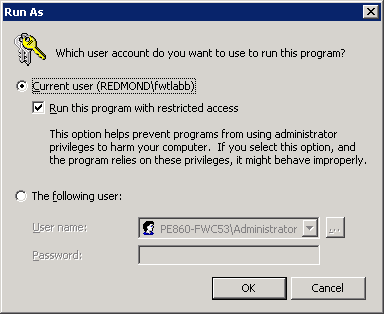
单击“确定”时,如果选中该选项,会导致 Visual Studio 崩溃。 在安装 NuGet 之前,请确保取消选中该选项。
无法卸载适用于 Windows Phone 工具的 NuGet
Windows Phone 工具不支持 Visual Studio 扩展管理器。 若要卸载 NuGet,请运行以下命令。
vsixinstaller.exe /uninstall:NuPackToolsVsix.Microsoft.67e54e40-0ae3-42c5-a949-fddf5739e7a5
更改 NuGet 包 ID 的大小写会中断包还原
正如在 这个 GitHub 问题中详尽讨论的那样,NuGet 支持可以更改 NuGet 包的大小写,但这会对那些在其 global-packages 全局包文件夹中已存在不同大小写的包的用户造成在包还原过程中的复杂情况。 建议仅在有办法与包的现有用户通信时请求案例更改,了解其生成时包还原可能发生的中断。
报告问题
若要报告 NuGet 问题,请访问 https://github.com/nuget/home/issues。