此多部分教程介绍如何为 Power Query 创建新的数据源扩展。 本教程旨在按顺序完成 — 每个课程都基于在上一课中创建的连接器上构建,以增量方式向连接器添加新功能。
在本课中,你将:
- 为 REST API 定义固定架构
- 动态设置列的数据类型
- 强制实施表结构以避免由于缺少列而导致的转换错误
- 隐藏结果集中的列
OData 服务在标准 REST API 上的优势之一是其 $metadata定义。 $metadata文档描述了此服务上找到的数据,包括其所有实体(表)和字段(列)的架构。 该 OData.Feed 函数使用此架构定义自动设置数据类型信息。 因此,最终用户无需像通过 Json.Document 那样获取所有文本和数字字段,而是可以获得日期、整数、时间等,从而提供更好的整体用户体验。
许多 REST API 无法以编程方式确定其架构。 在这些情况下,需要在连接器中包含架构定义。 在本课中,为每个表定义一个简单的硬编码架构,并针对从服务读取的数据强制实施架构。
注释
此处所述的方法应适用于许多 REST 服务。 未来的课程将通过对结构化列(记录、列表、表)递归地强制实施架构来完善此方法。 它们还提供示例实现,这些实现可以通过编程方式从 CSDL 或 JSON 架构 文档生成架构表。
总的来说,对连接器返回的数据强制实施架构具有多种优势,例如:
- 设置正确的数据类型
- 删除不需要向最终用户显示的列(例如内部 ID 或状态信息)
- 通过添加响应中可能缺少的任何列(REST API 指示字段的常见方式)
null来确保每个数据页具有相同的形状。
使用 Table.Schema 查看现有架构
在 上一课 中创建的连接器显示 TripPin 服务的三个表: Airlines, Airports以及 People。 运行以下查询以查看 Airlines 表:
let
    source = TripPin.Contents(),
    data = source{[Name="Airlines"]}[Data]
in
    data
在结果中,返回四列:
- @odata.id
- @odata.editLink
- 航空公司代码
- Name

“@odata.*” 列是 OData 协议的一部分,不应展示给连接器的最终用户,也不需要展示。
AirlineCode 和 Name 是你要保留的两列。 如果查看表的架构(使用方便的 Table.Schema 函数),表中的所有列都具有数据类型 Any.Type。
let
    source = TripPin.Contents(),
    data = source{[Name="Airlines"]}[Data]
in
    Table.Schema(data)

Table.Schema 返回有关表中列的许多元数据,包括名称、位置、类型信息和许多高级属性,例如 Precision、Scale 和 MaxLength。 未来的课程提供了用于设置这些高级属性的设计模式,但目前,只需关注所写类型(TypeName)、基元类型(Kind)以及列值是否可能 null (IsNullable)。
定义简单架构表
架构表由两列组成:
| 列 | 详细信息 |
|---|---|
| Name | 列的名称。 此名称必须与服务返回的结果中的名称匹配。 |
| 类型 | 要设置的 M 数据类型。 此类型可以是基元类型(text、 number、 datetime等),也可以是订阅类型(Int64.Type等等 Currency.Type)。 |
硬编码的架构表Airlines将AirlineCode和Name列设置为text,其结构如下:
Airlines = #table({"Name", "Type"}, {
        {"AirlineCode", type text},
        {"Name", type text}
    });
Airports 表中有四个您想保留的字段(其中一个是 record 类型):
Airports = #table({"Name", "Type"}, {
        {"IcaoCode", type text},
        {"Name", type text},
        {"IataCode", type text},
        {"Location", type record}
    });
最后,该People表有七个字段,包括列表(Emails、AddressInfo)、一个可为空的列(Gender),以及一个具有指定类型的列(Concurrency)。
People = #table({"Name", "Type"}, {
        {"UserName", type text},
        {"FirstName", type text},
        {"LastName", type text},
        {"Emails", type list},
        {"AddressInfo", type list},
        {"Gender", type nullable text},
        {"Concurrency", Int64.Type}
    })
SchemaTransformTable 辅助函数
SchemaTransformTable本部分中介绍的帮助程序函数用于对数据强制实施架构。 它采用以下参数:
| 参数 | 类型 | Description |
|---|---|---|
| 表 | 表 | 要在其中强制实施架构的数据表。 |
| 架构 | 表 | 要从中读取列信息的架构表,类型如下: type table [Name = text, Type = type] |
| enforceSchema | 数字 | (可选)控制函数行为的枚举。 默认值 ( EnforceSchema.Strict = 1) 通过添加任何缺失列并删除额外列来确保输出表与提供的架构表匹配。 该 EnforceSchema.IgnoreExtraColumns = 2 选项可用于保留结果中的额外列。 使用时 EnforceSchema.IgnoreMissingColumns = 3 ,将忽略缺失列和额外列。 |
此函数的逻辑如下所示:
- 确定源表中是否存在任何缺失的列。
- 确定是否有任何额外的列。
- 忽略结构化列(类型
list、record和table),以及设置为type any的列。 - 使用 Table.TransformColumnTypes 设置每个列类型。
- 根据在架构表中显示的顺序重新排序列。
- 使用 Value.ReplaceType 设置表本身的类型。
注释
设置表类型的最后一步消除了在查询编辑器中查看结果时 Power Query UI 推断类型信息的需求。 此设置将删除 在上一教程结束时看到的双重请求问题。
可以将以下帮助程序代码复制并粘贴到扩展中:
EnforceSchema.Strict = 1;               // Add any missing columns, remove extra columns, set table type
EnforceSchema.IgnoreExtraColumns = 2;   // Add missing columns, do not remove extra columns
EnforceSchema.IgnoreMissingColumns = 3; // Do not add or remove columns

SchemaTransformTable = (table as table, schema as table, optional enforceSchema as number) as table =>
    let
        // Default to EnforceSchema.Strict
        _enforceSchema = if (enforceSchema <> null) then enforceSchema else EnforceSchema.Strict,

        // Applies type transforms to a given table
        EnforceTypes = (table as table, schema as table) as table =>
            let
                map = (t) => if Type.Is(t, type list) or Type.Is(t, type record) or t = type any then null else t,
                mapped = Table.TransformColumns(schema, {"Type", map}),
                omitted = Table.SelectRows(mapped, each [Type] <> null),
                existingColumns = Table.ColumnNames(table),
                removeMissing = Table.SelectRows(omitted, each List.Contains(existingColumns, [Name])),
                primativeTransforms = Table.ToRows(removeMissing),
                changedPrimatives = Table.TransformColumnTypes(table, primativeTransforms)
            in
                changedPrimatives,

        // Returns the table type for a given schema
        SchemaToTableType = (schema as table) as type =>
            let
                toList = List.Transform(schema[Type], (t) => [Type=t, Optional=false]),
                toRecord = Record.FromList(toList, schema[Name]),
                toType = Type.ForRecord(toRecord, false)
            in
                type table (toType),

        // Determine if we have extra/missing columns.
        // The enforceSchema parameter determines what we do about them.
        schemaNames = schema[Name],
        foundNames = Table.ColumnNames(table),
        addNames = List.RemoveItems(schemaNames, foundNames),
        extraNames = List.RemoveItems(foundNames, schemaNames),
        tmp = Text.NewGuid(),
        added = Table.AddColumn(table, tmp, each []),
        expanded = Table.ExpandRecordColumn(added, tmp, addNames),
        result = if List.IsEmpty(addNames) then table else expanded,
        fullList =
            if (_enforceSchema = EnforceSchema.Strict) then
                schemaNames
            else if (_enforceSchema = EnforceSchema.IgnoreMissingColumns) then
                foundNames
            else
                schemaNames & extraNames,

        // Select the final list of columns.
        // These will be ordered according to the schema table.
        reordered = Table.SelectColumns(result, fullList, MissingField.Ignore),
        enforcedTypes = EnforceTypes(reordered, schema),
        withType = if (_enforceSchema = EnforceSchema.Strict) then Value.ReplaceType(enforcedTypes, SchemaToTableType(schema)) else enforcedTypes
    in
        withType;
更新 TripPin 连接器
若要使用新的架构强制代码,请对连接器进行以下更改。
- 定义一个“主架构表”(
SchemaTable), 其中包含您所有的架构定义。 - 请更新
TripPin.Feed、GetPage和GetAllPagesByNextLink以接受schema参数。 - 在
GetPage中应用你的架构。 - 更新导航表代码以用对新函数的调用包装每个表(
GetEntity)。 此函数为你将来的表定义操作提供更大的灵活性。
主架构表
现在,将架构定义合并到单个表中,并添加一个帮助程序函数(GetSchemaForEntity),以便基于实体名称(例如, GetSchemaForEntity("Airlines")) 查找定义。
SchemaTable = #table({"Entity", "SchemaTable"}, {
    {"Airlines", #table({"Name", "Type"}, {
        {"AirlineCode", type text},
        {"Name", type text}
    })},

    {"Airports", #table({"Name", "Type"}, {
        {"IcaoCode", type text},
        {"Name", type text},
        {"IataCode", type text},
        {"Location", type record}
    })},

    {"People", #table({"Name", "Type"}, {
        {"UserName", type text},
        {"FirstName", type text},
        {"LastName", type text},
        {"Emails", type list},
        {"AddressInfo", type list},
        {"Gender", type nullable text},
        {"Concurrency", Int64.Type}
    })}
});

GetSchemaForEntity = (entity as text) as table => try SchemaTable{[Entity=entity]}[SchemaTable] otherwise error "Couldn't find entity: '" & entity &"'";
向数据函数添加架构支持
现在,向 TripPin.Feed、GetPage 和 GetAllPagesByNextLink 函数添加一个可选的 schema 参数。
此参数允许将架构(当需要)传递到分页函数,该函数应用于从服务返回的结果。
TripPin.Feed = (url as text, optional schema as table) as table => ...
GetPage = (url as text, optional schema as table) as table => ...
GetAllPagesByNextLink = (url as text, optional schema as table) as table => ...
还需要更新对这些函数的所有调用,以确保正确传递架构。
强制实施架构
实际的模式实施在 GetPage 函数中完成。
GetPage = (url as text, optional schema as table) as table =>
    let
        response = Web.Contents(url, [ Headers = DefaultRequestHeaders ]),
        body = Json.Document(response),
        nextLink = GetNextLink(body),
        data = Table.FromRecords(body[value]),
        // enforce the schema
        withSchema = if (schema <> null) then SchemaTransformTable(data, schema) else data
    in
        withSchema meta [NextLink = nextLink];
注释
此 GetPage 实现使用 Table.FromRecords 将 JSON 响应中的记录列表转换为表。 使用 Table.FromRecords 的主要缺点是,它假定列表中的所有记录具有相同的字段集。 这种行为适用于 TripPin 服务,因为可以确保 OData 记录包含相同的字段,但对于所有 REST API 来说,情况可能并非如此。
更可靠的实现将使用 Table.FromList 和 Table.ExpandRecordColumn 的组合。 后续教程将展示如何修改实现方式,以便从架构表中获取列列表,确保在 JSON 到 M 的转换过程中不会丢失或遗漏任何列。
添加 GetEntity 函数
GetEntity 函数将您的调用包装到 TripPin.Feed。 它基于实体名称查找架构定义,并生成完整的请求 URL。
GetEntity = (url as text, entity as text) as table =>
    let
        fullUrl = Uri.Combine(url, entity),
        schemaTable = GetSchemaForEntity(entity),
        result = TripPin.Feed(fullUrl, schemaTable)
    in
        result;
然后更新 TripPinNavTable 函数以调用 GetEntity,而不是在内联中进行所有调用。
此更新的主要优点是,它允许你继续修改实体构建代码,而无需触摸导航表逻辑。
TripPinNavTable = (url as text) as table =>
    let
        entitiesAsTable = Table.FromList(RootEntities, Splitter.SplitByNothing()),
        rename = Table.RenameColumns(entitiesAsTable, {{"Column1", "Name"}}),
        // Add Data as a calculated column
        withData = Table.AddColumn(rename, "Data", each GetEntity(url, [Name]), type table),
        // Add ItemKind and ItemName as fixed text values
        withItemKind = Table.AddColumn(withData, "ItemKind", each "Table", type text),
        withItemName = Table.AddColumn(withItemKind, "ItemName", each "Table", type text),
        // Indicate that the node should not be expandable
        withIsLeaf = Table.AddColumn(withItemName, "IsLeaf", each true, type logical),
        // Generate the nav table
        navTable = Table.ToNavigationTable(withIsLeaf, {"Name"}, "Name", "Data", "ItemKind", "ItemName", "IsLeaf")
    in
        navTable;
汇总
完成所有代码更改后,编译并重新运行调用 Table.Schema Airlines 表的测试查询。
let
    source = TripPin.Contents(),
    data = source{[Name="Airlines"]}[Data]
in
    Table.Schema(data)
您的航空公司表现在仅包含在其架构中定义的两列:

如果对“People”表执行相同的代码...
let
    source = TripPin.Contents(),
    data = source{[Name="People"]}[Data]
in
    Table.Schema(data)
请注意,你使用的所指定的类型(Int64.Type)也已正确设置。

需要注意的一个重要事项是,此实现不会修改list和record列的类型,但Emails和AddressInfo列仍然类型为list。 发生此行为的原因是 Json.Document 将 JSON 数组正确映射到 M 列表,并将 JSON 对象映射到 M 记录。 如果在 Power Query 中展开列表或记录列,则所有展开的列都是类型 any。 将来的教程将改进实现,以递归方式为嵌套复杂类型设置类型信息。
结论
本教程提供了一个示例实现,用于对从 REST 服务返回的 JSON 数据强制实施架构。 虽然此示例使用简单的硬编码架构表格式,但可以通过从另一个源(例如 JSON 架构文件或数据源公开的元数据服务/终结点)动态生成架构表定义来扩展该方法。
除了修改列类型(和值),代码还设置表本身的正确类型信息。 在 Power Query 内部运行时,设置此类型信息会有利于性能,因为用户体验始终尝试推断类型信息来向最终用户显示正确的 UI 队列,推理调用最终可能会触发对基础数据 API 的其他调用。
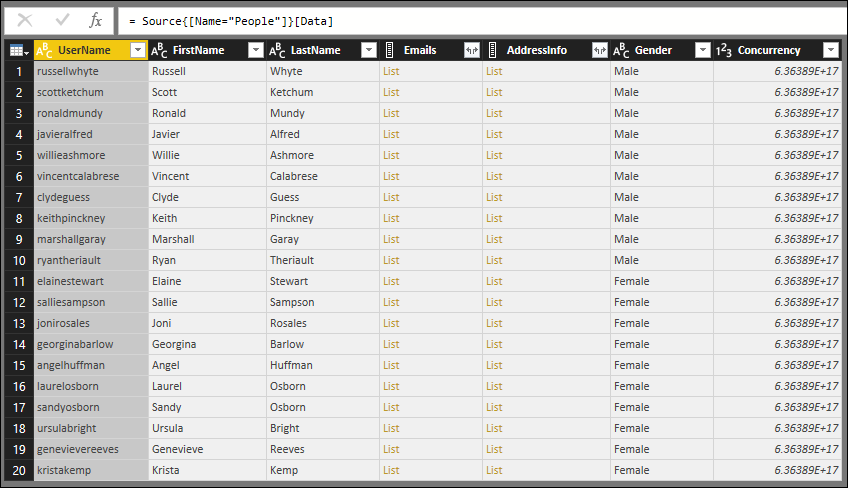
如果使用 上一课中的 TripPin 连接器查看 People 表,则所有列都具有“类型任意”图标(甚至包含列表的列):

如果在本课程中使用 TripPin 连接器运行同一查询,则类型信息现已正确显示。