适用于: SQL Server 2025 (17.x)
本文提供了有关为 Azure Arc 启用的 SQL Server 设置和配置 Microsoft Entra ID 托管标识的分步说明。
有关使用 SQL Server 的托管标识的概述,请参阅 Azure Arc 启用的 SQL Server 的托管标识。
先决条件
在 Azure Arc 启用的 SQL Server 中使用托管标识之前,请确保满足以下先决条件:
- 支持在 Windows 上运行的 SQL Server 2025 及更高版本。
- 将 SQL Server 连接到 Azure Arc。
- 适用于 SQL Server 的 Azure 扩展的最新版本。
启用主要托管标识
如果已将适用于 SQL Server 的 Azure 扩展安装到服务器,可以直接从 Azure 门户为 SQL Server 实例启用主托管标识。 还可以通过更新注册表手动启用主托管标识,但应谨慎行事。
- Azure 门户
- 手动
若要在 Azure 门户中启用主要托管标识,请执行以下步骤:
转到 Azure 门户中由 Azure Arc 启用的 SQL Server 资源。
在 “设置”下,选择 Microsoft Entra ID 和 Purview 以打开 Microsoft Entra ID 和 Purview 页面。
注释
如果未看到 “启用Microsoft Entra ID 身份验证 选项,请确保 SQL Server 实例已连接到 Azure Arc,并且已安装最新的 SQL 扩展。
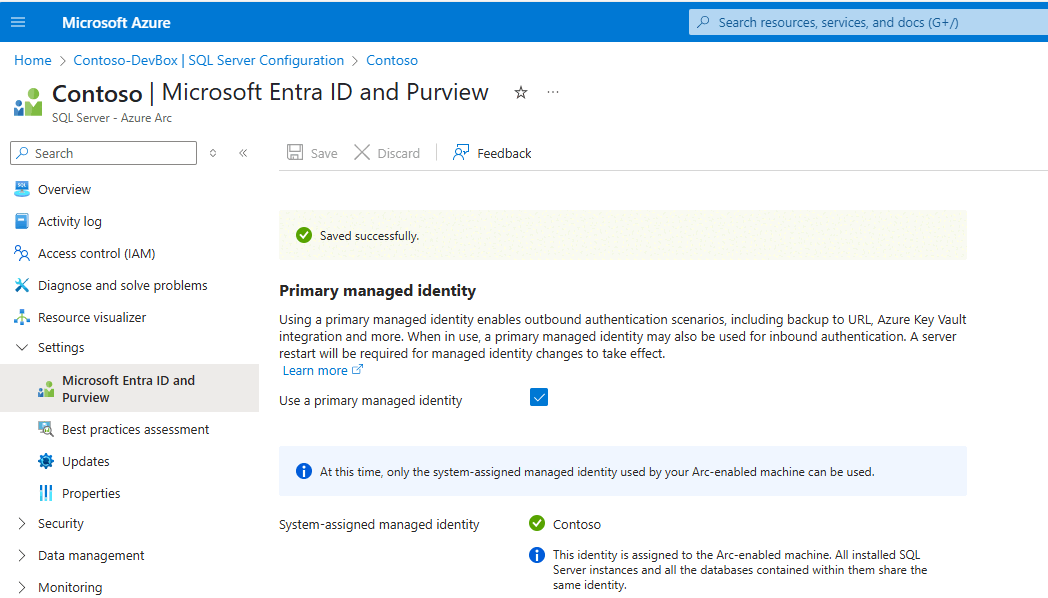
在 Microsoft Entra ID 和 Purview 页上,选中 “使用主托管标识 ”旁边的框,然后使用 “保存” 应用配置:


向标识授予应用程序权限
重要
只有特权角色管理员或更高角色才能授予这些权限。
系统分配的托管身份(使用支持 Arc 的机器名)必须具有以下 Microsoft Graph 应用程序权限(应用程序角色):
User.Read.All:允许访问 Microsoft Entra 用户信息。
GroupMember.Read.All:允许访问 Microsoft Entra 组信息。
Application.Read.ALL:允许访问 Microsoft Entra 服务主体(应用程序)信息。
可以使用 PowerShell 向托管标识授予所需的权限。 或者,可以 创建可分配角色的组。 创建组后,为组分配 目录读取者 角色,或者分配 User.Read.All、GroupMember.Read.All 和 Application.Read.All 权限,并将所有与 Azure Arc 兼容的计算机的系统分配托管标识添加到该组中。 不建议在生产环境中使用 目录读取器 角色。
以下 PowerShell 脚本向托管标识授予所需的权限。 请确保此脚本在 PowerShell 7.5 或更高版本上运行,并 Microsoft.Graph 已安装模块 2.28 或更高版本。
# Set your Azure tenant and managed identity name
$tenantID = '<Enter-Your-Azure-Tenant-Id>'
$managedIdentityName = '<Enter-Your-Arc-HostMachine-Name>'

# Connect to Microsoft Graph
try {
    Connect-MgGraph -TenantId $tenantID -ErrorAction Stop
    Write-Output "Connected to Microsoft Graph successfully."
}
catch {
    Write-Error "Failed to connect to Microsoft Graph: $_"
    return
}

# Get Microsoft Graph service principal
$graphAppId = '00000003-0000-0000-c000-000000000000'
$graphSP = Get-MgServicePrincipal -Filter "appId eq '$graphAppId'"
if (-not $graphSP) {
    Write-Error "Microsoft Graph service principal not found."
    return
}

# Get the managed identity service principal
$managedIdentity = Get-MgServicePrincipal -Filter "displayName eq '$managedIdentityName'"
if (-not $managedIdentity) {
    Write-Error "Managed identity '$managedIdentityName' not found."
    return
}

# Define roles to assign
$requiredRoles = @(
    "User.Read.All",
    "GroupMember.Read.All",
    "Application.Read.All"
)

# Assign roles using scoped syntax
foreach ($roleValue in $requiredRoles) {
    $appRole = $graphSP.AppRoles | Where-Object {
        $_.Value -eq $roleValue -and $_.AllowedMemberTypes -contains "Application"
    }

    if ($appRole) {
        try {
            New-MgServicePrincipalAppRoleAssignment   -ServicePrincipalId $managedIdentity.Id `
                -PrincipalId $managedIdentity.Id `
                -ResourceId $graphSP.Id `
                -AppRoleId $appRole.Id `
                -ErrorAction Stop

            Write-Output "Successfully assigned role '$roleValue' to '$managedIdentityName'."
        }
        catch {
            Write-Warning "Failed to assign role '$roleValue': $_"
        }
    }
    else {
        Write-Warning "Role '$roleValue' not found in Microsoft Graph AppRoles."
    }
}
创建登录名和用户
按照 Microsoft Entra 教程 中的步骤为托管标识创建登录名和用户。