追蹤資料庫功能可讓您將位於不同叢集中的資料庫附加至 Azure 數據總管叢集。
後續資料庫會以只讀模式附加,讓您能夠檢視數據,並在內嵌至領導者資料庫的數據上執行查詢。 追蹤者資料庫會同步處理領導者資料庫中的變更。 由於同步處理,數據可用性會有幾秒鐘到幾分鐘的數據延遲。 時間延遲的長度取決於領導者資料庫元數據的整體大小。 領導者和追蹤者資料庫會使用相同的記憶體帳戶來擷取數據。 領導者資料庫擁有記憶體。 後續資料庫會檢視數據,而不需要擷取數據。 由於附加資料庫是只讀資料庫,因此除了快取原則、主體和許可權之外,無法修改資料庫中的數據、數據表和原則。 無法刪除附加的資料庫。 領導者或追蹤者必須先卸離資料庫,才能刪除。
使用追蹤程式功能將資料庫附加至不同的叢集,會作為基礎結構,在組織與小組之間共享數據。 此功能有助於隔離計算資源,以保護生產環境免於非生產使用案例。 追蹤程式也可以用來將 Azure 數據總管叢集的成本與對數據執行查詢的合作對象產生關聯。
注意
如需以舊版 SDK 為基礎的程式代碼範例,請參閱 封存一文。
追蹤哪些資料庫?
下列適用於叢集:
- 叢集可以遵循一個資料庫、數個資料庫或領導者叢集的所有資料庫。
- 單一叢集可以追蹤來自多個領導者叢集的資料庫。
- 叢集可以同時包含追蹤者資料庫和領導者資料庫。
必要條件
附加資料庫
您可以使用各種方法來附加資料庫。 在本文中,我們會討論使用 C#、Python、PowerShell 或 Azure Resource Manager 範本附加資料庫。
若要附加資料庫,您必須擁有使用者、群組、服務主體或受控識別,且領導者叢集和追蹤者叢集上至少有參與者角色。 使用 Azure 入口網站、PowerShell、Azure CLI 和 ARM 範本新增或移除角色指派。 深入瞭解 Azure 角色型訪問控制 (Azure RBAC) 和 不同的角色。
注意
在附件程式期間建立追蹤資料庫時,不需要預先建立追蹤資料庫。
數據表層級共用
當您附加資料庫時,也會追蹤所有數據表、外部數據表和具體化檢視。 您可以藉由設定 『TableLevelSharingProperties』 來共用特定的數據表/外部數據表/具體化檢視。
'TableLevelSharingProperties' 包含八個字符串陣列:tablesToInclude、tablesToExcludeexternalTablesToInclude、、externalTablesToExcludematerializedViewsToInclude、materializedViewsToExclude、 functionsToInclude和 functionsToExclude。 所有陣列中的項目數目上限為100。
注意
- 使用 『*』 所有資料庫表示法時,不支持數據表層級共用。
- 包含具體化檢視時,也會包含其源數據表。
範例
下列範例包含所有數據表。 根據預設,所有數據表都會遵循,而不使用 『*』 表示法:
tablesToInclude = []
下列範例包含所有函式。 根據預設,所有函式都會遵循而不使用 『*』 表示法:
functionsToInclude = []
下列範例包含名稱開頭為 「Logs」 的所有資料表:
tablesToInclude = ["Logs*"]
下列範例包含所有外部資料表:
externalTablesToExclude = ["*"]
下列範例包含所有具體化檢視:
materializedViewsToExclude=["*"]
資料庫名稱覆寫
您可以選擇性地讓追蹤叢集中的資料庫名稱與領導者叢集不同。 例如,您可能想要將多個領導者叢集的相同資料庫名稱附加至追蹤者叢集。 若要指定不同的資料庫名稱,請設定 『DatabaseNameOverride』 或 'DatabaseNamePrefix' 屬性。
使用 C 附加資料庫#
必要的 NuGet 套件
C# 範例
var followerClusterId = KustoClusterResource.CreateResourceIdentifier(subscriptionId: "xxxxxxxx-xxxxx-xxxx-xxxx-xxxxxxxxx", resourceGroupName: "followerResourceGroup", clusterName: "follower");
var leaderClusterId = KustoClusterResource.CreateResourceIdentifier(subscriptionId: "xxxxxxxx-xxxxx-xxxx-xxxx-xxxxxxxxx", resourceGroupName: "leaderResourceGroup", clusterName: "leader");
var attachedDatabaseConfigurationName = "attachedDatabaseConfiguration";

var credentials = new ManagedIdentityCredential();
var resourceManagementClient = new ArmClient(credentials);
var followerCluster = resourceManagementClient.GetKustoClusterResource(followerClusterId);
var attachedDatabaseConfigurations = followerCluster.GetKustoAttachedDatabaseConfigurations();
var attachedDatabaseConfigurationData = new KustoAttachedDatabaseConfigurationData
{
    ClusterResourceId = leaderClusterId,
    DatabaseName = "<databaseName>", // Can be a specific database name in a leader cluster or * for all databases
    DefaultPrincipalsModificationKind = KustoDatabaseDefaultPrincipalsModificationKind.Union,
    Location = AzureLocation.NorthCentralUS
};

// Table level sharing properties are not supported when using '*' all databases notation.
if (attachedDatabaseConfigurationData.DatabaseName != "*")
{
    // Set up the table level sharing properties - the following is just an example.
    attachedDatabaseConfigurationData.TableLevelSharingProperties = new KustoDatabaseTableLevelSharingProperties();
    attachedDatabaseConfigurationData.TableLevelSharingProperties.TablesToInclude.Add("table1");
    attachedDatabaseConfigurationData.TableLevelSharingProperties.TablesToExclude.Add("table2");
    attachedDatabaseConfigurationData.TableLevelSharingProperties.ExternalTablesToExclude.Add("exTable1");
    attachedDatabaseConfigurationData.TableLevelSharingProperties.ExternalTablesToInclude.Add("exTable2");
    attachedDatabaseConfigurationData.TableLevelSharingProperties.MaterializedViewsToInclude.Add("matTable1");
    attachedDatabaseConfigurationData.TableLevelSharingProperties.MaterializedViewsToExclude.Add("matTable2");
    attachedDatabaseConfigurationData.TableLevelSharingProperties.FunctionsToInclude.Add("func1");
    attachedDatabaseConfigurationData.TableLevelSharingProperties.FunctionsToExclude.Add("func2");
}

await attachedDatabaseConfigurations.CreateOrUpdateAsync(WaitUntil.Completed, attachedDatabaseConfigurationName, attachedDatabaseConfigurationData);
使用 Python 附加資料庫
必要條件課程模組
pip install azure-identity
pip install azure-mgmt-kusto
Python 範例
from azure.mgmt.kusto import KustoManagementClient
from azure.mgmt.kusto.models import AttachedDatabaseConfiguration, TableLevelSharingProperties
from azure.identity import ClientSecretCredential
import datetime

#Directory (tenant) ID
tenant_id = "xxxxxxxx-xxxxx-xxxx-xxxx-xxxxxxxxx"
#Application ID
client_id = "xxxxxxxx-xxxxx-xxxx-xxxx-xxxxxxxxx"
#Client Secret
client_secret = "xxxxxxxxxxxxxx"
follower_subscription_id = "xxxxxxxx-xxxxx-xxxx-xxxx-xxxxxxxxx"
leader_subscription_id = "xxxxxxxx-xxxxx-xxxx-xxxx-xxxxxxxxx"
credentials = ClientSecretCredential(
         tenant_id=tenant_id,
         client_id=client_id,
         client_secret=client_secret
    )
kusto_management_client = KustoManagementClient(credentials, follower_subscription_id)

follower_resource_group_name = "followerResourceGroup"
leader_resource_group_name = "leaderResourceGroup"
follower_cluster_name = "follower"
leader_cluster_name = "leader"
attached_database_Configuration_name = "uniqueNameForAttachedDatabaseConfiguration"
database_name  = "db" # Can be a specific database name in a leader cluster or * for all databases
default_principals_modification_kind  = "Union"
location = "North Central US"
cluster_resource_id = "/subscriptions/" + leader_subscription_id + "/resourceGroups/" + leader_resource_group_name + "/providers/Microsoft.Kusto/Clusters/" + leader_cluster_name
table_level_sharing_properties = None
if (database_name != "*"):
    #Set up the table level sharing properties - the following is just an example.
    tables_to_include = ["table1", "table2", "table3"]
    external_tables_to_exclude =  ["Logs*"]
    table_level_sharing_properties = TableLevelSharingProperties(tables_to_include = tables_to_include, external_tables_to_exclude = external_tables_to_exclude)


attached_database_configuration_properties = AttachedDatabaseConfiguration(cluster_resource_id = cluster_resource_id, database_name = database_name, default_principals_modification_kind = default_principals_modification_kind, location = location, table_level_sharing_properties = table_level_sharing_properties)

#Returns an instance of LROPoller, see https://learn.microsoft.com/python/api/msrest/msrest.polling.lropoller?view=azure-python
poller = kusto_management_client.attached_database_configurations.begin_create_or_update(follower_resource_group_name, follower_cluster_name, attached_database_Configuration_name, attached_database_configuration_properties)
使用 PowerShell 附加資料庫
必要條件模組
Install : Az.Kusto
PowerShell 範例
$FollowerClustername = 'follower'
$FollowerClusterSubscriptionID = 'xxxxxxxx-xxxxx-xxxx-xxxx-xxxxxxxxx'
$FollowerResourceGroupName = 'followerResourceGroup'
$DatabaseName = "db"  ## Can be a specific database name in a leader cluster or * for all databases
$FollowerDatabaseName = 'followerdbname' ## Use this option if the follower database requires a different name than the leader database.
$LeaderClustername = 'leader'
$LeaderClusterSubscriptionID = 'xxxxxxxx-xxxxx-xxxx-xxxx-xxxxxxxxx'
$LeaderClusterResourceGroup = 'leaderResourceGroup'
$DefaultPrincipalsModificationKind = 'Union'
##Construct the LeaderClusterResourceId and Location
$getleadercluster = Get-AzKustoCluster -Name $LeaderClustername -ResourceGroupName $LeaderClusterResourceGroup -SubscriptionId $LeaderClusterSubscriptionID -ErrorAction Stop
$LeaderClusterResourceid = $getleadercluster.Id
$Location = $getleadercluster.Location
## Handle the config name if all databases need to be followed. The config name can be given any unique name
if($DatabaseName -eq '*')  {
        $configname = $FollowerClustername + 'config'
       }
else {
        $configname = $DatabaseName
     }
##Table level sharing is not supported when using '*' all databases notation. If you use the all database notation please remove all table level sharing lines from the powershell command.
New-AzKustoAttachedDatabaseConfiguration -ClusterName $FollowerClustername `
    -Name $configname `
    -ResourceGroupName $FollowerResourceGroupName `
    -SubscriptionId $FollowerClusterSubscriptionID `
    -DatabaseName $DatabaseName ` ## Leader database name.
    -DatabaseNameOverride $FollowerDatabaseName ` ## Use this option if the follower database requires a different name than the leader database. Otherwise, this parameter can be removed.
    -ClusterResourceId $LeaderClusterResourceid `
    -DefaultPrincipalsModificationKind $DefaultPrincipalsModificationKind `
    -Location $Location `
    -TableLevelSharingPropertyTablesToInclude "table1", "table2", "table3" `
    -TableLevelSharingPropertyExternalTablesToExclude "Logs*" `
    -ErrorAction Stop
使用 Azure Resource Manager 樣本附加資料庫
您可以使用 Azure Resource Manager 範本 ,將資料庫附加至現有的叢集。
使用下列步驟附加資料庫:
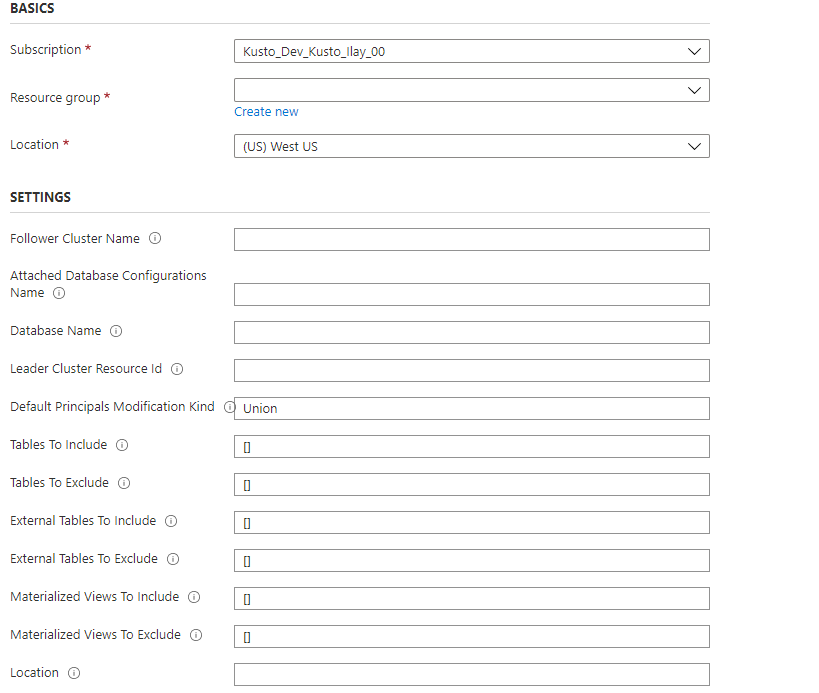
使用下表中的資訊建立範本,以協助您進行設定。
|
參數 |
說明 |
範例 |
|
followerClusterName |
追蹤者叢集的名稱;部署範本的位置。 |
|
|
已附加資料庫配置名稱 |
附加資料庫組態物件的名稱。 名稱可以是叢集層級唯一的任何字串。 |
|
|
databaseName |
要追蹤的資料庫名稱。 若要遵循所有領導者的資料庫,請使用 『*』。 |
|
|
leaderClusterResourceId |
領導者叢集的資源標識碼。 |
|
|
defaultPrincipalsModificationKind |
默認主體修改種類。 |
可以是 Union、Replace 或 None。 如需默認主體修改種類的詳細資訊,請參閱 主體修改種類管理命令。 |
|
包含的表格 |
要包含的數據表清單。 若要包含以 『Logs』 開頭的所有數據表,請使用 [“Logs*”]。 |
["table1ToInclude", "table2ToInclude"] |
|
要排除的表格 |
要排除的數據表清單。 若要排除所有數據表,請使用 [“*”]。 |
["table1ToExclude", "table2ToExclude"] |
|
要包含的外部表格 |
要包含的數據表清單。 若要包含以 『Logs』 開頭的所有外部數據表,請使用 [“Logs*”]。 |
["ExternalTable1ToInclude", "ExternalTable2ToInclude"] |
|
外部表格排除 |
要排除的數據表清單。 若要排除所有外部數據表,請使用 [“*”]。 |
["ExternalTable1ToExclude", "ExternalTable2ToExclude"] |
|
materializedViewsToInclude(使用的物化视图) |
要包含的具體化檢視清單。 若要包含以 『Logs』 開頭的所有具體化檢視,請使用 [“Logs*”]。 |
["Mv1ToInclude", "Mv2ToInclude"] |
|
要排除的物化視圖 |
要排除的具體化檢視清單。 若要排除所有具體化檢視,請使用 [“*”]。 |
["Mv11ToExclude", "Mv22ToExclude"] |
|
要包含的功能 |
要包含的函式清單。 |
["FunctionToInclude"] |
|
排除功能 |
要排除的函式清單。 |
["FunctionToExclude"] |
|
位置 |
所有資源的位置。 領導者和追蹤者必須位於相同的位置。 |
|
{
    "$schema": "https://schema.management.azure.com/schemas/2015-01-01/deploymentTemplate.json#",
    "contentVersion": "1.0.0.0",
    "parameters": {
        "followerClusterName": {
            "type": "string",
            "defaultValue": "",
            "metadata": {
                "description": "Name of the cluster to which the database will be attached."
            }
        },
        "attachedDatabaseConfigurationsName": {
            "type": "string",
            "defaultValue": "",
            "metadata": {
                "description": "Name of the attached database configurations to create."
            }
        },
        "databaseName": {
            "type": "string",
            "defaultValue": "",
            "metadata": {
                "description": "The name of the database to follow. You can follow all databases by using '*'."
            }
        },
        "leaderClusterResourceId": {
            "type": "string",
            "defaultValue": "",
            "metadata": {
                "description": "The resource ID of the leader cluster."
            }
        },
        "defaultPrincipalsModificationKind": {
            "type": "string",
            "defaultValue": "Union",
            "metadata": {
                "description": "The default principal modification kind."
            }
        },
        "tablesToInclude": {
            "type": "array",
            "defaultValue": [],
            "metadata": {
                "description": "The list of tables to include. Not supported when following all databases."
            }
        },
        "tablesToExclude": {
            "type": "array",
            "defaultValue": [],
            "metadata": {
                "description": "The list of tables to exclude. Not supported when following all databases."
            }
        },
        "externalTablesToInclude": {
            "type": "array",
            "defaultValue": [],
            "metadata": {
                "description": "The list of external tables to include. Not supported when following all databases."
            }
        },
        "externalTablesToExclude": {
            "type": "array",
            "defaultValue": [],
            "metadata": {
                "description": "The list of external tables to exclude. Not supported when following all databases."
            }
        },
        "materializedViewsToInclude": {
            "type": "array",
            "defaultValue": [],
            "metadata": {
                "description": "The list of materialized views to include. Not supported when following all databases."
            }
        },
        "materializedViewsToExclude": {
            "type": "array",
            "defaultValue": [],
            "metadata": {
                "description": "The list of materialized views to exclude. Not supported when following all databases."
            }
        },
        "functionsToInclude": {
            "type": "array",
            "defaultValue": [],
            "metadata": {
                "description": "The list of functions to include."
            }
        },
        "functionsToExclude": {
            "type": "array",
            "defaultValue": [],
            "metadata": {
                "description": "The list of functions to exclude."
            }
        },
        "location": {
            "type": "string",
            "defaultValue": "",
            "metadata": {
                "description": "Location for all resources."
            }
        }
    },
    "variables": {},
    "resources": [
        {
            "name": "[concat(parameters('followerClusterName'), '/', parameters('attachedDatabaseConfigurationsName'))]",
            "type": "Microsoft.Kusto/clusters/attachedDatabaseConfigurations",
            "apiVersion": "2021-01-01",
            "location": "[parameters('location')]",
            "properties": {
                "databaseName": "[parameters('databaseName')]",
                "clusterResourceId": "[parameters('leaderClusterResourceId')]",
                "defaultPrincipalsModificationKind": "[parameters('defaultPrincipalsModificationKind')]",
                "tableLevelSharingProperties":{
                    "tablesToInclude": "[parameters('tablesToInclude')]",
                    "tablesToExclude": "[parameters('tablesToExclude')]",
                    "externalTablesToInclude": "[parameters('externalTablesToInclude')]",
                    "externalTablesToExclude": "[parameters('externalTablesToExclude')]",
                    "materializedViewsToInclude": "[parameters('materializedViewsToInclude')]",
                    "materializedViewsToExclude": "[parameters('materializedViewsToExclude')]",
                    "functionsToInclude": "[parameters('functionsToInclude')]",
                    "functionsToExclude": "[parameters('functionsToExclude')]"
                }
            }
        }
    ]
}
使用 Azure 入口網站 或 PowerShell 部署 Azure Resource Manager 範本。
確認資料庫已成功附加
若要確認資料庫已成功附加,請在 Azure 入口網站 中尋找附加的資料庫。 您可以確認資料庫已成功附加在 追蹤者 或 領導者 叢集中。
檢查您的追蹤者叢集
流覽至追蹤叢集,然後選取 [ 資料庫]。
在資料庫清單中,搜尋新的唯讀資料庫。

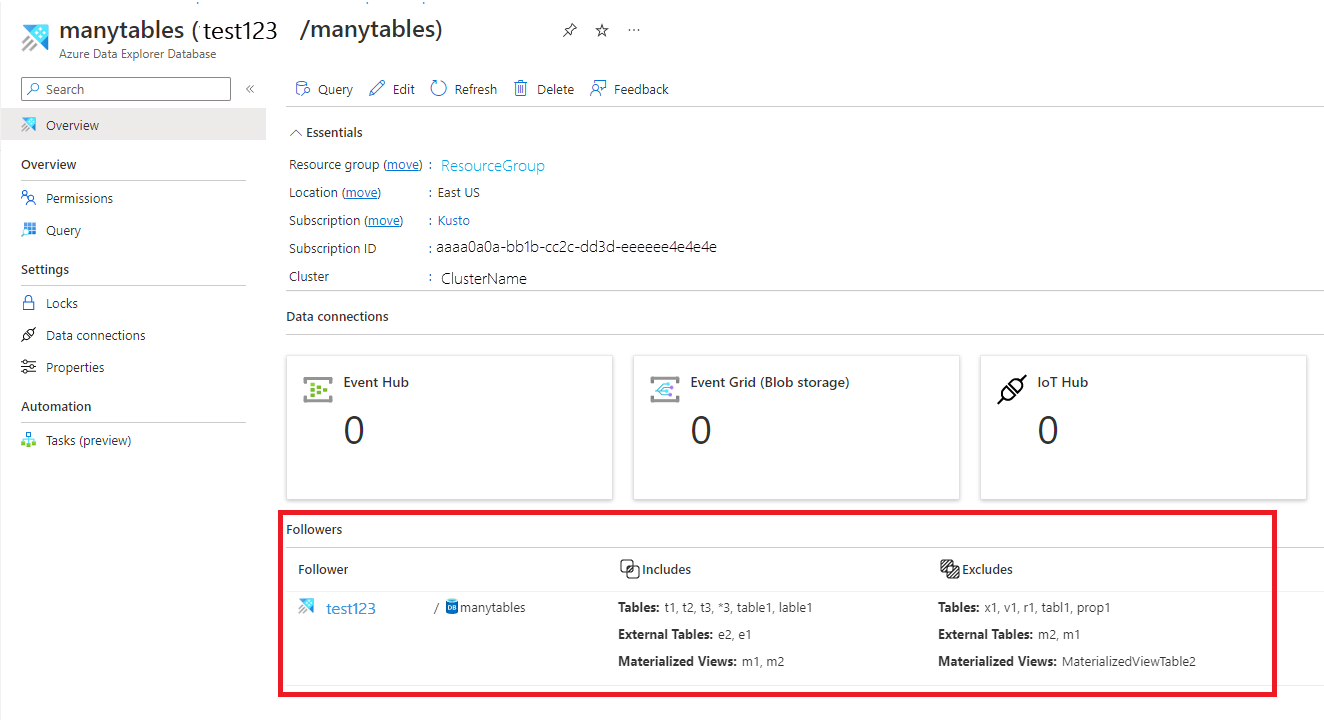
您也可以在資料庫概觀頁面中檢視此清單:

檢查您的領導者叢集
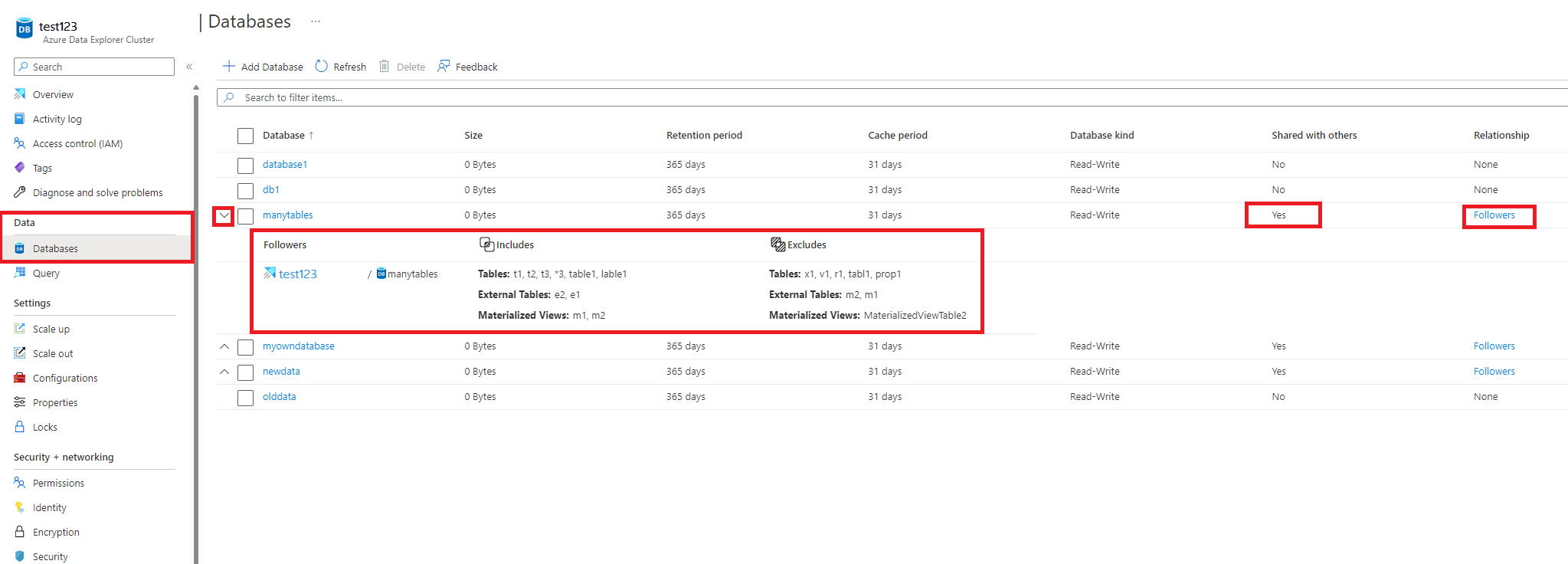
瀏覽至領導者叢集,然後選取 [ 資料庫]
檢查相關資料庫是否標示為 [與其他人>共用] 是
切換關聯性連結以檢視詳細數據。
您也可以在資料庫概觀頁面中檢視此專案:
中斷連結追蹤資料庫
注意
若要從追隨者或領導者角色卸離資料庫,您必須擁有使用者、群組、服務主體或受管識別,且在您要卸離資料庫的叢集上至少具有貢獻者角色。 在下列範例中,我們使用服務主體。
使用 C# 將附加的追蹤者資料庫與追蹤者叢集中斷連結
追蹤者叢集可以中斷連結任何附加的追蹤者資料庫,如下所示:
var attachedDatabaseConfigurationId = KustoAttachedDatabaseConfigurationResource.CreateResourceIdentifier(
    subscriptionId: "xxxxxxxx-xxxxx-xxxx-xxxx-xxxxxxxxx", resourceGroupName: "testrg", clusterName: "follower",
    attachedDatabaseConfigurationName: "attachedDatabaseConfiguration");
var credentials = new ManagedIdentityCredential();
var resourceManagementClient = new ArmClient(credentials);
var attachedDatabaseConfiguration = resourceManagementClient.GetKustoAttachedDatabaseConfigurationResource(attachedDatabaseConfigurationId);
await attachedDatabaseConfiguration.DeleteAsync(WaitUntil.Completed);
使用 C 從領導者叢集中斷連結連結的追蹤者資料庫#
領導者叢集可以中斷連結任何連結的資料庫,如下所示:
var leaderClusterId = KustoClusterResource.CreateResourceIdentifier(subscriptionId: "xxxxxxxx-xxxxx-xxxx-xxxx-xxxxxxxxx", resourceGroupName: "testrg", clusterName: "leader");
var followerClusterId = KustoClusterResource.CreateResourceIdentifier(subscriptionId: "xxxxxxxx-xxxxx-xxxx-xxxx-xxxxxxxxx", resourceGroupName: "followerResourceGroup", clusterName: "follower");
var followerDatabaseDefinition = new KustoFollowerDatabaseDefinition(
    clusterResourceId: followerClusterId,
    attachedDatabaseConfigurationName: "attachedDatabaseConfiguration"
);
var credentials = new ManagedIdentityCredential();
var resourceManagementClient = new ArmClient(credentials);
var leaderCluster = resourceManagementClient.GetKustoClusterResource(leaderClusterId);
await leaderCluster.DetachFollowerDatabasesAsync(WaitUntil.Completed, followerDatabaseDefinition);
使用 Python 從追蹤者叢集中斷連結連結的追蹤者資料庫
追蹤者叢集可以中斷連結任何連結的資料庫,如下所示:
from azure.mgmt.kusto import KustoManagementClient
from azure.common.credentials import ServicePrincipalCredentials
import datetime

#Directory (tenant) ID
tenant_id = "xxxxxxxx-xxxxx-xxxx-xxxx-xxxxxxxxx"
#Application ID
client_id = "xxxxxxxx-xxxxx-xxxx-xxxx-xxxxxxxxx"
#Client Secret
client_secret = "xxxxxxxxxxxxxx"
follower_subscription_id = "xxxxxxxx-xxxxx-xxxx-xxxx-xxxxxxxxx"
credentials = ServicePrincipalCredentials(
        client_id=client_id,
        secret=client_secret,
        tenant=tenant_id
    )
kusto_management_client = KustoManagementClient(credentials, follower_subscription_id)

follower_resource_group_name = "followerResourceGroup"
follower_cluster_name = "follower"
attached_database_configurationName = "uniqueName"

#Returns an instance of LROPoller, see https://learn.microsoft.com/python/api/msrest/msrest.polling.lropoller?view=azure-python
poller = kusto_management_client.attached_database_configurations.delete(follower_resource_group_name, follower_cluster_name, attached_database_configurationName)
使用 Python 從領導者叢集中斷連結連結的追蹤者資料庫
領導者叢集可以中斷連結任何連結的資料庫,如下所示:
from azure.mgmt.kusto import KustoManagementClient
from azure.mgmt.kusto.models import FollowerDatabaseDefinition
from azure.common.credentials import ServicePrincipalCredentials
import datetime

#Directory (tenant) ID
tenant_id = "xxxxxxxx-xxxxx-xxxx-xxxx-xxxxxxxxx"
#Application ID
client_id = "xxxxxxxx-xxxxx-xxxx-xxxx-xxxxxxxxx"
#Client Secret
client_secret = "xxxxxxxxxxxxxx"
follower_subscription_id = "xxxxxxxx-xxxxx-xxxx-xxxx-xxxxxxxxx"
leader_subscription_id = "xxxxxxxx-xxxxx-xxxx-xxxx-xxxxxxxxx"
credentials = ServicePrincipalCredentials(
        client_id=client_id,
        secret=client_secret,
        tenant=tenant_id
    )
kusto_management_client = KustoManagementClient(credentials, follower_subscription_id)

follower_resource_group_name = "followerResourceGroup"
leader_resource_group_name = "leaderResourceGroup"
follower_cluster_name = "follower"
leader_cluster_name = "leader"
attached_database_configuration_name = "uniqueName"
location = "North Central US"
cluster_resource_id = "/subscriptions/" + follower_subscription_id + "/resourceGroups/" + follower_resource_group_name + "/providers/Microsoft.Kusto/Clusters/" + follower_cluster_name

#Returns an instance of LROPoller, see https://learn.microsoft.com/python/api/msrest/msrest.polling.lropoller?view=azure-python
poller = kusto_management_client.clusters.detach_follower_databases(resource_group_name = leader_resource_group_name, cluster_name = leader_cluster_name, cluster_resource_id = cluster_resource_id, attached_database_configuration_name = attached_database_configuration_name)
使用 PowerShell 中斷連結資料庫
必要條件模組
Install : Az.Kusto
範例
$FollowerClustername = 'follower'
$FollowerClusterSubscriptionID = 'xxxxxxxx-xxxxx-xxxx-xxxx-xxxxxxxxx'
$FollowerResourceGroupName = 'followerResourceGroup'
$DatabaseName = "sanjn"  ## Can be specific database name or * for all databases

##Construct the Configuration name
$confignameraw = (Get-AzKustoAttachedDatabaseConfiguration -ClusterName $FollowerClustername -ResourceGroupName $FollowerResourceGroupName -SubscriptionId $FollowerClusterSubscriptionID) | Where-Object {$_.DatabaseName -eq $DatabaseName }
$configname =$confignameraw.Name.Split("/")[1]

Remove-AzKustoAttachedDatabaseConfiguration -ClusterName $FollowerClustername -Name $configname -ResourceGroupName $FollowerResourceGroupName -SubscriptionId $FollowerClusterSubscriptionID
管理主體、許可權和快取原則
管理主體
附加資料庫時,請指定 「預設主體修改種類」。 預設值是結合覆寫授權主體與已授權主體的 領導者資料庫集合
|
種類 |
說明 |
|
聯盟 |
附加的資料庫主體一律會包含原始資料庫主體,以及新增至追蹤資料庫的其他新主體。 |
|
取代 |
原始資料庫沒有主體的繼承。 您必須為附加的資料庫建立新的主體。 |
|
沒有 |
附加的資料庫主體只包含原始資料庫的主體,沒有其他主體。 |
如需使用管理命令來設定授權主體的詳細資訊,請參閱 管理命令來管理追蹤者叢集。
管理權限
管理唯讀資料庫許可權與所有資料庫類型的許可權相同。 若要指派許可權,請參閱管理 Azure 入口網站 中的資料庫許可權,或使用管理命令來管理資料庫安全性角色。
下列資料庫管理員可以修改 附加資料庫的快取原則 ,或裝載叢集上任何數據表的快取原則。 預設值是將領導者叢集資料庫和數據表層級快取原則中的源資料庫與資料庫和數據表層級覆寫原則中定義的原則結合在一起。 例如,您可以在領導者資料庫的 30 天快取原則上執行每月報告,以及追蹤者資料庫的三天快取原則,只查詢最近的數據以進行疑難解答。 如需使用管理命令在追蹤資料庫或數據表上設定快取原則的詳細資訊,請參閱 管理命令來管理追蹤者叢集。
備註
檢閱下列附註:
- 如果領導者/追蹤者叢集的資料庫之間發生衝突,當所有資料庫後面接著追蹤者叢集時,它們就會如下解決:
- 在追蹤者叢集上建立名為 DB 的資料庫優先於在領導者叢集上建立的相同名稱的資料庫。 這就是為什麼追蹤叢集中的資料庫 DB 必須移除或重新命名,讓追蹤者叢集包含領導者的資料庫 DB。
- 從兩個以上的領導者叢集後面接著名為 DB 的資料庫,將任意從 其中一個 領導者叢集選擇,而且不會追蹤超過一次。
- 顯示追蹤 叢集上執行叢集活動記錄和歷程記錄 的命令會顯示追蹤者叢集上的活動和歷程記錄,而其結果集不包含領導者叢集或叢集的結果。
- 例如:
.show queries 在追蹤者叢集上執行的命令,只會顯示在追蹤者叢集追蹤的資料庫中執行的查詢,而不會顯示在領導叢集中的相同資料庫上執行的查詢。
限制
查看下列限制條件:
- 追蹤者和領導者叢集必須位於相同的區域中。
- 如果在 所追蹤的資料庫上使用串流擷取 ,則串流擷取應啟用追蹤追蹤串流擷取數據。
- 下列限制支援使用 客戶管理金鑰 進行資料加密的叢集 (CMK):
- 追蹤者叢集或領導者叢集未追蹤其他叢集。
- 如果追蹤者叢集追蹤已啟用 CMK 的領導者叢集,且領導者對密鑰的存取權被撤銷,則領導者和追蹤者叢集都會暫停。 在此情況下,您可以解決 CMK 問題,然後繼續追蹤者叢集,也可以中斷追蹤者資料庫與追蹤者叢集的卸離,並獨立於領導者叢集繼續。
- 在卸離資料庫之前,您無法刪除附加至不同叢集的資料庫。
- 在卸離叢集之前,您無法刪除已連結至不同叢集的叢集。
- 在追蹤所有資料庫時,不支援數據表層級共用屬性。
- 在追蹤資料庫中,若要查詢使用受控識別做為驗證方法的外部數據表,必須將受控識別新增至追蹤者叢集。 當領導者和追蹤者叢集布建在不同的租使用者中時,這項功能將無法運作。
後續步驟
