Plumsail 文件

Plumsail Documents 連接器可讓您設定自動文件產生和轉換。 聯結器提供廣泛的動作來操作 PDF 檔案和 PDF 表單。 從範本建立文件、轉換為 PDF、分割和合併 PDF 檔案、保護它們、讀取 PDF 表單等等 - 所有這些都是在一個連接器中自動化文件所需的一切。 如需更多資訊,請造訪 https://plumsail.com/documents
此連接器適用於以下產品和區域:
| 服務 | Class | Regions |
|---|---|---|
| 副駕駛工作室 | 標準 | 除下列區域外的所有 Power Automate 區域 : - 美國政府(海灣合作委員會高中) - 由 21Vianet 營運的中國雲 - 美國國防部 (DoD) |
| 邏輯應用程式 | 標準 | 所有 Logic Apps 區域, 但下列區域除外: - Azure 中國區域 - 美國國防部 (DoD) |
| Power Apps | 標準 | 除下列區域外的所有 Power Apps 區域 : - 美國政府(海灣合作委員會高中) - 由 21Vianet 營運的中國雲 - 美國國防部 (DoD) |
| Power Automate(自動化服務) | 標準 | 除下列區域外的所有 Power Automate 區域 : - 美國政府(海灣合作委員會高中) - 由 21Vianet 營運的中國雲 - 美國國防部 (DoD) |
| 連絡人 | |
|---|---|
| 名稱 | Support |
| URL | https://plumsail.com |
| support@plumsail.com |
| 連接器中繼資料 | |
|---|---|
| Publisher | 梅帆 |
| 網站 | https://plumsail.com |
| 隱私策略 | https://plumsail.com/privacy-policy/ |
| 類別 | 生產力;內容和文件 |
在 Microsoft Power Automate、Azure Logic Apps 或 PowerApps 中產生文件
註冊帳戶
首先,您需要 註冊 Plumsail 帳戶。 此帳戶用於管理 Plumsail 文件、Plumsail Actions 和 Plumsail Forms 產品。
最好使用您的有效電子郵件地址。 訂閱將連結到此地址。
如果您已經有帳戶,只需登入 account.plumsail.com 即可。
產生 API 金鑰
您需要導航到“API 密鑰”部分並單擊“新增”。
建立 API 金鑰後,您可以在「秘密」欄中看到您的金鑰。 您也可以透過在「名稱」欄中按一下金鑰來變更金鑰的名稱:
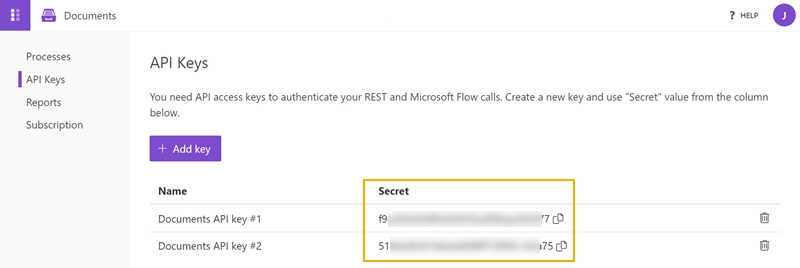
根據需要建立任意數量的金鑰,例如,用於不同的 Power Automate (Microsoft Flow) 帳戶。 如果您不再需要密鑰,您可以將其刪除,請確保不再使用該密鑰。
現在您可以複製並在以下位置使用它:
正在建立連線
連接器支援下列驗證類型:
| 預設值 | 建立連線的參數。 | 所有區域 | 可共用 |
預設
適用:所有地區
建立連線的參數。
這是可共享的連接。 如果 Power App 與其他使用者共用,也會共用連線。 如需詳細資訊,請參閱 畫布應用程式的連接器概觀 - Power Apps |Microsoft 文件
| 名稱 | 類型 | Description | 為必填項目 |
|---|---|---|---|
| API 金鑰 | securestring | 在 account.plumsail.com 中建立 API 金鑰 | 對 |
| 資料中心位置 | 字串 |
節流限制
| 名稱 | 呼叫 | 續約期間 |
|---|---|---|
| 每個連線的 API 呼叫 | 1200 | 60 秒 |
動作
使用 json 啟動文件產生程式
開始文件生成過程使用 JSON 數據填充與所選過程相關的 DOCX、XLSX、PPTX 或 PDF 模板。 文檔 - https://plumsail.com/docs/documents/v1.x/flow/actions/document-processing.html##start-process-json
參數
| 名稱 | 機碼 | 必要 | 類型 | Description |
|---|---|---|---|---|
|
程序名稱
|
processId | True | string |
要啟動的處理程序名稱 |
|
|
object |
傳回
- 結果檔案
- binary
保護 PDF 文件
保護 PDF 文件可為 PDF 檔案新增密碼、影印、列印和其他保護。 文檔 - https://plumsail.com/docs/documents/v1.x/flow/actions/document-processing.html#protect-pdf-document
參數
| 名稱 | 機碼 | 必要 | 類型 | Description |
|---|---|---|---|---|
|
文件內容
|
documentContent | True | byte |
PDF 文件的原始內容 |
|
啟用列印
|
allowPrinting | True | boolean |
保護 PDF 檔案不被列印出來 |
|
啟用修改
|
allowModification | True | boolean |
保護 PDF 檔案不被編輯 |
|
啟用擷取資料
|
allowExtract | True | boolean |
允許從 PDF 文件中提取文本、圖像和其他媒體 |
|
啟用註釋
|
allowAnnotate | True | boolean |
允許對 PDF 文件進行註釋(例如註釋、填寫表單、簽名) |
|
PDF 擁有者密碼
|
newOwnerPassword | string |
在此處輸入選用的擁有者密碼。 此密碼可用來停用文件限制 |
|
|
PDF 使用者密碼
|
newUserPassword | string |
在此處輸入選用使用者密碼。 每次使用者開啟 PDF 時,系統都會要求他輸入此密碼。 如果您不需要密碼提示,請將此欄位保留空白 |
|
|
密碼
|
password | string |
解密文件的密碼 |
傳回
分割 PDF
拆分 PDF 獲取 PDF 文檔並將其拆分。 文檔 - https://plumsail.com/docs/documents/v1.x/flow/actions/document-processing.html#split-pdf
參數
| 名稱 | 機碼 | 必要 | 類型 | Description |
|---|---|---|---|---|
|
分割類型
|
type | True | string |
如何分割檔案 |
|
要求
|
request | True | dynamic |
傳回
分割 PDF (已棄用) [已棄用]
此動作已被取代。 請改用 Split PDF 。
它採用 PDF 文檔並將其拆分(已棄用)
參數
| 名稱 | 機碼 | 必要 | 類型 | Description |
|---|---|---|---|---|
|
文件內容
|
documentContent | True | byte |
PDF 文件的原始內容 |
|
起始頁
|
startPage | integer |
開始分割的第一頁(從 1 開始) |
|
|
結束頁面
|
endPage | integer |
最後要分割的頁面(含) |
|
|
分割頁面
|
splitAtPage | integer |
每個分割區的頁數 |
|
|
密碼
|
password | string |
解密文件的密碼 |
傳回
剖析CSV
解析 CSV 的工作原理類似於解析 JSON,但適用於 CSV 文件。 文檔 - https://plumsail.com/docs/documents/v1.x/flow/actions/document-processing.html#parse-csv
參數
| 名稱 | 機碼 | 必要 | 類型 | Description |
|---|---|---|---|---|
|
CSV 文件的內容
|
content | True | byte |
CSV 文件的內容 |
|
分隔符號
|
delimiter | string |
列的分隔符(默認情況下它只是逗號) |
|
|
Locale
|
locale | string |
將套用至文件的地區設定 |
|
|
限制
|
limit | integer |
傳回前 “n” 列 |
|
|
Headers
|
headers | True | string |
以逗號分隔的標題清單,順序與 CSV 欄相同 |
|
跳過第一行
|
skipFirstLine | boolean |
如果您的 CSV 標題作為第一行,請選擇「是」。 |
傳回
取得 PDF 保護的相關資訊
取得有關 PDF 保護的資訊會傳回文件是否受密碼保護的資訊。 文檔 - https://plumsail.com/docs/documents/v1.x/flow/actions/document-processing.html#get-pdf-protection-information
參數
| 名稱 | 機碼 | 必要 | 類型 | Description |
|---|---|---|---|---|
|
文件內容
|
documentContent | True | byte |
PDF 文件的原始內容 |
傳回
合併 Docx
合併 Docx 獲取 Docx 文檔數組並將其合併到單個文件中。 文檔 - https://plumsail.com/docs/documents/v1.x/flow/actions/document-processing.html#merge-docx
參數
| 名稱 | 機碼 | 必要 | 類型 | Description |
|---|---|---|---|---|
|
Content
|
documentsContents | True | array of binary |
Docx 文件的原始內容陣列 |
|
套用頁首和頁尾
|
applyHeaderAndFooter | True | boolean |
將第一個文件的頁首和頁尾套用至所有其他文件 |
傳回
合併 PDF
合併 PDF 會取得 PDF 文件陣列,並將其合併為一個。 文檔 - https://plumsail.com/docs/documents/v1.x/flow/actions/document-processing.html#merge-pdf
參數
| 名稱 | 機碼 | 必要 | 類型 | Description |
|---|---|---|---|---|
|
Content
|
documentsContents | True | array of binary |
PDF 文件的原始內容陣列 |
傳回
- 結果檔案
- binary
合併 xlsx
合併 Xlsx 採用 Xlsx 文檔陣列並將其合併到單個文件中。 文檔 - https://plumsail.com/docs/documents/v1.x/flow/actions/document-processing.html#merge-xlsx
參數
| 名稱 | 機碼 | 必要 | 類型 | Description |
|---|---|---|---|---|
|
Content
|
documentsContents | True | array of binary |
Xlsx 文件的原始內容陣列 |
傳回
填寫 DOCX 文檔中的合併字段
在 DOCX 文檔中填充合併字段獲取帶有合併字段的 DOCX 文檔,並將它們替換為指定的數據。 資料物件中的索引鍵應與文件中 MergeFields(Express 區塊)的名稱相同。 文檔 - https://plumsail.com/docs/documents/v1.x/flow/actions/document-processing.html#fill-merge-fields-in-docx-document
參數
| 名稱 | 機碼 | 必要 | 類型 | Description |
|---|---|---|---|---|
|
DOCX 文件內容
|
docxDocument | True | byte |
docx 文檔模板的原始內容。 MergeField 名稱應與範本資料中的索引鍵相同 |
|
範本資料
|
data | True | object |
應套用至範本的 JSON 資料 |
傳回
填寫 PDF 表格
填寫 PDF 表單根據提供的數據填寫 PDF。 文檔 - https://plumsail.com/docs/documents/v1.x/flow/actions/document-processing.html#fill-in-pdf-form
參數
| 名稱 | 機碼 | 必要 | 類型 | Description |
|---|---|---|---|---|
|
文件內容
|
documentContent | True | byte |
PDF 文件的原始內容 |
|
JSON 資料
|
jsonData | True | object |
將用於填寫表單的資料 |
|
鎖定表單欄位
|
lockFormFields | boolean |
在填寫欄位後停用欄位編輯 |
|
|
密碼
|
password | string |
打開 PDF 文件的密碼 |
傳回
壓縮 PDF 文件
如果可能,壓縮 PDF 文檔大小並對其進行優化。 文檔 - https://plumsail.com/docs/documents/v1.x/flow/actions/document-processing.html#compress-pdf-document
參數
| 名稱 | 機碼 | 必要 | 類型 | Description |
|---|---|---|---|---|
|
文件內容
|
documentContent | True | byte |
PDF 文件的原始內容 |
|
密碼
|
password | string |
打開 PDF 文件的密碼 |
傳回
- 結果檔案
- binary
將 CSV 轉換為 Excel
將 CSV 轉換為 Excel 文件 (XLSX)。 文檔 - https://plumsail.com/docs/documents/v1.x/flow/actions/document-processing.html#csv-to-excel
參數
| 名稱 | 機碼 | 必要 | 類型 | Description |
|---|---|---|---|---|
|
CSV 文件的內容
|
content | True | byte |
CSV 文件的內容 |
|
分隔符號
|
delimiter | string |
列的分隔符(默認情況下它只是逗號) |
|
|
Locale
|
locale | string |
將套用至文件的地區設定 |
|
|
限制
|
limit | integer |
傳回前 “n” 列 |
|
|
使用第一行作為標題
|
hasHeaderRecords | boolean |
如果設定為「是」,則會從第一行讀取標頭。 |
|
|
CSV 欄名稱或索引
|
csvColumnIndexOrName | True | string |
CSV 欄名稱或欄索引 (1、2 等) |
|
XLSX 資料行類型
|
xlsxColumnType | string |
選擇性。 資料行類型 (ShortDateTime、TwoDecimal 等) |
|
|
XLSX 資料行名稱
|
xlsxColumnName | string |
選擇性。 將 CSV 欄重新命名為此名稱 |
傳回
- 結果檔案
- binary
將 DOC 轉換為 DOCX
將 DOC 轉換為 DOCX 文件。 此操作獲取DOC文檔並將其轉換為DOCX。 文檔 - https://plumsail.com/docs/documents/v1.x/flow/actions/document-processing.html#convert-doc-to-docx
參數
| 名稱 | 機碼 | 必要 | 類型 | Description |
|---|---|---|---|---|
|
文件內容
|
documentContent | True | byte |
應轉換的文件內容 |
傳回
- 結果檔案
- binary
將 DOCX 轉換為 PDF
將 DOCX 轉換為 PDF 文件。 此操作獲取 DOCX 文檔並將其轉換為 PDF。 文檔 - https://plumsail.com/docs/documents/v1.x/flow/actions/document-processing.html#convert-docx-to-pdf
參數
| 名稱 | 機碼 | 必要 | 類型 | Description |
|---|---|---|---|---|
|
文件內容
|
documentContent | True | byte |
應轉換的文件內容 |
傳回
將 HTML 轉換為 DOCX
將 HTML 轉換為 DOCX 文檔。 此操作採用 HTML 標記,將其渲染並轉換為 DOCX 文檔。 文檔 - https://plumsail.com/docs/documents/v1.x/flow/actions/document-processing.html#convert-html-to-docx
參數
| 名稱 | 機碼 | 必要 | 類型 | Description |
|---|---|---|---|---|
|
檔案內容
|
fileContent | binary |
要轉換為 DOCX 的 HTML 檔案的二進位內容 |
|
|
HTML 資料
|
rawHtml | string |
要轉換為 DOCX 的 HTML 數據 |
|
|
HTML 網址
|
htmlUrl | string |
要轉換為 DOCX 的網頁的 URL |
|
|
紙張尺寸
|
paperSize | string |
可以是A4、A5等... |
|
|
導覽
|
orientation | string |
縱向或橫向 |
|
|
解碼HTML
|
decodeHtml | boolean |
轉換前是否應該解碼 HTML |
|
|
邊距
|
margins | string |
頁邊距(以 pt 為單位)。 語法與CSS相同。 範例:25 50 75 100。 |
傳回
將 HTML 轉換為 PDF
將 HTML 轉換為 PDF 文件。 此動作會採用 HTML 標記、轉譯並轉換為 PDF 文件。 文檔 - https://plumsail.com/docs/documents/v1.x/flow/actions/document-processing.html#convert-html-to-pdf
參數
| 名稱 | 機碼 | 必要 | 類型 | Description |
|---|---|---|---|---|
|
來源HTML
|
html | True | string |
應轉換為 PDF 的 HTML 標記 |
|
Engine
|
engine | string |
轉換引擎 |
|
|
紙張尺寸
|
size | string |
可以是A4、A5等... |
|
|
導覽
|
orientation | string |
縱向或橫向 |
|
|
邊距
|
margins | string |
頁邊界。 語法與CSS相同。 範例:25 50 75 100。 |
|
|
標頭HTML
|
headerHtml | string |
僅限傳統引擎 - 應新增為標頭的 HTML 標記 |
|
|
頁尾 HTML
|
footerHtml | string |
僅限經典引擎 - 應新增為頁尾的 HTML 標記 |
傳回
將 JSON 轉換為 CSV
將 JSON 轉換為 CSV 檔案。 文檔 - https://plumsail.com/docs/documents/v1.x/flow/actions/document-processing.html#json-to-csv
參數
| 名稱 | 機碼 | 必要 | 類型 | Description |
|---|---|---|---|---|
|
JSON 檔案內容
|
content | byte |
選擇性。 JSON 檔案的內容 |
|
|
JSON 資料
|
jsonData | string |
選擇性。 要處理的 JSON 資料 |
|
|
Locale
|
locale | string |
將套用至文件的地區設定 |
|
|
JSON 陣列的路徑
|
pathToJsonArray | string |
JSON 中數組的點分隔路徑。 例如:「data」或「prop1.prop2.prop3」 |
|
|
分隔符號
|
delimiter | string |
CSV 中欄的分隔符號。 預設值為逗號 |
傳回
- 結果檔案
- binary
將 JSON 轉換為 Excel
將 JSON 轉換為 Excel 檔案 (XLSX)。 文檔 - https://plumsail.com/docs/documents/v1.x/flow/actions/document-processing.html#json-to-excel
參數
| 名稱 | 機碼 | 必要 | 類型 | Description |
|---|---|---|---|---|
|
JSON 檔案內容
|
content | byte |
選擇性。 JSON 檔案的內容 |
|
|
JSON 資料
|
jsonData | string |
選擇性。 要處理的 JSON 資料 |
|
|
Locale
|
locale | string |
將套用至文件的地區設定 |
|
|
JSON 陣列的路徑
|
pathToJsonArray | string |
JSON 中數組的點分隔路徑。 例如:「data」或「prop1.prop2.prop3」 |
|
|
JSON 屬性
|
jsonProperty | True | string |
JSON 屬性的名稱 |
|
XLSX 資料行類型
|
xlsxColumnType | string |
選擇性。 資料行類型 (ShortDateTime、TwoDecimal 等) |
|
|
XLSX 資料行名稱
|
xlsxColumnName | string |
選擇性。 將 JSON 屬性重新命名為此名稱 |
傳回
- 結果檔案
- binary
將 PDF 轉換為圖像
將 PDF 轉換為圖像。 此操作獲取 PDF 文檔並將其轉換為圖像(jpeg、png、gif、bmp 等)。 文檔 - https://plumsail.com/docs/documents/v1.x/flow/actions/document-processing.html#convert-pdf-to-image
參數
| 名稱 | 機碼 | 必要 | 類型 | Description |
|---|---|---|---|---|
|
文件內容
|
documentContent | True | byte |
PDF 文件的原始內容 |
|
檔案名稱前綴
|
filenamePrefix | string |
選擇性。 輸出檔案將具有此前置詞,後面接著名稱的索引號 |
|
|
起始頁
|
startPage | integer |
開始擷取的第一頁(以 1 為基礎) |
|
|
結束頁面
|
endPage | integer |
最後要提取的頁面(含) |
|
|
頁面
|
pages | string |
提取的頁碼以 ';' 分隔(僅提取此頁面) |
|
|
圖像格式
|
format | string |
結果影像的格式 |
|
|
DPI
|
dpi | integer |
結果影像的解析度 |
|
|
密碼
|
password | string |
解密文件的密碼 |
傳回
將 PDF 轉換為圖像(已棄用)[已棄用]
此動作已被取代。 請改用 將 PDF 轉換為圖像 。
將 PDF 轉換為圖像。 此操作獲取 PDF 文檔並將其轉換為圖像(jpeg、png、gif、bmp 等)。 文件 - https://plumsail.com/docs/documents/v1.x/flow/actions/document-processing.html#convert-pdf-to-image (已棄用)
參數
| 名稱 | 機碼 | 必要 | 類型 | Description |
|---|---|---|---|---|
|
文件內容
|
documentContent | True | byte |
PDF 文件的原始內容 |
|
起始頁
|
startPage | integer |
開始擷取的第一頁(以 1 為基礎) |
|
|
結束頁面
|
endPage | integer |
最後要提取的頁面(含) |
|
|
頁面
|
pages | string |
提取的頁碼以 ';' 分隔(僅提取此頁面) |
|
|
圖像格式
|
format | string |
結果影像的格式 |
|
|
DPI
|
dpi | integer |
結果影像的解析度 |
|
|
密碼
|
password | string |
解密文件的密碼 |
傳回
將 PPT 轉換為 PPTX
將 PPT 轉換為 PPTX 文件。 此操作獲取PPT文檔並將其轉換為PPTX。 文檔 - https://plumsail.com/docs/documents/v1.x/flow/actions/document-processing.html#convert-ppt-to-pptx
參數
| 名稱 | 機碼 | 必要 | 類型 | Description |
|---|---|---|---|---|
|
文件內容
|
documentContent | True | byte |
應轉換的文件內容 |
傳回
- 結果檔案
- binary
將 PPTX 轉換為 PDF
將 PPTX 轉換為 PDF 文件。 此操作會取得 PPTX 文件並將其轉換為 PDF。 文檔 - https://plumsail.com/docs/documents/v1.x/flow/actions/document-processing.html#convert-pptx-to-pdf
參數
| 名稱 | 機碼 | 必要 | 類型 | Description |
|---|---|---|---|---|
|
文件內容
|
documentContent | True | byte |
應轉換的文件內容 |
傳回
- 結果檔案
- binary
將 XLS 轉換為 XLSX
將 XLS 轉換為 XLSX 文件。 此操作會取得 XLS 文件,並將其轉換為 XLSX。 文檔 - https://plumsail.com/docs/documents/v1.x/flow/actions/document-processing.html#convert-xls-to-xlsx
參數
| 名稱 | 機碼 | 必要 | 類型 | Description |
|---|---|---|---|---|
|
文件內容
|
documentContent | True | byte |
應轉換的文件內容 |
傳回
- 結果檔案
- binary
將 XLSX 轉換為 PDF
將 XLSX 轉換為 PDF 文件。 此操作獲取 XLSX 文檔並將其轉換為 PDF。 文檔 - https://plumsail.com/docs/documents/v1.x/flow/actions/document-processing.html#convert-xlsx-to-pdf
參數
| 名稱 | 機碼 | 必要 | 類型 | Description |
|---|---|---|---|---|
|
文件內容
|
documentContent | True | byte |
應轉換的文件內容 |
傳回
- 結果檔案
- binary
將圖像轉換為 PDF
它獲取圖像並將其轉換為 PDF 文檔
參數
| 名稱 | 機碼 | 必要 | 類型 | Description |
|---|---|---|---|---|
|
每頁單一影像
|
imagePerPage | boolean |
如果您不希望每個圖像都位於單獨的頁面上,請選擇“否”。 預設值為「是」 |
|
|
映像內容
|
imageContent | True | array of byte |
影像的原始內容 |
傳回
- 結果檔案
- binary
將水印新增至 PDF
將浮水印新增至 PDF 為文字、影像或 PDF。 文檔 - https://plumsail.com/docs/documents/v1.x/flow/actions/document-processing.html#add-watermark-to-pdf
參數
| 名稱 | 機碼 | 必要 | 類型 | Description |
|---|---|---|---|---|
|
類型
|
type | True | string |
浮水印的類型 |
|
要求
|
request | True | dynamic |
傳回
建立存檔
壓縮檔案並將其新增至 ZIP 封存。
參數
| 名稱 | 機碼 | 必要 | 類型 | Description |
|---|---|---|---|---|
|
檔案名稱
|
fileName | True | string |
沒有副檔名的封存名稱 |
|
檔案名稱
|
fileName | string |
檔案名稱,包括副檔名 |
|
|
檔案內容
|
content | binary |
文件內容 |
|
|
密碼
|
password | string |
封存密碼 |
傳回
從 DOCX 模板創建文檔
從 DOCX 模板創建文檔。 詳細資訊:https://plumsail.com/docs/documents/v1.x/document-generation/docx/index.html
參數
| 名稱 | 機碼 | 必要 | 類型 | Description |
|---|---|---|---|---|
|
範本檔案
|
documentContent | True | binary |
範本內容 |
|
範本資料
|
data | True | object |
應套用至範本的 JSON 資料 |
|
文件輸出類型
|
outputType | True | string |
所需的文件類型 |
|
Locale
|
locale | string |
將套用至文件的地區設定 |
|
|
時區
|
timezone | string |
文件的時區 |
傳回
- 結果檔案
- binary
從 PDF 文檔中提取文本
從 PDF 中提取文本 獲取 PDF 文檔並將文本提取為原始或 HTML 格式。 文檔 - https://plumsail.com/docs/documents/v1.x/flow/actions/document-processing.html#extract-text-from-pdf-document
參數
| 名稱 | 機碼 | 必要 | 類型 | Description |
|---|---|---|---|---|
|
文件內容
|
documentContent | True | byte |
PDF 文件的原始內容 |
|
起始頁
|
startPage | integer |
開始擷取的第一頁(以 1 為基礎) |
|
|
結束頁面
|
endPage | integer |
最後要提取的頁面(含) |
|
|
結果類型
|
resultType | string |
原始或HTML |
|
|
密碼
|
password | string |
解密文件的密碼 |
傳回
從 PDF 獲取表單
從 PDF 取得表單會以 JSON 格式傳回 PDF 中的可填寫表單資料。 文檔 - https://plumsail.com/docs/documents/v1.x/flow/actions/document-processing.html#get-form-from-pdf
參數
| 名稱 | 機碼 | 必要 | 類型 | Description |
|---|---|---|---|---|
|
文件內容
|
documentContent | True | byte |
PDF 文件的原始內容 |
|
密碼
|
password | string |
解密文件的密碼 |
傳回
- response
- object
從 PPTX 模板創建文檔
從 PPTX 模板創建文檔。 詳細資訊:https://plumsail.com/docs/documents/v1.x/document-generation/pptx/index.html
參數
| 名稱 | 機碼 | 必要 | 類型 | Description |
|---|---|---|---|---|
|
範本檔案
|
documentContent | True | binary |
範本內容 |
|
範本資料
|
data | True | object |
應套用至範本的 JSON 資料 |
|
文件輸出類型
|
outputType | True | string |
所需的文件類型 |
|
Locale
|
locale | string |
將套用至文件的地區設定 |
|
|
時區
|
timezone | string |
文件的時區 |
傳回
從 XLSX 模板創建文檔
從 XLSX 模板創建文檔。 詳細資訊:https://plumsail.com/docs/documents/v1.x/document-generation/xlsx/index.html
參數
| 名稱 | 機碼 | 必要 | 類型 | Description |
|---|---|---|---|---|
|
範本檔案
|
documentContent | True | binary |
範本內容 |
|
範本資料
|
data | True | object |
應套用至範本的 JSON 資料 |
|
文件輸出類型
|
outputType | True | string |
所需的文件類型 |
|
Locale
|
locale | string |
將套用至文件的地區設定 |
|
|
時區
|
timezone | string |
文件的時區 |
傳回
- 結果檔案
- binary
從範本建立 HTML
建立 HTML 會取得輸入的 HTML 範本字串或檔案,並將特殊 {{Tokens}} 取代為指定的資料。 我們在內部使用 Mustache 框架作為模板。 有關 Mustache 文檔中模板的更多信息: http://mustache.github.io/mustache.5.html。 文檔 - https://plumsail.com/docs/documents/v1.x/flow/actions/document-processing.html#create-html-from-template
參數
| 名稱 | 機碼 | 必要 | 類型 | Description |
|---|---|---|---|---|
|
來源HTML
|
html | True | byte |
文字 HTML 範本或 HTML 檔案範本 |
|
範本資料
|
data | True | object |
應套用至範本的 JSON 資料 |
|
Locale
|
locale | string |
將套用至文件的地區設定 |
|
|
時區
|
timezone | string |
文件的時區 |
傳回
擷取存檔
從存檔中提取文件。
參數
| 名稱 | 機碼 | 必要 | 類型 | Description |
|---|---|---|---|---|
|
封存檔案
|
fileContent | byte |
存檔檔案內容 |
|
|
包含資料夾
|
includeFolders | boolean |
如果“true”文件夾中包含的文件將被解壓縮 |
|
|
密碼
|
password | string |
封存密碼 |
傳回
正則表達式測試
「正則運算式測試」會指出「正則運算式建構函式」中指定的正則運算式是否在指定的輸入字串中找到相符項。 我們建議使用 Regex Hero 來測試您的表達式。 它支援與動作相同的語法。 文檔 - https://plumsail.com/docs/documents/v1.x/flow/actions/document-processing.html#regular-expression-test
參數
| 名稱 | 機碼 | 必要 | 類型 | Description |
|---|---|---|---|---|
|
樣式
|
pattern | True | string |
規則運算式模式 |
|
文字
|
text | True | string |
搜尋相符專案的字串 |
傳回
正則運算式取代
「正則運算式取代」會將符合正規表示式模式的所有字串取代為指定輸入字串中的指定取代字串。 我們建議使用 Regex Hero 來測試您的表達式。 它支援與動作相同的語法。 文檔 - https://plumsail.com/docs/documents/v1.x/flow/actions/document-processing.html#regular-expression-replace
參數
| 名稱 | 機碼 | 必要 | 類型 | Description |
|---|---|---|---|---|
|
樣式
|
pattern | True | string |
規則運算式模式 |
|
文字
|
text | True | string |
搜尋相符專案的字串 |
|
Replacement
|
replacement | string |
替換字串 |
傳回
正則運算式比對
「正則運算式比對」會搜尋所有出現的正則運算式的輸入字串,並傳回所有相符專案。 我們建議使用 Regex Hero 來測試您的表達式。 它支援與動作相同的語法。 文檔 - https://plumsail.com/docs/documents/v1.x/flow/actions/document-processing.html#regular-expression-match
參數
| 名稱 | 機碼 | 必要 | 類型 | Description |
|---|---|---|---|---|
|
樣式
|
pattern | True | string |
規則運算式模式 |
|
文字
|
text | True | string |
搜尋相符專案的字串 |
傳回
獲取個人資料信息
開始文件產生程序
開始文件生成過程使用 JSON 數據填充與所選過程相關的 DOCX、XLSX、PPTX 或 PDF 模板。 文檔 - https://plumsail.com/docs/documents/v1.x/flow/actions/document-processing.html#start-document-generation-process
參數
| 名稱 | 機碼 | 必要 | 類型 | Description |
|---|---|---|---|---|
|
程序名稱
|
processId | True | string |
要啟動的處理程序名稱 |
|
資料
|
data | True | dynamic |
傳回
- 結果檔案
- binary
觸發程序
| 流程完成 |
建立在程式完成時執行的 Webhook |
流程完成
建立在程式完成時執行的 Webhook
參數
| 名稱 | 機碼 | 必要 | 類型 | Description |
|---|---|---|---|---|
|
程序名稱
|
processId | True | string |
要啟動的處理程序名稱 |
傳回
定義
ApplyHtmlTemplate回應
| 名稱 | 路徑 | 類型 | Description |
|---|---|---|---|
|
結果HTML
|
htmlResult | string |
原始 HTML 結果 |
BooleanResult回應
| 名稱 | 路徑 | 類型 | Description |
|---|---|---|---|
|
是成功
|
isSuccess | boolean |
DocumentContentWithFilename回應
| 名稱 | 路徑 | 類型 | Description |
|---|---|---|---|
|
檔名
|
filename | string |
檔案名稱 |
|
檔案內容
|
fileContent | byte |
檔案內容 |
DocumentProcessing回應
| 名稱 | 路徑 | 類型 | Description |
|---|---|---|---|
|
結果檔案
|
fileContent | byte |
結果作為檔案 |
DocumentsArray回應
| 名稱 | 路徑 | 類型 | Description |
|---|---|---|---|
|
結果檔案
|
resultFilesContents | array of byte |
結果檔案的原始內容陣列 |
DocumentsWithFilenames回應
| 名稱 | 路徑 | 類型 | Description |
|---|---|---|---|
|
結果檔案
|
resultFiles | array of DocumentContentWithFilenameResponse |
結果檔案的原始內容及其檔案名稱的陣列 |
GetPdfProtectionInfoResponse
| 名稱 | 路徑 | 類型 | Description |
|---|---|---|---|
|
is密碼保護
|
isPasswordProtected | boolean |
授權資訊
| 名稱 | 路徑 | 類型 | Description |
|---|---|---|---|
|
型別
|
type | integer | |
|
credits
|
credits | integer | |
|
額外學分
|
additionalCredits | integer | |
|
到期日期
|
expirationDate | date-time |
個人檔案資訊
| 名稱 | 路徑 | 類型 | Description |
|---|---|---|---|
|
名稱
|
name | string | |
|
電子郵件
|
string | ||
|
licenseStatus
|
licenseStatus | string | |
|
團隊名稱
|
teamName | string | |
|
授權資訊
|
licenseInfo | LicenseInfo | |
|
shortUserId
|
shortUserId | string |
字串結果回應
| 名稱 | 路徑 | 類型 | Description |
|---|---|---|---|
|
Result
|
result | string |
二進位
這是基本數據類型 『binary』。
物件
這是類型 'object'。