Applies to: ✅Microsoft Fabric✅Azure Data Explorer✅Azure Monitor✅Microsoft Sentinel
預設值 - 結果會顯示為數據表。
Note
This visualization can only be used in the context of the render operator.
Syntax
T|rendertable [with(propertyName=propertyValue [, ...])]
Learn more about syntax conventions.
Parameters
| Name | 類型 | Required | Description |
|---|---|---|---|
| T | string |
✔️ | 輸入數據表名稱。 |
| propertyName, propertyValue | string |
索引鍵/值屬性組的逗號分隔清單。 See supported properties. |
Supported properties
所有屬性都是選擇性的。
| PropertyName | PropertyValue |
|---|---|
accumulate |
每個量值的值是否會新增至其所有前置專案。 (true 或 false) |
legend |
是否要顯示圖例(visible 或 hidden)。 |
series |
以逗號分隔的數據行清單,其合併每個記錄值會定義記錄所屬的數位。 |
ymin |
要顯示在 Y 軸上的最小值。 |
ymax |
要顯示在 Y 軸上的最大值。 |
title |
視覺效果的標題(類型 string為 )。 |
xaxis |
如何縮放 X 軸 (linear 或 log)。 |
xcolumn |
結果中的哪一個數據行用於 x 軸。 |
xtitle |
x 軸的標題(類型為 string)。 |
yaxis |
如何縮放 Y 軸 (linear 或 log)。 |
ycolumns |
以逗號分隔的數據列清單,其中包含 x 資料行每個值所提供的值。 |
ytitle |
y 軸的標題(類型 string為 )。 |
| PropertyName | PropertyValue |
|---|---|
series |
以逗號分隔的數據行清單,其合併每個記錄值會定義記錄所屬的數位。 |
title |
視覺效果的標題(類型 string為 )。 |
Example
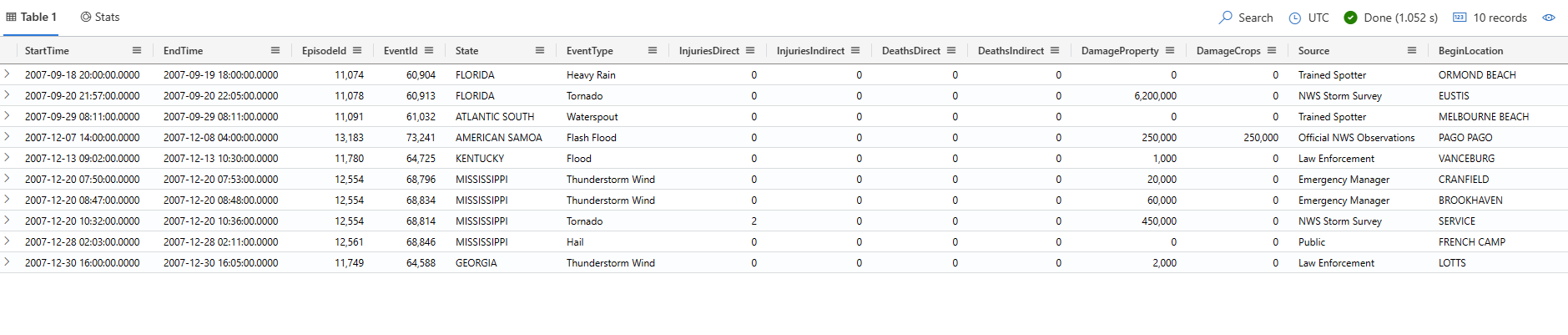
此查詢會輸出前 10 筆 storm 事件記錄的快照集,並以數據表格式顯示。
The examples in this article use publicly available tables in the help cluster, such as the
StormEventstable in the Samples database.
The examples in this article use publicly available tables, such as the
Weathertable in the Weather analytics sample gallery. 您可能需要修改範例查詢中的資料表名稱,以符合工作區中的資料表。
StormEvents
| take 10
| render table