此範例示範如何實作自訂資料提供者,以建立支援建立、擷取、更新和刪除作業的虛擬資料表。 對於每個作業,您可以實作一般外掛程式,使用外掛程式註冊工具註冊它們,並啟用虛擬表格資料來源來建立虛擬表格。
若要深入瞭解資料提供者和外掛程式開發,請參閱 自訂資料提供者
資料來源詳細資料
在本逐步解說中,您將在外部 SQL Server 中設定簡單的資料表,以建立虛擬資料表。 此範例中使用的表格名稱是 VETicket。
備註
如果您想要變更表格或欄的名稱,請更新您的外掛程式程式碼。
| 欄位名稱 | 數據類型 | 目標 |
|---|---|---|
| TicketID | 唯一識別碼,主鍵 | 表格的主鍵。 |
| Severity | 整數 | 工單的嚴重性值。 |
| 名稱 | 繩子 | 工單描述。 |
有四個步驟可讓自訂資料提供者建立虛擬資料表。
步驟 1:實作 CRUD 外掛程式並註冊元件
建立您的外掛程式專案,並安裝下列 NuGet 套件。 此範例中的解決方案名為 StubProvider。
組件 URL Microsoft.CrmSdk.CoreAssemblies https://www.nuget.org/packages/Microsoft.CrmSdk.CoreAssemblies Microsoft.CrmSdk.Data https://www.nuget.org/packages/Microsoft.CrmSdk.Data Microsoft.CrmSdk.部署 https://www.nuget.org/packages/Microsoft.CrmSdk.Deployment Microsoft.CrmSdk.工作流程 https://www.nuget.org/packages/Microsoft.CrmSdk.Workflow Microsoft.CrmSdk.XrmTooling.CoreAssembly https://www.nuget.org/packages/Microsoft.CrmSdk.XrmTooling.CoreAssembly Microsoft.IdentityModel.Clients.ActiveDirectory https://www.nuget.org/packages/Microsoft.IdentityModel.Clients.ActiveDirectory Microsoft.Rest.ClientRuntime https://www.nuget.org/packages/Microsoft.Rest.ClientRuntime Newtonsoft.Json https://www.nuget.org/packages/Newtonsoft.Json/13.0.1-beta2 將下列六個類別檔案新增至您的解決方案。 在每個類別檔案中,新增下列 using 語句
using System;
using System.Collections.Generic;
using System.Data.SqlClient;
using System.Linq; using System.Text;
using System.Threading.Tasks;
using Microsoft.Xrm.Sdk;
using Microsoft.Xrm.Sdk.Extensions;
using Microsoft.Xrm.Sdk.Data.Exceptions;
using Newtonsoft.Json;
備註
在每個類別檔案中,更新資料表名稱以符合您已設定的來源資料表名稱。 此範例使用 VETicket 作為來源資料表名稱。
類別文件名稱 目標 Connection.cs 這個類別包含用於建立和管理與外部 SQL 資料來源的連線的程式碼。 它包含外部資料庫特有的連接字串參數,以及建立連線所需的 SQL 型驗證資訊。 替換您將在 Dataverse 中建立虛擬表格的:資料庫伺服器、使用者 ID、密碼及資料表名稱的相應值。 CreatePlugin.cs 這個類別包含處理虛擬資料表建立作業的程式碼。 UpdatePlugin.cs 這個類別包含處理更新虛擬表中記錄的程式碼。 RetrievePlugin.cs 這個類別包含從虛擬表擷取特定記錄的程式碼。 RetrieveMultiplePlugin.cs 這個類別包含用於從虛擬表中取得多筆記錄的程式碼。 DeletePlugin.cs 這個類別包含可讓您刪除虛擬資料表中記錄的程式碼。
請閱讀下列有關在應用程式程式碼中使用連接字串或使用者名稱/密碼驗證的重要資訊。
這很重要
Microsoft 建議您使用最安全的可用驗證流程。 本文所述的驗證流程需要對應用程式具有非常高的信任度,並具有其他流程中不存在的風險。 只有在其他更安全的流程,例如受控識別無法使用時,才應該使用此流程。
Connection.cs代碼
 public static class Connection
{
   public static SqlConnection GetConnection()
   {
       try
       {
           //sample database to connect to
           SqlConnectionStringBuilder builder = new SqlConnectionStringBuilder();
           builder.DataSource = "Enter name or network address of the SQL Server";
           builder.UserID = "Enter User Name";
           builder.Password = "Enter password";
           builder.InitialCatalog = "Enter database details";
           SqlConnection connection = new SqlConnection(builder.ConnectionString);
           return connection;
       }
       catch (SqlException e)
       {
           Console.WriteLine(e.ToString());
           throw;
       }
   }
}
CreatePlugin.cs代碼
public class CreatePlugin : IPlugin
{
    public void Execute(IServiceProvider serviceProvider)
    {
        var context = serviceProvider.Get<IPluginExecutionContext>();
        if (context.InputParameters.Contains("Target") && context.InputParameters["Target"] is Entity)
        {
            Entity entity = (Entity)context.InputParameters["Target"];
            Guid id = Guid.NewGuid();
            //change the table name below to the source table name you have created
            string cmdString = "INSERT INTO VETicket (TicketID,Name,Severity) VALUES (@TicketID, @Name, @Severity)";
            SqlConnection connection = Connection.GetConnection();
            using (SqlCommand command = connection.CreateCommand())
            {
                command.CommandText = cmdString;
                command.Parameters.AddWithValue("@TicketID", id);
                command.Parameters.AddWithValue("@Name", entity["new_name"]);
                command.Parameters.AddWithValue("@Severity", entity["new_severity"]);
                connection.Open();
                try
                {
                    var numRecords = command.ExecuteNonQuery();
                    Console.WriteLine("inserted {0} records", numRecords);
                }
                finally
                {
                    connection.Close();
                }
                // other codes.
            }
            context.OutputParameters["id"] = id;
        }
    }
}
UpdatePlugin.cs代碼
public class UpdatePlugin: IPlugin {
    public void Execute(IServiceProvider serviceProvider)
    {
        var context = serviceProvider.Get<IPluginExecutionContext>();
        Guid id = Guid.Empty;
        if (context.InputParameters.Contains("Target") && context.InputParameters["Target"] is Entity)
        {
            Entity entity = (Entity)context.InputParameters["Target"];
            //change the table name below to the source table name you have created
            string cmdString = "UPDATE VETicket SET {0} WHERE TicketID=@TicketID";
            SqlConnection connection = Connection.GetConnection();
            using (SqlCommand command = connection.CreateCommand())
            {
                command.Parameters.AddWithValue("@TicketID", entity["new_ticketid"]);
                List<string> setList = new List<string>();
                if (entity.Attributes.Contains("new_name"))
                {
                    command.Parameters.AddWithValue("@Name", entity["new_name"]);
                    setList.Add("Name=@Name");
                }
                if (entity.Attributes.Contains("new_severity"))
                {
                    command.Parameters.AddWithValue("@Severity", entity["new_severity"]);
                    setList.Add("Severity=@Severity");
                }
                command.CommandText = string.Format(cmdString, string.Join(",", setList)); connection.Open();
                try
                {
                    var numRecords = command.ExecuteNonQuery();
                    Console.WriteLine("updated {0} records", numRecords);
                }
                finally
                {
                    connection.Close();
                }
                // other codes.
            }
        }
    }
}
RetrievePlugin.cs代碼
public class RetrievePlugin : IPlugin
{
    public void Execute(IServiceProvider serviceProvider)
    {
        var context = serviceProvider.Get<IPluginExecutionContext>();
        Guid id = Guid.Empty;
        if (context.InputParameters.Contains("Target") && context.InputParameters["Target"] is EntityReference)
        {
            EntityReference entityRef = (EntityReference)context.InputParameters["Target"];
            Entity e = new Entity("new_ticket");
            //change the table name below to the source table name you have created
            string cmdString = "SELECT TicketID, Severity, Name FROM VETicket WHERE TicketID=@TicketID";
            SqlConnection connection = Connection.GetConnection();
            using (SqlCommand command = connection.CreateCommand())
            {
                command.CommandText = cmdString;
                command.Parameters.AddWithValue("@TicketID", entityRef.Id);
                connection.Open();
                try
                {
                    using (SqlDataReader reader = command.ExecuteReader())
                    {
                        if (reader.Read())
                        {
                            e.Attributes.Add("new_ticketid", reader.GetGuid(0));
                            e.Attributes.Add("new_severity", reader.GetInt32(1));
                            e.Attributes.Add("new_name", reader.GetString(2));
                        }
                    }
                }
                finally
                {
                    connection.Close();
                }
                // other codes.
            }
            context.OutputParameters["BusinessEntity"] = e;
        }
    }
}
RetrieveMultiplePlugin.cs代碼
public class RetrieveMultiplePlugin : IPlugin
{
    public void Execute(IServiceProvider serviceProvider)
    {
        var context = serviceProvider.Get<IPluginExecutionContext>();
        EntityCollection collection = new EntityCollection();
        //change the table name below to the source table name you have created
        string cmdString = "SELECT TicketID, Severity, Name FROM VETicket";
        SqlConnection connection = Connection.GetConnection();
        using (SqlCommand command = connection.CreateCommand())
        {
            command.CommandText = cmdString;
            connection.Open();
            try
            {
                using (SqlDataReader reader = command.ExecuteReader())
                {
                    while (reader.Read())
                    {
                        Entity e = new Entity("new_ticket");
                        e.Attributes.Add("new_ticketid", reader.GetGuid(0));
                        e.Attributes.Add("new_severity", reader.GetInt32(1));
                        e.Attributes.Add("new_name", reader.GetString(2));
                        collection.Entities.Add(e);
                    }
                }
            }
            finally
            {
                connection.Close();
            }
            context.OutputParameters["BusinessEntityCollection"] = collection;
        }
    }
}
DeletePlugin.cs代碼
public class DeletePlugin : IPlugin
{
    public void Execute(IServiceProvider serviceProvider)
    {
        var context = serviceProvider.Get<IPluginExecutionContext>();
        //comment
        Guid id = Guid.Empty;
        if (context.InputParameters.Contains("Target") && context.InputParameters["Target"] is EntityReference)
        {
            EntityReference entityRef = (EntityReference)context.InputParameters["Target"];
            id = entityRef.Id;
            //change the table name below to the source table name you have created
            string cmdString = "DELETE VETicket WHERE TicketID=@TicketID";
            SqlConnection connection = Connection.GetConnection();
            using (SqlCommand command = connection.CreateCommand())
            {
                command.CommandText = cmdString; command.Parameters.AddWithValue("@TicketID", id);
                connection.Open();
                try
                {
                    var numRecords = command.ExecuteNonQuery();
                    Console.WriteLine("deleted {0} records", numRecords);
                }
                finally
                {
                    connection.Close();
                }
                // other codes.
            }
        }
    }
}
編譯並建置解決方案。 您現在將擁有一個組件檔案 (.dll),可用於在 Dataverse 環境中註冊。 您可以在 解決方案資料夾/bin/Debug 目錄中找到此檔案。

使用外掛程式註冊工具註冊元件。 您可以從 NuGet 取得最新的外掛程式註冊工具套件。
開啟外掛程式註冊工具。 您必須具有系統管理權限,才能註冊元件。選取 建立新連線 以連線到您的 Dataverse 環境。 選取 [註冊] 下拉式清單,然後選取 [註冊新組件]。
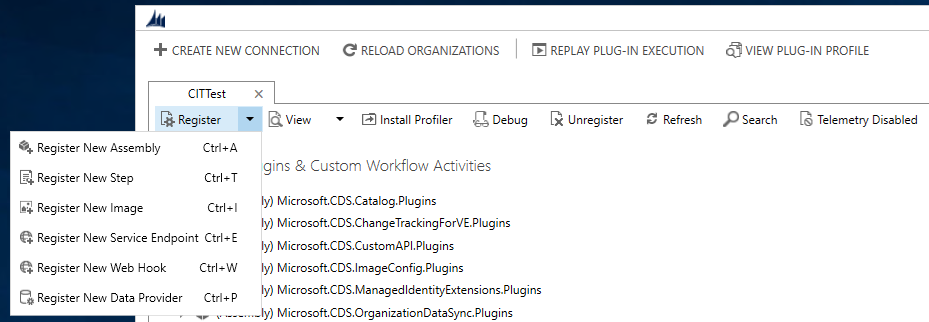
選取組件檔案並註冊外掛程式。確保您已選取所有外掛程式 (建立、更新、刪除、擷取及多重擷取外掛程式)。

步驟 2:建立資料提供者並將外掛程式新增至提供者
選取 [註冊] 下拉式清單,然後選取 [註冊新的資料提供者]。
在 [ 註冊新資料提供者 ] 對話方塊中,輸入下列詳細資料:
輸入 資料提供者名稱。
在 [解決方案] 選項中,選取現有的解決方案,或在下拉式清單中建立新的解決方案。 如果您想要建立新的解決方案,請從下拉式清單中選取 [新解決方案 ] 選項。 在 [ 建立新解決方案 ] 對話方塊中,輸入必要的詳細資料,然後選取 [ 儲存]。
在 [資料來源資料表 (實體)] 選項中,選取 [ 建立新資料來源]。 輸入詳細資料。 請確定資料來源是您建立或選取的解決方案的一部分。
備註
Dataverse 中的資料來源資料表會保存要傳遞至提供者外掛程式的資料來源記錄的組態資料。
將每個已註冊的外掛程式映射至其各自的作業。
註冊新的資料提供者。

在外掛程式註冊工具中,您會看到新的資料來源記錄和相關聯的資料提供者。 選取資料來源會顯示詳細數據,其中包括外掛程式及其已註冊的 GUID。

步驟 3:在 Dataverse 環境中建立虛擬資料表
導覽至 設定>管理>虛擬表格 (實體) 資料來源,以建立新的虛擬表格資料來源。
選取 新增,然後從下拉式清單中選取您在上一個步驟中建立的資料提供者。
輸入資料來源的名稱,然後選取 [儲存並關閉]。
您現在已準備好建立代表外部資料來源的虛擬表格。 為此,請轉到 “設置>”“自定義系統”。
在解決方案總管的左側導覽窗格中,選取資料表(實體),然後選取新增。
輸入下列詳細資料:
資料行 Description 資料來源 選取您在上一個步驟中建立的資料來源。 顯示名稱 虛擬資料表名稱。 複數名稱 該值將根據顯示名稱自動填充。 名稱 這也會根據您為顯示名稱輸入的值自動建立。 外部名稱 源數據表的名稱。 外部集合名稱 您可以使用複數名稱欄中的相同值。 選取 [儲存並關閉]。

在左側導覽窗格中,選取並展開您建立的虛擬資料表。
選取 欄位,以更新並建立新欄來代表外部來源。
選取虛擬資料表的 [主索引鍵] 資料行,然後選取 [編輯]。
更新 [外部名稱] 資料行,以符合外部資料來源中的資料行名稱。 在此範例中,外部資料行名稱為 TicketID。
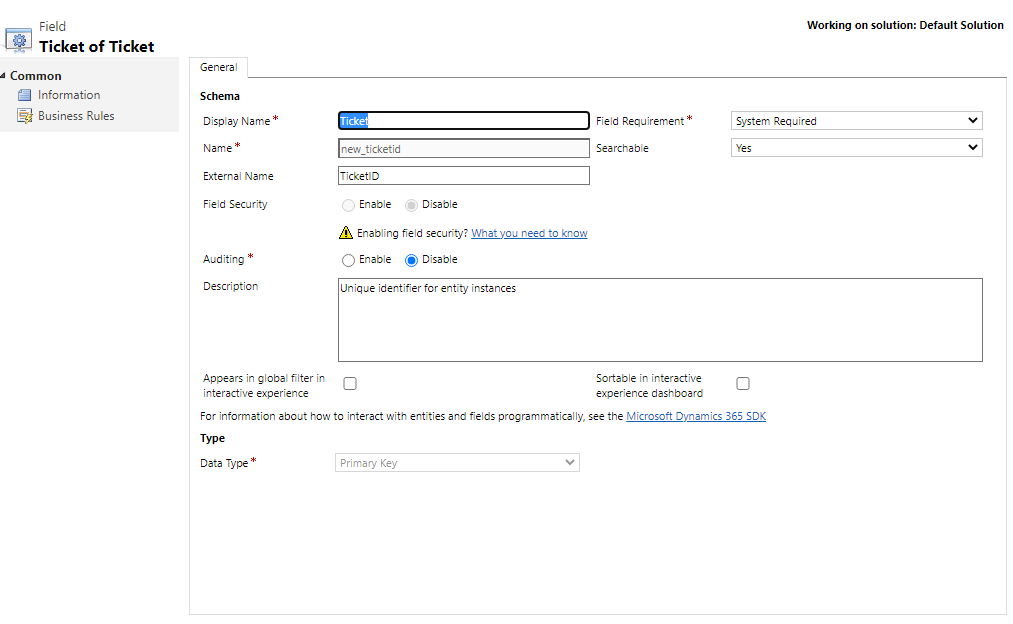
選取儲存後關閉。
選取虛擬資料表的 名稱 欄位,然後選取 編輯。
更新 [外部名稱] 欄位,以符合外部資料來源中的欄位名稱。 在此範例中,外部資料行名稱為 Name。

選取儲存後關閉。
選取 [ 新增 ] 以在虛擬資料表中建立新資料行。 此欄將代表外部資料來源中的嚴重性欄位。
輸入新欄的下列資訊:
欄位名稱 價值觀 顯示名稱 Severity 名稱 new_severity 外部名稱 Severity 欄位要求 業務需求 數據類型 整數 
選取儲存後關閉。
步驟 4:使用虛擬資料表建立、更新、檢視和刪除記錄
建立模型導向應用程式,並將虛擬資料表新增至網站地圖。 然後選取虛擬表格主表單和進階欄位檢視。 發佈應用程式。 更多資訊:從頭建構您的第一個模型導向應用程式
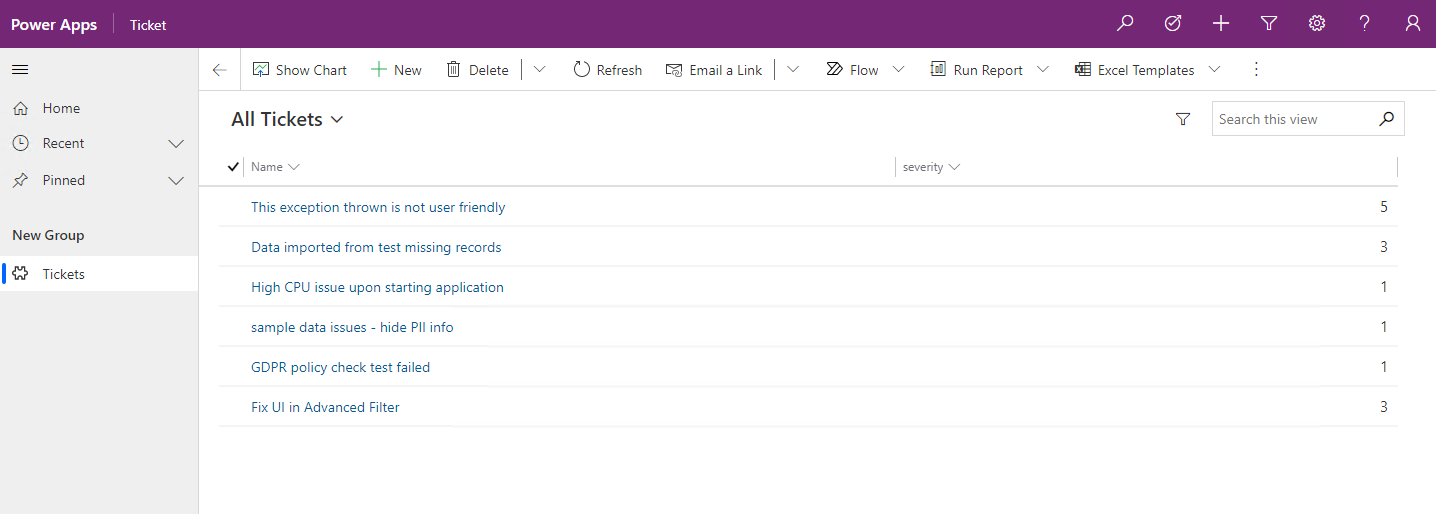
應用程式使用者可以使用虛擬資料表執行讀取、建立、更新、刪除作業,就像 Microsoft Dataverse 中的任何其他資料表一樣。
另請參閱
開始使用虛擬資料表
虛擬資料表的 API 考量
自訂虛擬資料表資料提供者
使用 OData v4 資料提供者的虛擬資料表指南