Describe Agent Hub
Agents are changing how organizations use Dynamics 365 applications. The Customer Intent Agent analyzes customer intent to help streamline the resolution process. The Case Management Agent can automate case creation, management, and resolution. With AI capabilities that are part of Dynamics 365, you need a tool to help with deployment and management of agents.
The Agent Hub in Dynamics 365 is a command center for managing AI-powered agents within Dynamics 365 Customer Service. It enables organizations to deploy, monitor, and optimize virtual agents and Copilot experiences, ensuring seamless automation and improved customer interactions.
The Agent Hub is a centralized workspace designed to:
Agent Hub provides a unified view of the following capabilities:
Learn: Administrators can access guided overviews of AI agents, security protocols, compliance impacts, and adoption of workflows. This helps understand AI and empowers decision-makers with the knowledge to act confidently.
Rollout manager: Allows you to configure the rollout plans for AI agents to specific intents and targeted workloads and monitor their performance.
Agent insights: Measure the performance of AI agents in your contact center. View metrics such as total conversations, average handle time, and customer satisfaction scores to understand how AI agents are performing.
Security: Understand the security measures in place to protect customer data and make sure of regulatory compliance.
Architecture: Get insights into the underlying architecture of AI agents and how they integrate with existing systems.
Privacy and compliance: Learn about the privacy and compliance considerations for using AI agents in your contact center.
The Agent Hub empowers businesses to deliver consistent, intelligent, and scalable support across multiple channels by consolidating these capabilities.
Rollout plans
One way Agent hub assists with managing and deploying agents in Dynamics 365 is with rollout manager. The rollout manager guides administrators to roll out agents to their organization. You can create individual rollout plans for each autonomous agent or a single rollout plan for multiple agents based on your business needs.
For Dynamics 365 customer service, you can create rollout plans for:
Customer Intent Agent: Helps service representatives by providing them with suggested responses based on customer intent.
Case Management Agent: Helps service representatives by automating case management tasks, such as creating and updating cases.
Customer Knowledge Management Agent: Helps service representatives by providing them with knowledge-based articles based on customer queries.
Quality Evaluation Agent: Helps organizations make sure that every customer engagement with support is compliant, ethical, and aligned with brand values.

Monitoring existing agents
Once your agents are deployed, the Agent Hub provides robust monitoring tools to stay on top of what is happening. These tools include:
Real-Time Dashboards: Track active sessions, conversation transcripts, and performance metrics.
Health Monitoring: Receive alerts for failures or anomalies to maintain service continuity.
Analytics and Optimization: Review usage trends, customer feedback, and retrain models for improved accuracy and efficiency.
Now that we described the different tools that are available in the Agent Hub, let’s examine a potential business scenario.
A midsize retailer has a contact center for managing their customer issues. They are in the process of integrating ai and more specifically agents into their daily routines. Currently, they want to deflect simple “order status / returns / store hours” inquiries with AI agents, while keeping complex cases with human reps. These agents are available through Web chat, SMS, and voice IVR.
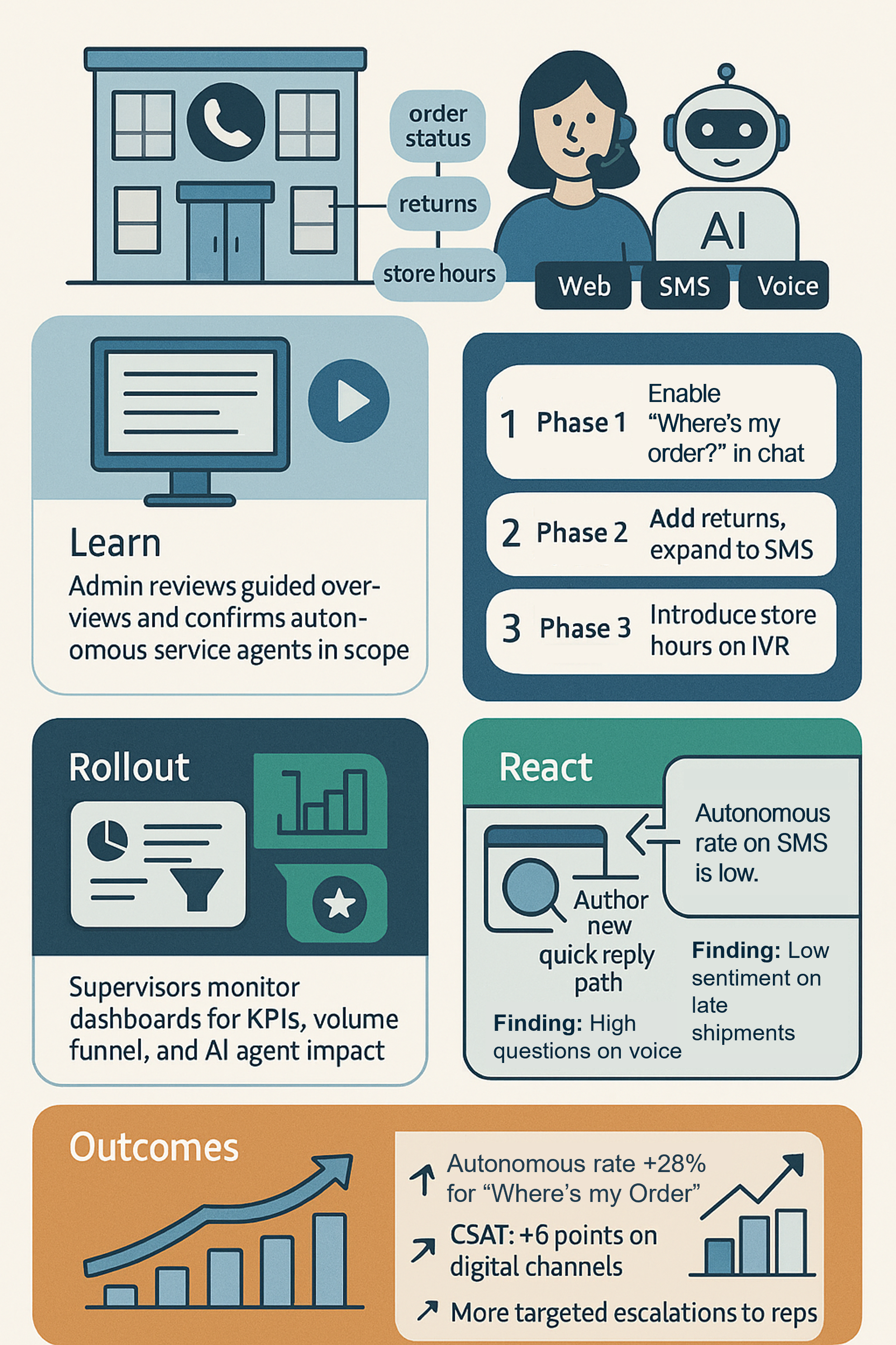
Learn: Before they deploy agents, the Customer Service admin uses Agent hub to review guided overviews on AI agents, privacy, compliance, and adoption of workflows and align them with internal policies and industry requirements. This helps them to confirm the autonomous service agents (Intent, Case Management, Knowledge, Quality Evaluation) that is in scope and how each contributes to outcomes
Rollout: Using Rollout manager, the supervisor defines a phased plan:
Phase 1 (Week 1–2): Enable AI for "Where's my order?" (WISMO) on web chat only; cap exposure at 20% of total WISMO traffic.
Phase 2 (Week 3–4): Add returns eligibility intents; expand to SMS; raise cap to 40%.
Phase 3: Introduce basic store hours on voice IVR, keeping complex calls routed to human reps.
Once rolled out, these plans are tracked and adjusted within Agent Hub’s rollout views.
Measure: As agents are deployed, organizational supervisors use the Agent insights dashboard to see:
Top KPIs: total volume, autonomous rate, quality score, and sentiment—filtered by line of business, intent group, and channel.
Volume funnel: % of conversations resolved by AI vs. escalated to reps.
Agent level insights: which AI agent (for example, Intent Agent) drives the most impact, and where quality dips.
React: Through monitoring, the organization can identify areas where they might want to make changes based on the data captured during weeks 2–4.
Finding: WISMO autonomous rate is 62% on web chat but only 35% on SMS; quality score dips when tracking numbers are missing.
- Action: Update the Customer Knowledge Management Agent to surface a "tracking number missing" flow and author a quick reply path; retrain intents using fresh conversation data.
Finding: Returns questions escalate often on voice.
- Action: Keep voice exposure low in Rollout manager until the Case Management Agent learns new exceptions; publish the rollout plan and track adoption deltas.
Finding: Sentiment dips on late shipments.
- Action: Set goal targets on sentiment/quality in Agent insights and add a rule to escalate "late shipment" intents sooner to human reps; monitor improvements week over week.
Outcomes: After six weeks of using agent hub to evaluate, roll out, and manage their agents, the retail organization found the following results.
Autonomous rate: +28% for WISMO across chat/SMS; AHT down 22% for human handled escalations.
CSAT: +6 points on digital channels; quality score meets target threshold after knowledge fixes.
Escalations: More targeted, with clearer summaries handed off to reps, reducing rework.
Agent Hub simulation
In the following simulation, you see how to create a rollout plan using the Agent Hub.