使用專家撰寫的課程、學習路徑、調適型技能測量等來提升您的技能。 將學習提升到下一個層級,最多六個月的 Pluralsight 技術技能平臺存取權。 主要 Azure、C#、Angular、ASP.NET Core 和其他趨勢技術。 評估您的技能,並向業界專家學習,以填補任何空白。
The eligibility table details the Pluralsight training benefit that's available with select Visual Studio subscriptions.
某些 Pluralsight 訂閱者也可以在完整 Pluralsight 目錄的權益訂閱到期後,利用有限的課程。 當您的完整目錄 Pluralsight 權益訂用帳戶到期時,Pluralsight 會引導合格訂閱者完成有限且持續存取的程式。 如果您不符合在初始權益訂用帳戶到期之後兌換更多 Pluralsight 訓練權益的資格,如果您嘗試在 Pluralsight 網站上啟用權益,則通知會提供您這項資訊。
Eligibility
下表描述選取 Visual Studio 訂用帳戶中包含的 Pluralsight 訓練權益:
| Subscription level | Channels | Benefit | Renewable? |
|---|---|---|---|
| Visual Studio Enterprise (標準) | 大量授權 (VL), Azure, 零售 | 12 months | Yes2 |
| 使用 GitHub Enterprise 的 Visual Studio Enterprise 訂用帳戶 | VL | 12 months | Yes2 |
| Visual Studio Professional (標準) | VL、Azure、Retail | 6 months | Yes2 |
| 包含 GitHub Enterprise 的 Visual Studio Professional 訂用帳戶 | VL | 6 months | Yes2 |
| Visual Studio Test Professional (標準) | VL, Retail | Not available | NA |
| MSDN 平台 (標準) | VL, Retail | Not available | NA |
| Visual Studio Enterprise、Visual Studio Professional (月租雲端) | Azure | Not available | NA |
| Visual Studio Enterprise (NFR1) | Program | Not available | NA |
1Includes: Not for Resale (NFR), Visual Studio Industry Partner (VSIP), MCT Software & Services Developer, Most Valuable Professional (MVP), Regional Director (RD), Microsoft Cloud Partner Program, FTE, Imagine, NFR Basic.
2The Pluralsight benefit in select Visual Studio subscriptions renews when your subscription renews. For example, if you have an annual subscription that you renew each year, the benefit is available to you each year when you renew. If you have a multi-year subscription, the Pluralsight benefit is available to you once during the term of the subscription. If you renew a multi-year subscription, the benefit is available again after the renewal.
Note
Microsoft不再在雲端訂用帳戶中提供 Visual Studio Professional 年度訂閱和 Visual Studio Enterprise 年度訂閱。 目前的客戶會繼續有相同的體驗,並能夠更新、增加、減少或取消其訂用帳戶。 建議新客戶前往 Visual Studio 定價,以探索購買 Visual Studio 的不同選項。
不確定您使用哪一個訂用帳戶? 若要查看與您的電子郵件地址相關聯的訂用帳戶,請移至 Visual Studio 訂用帳戶。 如果您沒有看到所有訂用帳戶,您可能會有一或多個與不同電子郵件地址相關聯的訂用帳戶。 您必須使用該電子郵件位址登入,才能看到這些訂用帳戶。
啟用 Pluralsight 權益
若要啟用 Visual Studio 訂用帳戶隨附的 Pluralsight 權益,請移至 Visual Studio 訂 用帳戶,然後選取 [ 權益 ] 索引標籤。在 [我的訂用帳戶中包含的權益] 底下,選取 [Pluralsight] 圖格上的 [ 啟用]。
![顯示 Visual Studio 訂用帳戶權益索引標籤上 Pluralsight 權益圖格的螢幕快照,其中醒目提示 [啟用] 按鈕。](_img/vs-pluralsight/tile.png)
Tip
To find the Pluralsight tile, select the Professional Development tab to view a smaller number of tiles.
在 Pluralsight 中啟用權益 Web 窗體中,完成下列步驟:
- 提供要求的連絡資訊。
- 選取複選框以接受 Pluralsight 使用規定。
- Select Redeem.
![Pluralsight 註冊窗體的螢幕快照,其中已選取 [使用規定] 複選框,並醒目提示 [兌換] 按鈕。](_img/vs-pluralsight/registration.png)
Note
註冊頁面會在幾分鐘后到期。 如果您在頁面到期前未完成註冊程式,請返回 Visual Studio 訂 用帳戶中的 Pluralsight 權益磚,然後再次選取 [ 啟用 ]。
設定 Pluralsight 帳戶可能需要一些時間。 設定您的帳戶時,Pluralsight 網頁會顯示確認。 具有登入資訊的電子郵件會傳送至您在建立帳戶時輸入的電子郵件位址。 如果您找不到電子郵件,請務必檢查您的垃圾郵件資料夾。
![Pluralsight 確認網頁和 [設定密碼] 按鈕的螢幕快照。](_img/vs-pluralsight/confirmation-set-password.png)
如果您的帳戶不符合兌換新 Pluralsight 權益優惠的資格,您收到的電子郵件會說明無法套用權益,因為帳戶不符合資格。 它也會告訴您如何連絡 Pluralsight 支援小組,以取得您的帳戶協助。
On the confirmation webpage, select Set Password.
In New Password, create a password for your Pluralsight account. Confirm the password, and then select Save.
![顯示 Visual Studio 訂用帳戶權益索引標籤上 Pluralsight 權益圖格的螢幕快照,其中醒目提示 [啟用] 按鈕。](_img/vs-pluralsight/tile.png#lightbox)
That's it! 您現在已準備好開始使用數千個 Pluralsight 課程進行學習。
Pluralsight 權益狀態
在 Visual Studio 訂用帳戶中啟用 Pluralsight 權益之後,Pluralsight 權益圖格會顯示 Pluralsight 權益的狀態。
當您的 Pluralsight 權益為使用中時
After you activate your Pluralsight benefit, the Activate button is replaced with a button of a white arrow in a blue circle. 選取按鈕以移至 Pluralsight 網站,您可以在其中登入並繼續訓練。
在 Visual Studio 訂用帳戶中,Pluralsight 圖格會顯示在 Pluralsight 權益上保留的時間。 此圖格也會顯示 Pluralsight 權益的啟用日期和到期日。
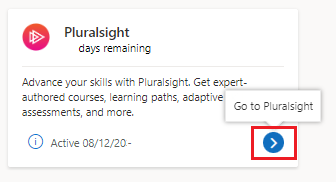
當您的 Pluralsight 權益結束時
當您的 Pluralsight 權益到期時,權益狀態會變更為 剩餘 0 天 ,並移除 Pluralsight 的連結。 您啟用 Pluralsight 權益的日期及其到期日期仍會顯示在圖格上。

常見問題
問:我有 Visual Studio Enterprise 訂用帳戶,但我未在 [權益] 頁面上看到 Pluralsight 圖格。 What's wrong?
答:並非所有Visual Studio Enterprise訂用帳戶都包含 Pluralsight 權益。 Check the eligibility table to see whether your subscription is eligible.
問:是否可以多次使用 Pluralsight 權益?
答:當您的訂用帳戶續約時,選取 Visual Studio 訂用帳戶中的 Pluralsight 權益會續約。 例如,如果您訂閱的是每年續約的年度訂閱,則每年您續約時,該權益可供您使用。 如果您有多年期訂用帳戶,則 Pluralsight 權益可在訂閱期間使用一次。 如果您續約多年訂閱,續約後會再次提供權益。 若要尋找您的續約日期,請移至 Visual Studio 訂 用帳戶,然後選取 [支援資訊]。 Under Valid through, check the date.
問:我是否可以存取任何自定義的學習播放清單或頻道?
A: Yes. 身為 Visual Studio 訂閱者,您可以存取精選角色、學習路徑和自定義頻道(播放清單),作為 Pluralsight 訓練權益的一部分。 Microsoft和 Pluralsight 特別策劃精選內容,以在感興趣的關鍵領域學習。 透過 Visual Studio 訂 用帳戶啟用 Pluralsight 權益,以存取 Pluralsight 配置檔上的學習內容。
問:Pluralsight 權益磚沒有 Activate 連結。 如何啟用權益?
A: If you've already activated your Pluralsight benefit, the Activate link is replaced with a link that takes you to the sign-in page for Pluralsight. 您會看到您啟用權益的日期,以及訂用帳戶上保留多少時間的相關信息。 如果您已經針對 Visual Studio 訂用帳戶使用 Pluralsight 權益,除非您更新訂用帳戶,否則無法再次啟用權益。
問:我的 Pluralsight 權益結束時會發生什麼事?
答:在免費的 Pluralsight 訂用帳戶結束時,您可以選擇直接從 Pluralsight 購買訂用帳戶,並繼續訓練。 For full details, contact Pluralsight.
Support resources
- Pluralsight 說明中心提供使用 Pluralsight 課程和使用 Pluralsight 網站的協助。
- 如需 Visual Studio 訂用服務的銷售、訂閱、帳戶和帳單方面的協助,請連絡 Visual Studio 訂用服務支援。
- 有關於 Visual Studio IDE、Azure DevOps Services 或其他 Visual Studio 產品或服務的問題嗎? 請造訪 Visual Studio 客服。
See also
Next steps
建立您的帳戶之後,您就可以開始訓練。 Go to Pluralsight. In the upper-right corner, select Sign in to start a new course or to return to a course that's already in progress.