從 Windows 8 開始,即使系統保持在 S0 電源狀態,裝置也可以進入 D3cold 電源子狀態。 本主題說明內嵌裝置實作 D3cold 支援的韌體需求。 下列討論旨在協助韌體開發人員使其內嵌裝置能夠可靠地進入和退出 D3cold。
此外,也會簡要討論支援 D3cold 的裝置驅動程式需求。 如需 D3cold 裝置驅動程式支援的詳細資訊,請參閱 在驅動程式中支援 D3cold。
簡介
裝置電源狀態 定義在 ACPI 規格和各種匯流排規格中。 PCI 匯流排規格自從引入 PCI 電源管理以來,已將 D3 (關閉) 裝置電源狀態分割為兩個子狀態,即 D3hot 和 D3cold。 此區別已新增至 ACPI 3.0 中的 ACPI 規格,並在 ACPI 4.0 中擴充。 Windows 一律都支援這兩種 D3 子狀態,但 Windows 7 和舊版 Windows 只有在整個電腦結束 S0 (運作中) 系統電源狀態以進入睡眠或休眠狀態時,才支援 D3cold 子狀態,通常是 S3 或 S4。 從 Windows 8 開始,裝置驅動程式可以讓其裝置進入 D3cold 狀態,即使系統停留在 S0 中。
D3hot,通常簡稱為“D3”,是設備的“軟關閉”狀態。 在此狀態下,匯流排掃描可以偵測到裝置,傳送至裝置的命令可能會導致裝置再次開啟電源。 在 D3cold 狀態中,會移除所有電源,但可能會例外保留少量電源,以驅動裝置的喚醒邏輯。 例如,對於 PCI Express (PCIe) 裝置,主要裝置電源 Vcc 在轉換至 D3cold 時經常關閉。 關閉 Vcc 可以降低耗電量,並延長行動硬體平台在電池充電時執行的時間。 當裝置處於 D3cold 時,匯流排掃描無法偵測到它,也無法接收命令。 恢復 Vcc 電源會將裝置移至未初始化狀態,這通常相當於 D0 狀態。 然後,軟體必須重新初始化裝置,使其進入工作狀態。
將裝置置於 D3cold 並不一定意味著裝置的所有電源都已移除,僅表示主電源 Vcc 已移除。 如果在喚醒邏輯中不需要輔助電源 Vaux,則可能會將其移除。 不過,可能需要向處理器發出喚醒事件訊號的裝置,必須能夠汲取足夠的功率以便運作喚醒邏輯。 例如,移除主電源的乙太網路介面卡 (NIC) 可能會從乙太網路纜線汲取足夠的電力。 或者,Wi-Fi NIC 的待命電源可能由 PCIe 介面外部的來源提供,在此情況下,PCIe 介面可以完全關閉。
在下列討論中,會說明一組需求,以啟用裝置電源狀態轉換至 D3cold。 這些要求分為以下兩類:
韌體和平台需求
設備驅動器需求
這兩個類別中的第一個是本次討論的主要焦點。 簡要概述了第二類。 如需裝置驅動程式需求的詳細資訊,請參閱 在驅動程式中支援 D3cold。
韌體和平台需求
在下列討論中,針對這兩種情況提供啟用 D3cold 的韌體和平臺需求:
當設備被列舉在 ACPI 中時。
當裝置由其父匯流排列舉時。
以下大部分討論都是針對 PCIe 的。 然而,這裡描述的一般原則在很大程度上也適用於其他匯流排。
抽象化一些細節,從 D3cold 到 D0 的轉換是通過將 Vcc 電源重新施加到嵌入式設備來觸發的。 重新通電可有效恢復設備與匯流排的連線。 Windows 會讀取裝置的識別碼,以區分下列兩種情況:
一個裝置被移除並被另一個裝置取代。
相同的設備被移除,然後重新插入。
如果識別碼相符,裝置驅動程式會重新初始化裝置。 如果識別碼不相符,Windows 會卸載裝置驅動程式,並為新裝置建置新的驅動程式堆疊。 例如,PCIe 會查詢供應商 ID、裝置 ID 和子系統 ID (在某些規格版本中會分成子裝置和子供應商 ID)。 這些識別碼必須在重新接通電源後(且匯流排指定的等待期過去)與先前連接的裝置的識別碼相符;否則,Windows 會認為新裝置與先前的裝置不同。
案例 1:內嵌裝置會在 ACPI 中列舉
如果內嵌裝置無法透過匯流排規格(如 PCIe 或 USB)所定義的機制被發現,但裝置是永久連線或至少專用於已知裝置,此裝置可以在平臺韌體中由 ACPI 的 _HID 和/或 _CID 物件進行描述。 這些物件可讓 OSPM 列舉裝置。 (“OSPM” 是 ACPI 規格中定義的詞彙。這表示鬆散地說,「軟體不是韌體」。只有在沒有總線列舉值偵測到裝置標識符時,OSPM 才會列舉裝置。 例如,ISA 匯流排上的裝置會由 OSPM 列舉。 此外,系統上晶片 (SoC) 上的裝置通常會由 ACPI 列舉,因為它們位於不可列舉的網狀結構上。 這類裝置的範例包括 USB 和 SD 主機控制器。
平臺韌體 (在 ACPI 中列舉)
OSPM 會使用 \_SB._OSC 將全平臺 OSPM 功能傳達至平臺韌體。 平臺韌體必須在 \_SB._OSC 傳回值中設定位 2,以向 OSPM 指出裝置支援_PR3。 如需詳細資訊,請參閱 ACPI 5.0 規格中的
嵌入式裝置(僅透過 ACPI 發現)
若要支援 D3cold,平臺韌體應該針對內嵌裝置實作下列 ACPI 電源資源物件:
_PR0:此物件會評估裝置在 D0(完全運行)裝置電源狀態下的電力需求。 傳回值是裝置在 D0 狀態下所需的電源資源清單。
_PR2:此物件會在 D2 裝置電源狀態下,評定裝置對電源的需求。 傳回值是裝置在 D2 狀態中所需的電源資源清單。 請注意,基於歷史原因,Windows 預期_PR2在_PR0存在時就存在。 如果 D2 是在硬體中實作,_PR2會列出 D2 所需的電源資源。 如果未實作 D2,_PR2會列出與 _PR0 相同的資源。
_PR3:這個物件用以評估裝置在 D3hot 電源狀態下的電力需求。 傳回值是裝置在 D3hot 狀態下所需的電源資源清單。
對於任何_PRx物件中識別的每個電源資源,必須實作下列控制方法:
_OFF:將電源資源設定為 關閉 狀態(關閉資源電源)。
_ON:將電源資源設定為 開啟 狀態(開啟資源電源)。
_STA:此物件會評估為電源資源目前的 開啟 或 關閉 狀態 (0:關閉,1:開啟)。
當 ACPI 在 _PR3 中列出的電源資源上執行_OFF控制方法時,就會轉換成 D3cold。 請注意,如果裝置函式驅動程式指出對 D3cold 的支援,這項支援並不表示所有轉換到 D3 會導致快速轉換至 D3cold。 裝置可能會進入並長時間停留在 D3hot 中,然後有兩種可能的情況:返回 D0 而不進入 D3cold,或者稍後才進入 D3cold。
父裝置 (在 ACPI 中列舉)
父裝置不需要能夠進行電源管理。 如果父裝置支援電源管理,但其任何一個子裝置(相依裝置)不處於D3模式,Windows就絕不會關閉此裝置的電源。
範例 (在 ACPI 中列舉)
以下方塊圖顯示了系統匯流排上的嵌入式裝置(標記為 EMBD)。 裝置的主電源 (Vcc) 和輔助電源 (Vaux) 可以透過標有 電源邏輯的區塊獨立開啟和關閉。

下列 ASL 程式碼範例說明上圖中嵌入式裝置所使用的電源資源。 此範例會從描述裝置驅動程式功能的_OSC控制方法宣告開始。 接下來,宣告裝置的兩個電源資源名稱 — PVCC 和 PVAX,以指派給裝置的主電源和輔助電源,分別為 Vcc 和 Vaux。 最後,會針對裝置支援的每個裝置電源狀態列出電源資源需求,並描述裝置的喚醒功能。
Scope (\_SB)
{
     Method(_OSC, 4, NotSerialized) // Platform-wide Capabilities Check.
     {
          ... // This must indicate support for _PR3.
     }

     PowerResource(PVCC,0,0) // Power resource representing the main power for the device.
                             // Required for the device to be fully functional (D0).
     {
          Name(_STA,VAR1)        // Return the state of the power resource.
          Method(_ON,0x0) {...}  // Turn on the power resource and set VAR1 to 1.
          Method(_OFF,0x0) {...} // Turn off the power resource and set VAR1 to 0.
     }

     PowerResource(PVAX,0,0) // Power resource representing the auxiliary power for the device.
                             // Required for low-power, less-functional states (e.g., D3hot).
     {
          Name(_STA,VAR2)
          Method(_ON,0x0) {...}
          Method(_OFF,0x0) {...}
     }

     Device(EMBD) // An ACPI-enumerated device on the processor bus that supports D3Cold
     {
               Name(_HID, ...)
               ... // Other (non-power) objects for this device

          // Indicate support for D0.
               Name(_PR0, Package() {PVCC, PVAX}) // Power resources required for D0

          // Indicate support for D1 (optional)...

          // Indicate support for D2.
               Name(_PR2, Package() {PVCC, PVAX}) // If D2 is implemented in the hardware,
                                                  //  list the power resources needed by D2.
                                                  // If D2 is not implemented, list the same
                                                  //  resources as _PR3.

          // Indicate support for D3Cold.
               Name(_PR3, Package() {PVCC, PVAX}) // Power resource for D3. These will be
                                                  //  turned off ONLY if drivers opt-in to D3cold.

          // Indicate support for wake. Required for entry into D3cold, even if the device doesn't
          // need or have a wake mechanism.
               Name(_S0W, 4) // The existence of this object indicates that the platform is
                             //  capable of handling wake events from this device while in S0.
                             // The value of this object indicates the lowest D-state this device
                             //  can be in to trigger wake events that can be handled while the
                             //  platform is in S0.

          // Enable wake events (optional)
          //  If this device actually does generate wake events, there must be a way for OSPM to
          //  enable and disable them. The mechanism for this depends on the platform hardware:
               /*
               Name(_PRW, ...) // If the event is signaled via a GPE bit (SCI) OR
                               //  if there are power resources required only for wake.
               Name(_CRS, ...) // If the event is signaled via a wake-capable interrupt.

               Method(_DSW, 3) {...} // Can be used with either of the above, if wake enablement
                                     // varies depending on the target S-state and D-state.
               */
     }  // End of Device EMBD
} End Scope \_SB
嵌入式裝置在匯流排上被識別的案例 2
如果嵌入式裝置符合通用匯流排規格,例如 PCIe 或 USB,則可以透過匯流排定義的機制來發現此裝置,並且可以透過匯流排部分或全部供電。 如果此裝置不是由其他邊頻電源資源供電,則裝置的主要電源是將裝置連接到父匯流排控制器的鏈路。 匯流排列舉裝置可由內嵌裝置定義中的_ADR物件來識別。 _ADR 物件可用來向 OSPM 提供嵌入式裝置父匯流排上裝置的位址。 此位址用於將匯流排的裝置的表示(即匯流排硬體所識別的方式)與平台的裝置表示(由ACPI韌體所識別的方式)相結合。 (_ADR 位址編碼是總線特定的。) 如需詳細資訊,請參閱 ACPI 5.0 規格中的第 6.1.1 節「_ADR (位址)」。 採用此機制時,D3cold 支援必須與父匯流排驅動程式協調。
如果嵌入式裝置的主要電源是將此裝置連接到其父匯流排的鏈路,則將裝置放置在 D3cold 中的關鍵要求是關閉鏈路的電源。 如需轉換至 D3cold 的詳細資訊,請參閱 裝置電源狀態中的狀態圖表。
平台韌體 (匯流排列舉)
OSPM 會使用 \_SB._OSC 將全平臺 OSPM 功能傳達至平臺韌體。 平臺韌體必須在 \_SB._OSC 傳回值中設定位 2,以向 OSPM 指出裝置支援_PR3。 如需詳細資訊,請參閱 ACPI 5.0 規格中的
嵌入式裝置 (匯流排列舉)
不需要 D3cold 特定的 ACPI 變更。 在此情況下,只要裝置驅動程式和平臺已指出支援 D3cold,當父匯流排離開 D0 並進入低功率狀態 Dx 時,就可以關閉為內嵌裝置供電的匯流排鏈路。 當鏈路斷電時,會發生嵌入式裝置從 D3hot 到 D3cold 的轉換。 父總線進入的 Dx 狀態可以是導致鏈路電源關閉的任何狀態。
父裝置 (匯流排列舉)
父匯流排的 ACPI 描述元必須執行下列動作:
實作_S0W(Dx)。 此物件會將 Dx 指定為最低功耗的 D 狀態,此狀態允許子裝置(嵌入式設備)在系統處於 S0 狀態時從中喚醒。
定義電源資源,以代表將子 (內嵌) 裝置連接至母匯流排的鏈結。 此外,應該為此電源資源定義_ON、_OFF和_STA物件。 此清單後面的ASL程式碼範例將鏈路電源描述為兩個資源:PVC1和PVX1。 對於每個資源,都會定義_ON、_OFF及_STA物件。
如果 “Dx” (最低電源 D 狀態;請參閱第一個清單項目) 是 D3cold,請提供 _PR3 物件,其中包含子 (內嵌) 裝置 D3hot 所需的電源資源 (例如 Vcc 和 Vaux) 。 如果 D0、D2 和 D3hot 需要相同的電源,則 _PR0、_PR2 和 _PR3 都會指定相同的電源資源。 只有在子裝置進入 D3cold 時,才會關閉這些資源。
基於歷史原因,Windows 預期_PR2只要存在_PR0就會出現。 如果 D2 是在硬體中實作,_PR2會列出 D2 所需的電源資源。 如果未實作 D2,_PR2會列出與 _PR0 相同的資源。
實作 _PR0。 父匯流排的 _PR0 物件中的資源清單應該包含為將父匯流排連線至子 (內嵌) 裝置之連結提供電源的資源。
範例 (匯流排列舉)
下列方塊圖中的範例硬體組態顯示了兩種不同方式,可以針對 PCIe 裝置啟用 D3cold。 首先,端點(標記為 ENDP)連接到 PCIe 根端口 (RP01),並通過 PCIe 鏈路從其父設備接收輔助電源。 其次,圖中 高清音訊 裝置沒有標準連結到其父裝置(標示為 PCI0 的 PCI 控制器),因此其模型化方式類似於 ACPI 列舉的情況。
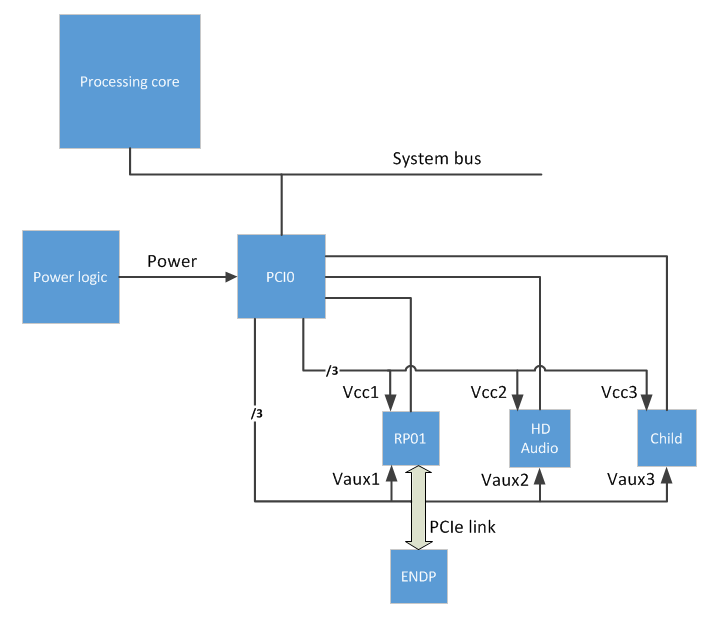
此圖中的 RP01 裝置具有主電源 Vcc1 和輔助電源 Vaux1。 同樣, HD Audio 裝置具有主電源 Vcc2 和輔助電源 Vaux2。
下列 ASL 程式碼描述上圖所示的父匯流排控制器 (PCI0) 和 ENDP 和 HD 音訊 裝置所需的電源資源。
Scope (_SB)
{
     Method(_OSC, 4, NotSerialized) // Platform-wide Capabilities Check.
     {
          ... // This must indicate support for _PR3.
     }

     PowerResource(PVC1,0,0) // Power resource representing Vcc1 for the RP01 device.
                             // Required for the device(s) to be fully functional (D0).
     {
          Name(_STA,VAR0)
          Method(_ON,0x0) {...}
          Method(_OFF,0x0) {...}
     }

     PowerResource(PVX1,0,0) // Power resource representing Vaux1 for the RP01 device.
                             // Required for low-power, less-functional states (e.g., D3hot).
     {
          Name(_STA,VAR1)
          Method(_ON,0x0) {...}
          Method(_OFF,0x0) {...}
     }

     PowerResource(PVC2,0,0) // Power resource representing Vcc2 for the HD device.
                             // Required for the device(s) to be fully functional (D0).
     {
          Name(_STA,VAR2)
          Method(_ON,0x0) {...}
          Method(_OFF,0x0) {...}
     }

     PowerResource(PVX2,0,0) // Power resource representing Vaux2 for the HD device.
                             // Required for low-power, less-functional states (e.g., D3hot).
     {
          Name(_STA,VAR3)
          Method(_ON,0x0) {...}
          Method(_OFF,0x0) {...}
     }

     ... // Power resources for other child devices

     Device(PCI0) // The PCI root complex
     {
          Name(_HID, EISAID("PNP0A08"))  // ACPI enumerated
          Method(_OSC, 4, NotSerialized) // PCIe-specific Capabilities Check.
          {
               ... // This must support hand-off of PCIe control to the OS.
          }
          ... // Other (non-power) objects for this device

          Device(RP01) // PCIe Root Port 1
          {
                    Name(_ADR, "...") // Bus enumerated
                    ... // Other (non-power) objects for this device

               // Indicate support for D0.
                    Name(_PR0, Package() {PVC1, PVX1}) // Power resources required for D0.
                                                       // Includes the Link Power for ENDP.

               // Indicate support for D1 (optional)...

               // Indicate support for D2.
                    Name(_PR2, Package(){PVC1, PVX1})

               // Indicate support for wake. Required for entry into D3cold, even if the
               // device doesn't need or have a wake mechanism.
                    Name(_S0W, 4) // The existence of this object indicates the platform
                                  //  is capable of handling wake events from this device
                                  //  while the platform is in S0.
                                  // The value of this object indicates the lowest D-state
                                  //  this device can be in to trigger wake events that
                                  //  can be handled while the platform is in S0.

               // Enable wake events (optional)
               //  If this device actually does generate wake events, there must be a way
               //  for OSPM to enable and disable them. The mechanism for this depends on
               //  the platform hardware:

                    /*
                    Name(_PRW, ...) // If the event is signaled via a GPE bit (SCI) OR
                                    //  if there are power resources required only for wake.
                    Name(_CRS, ...) // If the event is signaled via a wake-capable interrupt.

                    Method(_DSW, 3) {...} // Can be used with both of the above, if wake
                                          //  enablement varies depending on the target
                                          //  S-state and D-state.
                    */

                    Device(ENDP) // This device supports D3cold. No power-related objects
                                 // are required.
                    {
                         Name(_ADR, "...")  // Bus enumerated
                         ... // Other (non-power) objects
                    }  // End of Device ENDP
          }  // End of Device RP01

          Device(HD) // A PCIe Bus0 device (HD Audio) that supports D3cold. Note that
                     //  this case is modeled similar to the ACPI-enumerated case
                     //  because device HD has no standard link to its parent.
          {
                    Name(_ADR, "...") // Bus enumerated
                    ... // Other (non-power) objects for this device

               // Indicate support for D0.
                    Name(_PR0, Package() {PVC2, PVX2}) // Power resources required for D0

               // Indicate support for D1 (optional)...

               // Indicate support for D2.
                    Name(_PR2, Package(){PVC2, PVX2})

               // Indicate support for D3Cold.
                    Name(_PR3, Package() {PVC2, PVX2}) // Power resource for D3; These will
                                                       //  be turned off ONLY if drivers
                                                       //  opt-in to D3cold.

               // Indicate support for wake. Required for entry into D3cold, even if the
               // device doesn't need or have a wake mechanism.
                    Name(_S0W, 4) // The existence of this object indicates that the platform
                                  //  is capable of handling wake events from this device
                                  //  while the platform is in S0.
                                  // The value of this object indicates the lowest D-state
                                  //  this device can be in to trigger wake events that can
                                  //  be handled while the platform is in S0.

               // Enable wake events (optional).
               //  If this device actually does generate wake events, there must be a way for
               //  OSPM to enable and disable them. The mechanism for this depends on the HW:
                    /*
                    Name(_PRW, ...) // If the event is signaled via a GPE bit (SCI) OR
                                    //  if there are power resources required only for wake.
                    Name(_CRS, ...) // If the event is signaled via a wake-capable interrupt.

                    Method(_DSW, 3) {...} // Can be used with both of the above, if wake
                                          //  enablement varies depending on the target
                                          //  S-state and D-state.
                    */
          }  // End Device HD

          ... // Device objects for other child devices

     }  // End Device PCI0
}  // End Scope _SB
其他可能性
前兩個範例中顯示的技術可以結合起來,以支援同時使用匯流排電源和邊帶電源的配置。
設備驅動器需求
裝置的電源原則擁有者 (通常是函式驅動程式) 會告知作業系統是否要啟用裝置從 D3hot 轉換至 D3cold。 驅動程式可以在安裝裝置的 INF 檔案中提供這項資訊。 或者,驅動程式可以在運行時間呼叫 SetD3ColdSupport 常式,以動態啟用或停用裝置轉換至 D3cold。 藉由讓裝置進入 D3cold,驅動程式會保證下列行為:
當計算機保留在 S0 中時,裝置可以容許從 D3hot 轉換為 D3cold。
當裝置從 D3cold 返回到 D0 時,它會正常運作。
如果裝置無法滿足其中任何一個需求,它在進入 D3cold 狀態後,可能會無法使用,直到電腦重新啟動或進入睡眠狀態為止。 如果裝置必須能夠從其進入的任何低功耗 Dx 狀態發出喚醒事件訊號,那麼除非驅動程式確定喚醒訊號在 D3cold 中有效,否則不得啟用進入 D3cold。
如需詳細資訊,請參閱 在驅動程序中支援 D3cold。