Overview
The Yield Analytics API and services are exposed via a REST based interface. It is intended to make development of custom functionality comfortable to developers experienced with Web 2.0, AJAX, REST, and service oriented development platforms. Developers should have familiarity with web-based application paradigms including AJAX, XML, JSON, and the HTTP(S) protocol prior to attempting development with the Yield Analytics API and services.
The Bulk Product Creation API currently exposes interfaces related to:
- Bulk Product Creation
- Bulk Product Creation Status
Content types
The Service REST API is currently designed to support the following content type:
- JSON - using
Content-type: application/json
Selecting the desired content type is a choice the API developer should make on a case by case basis. API functionality is symmetrical across content types. API developers may specify the desired content type in the HTTP GET or POST method parameters or via their AJAX or HTTP client library.
Error checking and status codes
API developers should check the HTTP response codes returned from the service REST API to detect errors propagated from API calls. Successful calls to the service will result in 200 range response codes. 400 and 500 range http responses denote errors. The specific response codes and text will likely undergo change during BETA development of the API, however, the ranges will not.
Security
The service API exposes application data in a secure manner. Use of API functionality is restricted to authenticated users and is exposed over secure transport protocols. Access to the API must take place within the following context:
Example cURL authentication
Authentication occurs by passing credentials via http headers on each request.
- username: curl -H "username:username"
- password: curl -H "password:password"
- source: curl -H "source:client_id"
Example HTTPS authentication
GET /api/v1/rest/
HTTPS/1.1
Host: yieldanalytics.xandr.com
Accept: application/xml, application/json
Content-Type: application/json
username: {{username}}
password: {{password}}
source: {{client_id}}
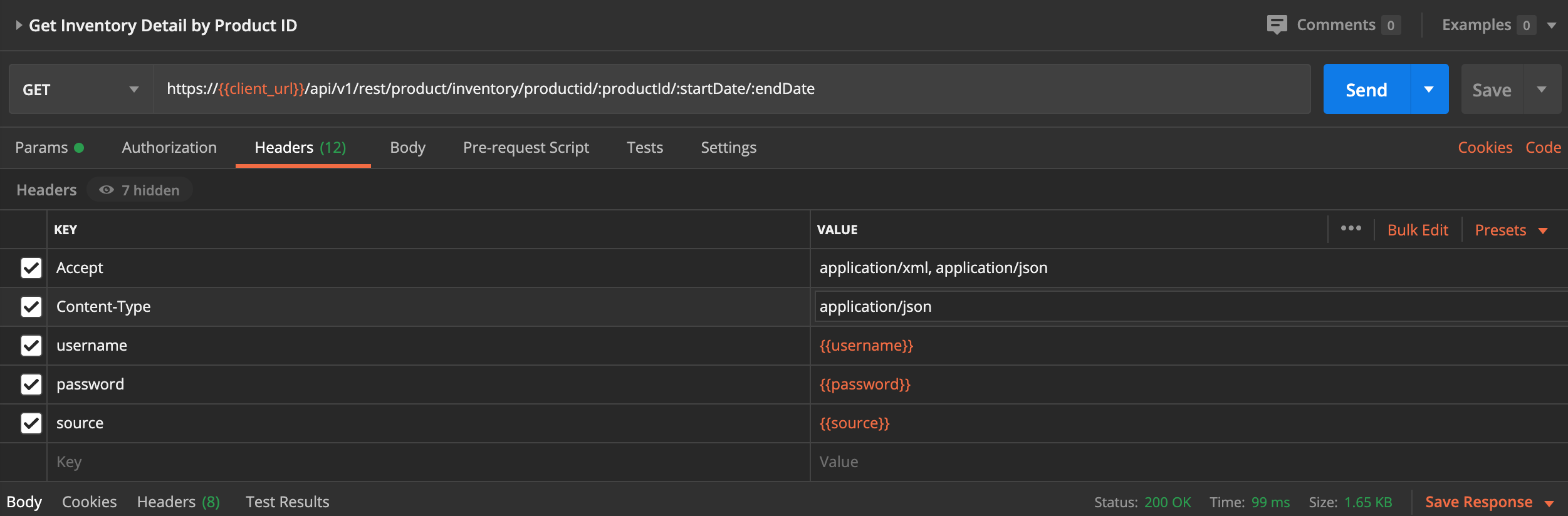
Example POSTMAN authentication
Find an example of header settings in Postman below:
Note
- 'Authorization' is set to "No Auth"; the settings below are to be placed in the 'Headers' tab.
- For a more in depth tutorial of using Postman, see Using Postman with the Yield Analytics API.
Confidentiality
Confidentiality is maintained by using Secure Socket Layer based communication to interact with the Yield Analytics API. API developers should prefer use of HTTPS over HTTP insecure communication whenever possible. Consult your HTTP Client library on how to enable HTTP over SSL when developing outside of a web browser context.
End points
POST: Bulk product creation
POST /api/product/bulk/create
Description
Uniqueness of records is defined by productId and externalId. If neither of those is present then the row will result in a NEW product record (possibly with a new [generated] product name).
If productId is provided then it MUST correspond to a product id in our system; otherwise an error is returned.
In this scenario we will UPDATE the designated product.
Note
We do not check the externalId, we simply update this record. This means if an externalId was provided in the request but does not match the product found by this productId, we will update the externalId on this product with the new value provided. If externalId conflicts with a pre-existing externalId from another product, this update will fail and an error message will be generated.
- If productId is NOT provided then we will check for externalId.
- If externalId is provided and a product with that externalId exists in our system then that product will be UPDATED.
- If externalId is provided and a product with that externalId does NOT exist in our system, the product will be CREATED.
- If neither productId nor externalId is provided then we will create a new product.
Note
Product Name is not required to be unique when creating or updating products, but a post-process will run that renames products which overlap. Any product name which conflicts with another product in the system is renamed to productName-{productId} (our internal product id); thereby creating a unique name for that product.
For each uploaded set of products our system will generate a hash based on the contents of the file (and/or post-body) (using MD5 algorithm) and stored with the product data. This protects against duplicate uploads of the exact same data (or file). Duplicate posts will result in an error message that the request is a duplicate.
Parameters
Type Name Description Required Schema BodyParameter bulkProductCreation bulkProductCreation true BulkProductCreation Responses
HTTP Code Description Schema 200 OK BulkProductCreationResponse 201 Created 401 Unauthorized 403 Forbidden 404 Not Found Consumes
application/json
Produces
application/json
Example cURL request
$ curl 'https://api-host/api/v1/rest/product/bulk/create' -i -X POST -H 'Content-Type: application/json;charset=UTF-8' -d
'{"bulkProductCreation":{
     "products": [
    {
         "productName": "Test Product New",
         "state": "ACTIVE",
         "externalId": "1",
         "rateCardCPM": "1.0",
         "productClass": "RATE_CARD",
         "productGroupNames": ["Test Product Group 1"],
         "originatingTarget": "ad_server in ('TEST') and size in ('size') and placement in ('placement') and
         segment in ('true') and segment2 in ('true')",
         "userGroupNames": ["User Group Name 1", "User Group Name 2"]
     },
    {
         "productName": "",
         "state": "ACTIVE",
         "externalId": "2",
         "rateCardCPM": "1.0",
         "productClass": "RATE_CARD",
         "productGroupNames": ["Test Product Group 1", "Test Product Group 2"],
         "originatingTarget": "ad_server in ('TEST') and size in ('size') and placement in ('placement') and
         segment in ('true') and segment2 in ('true')"
     }]
}}'
Example HTTP request
POST /api/v1/rest/product/bulk/create HTTP/1.1
Content-Type: application/json;charset=UTF-8
Host: https://api-host
Content-Length: 184

{"bulkProductCreation":{
    "products": [
   {
        "productName": "Test Product New",
        "state": "ACTIVE",
        "externalId": "1",
        "rateCardCPM": "1.0",
        "productClass": "RATE_CARD",
        "productGroupNames": ["Test Product Group 1"],
        "originatingTarget": "ad_server in ('TEST') and size in ('size') and placement in ('placement') and
        segment in ('true') and segment2 in ('true')",
        "userGroupNames": ["User Group Name 1", "User Group Name 2"]
    },
   {
        "productName": "",
        "state": "ACTIVE",
        "externalId": "2",
        "rateCardCPM": "1.0",
        "productClass": "RATE_CARD",
        "productGroupNames": ["Test Product Group 1", "Test Product Group 2"],
        "originatingTarget": "ad_server in ('TEST') and size in ('size') and placement in ('placement') and
        segment in ('true') and segment2 in ('true')"
    }]
}}
Example HTTP response
HTTP/1.1 200 OK
Content-Type: application/json;charset=UTF-8
Content-Length: 236

{"bulkProductCreationResponse":{"products":[
{"productName":"Test Product New", "externalId": "1", productId:"", status:"PENDING"},
{"productName":"A second product", "externalId": "2", productId:"3364", status:"CREATED"},
{"productName":"", "externalId": "3", productId:"", status:"ERRORS": "errors":[
{"field":"name", "error":"productName field is required"},
{"field":"originatingTarget", "error":"Invalid targeting string: unmatched ')'"},
]}
]}
}
GET: Bulk product creation By date
GET /api/product/bulk/create/{date}
Description
Send a GET request to obtain the status of products pending creation or having been created. Date is optional. If not specified we return the current set of PENDING products.
Parameters
Type Name Description Required Schema PathParameter date date true string Responses
HTTP Code Description Schema PathParameter date string Consumes
application/json
Produces
application/json
Example cURL request
$ curl 'https://api-host/api/v1/rest/product/bulk/create/2017-01-01' -i -H 'Content-Type: application/json;charset=UTF-8'Example HTTP request
GET /api/v1/rest/product/bulk/create/2017-01-01 HTTP/1.1
Content-Type: application/json;charset=UTF-8
Host: https://api-host
Example HTTP response
HTTP/1.1 200 OK
Content-Type: application/json;charset=UTF-8
Content-Length: 111

{"bulkProductCreationResponse":{"products":[
   {"productName":"Test Product New", "externalId": "1", productId:"", status:"PENDING"},
   {"productName":"A second product", "externalId": "2", productId:"3364", status:"CREATED"}
]}
}
Types
BulkProductCreation
| Name | Description | Required | Schema |
|---|---|---|---|
| bulkProductCreation | false | BulkProductCreation | |
| products | A collection of product creation data types holding the relevant data for each product to be added to the system | true | ProductCreation array |
ProductCreation
A JSON object to hold the request for Product Creation.
| Name | Description | Required | Schema |
|---|---|---|---|
| externalId | rim then: not empty and length < 200 If productId exist and found in system, check for existence of externalId. If externalId also exist violates uniqueness of external ids. raise error: "Unable to update an existing product with product id: XXX that changes externalId to one: XXX that already exist" |
false | string |
| originatingTarget | trim then: length > 0, parsable, and attributes and values exist in our system | true | string |
| productClass | CUSTOM or RATE_CARD or REPORTING or SEASONAL_MODEL | true | string |
| productGroupNames | Comma separated list of user group names. User groups must exist or an error will be generated, new user groups are not created. | false | string array |
| productId | If present must be Long and must correspond to a product in our system. | false | integer (int64) |
| productName | check for null, trim then: not empty and length < 4000 | true | string |
| rateCardCPM | if present must be double - If omitted default value of 0 will be used. | false | number (double) |
| state | ACTIVE or INACTIVE | true | string |
| userGroupNames | Comma separated list of user group names. User groups must exist or an error will be generated, new user groups are not created. | false | string array |
BulkProductCreationResponse
A JSON object to hold the request for Bulk Product Creation Response.
| Name | Description | Required | Schema |
|---|---|---|---|
| products | A collection of product creation detail of the bulk product creation response | false | ProductCreationDetail array |
ProductCreationDetail
A JSON object to hold the results for Product Creation.
| Name | Description | Required | Schema |
|---|---|---|---|
| errors | The a collection of validation constraints that were not met during creation scheduling | false | ProductCreationError array |
| externalId | The ID of the product from it’s system of record | false | string |
| productId | The ID of the product within the Yield Analytics platform | false | string |
| productName | The name of the product within the Yield Analytics platform | true | string |
| status | The status of the product creation job: PENDING, COMPLETED, FAILED | true | string |
ProductCreationError
A JSON object to hold the error for product creation.
| Name | Description | Required | Schema |
|---|---|---|---|
| error | The error msg of the product creation field | true | string |
| field | The field of the product creation | true | string |