Where can I download the latest versions of programs compatible with Windows 7, Microsoft Edge and WebView2 Runtime 109.0.1518.140 and WebView2 SDK 1.0.1518.46 from? There are only descriptions of these versions on Google and download links only to the latest versions that are incompatible with Windows 7.The latest Foxit Reader PDF viewer recommends installing WebView2 Runtime, but I would also like to download the WebView2 SDK version just in case, even if I have never used the SDK version.I know that it is not recommended to use Windows 7 for the Internet, but I built an old computer to play old games and run old and new programs, and these programs require Microsoft Edge WebView2.
https://blogs.windows.com/msedgedev/2022/12/09/microsoft-edge-and-webview2-ending-support-for-windows-7-and-windows-8-8-1
https://github.com/MicrosoftEdge/WebView2Feedback/issues/3404
tried to install from here https://www.catalog.update.microsoft.com/Search.aspx?q=Microsoft%20Edge-WebView2%20Runtime%20109.0.1518.140 Microsoft Edge-WebView2 Runtime x64 (build 109.0.1518.140) and the following message appeared
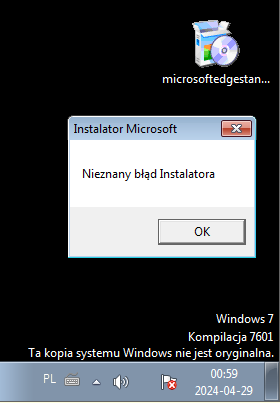
Unknown installer error
I installed all these updates and it's still the same.
https://learn.microsoft.com/en-us/answers/questions/1329053/how-to-fix-unknow-installation-error-while-install
Hi @Ramakrishnan R ,
This installer you've downloaded is meant for v109 down-level extended support on Win 7, 8, and 8.1 (including Server 2012 R2 which is based on Win 8.1), so you're supposed to install it on one of these platforms and it only serves as an update.
If you would like to install WebView2, you can visit https://developer.microsoft.com/en-us/microsoft-edge/webview2/.
If the answer is helpful, please click "Accept Answer" and kindly upvote it. If you have extra questions about this answer, please click "Comment".
Note: Please follow the steps in our documentationto enable e-mail notifications if you want to receive the related email notification for this thread.
Best Regards,
Shijie Li[
There is no version of Microsoft Edge-WebView2 Runtime 109.0.1518.140 on the website https://developer.microsoft.com/en-us/microsoft-edge/webview2/?form=MA13LH, only the latest versions are available in the offline installer.
It is possible to install the Microsoft Edge-WebView2 Runtime 109.0.1518.140 version when I select Evergreen Bootstrapper and click download, but this is an online installer. When I run it on Windows 7 and there is access to the Internet, the Microsoft Edge-WebView2 Runtime 109.0.1518.14 version will be installed, i.e. the latter is compatible with Windows 7, but I am looking for an offline installer.
I tried a trick to save the C:\Users\User\AppData\Local\Temp folder as an offline installer when installing this version on Windows 7, right after the download.
Here are the download logs from Fiddler
curl -k -i --raw -o 0.dat "http://www.download.windowsupdate.com/msdownload/update/v3/static/trustedr/en/authrootstl.cab" -H "Cache-Control: max-age = 900" -H "Accept: */*" -H "If-Modified-Since: Tue, 26 Mar 2024 17:39:14 GMT" -H "If-None-Match: \"b3685385a47fda1:0\"" -H "User-Agent: Microsoft-CryptoAPI/6.1" -H "Connection: Keep-Alive" -H "Host: www.download.windowsupdate.com"
curl -k -i --raw -o 1.dat "http://www.download.windowsupdate.com/msdownload/update/v3/static/trustedr/en/authrootstl.cab" -H "Cache-Control: max-age = 900" -H "Accept: */*" -H "If-Modified-Since: Tue, 26 Mar 2024 17:39:14 GMT" -H "If-None-Match: \"b3685385a47fda1:0\"" -H "User-Agent: Microsoft-CryptoAPI/6.1" -H "Connection: Keep-Alive" -H "Host: www.download.windowsupdate.com"
curl -k -i --raw -o 2.dat "http://www.download.windowsupdate.com/msdownload/update/v3/static/trustedr/en/authrootstl.cab" -H "Cache-Control: max-age = 900" -H "Accept: */*" -H "If-Modified-Since: Tue, 26 Mar 2024 17:39:14 GMT" -H "If-None-Match: \"b3685385a47fda1:0\"" -H "User-Agent: Microsoft-CryptoAPI/6.1" -H "Connection: Keep-Alive" -H "Host: www.download.windowsupdate.com"
curl -k -i --raw -o 3.dat "http://www.download.windowsupdate.com/msdownload/update/v3/static/trustedr/en/authrootstl.cab" -H "Cache-Control: max-age = 900" -H "Accept: */*" -H "If-Modified-Since: Tue, 26 Mar 2024 17:39:14 GMT" -H "If-None-Match: \"b3685385a47fda1:0\"" -H "User-Agent: Microsoft-CryptoAPI/6.1" -H "Connection: Keep-Alive" -H "Host: www.download.windowsupdate.com"
curl -k -i --raw -o 4.dat -I "http://msedge.f.tlu.dl.delivery.mp.microsoft.com/filestreamingservice/files/0c4084f3-1bed-4246-b8ed-206ccbe60e3c?P1=1715032113&P2=404&P3=2&P4=Rjzo7LoJUgW0Mb2JHMFqYEbdcFS5IFpPBnJRMSaQXT0vQ3ulYOEGUx5jeRm796DeP%%2bAsslwlTmaibg3fhjOYuw%%3d%%3d" -H "Accept: */*" -H "Accept-Encoding: identity" -H "User-Agent: Microsoft BITS/7.5" -H "X-Old-UID: cnt=0" -H "X-Last-HR: 0x0" -H "X-Last-HTTP-Status-Code: 0" -H "X-Retry-Count: 0" -H "X-HTTP-Attempts: 1" -H "Connection: Keep-Alive" -H "Host: msedge.f.tlu.dl.delivery.mp.microsoft.com"
curl -k -i --raw -o 5.dat "http://msedge.f.tlu.dl.delivery.mp.microsoft.com/filestreamingservice/files/0c4084f3-1bed-4246-b8ed-206ccbe60e3c?P1=1715032113&P2=404&P3=2&P4=Rjzo7LoJUgW0Mb2JHMFqYEbdcFS5IFpPBnJRMSaQXT0vQ3ulYOEGUx5jeRm796DeP%%2bAsslwlTmaibg3fhjOYuw%%3d%%3d" -H "Accept: */*" -H "Accept-Encoding: identity" -H "If-Unmodified-Since: Thu, 14 Sep 2023 23:06:11 GMT" -H "User-Agent: Microsoft BITS/7.5" -H "X-Old-UID: cnt=0" -H "X-Last-HR: 0x0" -H "X-Last-HTTP-Status-Code: 0" -H "X-Retry-Count: 0" -H "X-HTTP-Attempts: 1" -H "Connection: Keep-Alive" -H "Host: msedge.f.tlu.dl.delivery.mp.microsoft.com"
curl -k -i --raw -o 6.dat "http://www.download.windowsupdate.com/msdownload/update/v3/static/trustedr/en/authrootstl.cab" -H "Cache-Control: max-age = 900" -H "Accept: */*" -H "If-Modified-Since: Tue, 26 Mar 2024 17:39:14 GMT" -H "If-None-Match: \"b3685385a47fda1:0\"" -H "User-Agent: Microsoft-CryptoAPI/6.1" -H "Connection: Keep-Alive" -H "Host: www.download.windowsupdate.com"
curl -k -i --raw -o 7.dat "http://www.download.windowsupdate.com/msdownload/update/v3/static/trustedr/en/authrootstl.cab" -H "Cache-Control: max-age = 900" -H "Accept: */*" -H "If-Modified-Since: Tue, 26 Mar 2024 17:39:14 GMT" -H "If-None-Match: \"b3685385a47fda1:0\"" -H "User-Agent: Microsoft-CryptoAPI/6.1" -H "Connection: Keep-Alive" -H "Host: www.download.windowsupdate.com"
curl -k -i --raw -o 8.dat "http://www.download.windowsupdate.com/msdownload/update/v3/static/trustedr/en/authrootstl.cab" -H "Cache-Control: max-age = 900" -H "Accept: */*" -H "If-Modified-Since: Tue, 26 Mar 2024 17:39:14 GMT" -H "If-None-Match: \"b3685385a47fda1:0\"" -H "User-Agent: Microsoft-CryptoAPI/6.1" -H "Connection: Keep-Alive" -H "Host: www.download.windowsupdate.com"
curl -k -i --raw -o 9.dat "http://www.download.windowsupdate.com/msdownload/update/v3/static/trustedr/en/authrootstl.cab" -H "Cache-Control: max-age = 900" -H "Accept: */*" -H "If-Modified-Since: Tue, 26 Mar 2024 17:39:14 GMT" -H "If-None-Match: \"b3685385a47fda1:0\"" -H "User-Agent: Microsoft-CryptoAPI/6.1" -H "Connection: Keep-Alive" -H "Host: www.download.windowsupdate.com"
curl -k -i --raw -o 10.dat "http://www.download.windowsupdate.com/msdownload/update/v3/static/trustedr/en/authrootstl.cab" -H "Cache-Control: max-age = 900" -H "Accept: */*" -H "If-Modified-Since: Tue, 26 Mar 2024 17:39:14 GMT" -H "If-None-Match: \"b3685385a47fda1:0\"" -H "User-Agent: Microsoft-CryptoAPI/6.1" -H "Connection: Keep-Alive" -H "Host: www.download.windowsupdate.com"
curl -k -i --raw -o 11.dat "http://www.download.windowsupdate.com/msdownload/update/v3/static/trustedr/en/authrootstl.cab" -H "Cache-Control: max-age = 900" -H "Accept: */*" -H "If-Modified-Since: Tue, 26 Mar 2024 17:39:14 GMT" -H "If-None-Match: \"b3685385a47fda1:0\"" -H "User-Agent: Microsoft-CryptoAPI/6.1" -H "Connection: Keep-Alive" -H "Host: www.download.windowsupdate.com"
curl -k -i --raw -o 12.dat "http://www.download.windowsupdate.com/msdownload/update/v3/static/trustedr/en/authrootstl.cab" -H "Cache-Control: max-age = 900" -H "Accept: */*" -H "If-Modified-Since: Tue, 26 Mar 2024 17:39:14 GMT" -H "If-None-Match: \"b3685385a47fda1:0\"" -H "User-Agent: Microsoft-CryptoAPI/6.1" -H "Connection: Keep-Alive" -H "Host: www.download.windowsupdate.com"
curl -k -i --raw -o 13.dat "http://www.download.windowsupdate.com/msdownload/update/v3/static/trustedr/en/authrootstl.cab" -H "Cache-Control: max-age = 900" -H "Accept: */*" -H "If-Modified-Since: Tue, 26 Mar 2024 17:39:14 GMT" -H "If-None-Match: \"b3685385a47fda1:0\"" -H "User-Agent: Microsoft-CryptoAPI/6.1" -H "Connection: Keep-Alive" -H "Host: www.download.windowsupdate.com"
curl -k -i --raw -o 14.dat "http://www.download.windowsupdate.com/msdownload/update/v3/static/trustedr/en/authrootstl.cab" -H "Cache-Control: max-age = 900" -H "Accept: */*" -H "If-Modified-Since: Tue, 26 Mar 2024 17:39:14 GMT" -H "If-None-Match: \"b3685385a47fda1:0\"" -H "User-Agent: Microsoft-CryptoAPI/6.1" -H "Connection: Keep-Alive" -H "Host: www.download.windowsupdate.com"
curl -k -i --raw -o 15.dat "http://www.download.windowsupdate.com/msdownload/update/v3/static/trustedr/en/authrootstl.cab" -H "Cache-Control: max-age = 900" -H "Accept: */*" -H "If-Modified-Since: Tue, 26 Mar 2024 17:39:14 GMT" -H "If-None-Match: \"b3685385a47fda1:0\"" -H "User-Agent: Microsoft-CryptoAPI/6.1" -H "Connection: Keep-Alive" -H "Host: www.download.windowsupdate.com"
curl -k -i --raw -o 16.dat "http://www.download.windowsupdate.com/msdownload/update/v3/static/trustedr/en/authrootstl.cab" -H "Cache-Control: max-age = 900" -H "Accept: */*" -H "If-Modified-Since: Tue, 26 Mar 2024 17:39:14 GMT" -H "If-None-Match: \"b3685385a47fda1:0\"" -H "User-Agent: Microsoft-CryptoAPI/6.1" -H "Connection: Keep-Alive" -H "Host: www.download.windowsupdate.com"
curl -k -i --raw -o 17.dat "http://www.download.windowsupdate.com/msdownload/update/v3/static/trustedr/en/authrootstl.cab" -H "Cache-Control: max-age = 900" -H "Accept: */*" -H "If-Modified-Since: Tue, 26 Mar 2024 17:39:14 GMT" -H "If-None-Match: \"b3685385a47fda1:0\"" -H "User-Agent: Microsoft-CryptoAPI/6.1" -H "Connection: Keep-Alive" -H "Host: www.download.windowsupdate.com"
curl -k -i --raw -o 18.dat "http://www.download.windowsupdate.com/msdownload/update/v3/static/trustedr/en/authrootstl.cab" -H "Cache-Control: max-age = 900" -H "Accept: */*" -H "If-Modified-Since: Tue, 26 Mar 2024 17:39:14 GMT" -H "If-None-Match: \"b3685385a47fda1:0\"" -H "User-Agent: Microsoft-CryptoAPI/6.1" -H "Connection: Keep-Alive" -H "Host: www.download.windowsupdate.com"
curl -k -i --raw -o 19.dat "http://www.download.windowsupdate.com/msdownload/update/v3/static/trustedr/en/authrootstl.cab" -H "Cache-Control: max-age = 900" -H "Accept: */*" -H "If-Modified-Since: Tue, 26 Mar 2024 17:39:14 GMT" -H "If-None-Match: \"b3685385a47fda1:0\"" -H "User-Agent: Microsoft-CryptoAPI/6.1" -H "Connection: Keep-Alive" -H "Host: www.download.windowsupdate.com"
curl -k -i --raw -o 20.dat "http://www.download.windowsupdate.com/msdownload/update/v3/static/trustedr/en/authrootstl.cab" -H "Cache-Control: max-age = 900" -H "Accept: */*" -H "If-Modified-Since: Tue, 26 Mar 2024 17:39:14 GMT" -H "If-None-Match: \"b3685385a47fda1:0\"" -H "User-Agent: Microsoft-CryptoAPI/6.1" -H "Connection: Keep-Alive" -H "Host: www.download.windowsupdate.com"
curl -k -i --raw -o 21.dat "http://www.download.windowsupdate.com/msdownload/update/v3/static/trustedr/en/authrootstl.cab" -H "Cache-Control: max-age = 900" -H "Accept: */*" -H "If-Modified-Since: Tue, 26 Mar 2024 17:39:14 GMT" -H "If-None-Match: \"b3685385a47fda1:0\"" -H "User-Agent: Microsoft-CryptoAPI/6.1" -H "Connection: Keep-Alive" -H "Host: www.download.windowsupdate.com"
curl -k -i --raw -o 22.dat "http://www.download.windowsupdate.com/msdownload/update/v3/static/trustedr/en/authrootstl.cab" -H "Cache-Control: max-age = 900" -H "Accept: */*" -H "If-Modified-Since: Tue, 26 Mar 2024 17:39:14 GMT" -H "If-None-Match: \"b3685385a47fda1:0\"" -H "User-Agent: Microsoft-CryptoAPI/6.1" -H "Connection: Keep-Alive" -H "Host: www.download.windowsupdate.com"
curl -k -i --raw -o 23.dat "http://www.download.windowsupdate.com/msdownload/update/v3/static/trustedr/en/authrootstl.cab" -H "Cache-Control: max-age = 900" -H "Accept: */*" -H "If-Modified-Since: Tue, 26 Mar 2024 17:39:14 GMT" -H "If-None-Match: \"b3685385a47fda1:0\"" -H "User-Agent: Microsoft-CryptoAPI/6.1" -H "Connection: Keep-Alive" -H "Host: www.download.windowsupdate.com"
curl -k -i --raw -o 24.dat "http://www.download.windowsupdate.com/msdownload/update/v3/static/trustedr/en/authrootstl.cab" -H "Cache-Control: max-age = 900" -H "Accept: */*" -H "If-Modified-Since: Tue, 26 Mar 2024 17:39:14 GMT" -H "If-None-Match: \"b3685385a47fda1:0\"" -H "User-Agent: Microsoft-CryptoAPI/6.1" -H "Connection: Keep-Alive" -H "Host: www.download.windowsupdate.com"
curl -k -i --raw -o 25.dat "http://ocsp.digicert.com/MFEwTzBNMEswSTAJBgUrDgMCGgUABBSAUQYBMq2awn1Rh6Doh%%2FsBYgFV7gQUA95QNVbRTLtm8KPiGxvDl7I90VUCEAJ5rEWLwbJFq%%2FmAU80sm7E%%3D" -H "Accept: */*" -H "User-Agent: Microsoft-CryptoAPI/6.1" -H "Connection: Keep-Alive" -H "Host: ocsp.digicert.com"
curl -k -i --raw -o 26.dat "http://www.download.windowsupdate.com/msdownload/update/v3/static/trustedr/en/authrootstl.cab" -H "Cache-Control: max-age = 900" -H "Accept: */*" -H "If-Modified-Since: Tue, 26 Mar 2024 17:39:14 GMT" -H "If-None-Match: \"b3685385a47fda1:0\"" -H "User-Agent: Microsoft-CryptoAPI/6.1" -H "Connection: Keep-Alive" -H "Host: www.download.windowsupdate.com"
curl -k -i --raw -o 27.dat "http://www.download.windowsupdate.com/msdownload/update/v3/static/trustedr/en/authrootstl.cab" -H "Cache-Control: max-age = 900" -H "Accept: */*" -H "If-Modified-Since: Tue, 26 Mar 2024 17:39:14 GMT" -H "If-None-Match: \"b3685385a47fda1:0\"" -H "User-Agent: Microsoft-CryptoAPI/6.1" -H "Connection: Keep-Alive" -H "Host: www.download.windowsupdate.com"
curl -k -i --raw -o 28.dat "http://ocsp.digicert.com/MFEwTzBNMEswSTAJBgUrDgMCGgUABBSXi0cW5bD2WLrmnasWibg2OuPDpgQUVXRPsnJP9WC6UNHX5lFcmgGHGtcCEAoYUcrWzNNkWVgs7ELR7%%2FU%%3D" -H "Accept: */*" -H "User-Agent: Microsoft-CryptoAPI/6.1" -H "Connection: Keep-Alive" -H "Host: ocsp.digicert.com"
curl -k -i --raw -o 29.dat "http://www.download.windowsupdate.com/msdownload/update/v3/static/trustedr/en/authrootstl.cab" -H "Cache-Control: max-age = 900" -H "Accept: */*" -H "If-Modified-Since: Tue, 26 Mar 2024 17:39:14 GMT" -H "If-None-Match: \"b3685385a47fda1:0\"" -H "User-Agent: Microsoft-CryptoAPI/6.1" -H "Connection: Keep-Alive" -H "Host: www.download.windowsupdate.com"
curl -k -i --raw -o 30.dat "http://www.download.windowsupdate.com/msdownload/update/v3/static/trustedr/en/authrootstl.cab" -H "Cache-Control: max-age = 900" -H "Accept: */*" -H "If-Modified-Since: Tue, 26 Mar 2024 17:39:14 GMT" -H "If-None-Match: \"b3685385a47fda1:0\"" -H "User-Agent: Microsoft-CryptoAPI/6.1" -H "Connection: Keep-Alive" -H "Host: www.download.windowsupdate.com"
curl -k -i --raw -o 31.dat "http://www.download.windowsupdate.com/msdownload/update/v3/static/trustedr/en/authrootstl.cab" -H "Cache-Control: max-age = 900" -H "Accept: */*" -H "If-Modified-Since: Tue, 26 Mar 2024 17:39:14 GMT" -H "If-None-Match: \"b3685385a47fda1:0\"" -H "User-Agent: Microsoft-CryptoAPI/6.1" -H "Connection: Keep-Alive" -H "Host: www.download.windowsupdate.com"
curl -k -i --raw -o 32.dat "http://www.download.windowsupdate.com/msdownload/update/v3/static/trustedr/en/authrootstl.cab" -H "Cache-Control: max-age = 900" -H "Accept: */*" -H "If-Modified-Since: Tue, 26 Mar 2024 17:39:14 GMT" -H "If-None-Match: \"b3685385a47fda1:0\"" -H "User-Agent: Microsoft-CryptoAPI/6.1" -H "Connection: Keep-Alive" -H "Host: www.download.windowsupdate.com"
curl -k -i --raw -o 33.dat "http://www.download.windowsupdate.com/msdownload/update/v3/static/trustedr/en/authrootstl.cab" -H "Cache-Control: max-age = 900" -H "Accept: */*" -H "If-Modified-Since: Tue, 26 Mar 2024 17:39:14 GMT" -H "If-None-Match: \"b3685385a47fda1:0\"" -H "User-Agent: Microsoft-CryptoAPI/6.1" -H "Connection: Keep-Alive" -H "Host: www.download.windowsupdate.com"
curl -k -i --raw -o 34.dat "http://cacerts.digicert.com/DigiCertGlobalRootG3.crt" -H "Accept: */*" -H "User-Agent: Microsoft-CryptoAPI/6.1" -H "Connection: Keep-Alive" -H "Host: cacerts.digicert.com"
curl -k -i --raw -o 35.dat "http://www.download.windowsupdate.com/msdownload/update/v3/static/trustedr/en/authrootstl.cab" -H "Cache-Control: max-age = 900" -H "Accept: */*" -H "If-Modified-Since: Tue, 26 Mar 2024 17:39:14 GMT" -H "If-None-Match: \"b3685385a47fda1:0\"" -H "User-Agent: Microsoft-CryptoAPI/6.1" -H "Connection: Keep-Alive" -H "Host: www.download.windowsupdate.com"
curl -k -i --raw -o 36.dat "http://www.download.windowsupdate.com/msdownload/update/v3/static/trustedr/en/authrootstl.cab" -H "Cache-Control: max-age = 900" -H "Accept: */*" -H "If-Modified-Since: Tue, 26 Mar 2024 17:39:14 GMT" -H "If-None-Match: \"b3685385a47fda1:0\"" -H "User-Agent: Microsoft-CryptoAPI/6.1" -H "Connection: Keep-Alive" -H "Host: www.download.windowsupdate.com"
curl -k -i --raw -o 37.dat "http://www.download.windowsupdate.com/msdownload/update/v3/static/trustedr/en/authrootstl.cab" -H "Cache-Control: max-age = 900" -H "Accept: */*" -H "If-Modified-Since: Tue, 26 Mar 2024 17:39:14 GMT" -H "If-None-Match: \"b3685385a47fda1:0\"" -H "User-Agent: Microsoft-CryptoAPI/6.1" -H "Connection: Keep-Alive" -H "Host: www.download.windowsupdate.com"
but the normal version of the Microsoft Edge installer is downloaded to this folder and the installer installs Microsoft Edge-WebView2 Runtime with some parameters from this normal installer, but I don't know these parameters.
On the Internet, several people have uploaded offline installers of 32 and 64 bit Microsoft Edge-WebView2 Runtime, but in version 109.0.1518.78 instead of version 109.0.1518.140. If they uploaded the required version, 109.0.1518.140, there would be no issue. These versions are not much different, but since the latest compatible version of the Microsoft Edge browser is version 109.0.1518.140, I also want to have an offline installer in this version.
' cx='32' cy='32' r='32' /%3E%3Ctext x='50%25' y='55%25' dominant-baseline='middle' text-anchor='middle' fill='%23FFF' %3EKS%3C/text%3E%3C/svg%3E)


' cx='32' cy='32' r='32' /%3E%3Ctext x='50%25' y='55%25' dominant-baseline='middle' text-anchor='middle' fill='%23FFF' %3EA%3C/text%3E%3C/svg%3E)