
Go to Settings > VPN > Click on information icon to go to VPN settings > Options > and check "Send alltraffic over VPN connection" > disconnect form VPN, connect again > and try run remote desktop connection again.
This browser is no longer supported.
Upgrade to Microsoft Edge to take advantage of the latest features, security updates, and technical support.
' cx='32' cy='32' r='32' /%3E%3Ctext x='50%25' y='55%25' dominant-baseline='middle' text-anchor='middle' fill='%23FFF' %3EPF%3C/text%3E%3C/svg%3E)
I am able to remote into my Windows 10 PC fine from another Windows PC. However, when I attempt to remote in from my MAC OS running High Sierra 10.13.6 using the Microsoft Remote Desktop for MAC I get Error Code 0x204. Can anyone help?
' cx='32' cy='32' r='32' /%3E%3Ctext x='50%25' y='55%25' dominant-baseline='middle' text-anchor='middle' fill='%23FFF' %3EA%3C/text%3E%3C/svg%3E)
Hi,
Have you checked if the answer helps?
If the Answer is helpful, please click "Accept Answer" and upvote it. Thanks.
Hi, do you have any further question? Does the information provided help you?
' cx='32' cy='32' r='32' /%3E%3Ctext x='50%25' y='55%25' dominant-baseline='middle' text-anchor='middle' fill='%23FFF' %3EAB%3C/text%3E%3C/svg%3E)
I am having the same problem. I running Mac OS11 (Big Sur) on a M1 Mac mini. I am using Sonicwall Mobile Connect to connect to make the VPN connection to my PC at work and that is working. However, when I connect with Microsoft Remote Desktop, I get the 0x204 error. I have unchecked "Use system proxy configuration" and also unchecked "Use hardware acceleration when possible".
I was unable to access the Group Containers or locate the UBF8T346G9.com.microsoft.rdc file. It appears that this has changed in OS11 Big Sur. Also, the Network Utility no longer exists so I am unable to verify the port. Apparently this can still be done through the Terminal, but I have no knowledge of how to do this.
I am able to VPN in and use Remote Desktop from my home on Windows PC to get into my work computer, so I know that the computer at work is set up correctly and that my router at home is not blocking the connection.
' cx='32' cy='32' r='32' /%3E%3Ctext x='50%25' y='55%25' dominant-baseline='middle' text-anchor='middle' fill='%23FFF' %3EGS%3C/text%3E%3C/svg%3E)
Same here exactly - Group Containers or locate the UBF8T346G9.com.microsoft.rdc file
Did you got any chance to fix it mate ?
I am struggling here.
No luck, my friend.
' cx='32' cy='32' r='32' /%3E%3Ctext x='50%25' y='55%25' dominant-baseline='middle' text-anchor='middle' fill='%23FFF' %3ESB%3C/text%3E%3C/svg%3E)
Same here. This just doesn't work properly on Big Sur. Microsoft needs to remove BIg Sur as being compatible.
' cx='32' cy='32' r='32' /%3E%3Ctext x='50%25' y='55%25' dominant-baseline='middle' text-anchor='middle' fill='%23FFF' %3EDP%3C/text%3E%3C/svg%3E)
I am having the same problem with the Remote Desktop app and the suggestions above. It does not seem to fall into the same structure. I need to access a RDS through my phone's hotspot through a whitelisted IP address. This address changes and I change the allowed IP each time, but the Remote Desktop app will not connect and I get error code 0x204.
' cx='32' cy='32' r='32' /%3E%3Ctext x='50%25' y='55%25' dominant-baseline='middle' text-anchor='middle' fill='%23FFF' %3EGC%3C/text%3E%3C/svg%3E)
Aram,
I have the same mac computer and mac os. Seems that my mac side is ok since I can connect to a Windows 7 pc on the same network just not my Windows 10 Pro laptop. Just upgraded my key to pro to do this so I am quite disappointed.
No group containers here and can't check the port but since it works to the Windows 7 PC I am quite confused!
Struggling too!
Seems like my problem is on the Windows 10 side. I just checked and I can connect W10 to control W7 but not W7 (or Mac) to control W10.
I followed all the instructions to setup the W10 to receive connections. :(
' cx='32' cy='32' r='32' /%3E%3Ctext x='50%25' y='55%25' dominant-baseline='middle' text-anchor='middle' fill='%23FFF' %3END%3C/text%3E%3C/svg%3E)
Im having the same problem running Mac OS12 (Monterey) on an M1 MacBook Pro.
I haven't checked the problems on the server since I can connect from any Windows 10 or windows 7 machine to the server.
I found Group Containers and UBF8T346G9.com.microsoft.rdc in (Macintosh HD > Users > <MyUserName> > Library > Group Containers).
According to troubleshoot above I had to delete the folder, restarted application, still couldn't connect error 0x204.
I also try to connect using OpenVPN, I can see other networked devices and the server does respond to pings, so I'm almost certain it isn't the VPN.
Once in office I will try to check from local network without a VPN.
I do realise couple of months had passed since the original comment, did anyone found anything useful?
' cx='32' cy='32' r='32' /%3E%3Ctext x='50%25' y='55%25' dominant-baseline='middle' text-anchor='middle' fill='%23FFF' %3EF%3C/text%3E%3C/svg%3E)
New post as this thread is a year old.
' cx='32' cy='32' r='32' /%3E%3Ctext x='50%25' y='55%25' dominant-baseline='middle' text-anchor='middle' fill='%23FFF' %3EOP%3C/text%3E%3C/svg%3E)
Hi All,
I have tried every answers written in this question and also all helpful informations from any other forums/websites. But nothing worked.
I found my issue myself. It is something weird.
On your mac; go to System Preferences -> Network
On the left pane please make sure that your VPN definition is upper than the Thunderbolt Bridge. Somehow Microsoft Remote Desktop app does not work if the VPN definition is below the Thunderbolt Bridge. After I moved my VPN definition as below, I could successfully rdp to my pc.
Hope this will work for some people having similar problem.
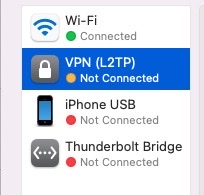
Best Regards.
' cx='32' cy='32' r='32' /%3E%3Ctext x='50%25' y='55%25' dominant-baseline='middle' text-anchor='middle' fill='%23FFF' %3ED3%3C/text%3E%3C/svg%3E)
Go to Settings > VPN > Click on information icon to go to VPN settings > Options > and check "Send alltraffic over VPN connection" > disconnect form VPN, connect again > and try run remote desktop connection again.
' cx='32' cy='32' r='32' /%3E%3Ctext x='50%25' y='55%25' dominant-baseline='middle' text-anchor='middle' fill='%23FFF' %3EDH%3C/text%3E%3C/svg%3E)
Boa noite!
Infelizmente, continuo recebendo o 0x204 ao tentar RDP do meu MacOS Ventura.
Mesmo após todas essas tentativas, ainda recebo o erro 0x204.
Alguém pode ajudar por favor?
' cx='32' cy='32' r='32' /%3E%3Ctext x='50%25' y='55%25' dominant-baseline='middle' text-anchor='middle' fill='%23FFF' %3EGS%3C/text%3E%3C/svg%3E)
Same here!
' cx='32' cy='32' r='32' /%3E%3Ctext x='50%25' y='55%25' dominant-baseline='middle' text-anchor='middle' fill='%23FFF' %3EKP%3C/text%3E%3C/svg%3E)
In my case,
After changing IP to public IP, recheck all ports in VM Windows.
I have to change firewall from High to Medium in settings of my router network (192.168.1.1).
' cx='32' cy='32' r='32' /%3E%3Ctext x='50%25' y='55%25' dominant-baseline='middle' text-anchor='middle' fill='%23FFF' %3ECK%3C/text%3E%3C/svg%3E)
Just add the new RDP Port 19529 behind your remote IP Adress:
xxx.255.xxx.1:19529
That fixed the Issue for me.
' cx='32' cy='32' r='32' /%3E%3Ctext x='50%25' y='55%25' dominant-baseline='middle' text-anchor='middle' fill='%23FFF' %3EJT%3C/text%3E%3C/svg%3E)
I realize I'm late to the party, but I just experienced this and resolved by choosing not to split tunnels in VPN config on the Mac. In Settings > Network > Click the (i) information icon next the VPN connection. Select "Options" and the toggle "Send all traffic over VPN connection" to On.
I was then able to RDP to the desired PC by it's local DNS name OR it's private static IP.