Hi all, I hope you could help me.
I have built custom IIS Web Site and IIS App Pool availability monitors to replace the original ones. The reason is that the original do not have an option to alert only after certain period of object being down, and we have a lot of IIS restarts that cause alerts.
I have used Kevin Holman's fragments in Visual studio and the whole thing have two, pretty much the same, PowerShell script based monitors. One for App Pools and one for Web Sites. At the beginning I haven't build with cookdown and I though that was the reason. Once implemented, the cookdown has reduced resource usage a lot, but I still get a lot of strain on agents.
For example, all my agents on IIS web servers are restarting all the time, and Monitoring host private bytes are looking like this:
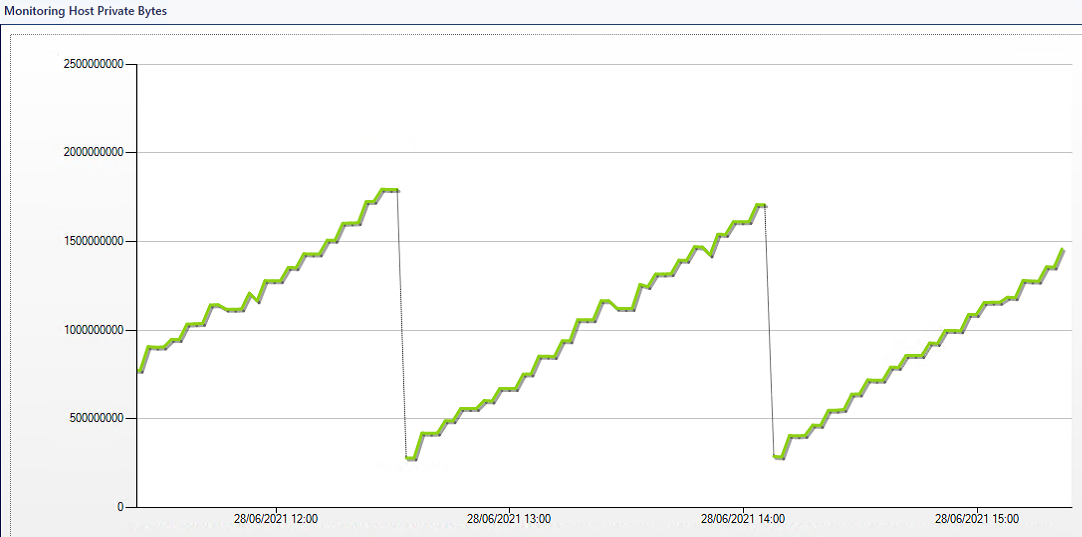
If I disable one of these monitors, I will get slightly less impact on performance, but only after disabling both, it will come back to normal.
The scripts are very simple. I am including only logic part, not the whole script.
App Pool Availability Monitor
# Begin MAIN script section
#=================================================================================

$strCondition = Get-WebAppPoolState

foreach ($strCond in $strCondition) {

    $bag = $momapi.CreatePropertyBag()
    $PoolID = $strCond.ItemXPath.split("'")[1]
    $AppPoolStatus = $strCond.Value
    $bag.AddValue('PoolID',$PoolID)

    #Check the value of $strCond
    IF ($AppPoolStatus -eq 'Started') {
    $momapi.LogScriptEvent($ScriptName,$EventID,0,'Good Condition Found')
    $bag.AddValue('Result','Running')
    } else {
    $momapi.LogScriptEvent($ScriptName,$EventID,0,'Bad Condition Found')
    $bag.AddValue('Result','NotRunning')
    }

    $bag
}

# End of script section
Web Site Availability Monitor
# Begin MAIN script section
#=================================================================================

$strCondition = Get-WebSiteState

foreach ($strCond in $strCondition) {

    $bag = $momapi.CreatePropertyBag()
    $DisplayName = $strCond.ItemXPath.split("'")[1]
    $WebSiteStatus = $strCond.Value
    $bag.AddValue('DisplayName',$DisplayName)

    #Check the value of $strCond
    IF ($WebSiteStatus -eq 'Started') {
    $momapi.LogScriptEvent($ScriptName,$EventID,0,'Good Condition Found')
    $bag.AddValue('Result','Running')
    } else {
    $momapi.LogScriptEvent($ScriptName,$EventID,0,'Bad Condition Found')
    $bag.AddValue('Result','NotRunning')
    }

    $bag
}

# End of script section
I am wondering why is this using so much resources and is there a way for me to pinpoint where it happens?
I have also tried to override an agent and add bigger values to Private Bytes and Handle Count, but it just kept on rising until agent restarted.
Also, if there are alternatives that solve initial problem, an other way to get Web Site and App Pool availability monitor that you can control in terms of alert suppression.
Thanks!
Niksa
' cx='32' cy='32' r='32' /%3E%3Ctext x='50%25' y='55%25' dominant-baseline='middle' text-anchor='middle' fill='%23FFF' %3EN%3C/text%3E%3C/svg%3E)
' cx='32' cy='32' r='32' /%3E%3Ctext x='50%25' y='55%25' dominant-baseline='middle' text-anchor='middle' fill='%23FFF' %3EC%3C/text%3E%3C/svg%3E)
' cx='32' cy='32' r='32' /%3E%3Ctext x='50%25' y='55%25' dominant-baseline='middle' text-anchor='middle' fill='%23FFF' %3EAH%3C/text%3E%3C/svg%3E)
' cx='32' cy='32' r='32' /%3E%3Ctext x='50%25' y='55%25' dominant-baseline='middle' text-anchor='middle' fill='%23FFF' %3EAC%3C/text%3E%3C/svg%3E)