Note
Access to this page requires authorization. You can try signing in or changing directories.
Access to this page requires authorization. You can try changing directories.
WCF Data Servicesの新機能3)Server Driven Paging(SDP) をご紹介します。(2/24に実施されたTechDaysセッションのフォローアップも兼ねています)
このシリーズの目次は以下になります。
1) WCF Data Servicesの新機能 – 射影
2) WCF Data Servicesの新機能 – カウント
3) WCF Data Servicesの新機能 – Server Driven Paging(SDP)
4) WCF Data Servicesの新機能 – Feed Customization
5) WCF Data Servicesの新機能 – データバインド
6) WCF Data Servicesの新機能 – カスタムプロバイダ1
7) WCF Data Servicesの新機能 – カスタムプロバイダ2
8) WCF Data Servicesの新機能 – リクエストパイプライン
9)Open Data Protocolの実装 – Share Point Server 2010のデータを操作する
また以下のトピックに関しては1)の記事を参照してください。
■名称の変更
■新バージョン
■更新モジュール(開発環境)
■今回の説明で使用するDataService
■Server Driven Paging(サービス)
この機能はページングをサーバー側で行ってくれると言ったものになります。
サービス側の指定は非常に簡単です。以下のコードに指定部分を書いてみました。
public static void InitializeService(DataServiceConfiguration config) { config.SetEntitySetAccessRule("*", EntitySetRights.All); config.SetEntitySetPageSize("employee",2); config.DataServiceBehavior.MaxProtocolVersion = DataServiceProtocolVersion.V2; } |
InitializeServiceはサービスの初期化イベントですが、この中のBoldになっている個所で指定をしています。ここではemployeeエンティティは2つのEntryで1ページである。 と指定をしました。
つまり以下のようなリクエストを出せば、
https://localhost:25872/pubsDataService.svc/employee
下図のように、2レコードで1ページが取得でます。(entryタグが2つになっていますね) 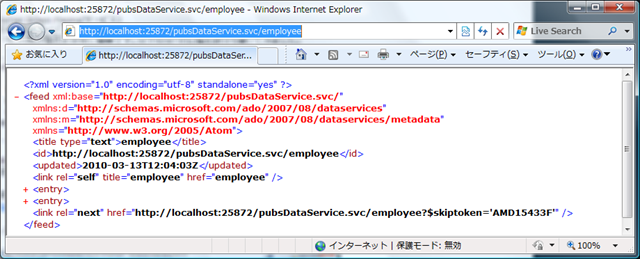
じゃあ、次のページ(次のレコード)は?と言うと、上図の一番下にある以下が次のページのリンクになっています。
https://localhost:25872/pubsDataService.svc/employee?$skiptoken='AMD15433F'"
そして、上のアドレスでリクエストすれば、続きのページ+更に次のページへのリンクを取得することが出来るようになっています。
また、以下のようにfilterで条件を指定しても、この結果は変わりありません。
https://localhost:25872/pubsDataService.svc/employee?$filter=job_id eq 5
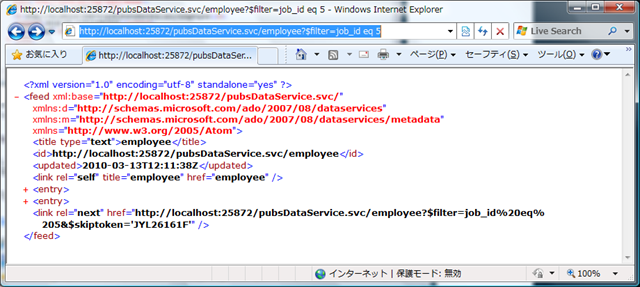
やはり、次のページへのリンクが含まれています。
■Server Driven Paging(クライアント)
.NET Frameworkを使用したクライアントプログラムでこのページングを制御することももちろん可能です。
DataServiceCollection<employee> emp = new DataServiceCollection<employee>(context.employee); while (emp.Continuation != null) { emp.Load(context.Execute<employee>(emp.Continuation)); Console.WriteLine(emp.Count); } foreach (var co in emp) { Console.WriteLine(co.fname); } |
新たに加わった、DataServiceCollectionクラスを使用してContinuation に続きのページが有るかをチェックするわけですね。
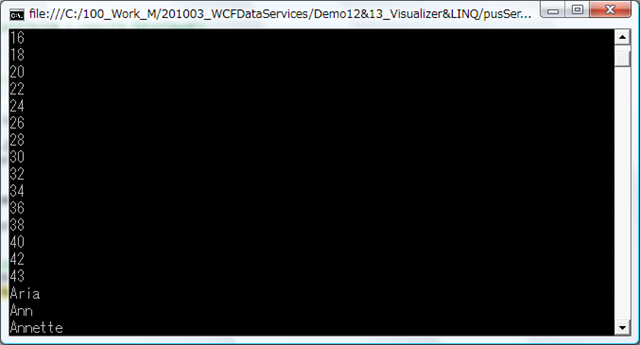
この結果は書いてもあまり意味はないような気がしますが、以下のようになります。カウントを表示したのちに、fnameを書いています。このときは全てのページを読み込んでいますので、全レコードの出力になります。
また下記のようにDataServiceCollectionクラスを使用しないようにすることも可能です。QueryOperationResponseがもつGetContinuationを使用する方法になります。
var query = context.employee.Execute(); List<employee> custList = query.ToList(); while (((QueryOperationResponse)query).GetContinuation() != null) { query = context.Execute<employee>( ((QueryOperationResponse)query).GetContinuation().NextLinkUri ); custList.AddRange(query.ToList()); Console.WriteLine(custList.Count); } |