Note
Access to this page requires authorization. You can try signing in or changing directories.
Access to this page requires authorization. You can try changing directories.
If you use Amazon API Gateway and want to migrate your workload to Azure, this guide helps you understand feature mappings, best practices, and the migration process. On Azure, Azure API Management provides API gateway capabilities. These capabilities include API request and response routing, authorization and access control, monitoring and governance, and API version management.
What you'll accomplish
In this guide, you:
- Assess your current Amazon API Gateway deployment.
- Map Amazon API Gateway capabilities to Azure API Management capabilities.
- Prepare your Amazon and Azure environments for a successful migration.
- Plan and execute a migration with minimal downtime.
- Validate that your migrated workload meets performance and reliability requirements.
- Learn how to iterate on the architecture for future enhancements.
Example scenario: Multiple-backend health records system
A health services organization uses Amazon API Gateway to access a health records system that has multiple backends. This example scenario features a common configuration of Amazon API Gateway in an Amazon Web Services (AWS) environment. It shows typical integrations with related Amazon services and several common API backends, including proxied Lambda functions and HTTP or REST APIs.
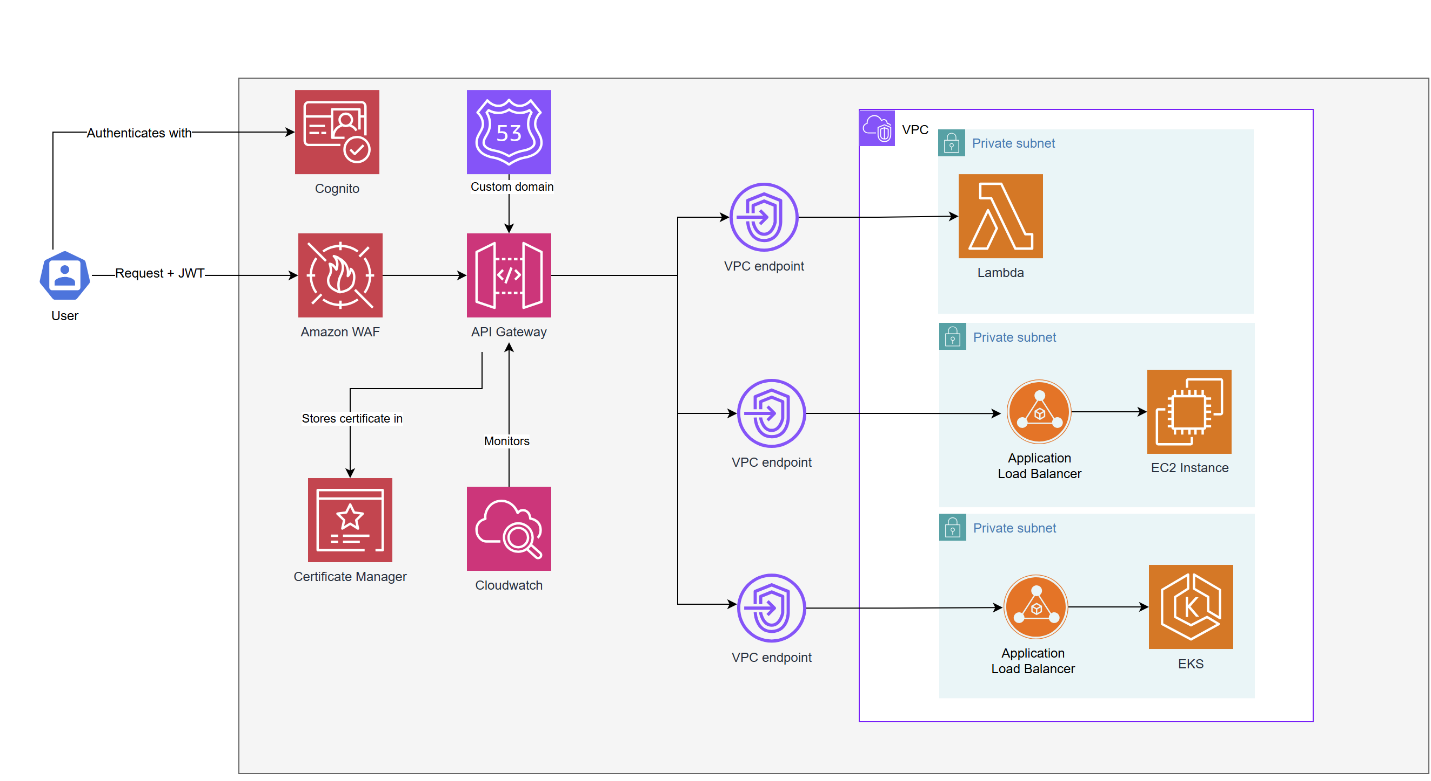
This architecture includes:
User authentication via Amazon Cognito with JSON Web Tokens (JWTs).
Security filtering of requests through Amazon Web Application Firewall (WAF) before they reach Amazon API Gateway.
Amazon API Gateway configured with a custom domain through a certificate stored in Certificate Manager.
Monitoring via Amazon CloudWatch.
Private connectivity through Amazon Virtual Private Cloud (VPC) endpoints to three private subnets.
Backend services, including:
- Lambda to trigger patient record updates.
- Amazon Elastic Compute Cloud (EC2), which hosts legacy services behind an application load balancer.
- Amazon Elastic Kubernetes Service (EKS) behind an application load balancer for data processing via microservices.
Here's an example architecture of the workload migrated to Azure. In this scenario, Azure API Management is deployed in the Premium tier.
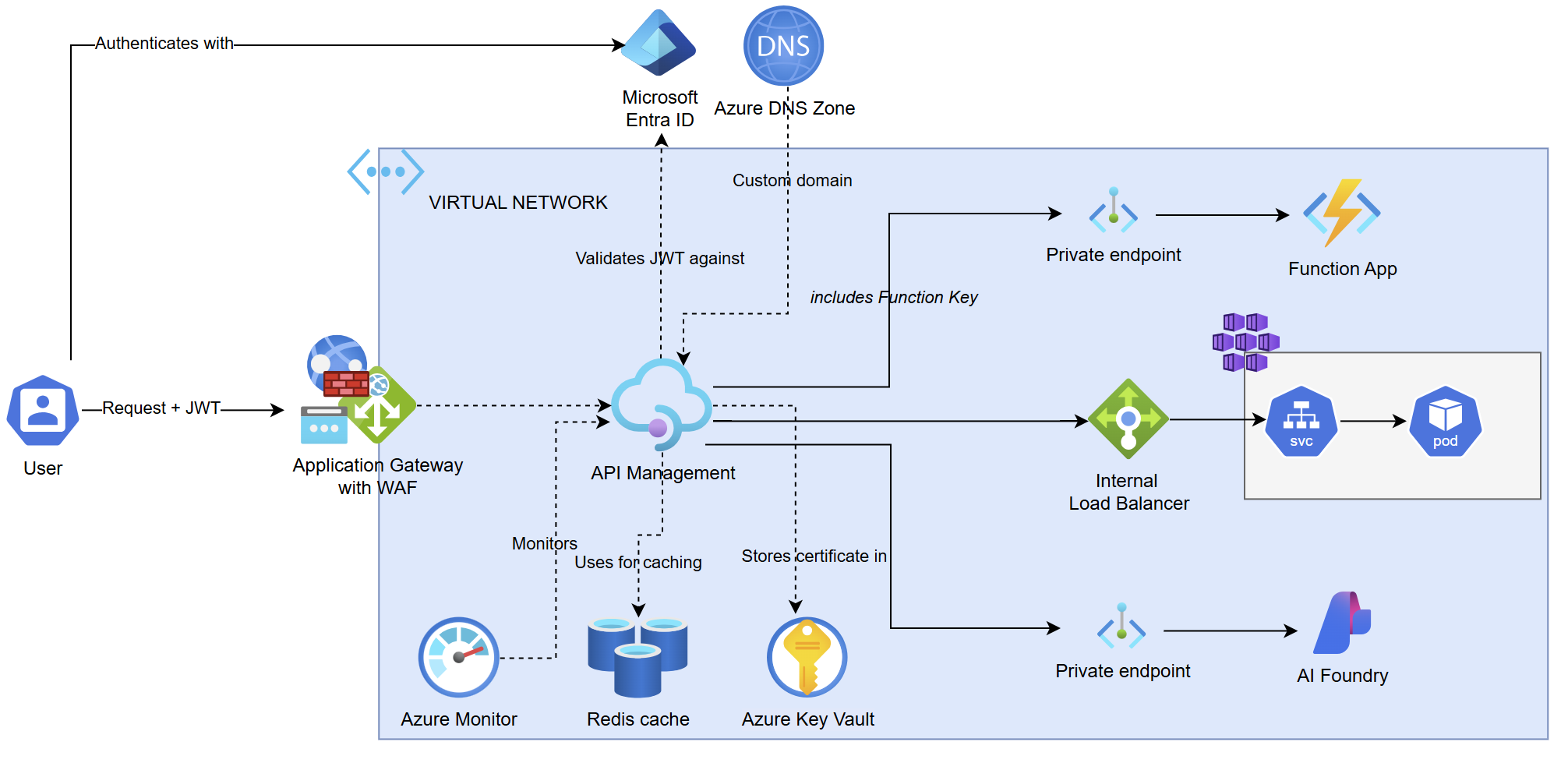
This architecture includes:
Secure entry via Azure Application Gateway with a web application firewall (WAF). The firewall forwards requests with a JWT added for authentication.
Azure API Management configured inside a virtual network. It uses Microsoft Entra ID to validate JWTs.
An internal load balancer that routes traffic to Azure Kubernetes Service (AKS) for microservices-based backends.
Secure connections via private endpoints to Azure function apps and Microsoft Foundry backends.
Monitoring handled by Azure Monitor.
Certificates and a domain managed via Azure Key Vault and an Azure DNS zone. A certificate is also configured on Application Gateway for TLS termination.
Architectural overview
This architecture example showcases common features in Amazon API Gateway and Azure API Management. These features include network isolation, traffic management and routing to various backend APIs, authorization and access control, and monitoring.
Both architectures provide comparable functionality:
High-availability deployment: Resources are distributed across multiple availability zones in a region for fault tolerance, with options for higher availability by deployment to multiple regions.
Custom domains and certificates: The platforms support custom domain names with TLS/SSL termination for secure API communication.
Network isolation: Traffic to backend APIs is isolated in a virtual network.
Traffic filtering: A web application firewall at the edge filters and helps protect inbound traffic.
API workload support: Gateways act as proxies for requests to diverse backend systems, including cloud compute services, Kubernetes-based microservices, and custom backends.
API monitoring: Built-in platform services log API activity and expose service metrics.
API modulation: Services support response caching, request quotas and rate limits, cross-origin resource sharing (CORS) configuration, and request/response transformations.
API authentication and authorization: Gateways support multiple access methods, including keys, OAuth token-based access, and API-based policies.
Step 1: Assessment
Before you migrate from Amazon API Gateway to Azure API Management, assess the existing infrastructure features, API workloads, and API configurations. Identify capabilities to map or replace. This assessment helps ensure a smooth migration and maintains your applications' functionality.
Note
Amazon API Gateway capabilities can vary depending on whether you expose your APIs as a REST API or an HTTP API product type. In Azure API Management, capabilities vary by service tier, not by API type designation.
Assess infrastructure capabilities
| Amazon API Gateway capability | Azure API Management equivalent | Migration approach |
|---|---|---|
| Private VPC endpoints | Azure API Management deployment to an internal virtual network Integration of API Management with a private virtual network for outbound connections |
Configure dedicated subnets for backends in a virtual network where the Azure API Management service is injected or integrated, or reach backends through Azure Private Link. |
| AWS Web Application Firewall | Azure Web Application Firewall; for example, in Azure Application Gateway (a regional service) or Azure Front Door (a global service) | Map WAF rules applied at API stages in Amazon API Gateway to service-level rules in Azure Web Application Firewall. |
| Custom domains | Custom domains configured in Azure API Management and an upstream entry point such as Application Gateway or Azure Front Door | Use the same domain names and existing certificates with an external Domain Name System (DNS) cutover. If the migration uses different domain names, you need to obtain new certificates. |
| Edge-optimized endpoints | Multiple-region deployment | Configure Azure API Management gateways in multiple regions, depending on requirements for client access. This topology is typically paired with the global point of presence in Azure Front Door. |
| Availability zones by default | Availability zones by default (Premium tier) | Deploy Azure API Management in the Premium tier, in a region that supports availability zones. Use the default automatic configuration of availability zones. |
| CloudWatch metrics | Azure Monitor metrics | Configure gateway request metrics to support the comparison of Azure API Management performance against a baseline in Amazon API Gateway. |
| CloudWatch logs and CloudTrail logs | Azure Monitor logs | Configure diagnostic settings to send Azure API Management logs to a Log Analytics workspace for built-in analytics and custom analysis. Consider deploying Application Insights or other observability tools for added operational monitoring. |
Note
Establish baseline metrics from Amazon API Gateway before migration. Use these baselines to compare Azure API Management performance after migration and confirm that it meets or exceeds expectations.
Capability mismatches and strategies
- WAF integration in Amazon API Gateway doesn't have a direct match in Azure API Management. In Amazon API Gateway, WAF rules are directly applied on REST API stages. In Azure API Management, configuration of WAF rules typically requires deployment of an upstream Application Gateway instance, traffic forwarding, and TLS termination through the gateway. Alternatively, for active/active multiple-region scenarios, use Azure Front Door in front of Azure API Management.
- Custom domains are supported in Azure API Management. If you use Application Gateway and Azure Web Application Firewall in front, you must also configure the custom domain and TLS certificate at the Application Gateway layer.
- Edge-optimized endpoints in Amazon API Gateway support geographically distributed clients. The similar capability in Azure API Management requires deployment of extra regional gateways at extra cost.
Compare API workloads
As part of the assessment, consider whether to retain or replace existing services. Evaluate if the migration is an opportunity to modernize or consolidate services.
| Amazon API Gateway workload | Azure API Management equivalent | Migration approach |
|---|---|---|
| Lambda proxy integration Lambda non-proxy (custom) integration Invoking Lambda by using an Amazon API Gateway endpoint |
Azure function app API type | Consider whether to retain or replace existing Lambda functions (for example, with Azure functions or containers). |
| REST APIs HTTP APIs |
Import of an OpenAPI specification | Export a REST API from Amazon API Gateway and import it in Azure API Management. Or, manually access the API configuration in Amazon API Gateway and re-create it in Azure API Management. |
| WebSocket APIs | WebSocket API type | Manually access the API configuration in Amazon API Gateway and re-create it in Azure API Management. |
Capability mismatches and strategies
- Lambda backends are supported natively in Amazon API Gateway as HTTP APIs. Azure API Management doesn't provide native integration with the comparable Azure function apps. Azure API Management must call function apps over HTTP by using a function key or managed identity.
- OpenAPI specifications exported from an Amazon API Gateway REST API contain details specific to the frontend implementation in Amazon API Gateway, not the backend service. You need to remove AWS-specific tags and configure details in the specification (such as the backend service URL) before import to Azure API Management or during the migration process.
- Kubernetes microservices backends, such as gRPC APIs, are handled differently:
- Amazon API Gateway connects to the application load balancer in VPC, which in turn provides ingress to AWS EKS.
- Azure API Management supports gRPC APIs on Kubernetes clusters accessed only through the self-hosted gateway.
- Use of gRPC prevents the use of Application Gateway as a WAF.
Compare API configurations
The migration approach for API configurations must consider the scope of the configuration in Amazon API Gateway. At a high level, API scopes map as follows from Amazon API Gateway to Azure API Management:
| Amazon API Gateway API scope | Azure API Management equivalent |
|---|---|
| API resource | API |
| API stage | API version |
| API method | API operation |
| Usage plan | Product |
The following table assesses API configurations in Amazon API Gateway and equivalent configurations in Azure API Management:
| Amazon API Gateway API configuration | Azure API Management equivalent | Migration approach |
|---|---|---|
| Stage variables | Named values | Configure named values (name/value pairs) at the service level in Azure API Management. |
| Response caching | Response caching | Configure caching policies at the mapped scope, as shown in the preceding table. Optionally, configure an external Redis-compatible cache for greater control and reliability. |
| Usage plans and API keys | Products and Subscriptions | Document Amazon API Gateway configurations, and re-create them in Azure API Management. |
| Throttling and quotas | Rate limiting and quota policies | Configure rate limiting and quota policies at the mapped scope, as shown in the preceding table. |
| CORS | CORS policy | Configure a CORS policy with allowed headers and origins at the mapped scope, as shown in the preceding table. |
| Resource policies VPC endpoint policies Cognito user pools mTLS authentication |
Authentication and authorization policies Credential manager |
Manual mapping. Consider using AI assistance with tools such as Microsoft Copilot in Azure. |
| Mapping templates | Transformation policies | Manual mapping. Consider using AI assistance with tools such as Microsoft Copilot in Azure. |
| API stages | API versions | Create API versions in Azure API Management. |
Capability mismatches and strategies
Quota and throttling limits are imposed by Amazon API Gateway per AWS account. In Azure API Management, the highest scope is the "all APIs" scope per instance.
API authentication and authorization methods in Amazon API Gateway, such as IAM permissions and Lambda authorizers, don't map directly to Azure API Management. Customers can evaluate alternative authentication and authorization methods, such as using Microsoft Entra ID or an external identity provider.
Cache-related metrics in Amazon API Gateway don't map directly to Azure API Management metrics. Cache hits and misses can be counted in trace logs in Azure API Management.
Review resources for migration
API authentication and authorization in Azure API Management
Microsoft Copilot in Azure for API Management policy generation
Also, for API workloads:
Step 2: Preparation
In the preparation phase, plan your Azure infrastructure, select appropriate API Management tiers for test and production, and thoroughly document your source APIs and integrated services. Export relevant AWS configurations and design a phased migration strategy to ensure a smooth transition.
Plan for infrastructure setup
Plan for ingress and egress, firewalls, network isolation, and integration with network traffic entry points like Application Gateway, Azure Front Door, or Azure Traffic Manager. Understand the implications of private versus public exposure of the target Azure API Management system, especially around DNS and traceability.
Review the guidance in Azure API Management landing zone accelerator and evaluate scenarios that might be suitable for your migration and API backends. Consider when the workloads are isolated enough to benefit from them.
A basic scenario that you can use for initial migration and build-out in Azure is a secure baseline with a sample workload.
Plan for test and production API Management instances
Choose appropriate Azure API Management service tiers for test and production environments:
If you need network isolation of both inbound and outbound traffic, along with traffic entry through Azure Front Door or Application Gateway, we currently recommend the Azure API Management Premium tier. If you select the Premium tier, you can use the Developer tier (not supported with a service-level agreement) for proof-of-concept migrations. The Developer tier supports networking capabilities that are also available in the Premium tier. However, you shouldn't use the Developer tier for production.
Depending on your requirements for availability, performance, and network isolation, consider the Standard v2 or Premium v2 tier. Both support integration with network-isolated backends. The Premium v2 tier also supports injection into a virtual network to isolate inbound traffic.
Currently, the Premium v2 tier with capabilities to isolate inbound traffic is in preview. You can consider using it for migrations, depending on your implementation timelines in relation to the available information about the Premium v2 release and migration paths.
Understand and document the source APIs under management
Capture API configurations, including authentication and authorization flows, transformation, and caching mechanisms.
Identify all services integrated with Amazon API Gateway, such as Lambda authorizers, application load balancers, network load balancers, and Kubernetes workloads.
For cataloging APIs under management, consider using Azure API Center and synchronizing APIs from Amazon API Gateway.
Use discovery tools such as AWS Resource Explorer where possible. But expect to rely heavily on manually collected information, internal documentation, and checklists.
Document data flows, network topology, and architectural diagrams, even if they're approximate.
Export AWS configurations where possible
Export configurations such as:
OpenAPI specifications from backend APIs; for example, using the AWS console or AWS CLI. If the APIs were defined via OpenAPI originally, you might already have those specifications.
SSL/TLS certificates stored in AWS Certificate Manager.
WAF rules, by exporting to CloudFormation.
Capture artifacts, including CloudFormation templates, that might be exported to Terraform through external tools. These artifacts can facilitate mapping to Azure (Bicep, Azure Resource Manager, and Terraform templates).
Plan a phasing strategy
We recommend that you plan for a phased migration (API by API, or domain by domain). Update one set of domains or API endpoints to Azure API Management while others remain on AWS, and then gradually move the rest. This strategy might require your client applications to handle mixed endpoints or use a routing layer.
Step 3: Evaluation
The migration is considered successful when the migrated system meets validation criteria and when Azure API Management serves all production traffic with no significant regression in functionality or performance.
Validation criteria include:
Validate infrastructure: Network infrastructure is documented and accessible only as intended. For example, if it's injected in an internal virtual network, confirm that no public IPs are exposing it.
The Azure API Management instance can reach any required networks or dependencies for operations.
Validate API functionality for all endpoints: All API endpoints perform as expected with real-world scenarios, including valid and invalid requests and payloads. Ensure that any request or response transformations in configured policies take place:
Confirm all required authentication and authorization configurations (subscription keys, OAuth tokens, certificates) for each API.
Confirm that clients can use APIs as before with no changes (except possibly the endpoint URL, if the domain name changed).
Confirm that rate limits and quotas are configured at the appropriate scope.
Validate operational metrics: Monitor performance by using dashboards or other observability tools under production load. Review metrics such as average latency and throughput, and compare them to historical data from Amazon API Gateway. Review capacity metrics to ensure that the Azure API Management instance is properly scaled.
Step 4: Process
Expect the migration process to take multiple weeks or months, depending on the complexity of the service infrastructure and the number and complexity of the APIs to migrate.
Complete foundational setup
If you don't already have the Azure tenant and core infrastructure (core networking, ingress, security) in place, build them before you migrate Amazon API Gateway and APIs. You can set up the environment by using an Azure landing zone architecture that's suitable for your migration.
If an Azure API Management infrastructure-as-code landing zone accelerator is suitable for your migration, implement one for your base Azure API Management deployment. Include Application Gateway and internal virtual networking in Azure API Management. Although the landing zone accelerator uses the Premium tier of Azure API Management, we recommend that you adapt the templates to use the Developer tier for proof-of-concept migration.
Create and assign Azure role-based access control (RBAC) roles so that only authorized administrators can manage the Azure API Management instance and the APIs.
Configure Azure API Management platform settings
In the new Azure API Management instance, set up global configurations similar to those in Amazon API Gateway:
Custom host name: Add your custom domain to Azure API Management, upload the SSL certificate (or use Key Vault references), and perform validation. Do this task now or just before production cutover. When you're using Application Gateway (recommended), configure a listener with the custom domain and certificate, and then point it to the internal endpoint for Azure API Management. Configuring the listener simplifies configuration because it doesn't require domain validation.
Networking and security: Make sure Application Gateway (or another Azure entry point) is configured to forward requests to Azure API Management. Set up network security group (NSG) rules or firewall rules so that Azure API Management can reach backend services. These services can include your Azure backends or even the source AWS backends if you're initially pointing to them.
Managed identity: Enable a managed identity on Azure API Management to call Azure services securely (like Key Vault for certificates or function apps).
By the end of this phase, you should have a working shell of Azure API Management in Azure with connectivity and the basic framework ready to start importing APIs.
Import and re-create APIs in Azure API Management
With the infrastructure ready, begin migrating the API definitions and configurations:
Start with a simple, low-risk API: Use a representative API to validate basic gateway functionality in Azure API Management before you re-create APIs from Amazon API Gateway.
Import into Azure API Management: Use the Azure portal or scripts to import OpenAPI definitions from Amazon API Gateway or backends as new APIs in Azure API Management. During import, Azure API Management automatically creates the structure of APIs and operations. If you have multiple API stages in Amazon API Gateway, create multiple API versions in Azure API Management.
Initially, set the backend URL for each API to point to the current backend. (For now, the current backend might still be an AWS endpoint or public endpoint.) For example, if Amazon API Gateway forwarded to Lambda, you might set the Azure API Management backend to the equivalent API in Amazon API Gateway or to an equivalent Azure function app if it's already migrated. (If you set the Azure API Management backend to the equivalent API in Amazon API Gateway, you'll change this configuration later if you migrate the Lambda function to Azure.) If the backend was an AWS application load balancer or endpoint, Azure API Management can call it over the internet.
If you have a large number of APIs, you can use Azure API Center to catalog the APIs that are migrated to Azure API Management over time and the ones that remain in Amazon API Gateway.
Consider migrating or refactoring backend services (for example, as Azure function apps or AKS workloads) after you validate the infrastructure. See the guidance in the Azure migration hub.
Set up authentication and authorization
Subscriptions and products: If your APIs required API keys in Amazon API Gateway (via the
x-api-keyheader), decide how to handle that in Azure API Management. One approach is to make those APIs accessible only to users who have a subscription to a product. Create initial products in Azure API Management, either corresponding one to one with AWS usage plans or reorganized logically.User groups: Create user groups in Azure API Management to mirror how you share APIs with developers.
Named values: Import any configuration values (like endpoints or API keys for backend services) that were in Amazon API Gateway stage variables into Azure API Management named values. For sensitive values, use Azure Key Vault integration.
Token retrieval and validation: For JWT validation of API requests, configure validation policies in Azure API Management that authorize API access. You can initially use your existing identity provider (such as AWS Cognito) and consider migration over time to Microsoft Entra ID.
Configure the credential manager in Azure API Management for managing tokens to OAuth backends. Or, set up token retrieval logic by using policies from the Policy snippets repo.
Backends in Azure API Management: Configure backends in Azure API Management to register each backend service (with its URL, credentials, and other information). This action provides a central place to update if the backend URL changes. For example, if you initially point to an AWS endpoint but later switch to an Azure backend, you can simply update the Azure API Management backend configuration.
Feature parity checks: Go through the list of features that each API uses and ensure that they're addressed.
For example, test APIs that deal with binary payloads (images and files) or large payloads. Ensure that Azure API Management is configured with adequate timeout, size, or content validation settings for those scenarios.
Azure API Management treats all imported APIs fairly uniformly, so that Amazon API Gateway HTTP APIs (the newer lightweight type) versus REST APIs (the classic type) are managed consistently in Azure API Management. Differences like the lack of usage plans in HTTP APIs are moot after the APIs are in Azure API Management, but ensure that any Amazon API Gateway-specific constraints are addressed.
Manage transformation and policy mapping
Replicate existing API configurations as Azure API Management policies where applicable, especially for authorization and backward compatibility.
Map CORS configuration in Amazon API Gateway to a CORS policy in Azure API Management.
Handle transformations (such as schema mapping or enrichment) case by case.
AI tools such as Microsoft Copilot in Azure in the Azure portal, and MCP servers for AWS and Microsoft documentation, can assist with configuration mapping or other transformation. However, expect to perform manual policy configuration and debugging in Azure API Management.
Set up observability
For initial monitoring, configure Azure Monitor to collect API metrics and logs. More monitoring or observability solutions, such as Application Insights, can be layered in later.
Perform testing
With the APIs configured in Azure API Management, thorough testing is critical. Expect this phase to be iterative.
Functional testing: For each API, call the new Azure API Management endpoint (via the Azure portal's test console or client tools) and compare responses to the Amazon API Gateway endpoint. Check for expected status codes, headers, and body. If you find differences, adjust Azure API Management policies or configuration accordingly.
Note
If the API Management instance is in an internal virtual network configuration, the test console won't work. You can test APIs by using other client tools deployed in the network, or by using the API Management developer portal (if you enable it for your instance).
Security testing: Validate that API authentication and authorization are working. For instance, present a valid JWT or subscription key to Azure API Management. Ensure that Azure API Management accepts the request, and that invalid credentials are rejected with proper error codes. Clients that pass tokens for JWT validation might need to authorize with a different identity provider if you configured one during migration. If you use subscription keys, test with and without the key.
Performance baseline: Use a tool to simulate load on the Azure API Management endpoints and verify that they can handle the expected throughput. Compare latency of calls via Azure API Management to latency via Amazon API Gateway. Azure API Management in the Developer tier is less performant than the Premium tier and single instance, so heavy performance testing might wait until you deploy a Premium-tier Azure API Management instance.
Begin production rollout
Upgrade to the Premium tier or another production-ready tier of Azure API Management in the production environment. Repeat or migrate the API import and configuration settings that you created in preproduction environments. You can use APIOps processes to publish APIs and manage API configurations across environments.
Rehearse cutover in a lower environment or with a subset of traffic. For instance, select one noncritical API and have one client application switch to using the Azure endpoint. This practice can reveal any client-side problems or help validate your DNS change process. If your API consumers are internal, you can simulate a change by editing host files or by using a test DNS zone to point the domain to Azure API Management temporarily.
DNS switch: The most common approach is to switch the DNS entry of your custom Amazon API Gateway domain to point to the new Azure endpoint. For example, if you mapped your domain api.example.com to Amazon API Gateway, update its CNAME or A record to point to the Azure API Management host name or to the frontend (like Application Gateway) domain.
Time to live (TTL) considerations: Lower the DNS TTL beforehand so that clients pick up changes quickly. When you're ready, change the DNS. Propagation can take minutes to hours. During that time, some traffic might still go to AWS while some goes to Azure. If you need an immediate cut, you can use an alternative method such as a reverse proxy.
Alternative cutover methods: Sometimes, instead of DNS, organizations use a reverse proxy or gateway flip. For example, an organization might keep the public DNS the same but initially have Application Gateway forward requests to Amazon API Gateway (via its URL). During flipping, the organization points Application Gateway to Azure API Management internally. This approach is more complex, but it can achieve an instantaneous switch. Another method, if you use Azure Front Door or Traffic Manager, is to reweight traffic from one backend (AWS) to another (Azure) gradually.
Monitoring during cutover: As soon as the switch happens, closely monitor requests to both the Azure API Management instance and Amazon API Gateway. Monitor Azure API Management metrics (requests, latency, CPU, capacity memory) in real time via the Azure portal or whatever dashboard you set up. Also use Azure Monitor to watch for spikes in errors, such as 4XX/5XX responses.
Rollback plan: Decide on what triggers a rollback. For example, if the error rate exceeds a certain percentage or a critical functionality is broken, you might revert within 30 minutes. A rollback means undoing whatever switch you did. For example, if the switch was DNS, revert the DNS record to point back to Amazon API Gateway. Because of DNS propagation, rollback might take some time. The rollback time highlights the importance of low TTL and possibly keeping both systems running. If you used a reverse proxy, flip it back to AWS.
Decommission Amazon API Gateway
Decommission Amazon API Gateway after a period when it receives zero traffic and the Azure API Management instance meets the validation criteria. Typically, you run both in parallel (with Azure taking all traffic) through at least one full business cycle or peak traffic period to ensure that the new system handles it.
Iterative optimization
After migration, focus on optimizing the API Management configuration iteratively by closing feature gaps and implementing best practices. This iterative improvement process ensures that the migrated workload meets all success criteria that you established during the assessment step. It also ensures that the migrated workload follows the architecture best practices for API Management.
Iterate on feature gaps
Some Amazon API Gateway features don't have a one-to-one mapping in Azure API Management and require workarounds, as described earlier in the Assessment section. For example:
Web application firewall: Azure API Management doesn't automatically block bad payloads that AWS WAF blocks. If you set up Azure Web Application Firewall, make sure that Azure API Management is accessible only through the WAF, and that WAF rules replicate AWS WAF restrictions.
Event streams: If CloudWatch alarms or events were tied to Amazon API Gateway (for example, on certain error patterns), set up equivalent alerts in Azure Monitor for Azure API Management (for example, an alert on an Azure API Management 5XX rate).
Automation: If you have continuous integration and continuous delivery (CI/CD) pipelines, integrate Azure API Management into them. For example, you might store your Azure API Management configurations (APIs and policies) in source control by using infrastructure-as-code approaches. These approaches might include Azure Resource Manager, Bicep, or Terraform templates, or an APIOps methodology. This integration ensures that future changes to the APIs can be deployed consistently with controlled versioning.
Implement best practices
Iteratively implement best practices, including cost optimization, security hardening, and operational improvements. Review and implement architecture best practices for Azure API Management along the pillars of reliability, security, operational excellence, cost management, and performance. Address Azure Advisor recommendations for your Azure API Management instance.
Over time, layer in more capabilities such as:
- External caching.
- Monitoring capabilities beyond Azure Monitor, such as Application Insights or non-Microsoft solutions like Datadog.
- Policies in Azure API Management that aren't available in Amazon API Gateway.
Key takeaways
Migrating Amazon API Gateway to Azure requires careful planning and systematic execution to get equivalent functionality or alternative approaches. Key success factors include:
Thorough assessment: Conduct a detailed assessment of the existing Amazon API Gateway setup, including all APIs, service integrations, and dependencies. Identify gaps or differences in capabilities between Amazon API Gateway and Azure API Management.
Opportunities for modernization: Use the migration as an opportunity to modernize or migrate backend services or improve API design.
Comprehensive preparation: Prepare the Azure environment, including networking, security, and infrastructure setup. Document all configurations and plan for any necessary changes to backend services.
Incremental migration: Plan for an incremental migration approach, starting with less critical APIs or services. This approach allows for testing and validation of the new setup before you fully commit to the switch.
Validation and testing: Implement comprehensive testing and validation processes to ensure that the Azure API Management instance meets all functional and performance requirements. This effort includes load testing, security testing, and user acceptance testing.
Monitoring and observability: Set up robust monitoring and observability for the new Azure API Management instance to quickly identify and address any problems that arise during or after migration.
Iterative optimization: After migration, continuously optimize the Azure API Management setup by addressing feature gaps and implementing best practices.