Note
Access to this page requires authorization. You can try signing in or changing directories.
Access to this page requires authorization. You can try changing directories.
Applies to: Multi-rack deployments of Azure Local 2511 and later
This article provides an overview of monitoring for multi-rack deployments of Azure Local.
Monitoring multi-rack deployments of Azure Local involves regular collection and analysis of data from all components of your system to promptly identify and address any potential issues. Routine monitoring is crucial for maintaining the health and functionality of your system.
To understand current performance patterns, identify performance anomalies, and develop methods to address issues, it's important to set baseline performance metrics for your system under different times and load conditions.
Important
This feature is currently in PREVIEW. See the Supplemental Terms of Use for Microsoft Azure Previews for legal terms that apply to Azure features that are in beta, preview, or otherwise not yet released into general availability.
High-level architecture
At a high-level, the monitoring architecture includes:
- An observability pipeline to collect log and metrics as part of the cloud platform.
- Azure Monitor tools including Metrics, Logs, Workbooks, and Alerts to analyze, visualize, and respond to the data effectively.
Here's an architectural representation of Azure Local monitoring implementation:
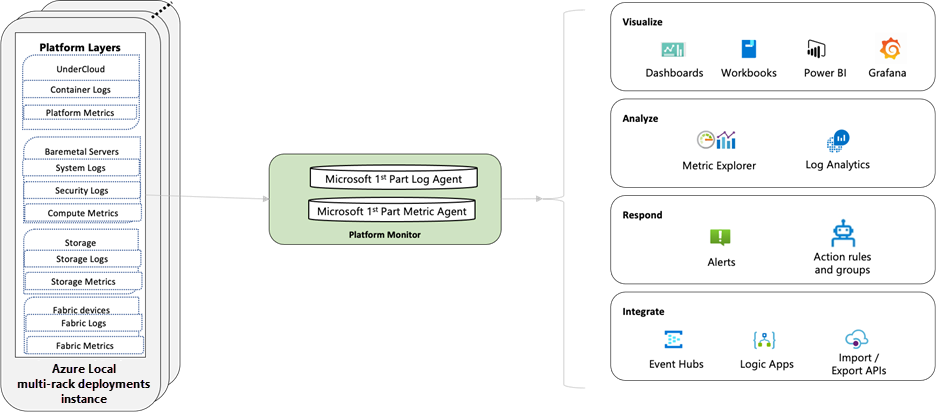
The observability framework is built on the following key components:
- Azure Monitor collects and aggregates logging data from the Azure Local components.
- Azure Log Analytics Workspace (LAW) collects and aggregates logging data from multiple Azure subscriptions and tenants.
- Analysis, visualization, and alerting are performed on the aggregated log data.
Benefits
Here are the key benefits of Azure Local observability framework:
- Centralized data collection. All monitoring data from your on-premises instances is collected in a central location for unified analysis.
- Reliable tooling. The observability solution uses Azure Monitor to collect, analyze, and act on telemetry data from both cloud and on-premises instances.
- User-friendly experience. The solution makes it easy for you to analyze and debug problems with the ability to search the data from within or across all of your cloud and on-premises instances.
- Visualization tools. Create customized dashboards and workbooks per your needs.
- Integrated alerting. Create alerts based on custom thresholds. You can create and reuse alert templates across all of your instances.
Monitoring capabilities
Azure Local provides monitoring capabilities fully integrated with Azure Monitor. These capabilities provide insights, help visualize and analyze data, and empower you to respond to incoming monitoring data. The following sections provide an overview of what capabilities are available and the benefits they provide.
Metrics
Azure Local provides key infrastructure metrics out of the box, at no extra cost. These metrics include CPU and memory usage, storage performance metrics, such as IOPS, latency and throughput, and network throughput. You can view these metrics in Azure Monitor through predefined charts. You can also create custom charts to visualize these metrics based on your preferences.
For additional monitoring, Cluster Metrics Configuration enables you to extend beyond the default metrics by selectively enabling optional ones. This gives you tailored visibility and greater control over monitoring to meet specific operational needs. To learn more about Cluster Metrics Configuration, see Cluster metrics configuration.
Logs
Azure Local emits logs from edge platform components. These metrics can be streamed to your storage account, event hub, or Log Analytics workspace for storing analyzing logs into customer specified targets. To learn more about logs available for streaming, see Logs available for streaming.
Logs available for streaming
Logs emitted by system resources provide detailed insight into the operations of Azure Local components and are useful for monitoring their health and availability. Logs are categorized based on the type of resource emitting them.
You can stream these logs to the following targets by configuring Diagnostic Settings in Azure Monitor:
- Log Analytics Workspace
- Storage Account
- Event Hubs
Cluster
| Log categories | Description |
|---|---|
| Kubernetes Logs | Logs emitted by the Kubernetes containers |
| VM Orchestration Logs | Logs emitted by the hypervisor service |
Bare metal servers
| Log categories | Categories | Description |
|---|---|---|
| System | Debug, Info, Notice, Warning, Error, Critical | System logs from the Bare metal server |
| Security | Debug, Info, Notice, Warning, Error, Critical, Defender, BreakGlass Audit | Security logs from the Bare metal server |
Storage appliance
| Log categories | Description |
|---|---|
| Storage Appliance logs | System Logs from Storage Appliance |
| Storage Appliance audits | Audit Logs from Storage Appliance |
| Storage Appliance alerts | Alert logs from Storage Appliance |
Note
Storage appliance audit and alert logs are specific to a single storage appliance. Instances with multiple storage appliances have different tables for each storage appliance. System logs have a single table for all storage appliances in the instance.
Cluster Manager
| Log categories | Description |
|---|---|
| Cluster Manager Deploy or Upgrade Logs | Logs emitted during the deployment or upgrade of the Cluster from Cluster Manager |
Alerts
Azure Local provides alerting capabilities through Azure Monitor Alerts. Alerts proactively notify you when important conditions are found in your monitoring data. Alerts can be raised based on predefined health faults from the OS health service, or you can create custom alerts based on metrics or logs you collect. To simplify custom alert creation, a set of recommended alerts is available that you can use as templates.
Alerts allow you to identify and address issues before users of your system notice them. The response could be a text or email to an administrator, or an automated process that attempts to correct an error condition.
For more information on alerting, see What are Azure Monitor alerts?
Types of alerts
The following table provides a brief description and setup instructions for each alert type:
| Alert type | Description | How to configure |
|---|---|---|
| Log based alerts | These alerts are customer-defined and are used to perform advanced logic operations on your log data. These alerts allow you to use Log Analytics query to evaluate resource logs at a predefined frequency. Predefined templates are available to get you started with Log alerts. |
See Create a log search alert for an Azure resource. |
| Metric based alerts | These are customer-defined alerts that are used to evaluate metrics of your system at regular intervals. Metric alerts are useful when you want to be alerted about data that requires little or no manipulation. | See Create or edit a metric alert rule. |
| Recommended alerts | These are predefined metric-based alerts for your system resource. These alerts provide you with initial monitoring for a common set of metrics using recommended alert templates. |