Note
Access to this page requires authorization. You can try signing in or changing directories.
Access to this page requires authorization. You can try changing directories.
This article provides guidance on how to select the right technology platform for each of your potential agent use cases, whether adopting a ready-to-use SaaS agent or building a custom agent with one of Microsoft's agent development platforms. Developing a technology plan is the second step in the Plan for agents phase of AI agent adoption (see figure 1).
 Figure 1. Microsoft's AI agent adoption process.
Effective technology adoption aligns goals with cost, level of effort, and customization needs. This alignment matches the technology to the use case and balances the effort required to achieve a return on investment. Understanding the available landscape ensures the right choice between adopting a ready-to-use SaaS agent or building a custom solution to provide business advantage.
AI agent decision tree
The AI agent decision tree guides the technology selection process by focusing on one primary question: Does a SaaS agent meet your functional requirements? If a SaaS agent satisfies your needs, adopt the prebuilt solution. If no SaaS agent fits the use case, you must build a custom agent. Determining which platform to use for a custom build, Microsoft Foundry, Microsoft Copilot Studio, or custom infrastructure, requires further investigation. The sections below provide guidance on selecting the right platform based on your specific requirements.
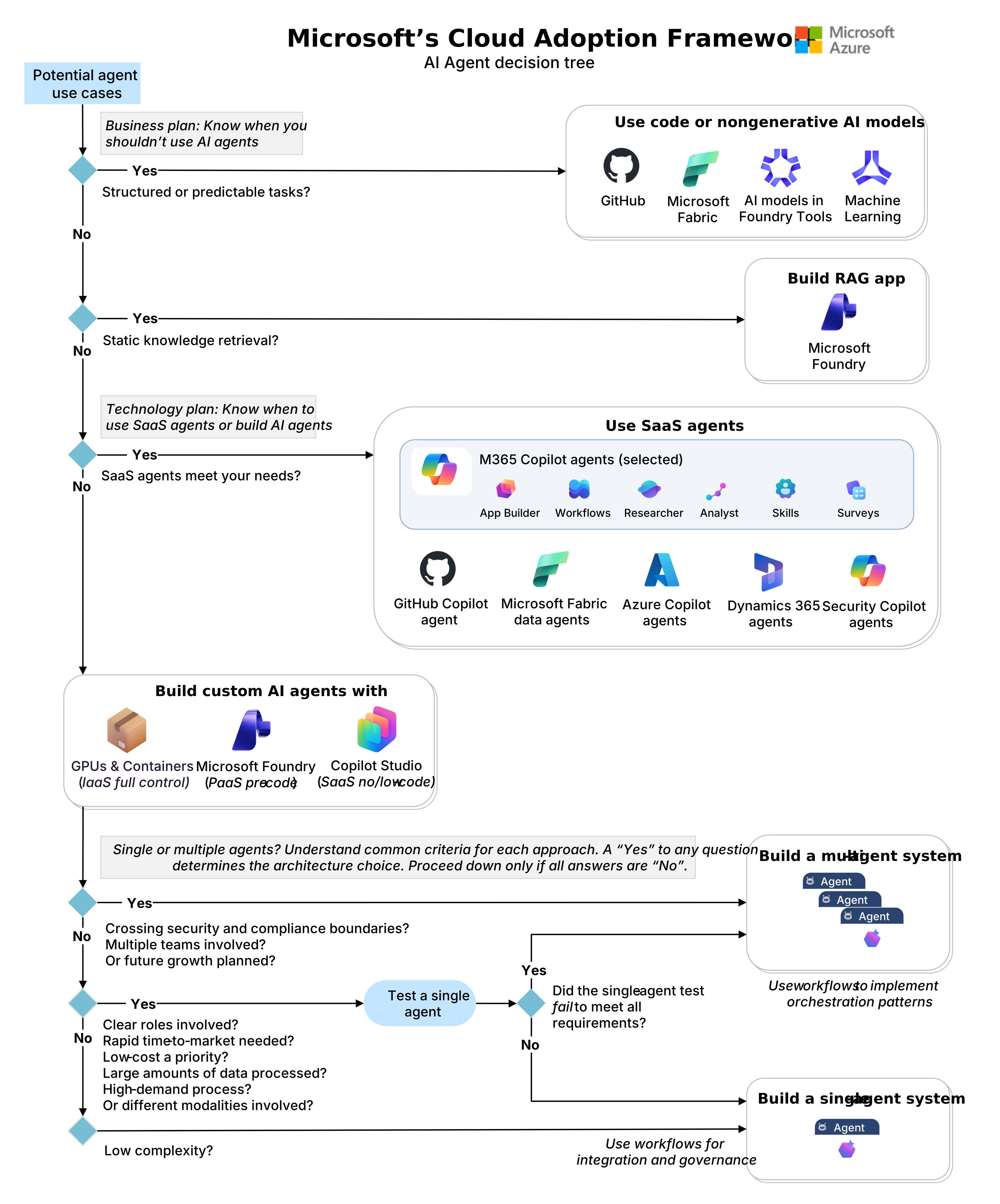
Use SaaS agents
SaaS agents are ready-to-use solutions built by Microsoft that enable immediate deployment. These agents provide rapid value for standard business functions but offer limited customization compared to custom builds. Evaluate the agents available across the technology stack to determine if a prebuilt solution meets your requirements.
Agents in Microsoft 365 Copilot. App Builder agent, Workflows agent, and Researcher enable task automation and information synthesis from Microsoft 365 data. Use the Agent Success Kit to structure your deployment approach and governance model.
In-product SaaS agents. GitHub Copilot agents support coding tasks. Microsoft Fabric data agents enable data analysis from data in Fabric. Azure Copilot agents provide insights and recommendations for your Azure environment. Dynamics 365 agents help with customer service workflows. Security Copilot agents enhance threat detection and response. These agents deliver immediate capabilities for domain-specific productivity and process automation. For more context, see Overview of available Copilots.
When no SaaS agents meet your functional requirements, build custom agents to achieve the necessary capabilities and integration depth.
Build AI agents
Choose a build path based on your organization's technical capabilities, timeline, and control requirements. Microsoft provides two primary platforms: Foundry for pro-code development with maximum flexibility and Copilot Studio for low-code development with faster deployment.

Microsoft Foundry
Microsoft Foundry provides a platform-as-a-service (PaaS) environment for pro-code agent development. Use this platform when requirements demand specific model selection, complex orchestration logic, or deep integration with custom code that low-code solutions can't support. It consolidates runtime, orchestration, and integration into a managed environment, removing the need to manage underlying virtual machine or Kubernetes infrastructure.

- Activity protocol, A2A, & integration with M365/Agent 365. Foundry supports the Activity Protocol and agent-to-agent (A2A) patterns for standardized messaging. Agents can be published to Microsoft 365 and Agent 365 to surface capabilities directly in user workflows.
- Multi-agent workflows. Workflows orchestrate complex business processes by handling sequential logic, conditional branching, and state management across multiple agents.
- Declarative agents. Prompt-based agents rely primarily on model reasoning and instructions, simplifying updates and versioning for behavior-driven agents.
- Hosted agents. Code-first, hosted agents support custom libraries or frameworks. This option provides a managed runtime that handles provisioning and scaling while allowing full code control.
- Models from. The Model catalog includes models from OpenAI, Anthropic, Meta, and Mistral, allowing selection based on specific performance, latency, and cost requirements.
- Memory. Managed memory maintains conversation context. For strict data sovereignty requirements, a bring-your-own (BYO) memory store option is available.
- Tools. The Tool catalog, model context protocol (MCP), and OpenAPI specifications enable connections to external systems. Integration with Azure Logic Apps and Azure Functions supports serverless automation.
Setup options: Choose a setup configuration that aligns with your security and operational needs. Use the basic setup for rapid prototyping and individual development when speed and ease of access are priorities, noting that this option lacks network isolation. For production environments and enterprise teams, use the standard setup to gain fine-grained control over data, security, and networking. Within the standard setup, select public networking for nonconfidential workloads that require enterprise data controls, or private networking for confidential workloads that must integrate with existing Azure resources to meet strict compliance standards. Review the comparison and deployment guide for details on both topologies.
Foundry playground: Start with the Foundry playground to build and test prototypes. Follow the quickstart guide to create a new agent.
Microsoft Copilot Studio
Microsoft Copilot Studio offers a software-as-a-service (SaaS) platform for low-code development. It enables business teams to deploy agents quickly with moderate customization. The platform includes prebuilt connectors, supports retrieval and task agents, and integrates with Azure AI Search. Built-in responsible AI features reduce the need for custom safeguards.
You can use Copilot Studio's low-code interface with Foundry's advanced models to handle sophisticated use cases while maintaining SaaS security and reliability. This hybrid approach allows business teams to build agents without extensive coding while accessing enterprise-grade AI capabilities. The combination reduces development time compared to full pro-code solutions while providing more customization than standard SaaS agents.
Test use cases with the 60-day free trial before committing to production deployment. Review available access options to determine the best entry point for your organization.
GPUs & Containers
You can also choose to deploy agents on GPU infrastructure using Azure Virtual Machines with containers as an alternative. While this guidance doesn't provide detailed steps for that approach, it can be useful when you need flexibility for custom configurations, integration with existing VM-based workloads, or scenarios requiring advanced security controls. Development uses Visual Studio Code and GitHub. Costs scale with token consumption and compute usage. For deployment guidance, see AI on IaaS.
Validate technology choices
Organizations often use multiple approaches to meet diverse requirements. Validate platform fit through structured experimentation before scaling.

Run time-boxed experiments. Build short prototypes for each candidate solution. Allocate one to two weeks per option. Compare low-code agents in Copilot Studio with pro-code solutions in Foundry. Evaluate development speed, functional coverage, and integration complexity.
Require documentation and stakeholder review. Document findings and present clear recommendations. If a low-code solution meets functional and security requirements, proceed with that option. If not, shift to pro-code or adjust scope. Stakeholder review reduces rework and increases confidence.
Assess single-agent versus multi-agent architecture. Use prototypes to determine whether the task requires multiple specialized agents or a single agent. Avoid unnecessary complexity. If a single agent meets business needs efficiently, proceed with that approach. If not, define a roadmap for multi-agent orchestration. Refer to Single agent or multiple agents?.
| Solution | Approach | Agent types | Best for |
|---|---|---|---|
| SaaS agents | Ready-to-use (SaaS) | Retrieval, Task | Personal productivity. Requires minimal customization to deliver immediate value. |
| Microsoft Foundry | Pro-code (PaaS) | Retrieval, Task, Autonomous | Strategic transformation. Supports deep integration and custom logic. |
| Microsoft Copilot Studio | Low-code (SaaS) | Retrieval, Task, Autonomous | Process transformation. Enables fast development with minimal coding and SaaS security. |
| GPUs & Containers | Pro-code (IaaS) | Retrieval, Task, Autonomous | Custom infrastructure. Provides full control of the entire technology stack. |
See the general AI decision tree for more guidance.
Next step
After you define your business and technology strategies for AI agents, focus on organizational structure and talent. Your teams need the right skills and structure to deliver and sustain these solutions.