Note
Access to this page requires authorization. You can try signing in or changing directories.
Access to this page requires authorization. You can try changing directories.
This article shows you how to establish secure, high-performance connectivity between Azure and Oracle Cloud Infrastructure (OCI) with ExpressRoute and FastConnect. You learn proven approaches to integrate Azure landing zones with OCI, and you enable hybrid cloud scenarios that maximize both platforms' capabilities.
Tip
New to Azure-OCI connectivity? Start your first connection
Set up ExpressRoute connectivity to Oracle Cloud Infrastructure
ExpressRoute and FastConnect integration serves as the cornerstone for connections between Azure virtual networks and OCI virtual cloud networks. This enterprise-grade connectivity approach allows resources across both cloud platforms to communicate seamlessly when private IP address spaces don't overlap. The Azure-OCI interconnect architecture delivers dedicated private network connectivity that eliminates internet routing for enhanced security and performance.
Create the ExpressRoute circuit in the connectivity subscription. The connectivity subscription is the recommended approach for network resource centralization and provides consistent management for cross-cloud connections. Deploy the ExpressRoute circuit that connects Azure with OCI in this dedicated connectivity subscription to maintain separation of concerns and enable proper governance of network infrastructure. This Azure landing zone design pattern ensures network isolation and centralized network management. For guidance on subscription organization, see Azure landing zone design areas.
Implement ExpressRoute Metro for same-city deployments. ExpressRoute Metro delivers enhanced connectivity within metropolitan areas with superior latency and bandwidth characteristics compared to standard ExpressRoute circuits. Verify whether your Azure and OCI resources are located in the same metropolitan area to take advantage of Metro connectivity benefits, which include reduced latency and cost optimization. ExpressRoute Metro is available in select metropolitan areas that include Amsterdam, Chicago, Madrid, Singapore, Washington DC, and others. Compare ExpressRoute Metro capabilities and pricing to standard circuits before you choose your connectivity approach.
Connect the ExpressRoute circuit to your hub network architecture. Both traditional hub-and-spoke and Azure Virtual WAN topologies support OCI connectivity through ExpressRoute circuit integration. Connect the ExpressRoute circuit to your hub VNet or Virtual WAN hub to provide centralized connectivity that you can share across spoke networks and maintain consistent network policies. This hub-centric approach represents the best practice for enterprise Azure network architectures.

The diagram displays an Azure hub virtual network connected to multiple spoke virtual networks, with an ExpressRoute circuit providing dedicated connectivity to OCI virtual cloud network. The hub contains an ExpressRoute gateway, and traffic flows between Azure spokes and OCI resources through the centralized hub architecture. This architecture demonstrates the recommended enterprise pattern for Azure-OCI connectivity, where the ExpressRoute circuit connects to the central hub, enabling all spoke networks to access OCI resources through the shared connectivity infrastructure.
Figure 1: Interconnectivity between Azure and OCI via ExpressRoute.
Boost performance with ExpressRoute FastPath
FastPath provides the solution for improved data path performance between Azure and OCI by bypassing the ExpressRoute gateway for virtual machine traffic. This FastPath optimization reduces latency and increases throughput for applications that demand high-performance connectivity between cloud platforms. FastPath represents a critical performance enhancement for enterprise workloads that require optimal cross-cloud communication.
Enable FastPath for latency-sensitive applications. FastPath delivers direct network traffic routing to virtual machines in the virtual network and bypasses the ExpressRoute gateway for maximum performance gains. Deploy your application in a single VNet with an ExpressRoute gateway and FastPath enabled when your workload demands the lowest possible latency between Azure and OCI. This configuration represents the optimal architecture for latency-critical applications.

The diagram displays a single Azure virtual network with an ExpressRoute gateway that has FastPath enabled, providing direct connectivity to OCI virtual cloud network. Virtual machines in the Azure VNet communicate directly with OCI resources, bypassing the gateway for optimal performance. This architecture demonstrates the recommended pattern for latency-sensitive applications requiring minimal network hops between Azure and OCI resources. FastPath technology enables direct traffic flow from virtual machines to OCI, eliminating gateway processing delays.
Figure 2: Interconnectivity between Azure and OCI with a single VNet.
Deploy Ultra Performance or ErGw3AZ gateway SKUs for FastPath. FastPath requires specific ExpressRoute gateway SKUs (stock keeping units - pricing tiers) to function properly while the gateway maintains route exchange capabilities. Deploy either the Ultra Performance SKU or the ErGw3AZ SKU for your ExpressRoute gateway to enable FastPath functionality and ensure proper route management between Azure and OCI networks. These gateway SKUs are the only supported configurations for FastPath enablement.
Understand FastPath limitations before implementation. FastPath has specific limitations that impact network architecture design decisions. Not all FastPath features are available on every circuit type. FastPath is supported on ExpressRoute Direct and ExpressRoute provider circuits, but certain features (for example, virtual network peering over FastPath or Private Link/Private Endpoint support) are limited to ExpressRoute Direct or require enrollment. FastPath also doesn't support Azure Virtual WAN hubs and has complex behavior with internal load balancers in spoke virtual networks, where traffic can still go through the gateway.
Plan availability zones for optimal latency
Availability zone placement is a critical factor that affects latency between Azure and OCI resources and requires careful consideration of performance versus availability requirements. The geographic distribution of your workloads influences the optimal placement strategy for reduced cross-cloud communication delays. Proper availability zone planning ensures both resilience and performance optimization for Azure-OCI hybrid architectures.
Conduct thorough latency testing across availability zones. Availability zone placement impacts latency between Azure and OCI resources and affects application performance. Deploy test virtual machines in different availability zones and measure latency to OCI resources to identify which availability zone provides optimal performance for your specific workload requirements. This testing approach ensures data-driven placement decisions.
Architect for balanced availability and performance requirements. Availability zones provide resilience but introduce latency variations that affect application performance. Design your application architecture to balance high availability needs with performance requirements, and consider whether workload distribution across availability zones or concentration in a single optimal availability zone better serves your business objectives. This architectural decision is fundamental to Azure-OCI hybrid success.
Validate regional availability for interconnectivity. Azure-OCI interconnectivity is available only in specific regional pairs and limits deployment options. Confirm that your target Azure and OCI regions support direct interconnectivity before you finalize your architecture design to avoid unexpected connectivity limitations or additional routing complexity. Regional validation is essential for successful Azure-OCI integration planning.
Configure secure operational access
Operational access to OCI resources from Azure requires specific connectivity patterns that deliver secure and efficient management capabilities. These connectivity patterns enable consistent operational practices across both cloud platforms while the patterns maintain security boundaries. Proper operational access design is crucial for effective Azure-OCI hybrid management.
Tip
Security first: Choose between self-managed jump boxes or Azure Bastion for zero-trust browser access
Deploy jump boxes for secure OCI resource management from Azure. Jump boxes deliver secure access to OCI virtual cloud networks from Azure environments without exposure of OCI resources. Deploy a jump box in a spoke VNet connected to your hub network to establish a secure operational bridge that allows Azure-based management tools to access OCI resources while the setup maintains network isolation. As a managed alternative to self-managed jump boxes, use Azure Bastion for zero-trust RDP/SSH access to provide secure, browser-based access without exposure of management ports. This jump box approach represents the recommended pattern for secure cross-cloud operations.
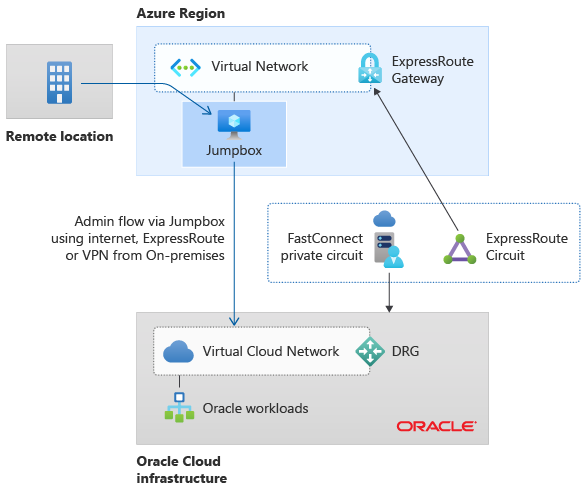
The diagram displays an Azure virtual network containing a jump box virtual machine that provides secure administrative access to OCI virtual cloud network through ExpressRoute connectivity. The jump box serves as a secure bridge for Azure-based management tools to operate OCI resources while maintaining network isolation and security boundaries. This architecture enables secure cross-cloud operations by providing controlled access points for administrative tasks, ensuring that direct access to OCI resources is managed through designated secure gateways within the Azure environment.
Figure 3: Managing OCI resources from Azure via a jump box.
Implement ExpressRoute Global Reach for on-premises to OCI connectivity. ExpressRoute Global Reach enables direct connectivity from on-premises networks to OCI through existing Azure ExpressRoute circuits. Connect your existing on-premises ExpressRoute circuit to the OCI ExpressRoute circuit to allow the Microsoft Enterprise Edge (MSEE) router to serve as the central routing point, but calculate bandwidth costs with the Azure pricing calculator before you implement this ExpressRoute approach for large data migration scenarios.
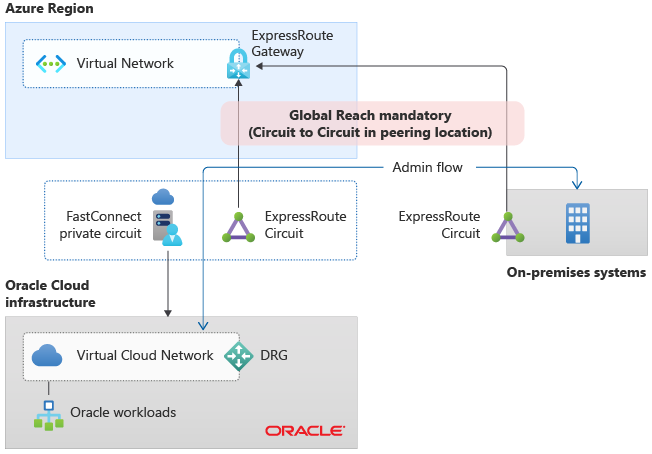
The diagram displays an on-premises network connected to Azure hub-and-spoke topology via ExpressRoute, with Global Reach linking the on-premises ExpressRoute circuit to a separate OCI ExpressRoute circuit. The Microsoft Enterprise Edge (MSEE) router serves as the central routing point, enabling direct communication between on-premises networks and OCI virtual cloud network while maintaining connectivity to Azure spoke networks. This architecture demonstrates how ExpressRoute Global Reach extends on-premises connectivity beyond Azure to reach OCI resources directly, providing a unified hybrid cloud connectivity solution that spans multiple cloud platforms through Microsoft's global network infrastructure.
Figure 4: Managing OCI resources from on-premises via ExpressRoute Global Reach.
Key takeaways and next actions
Azure-OCI connectivity through ExpressRoute and FastConnect delivers enterprise-grade hybrid cloud capabilities. Here's your implementation roadmap:
Phase 1: Foundation setup
- ExpressRoute circuit deployment in dedicated connectivity subscriptions for centralized network management
- FastPath implementation with Ultra Performance or ErGw3AZ gateway SKUs for optimal performance
Phase 2: Optimization
- Availability zone optimization through latency testing and architectural planning
- Operational access patterns with jump boxes or Azure Bastion for secure cross-cloud management
Phase 3: Scale and connect
- ExpressRoute Global Reach for on-premises to OCI connectivity requirements
This Azure-OCI integration architecture enables seamless hybrid cloud operations while the architecture maintains security, performance, and operational consistency across both platforms.
Essential tools and resources
Use these Azure services and resources to implement your Azure-OCI connectivity solution:
| Category | Tool | What it does for you |
|---|---|---|
| Networking | Azure ExpressRoute | Establishes private connectivity between Azure and OCI through dedicated circuits |
| Performance | ExpressRoute FastPath | Boosts data path performance by bypassing ExpressRoute gateway for VM traffic |
| Metropolitan | ExpressRoute Metro | Delivers enhanced connectivity within metropolitan areas for same-city deployments |
| Global reach | ExpressRoute Global Reach | Connects on-premises networks to OCI through existing Azure ExpressRoute circuits |
| Configuration | ExpressRoute virtual network gateways | Provides gateway SKU guidance for FastPath enablement and route management |
| Architecture | Azure landing zone design areas | Provides subscription organization guidance for connectivity resources |
| Cost planning | Azure pricing calculator | Calculates bandwidth costs for ExpressRoute Global Reach and data migration scenarios |
| Integration | Oracle application solutions integration | Provides comprehensive guidance for Azure-OCI interconnectivity and regional availability |
| Setup guide | Configure Azure-OCI networking | Provides step-by-step guidance for network connectivity configuration between Azure and OCI |
| Resilience | Availability zones overview | Explains availability zone concepts for latency optimization planning |
Continue your connectivity journey
Ready to explore more cloud connectivity options? Discover how to connect Azure to other major cloud providers: