Note
Access to this page requires authorization. You can try signing in or changing directories.
Access to this page requires authorization. You can try changing directories.
Azure Copilot can help you analyze, estimate and optimize cloud costs. Ask questions using natural language to get information and recommendations based on Microsoft Cost Management.
When you ask Azure Copilot questions about your costs, it automatically pulls context based on the last scope that you accessed using Cost Management. If the context isn't clear, you'll be prompted to select a scope or provide more context.
For OpenAI token-based models, Azure Copilot can provide simulations that estimate your costs for increasing or decreasing usage. You can also get estimates for changes to your OpenAI-token based models, such as moving from GPT-35-Turbo to GPT-4.
Tip
The tasks and sample prompts listed here show a few of the areas where Azure Copilot can be especially helpful. However, this isn't a complete list of all the things you can do. We encourage you to experiment with your own prompts and see how Azure Copilot can help you manage your Azure resources and environment.
Sample prompts
Here are a few examples of the kinds of prompts you can use for Cost Management. Modify these prompts based on your real-life scenarios, or try additional prompts to meet your needs.
- "Summarize my cost for the last 6 months"
- "What are the top services contributing to my cost?"
- "Can you provide last month's costs broken-down by service and region?"
- "Can you provide an estimate of our expected expenses for the next 3 months?"
- "How can we reduce our costs?"
- "How much would the cost change if GPT-35-Turbo usage increased by 15%?"
- "What would be the financial effect of transitioning from GPT-35-Turbo to GPT-4?"
Examples
When you prompt Azure Copilot, "Summarize my costs for the last 6 months," a summary of costs for the selected scope is provided.

You can follow up with questions to get more granular details, such as "What was our virtual machine spending last month?"

Next, you can ask "How can we reduce our costs?" Azure Copilot provides a list of recommendations you can take, including an estimate of the potential savings you might see. You can select specific resources, or get general recommendations across your account.

To better understand cost details, you can say "What was the cost breakdown for each service last month?"

You can also ask Azure Copilot to break down costs by meter or product. For example, you can say "Can you break down my March costs by Meter?"

For a detailed look at month-to-month changes, say "Can you compare how my costs have changed from February to March by service?"

You can also get an estimate of upcoming expenses by saying "Can you forecast my cost by month for the next 3 months?"

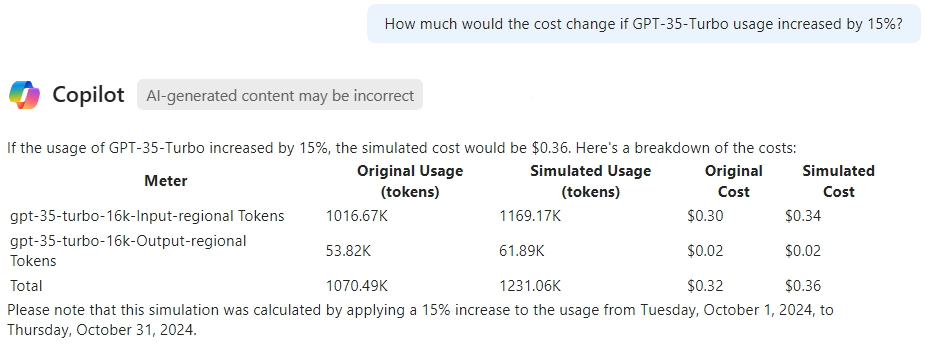
For OpenAI token-based models, you can ask questions to estimate costs for usage changes. For example, you can say "How much would the cost change if GPT-35-Turbo usage increased by 15%?"
Next steps
- Explore capabilities of Azure Copilot.
- Learn more about Microsoft Cost Management.
- Learn how Azure Copilot can help reduce storage account costs.