Note
Access to this page requires authorization. You can try signing in or changing directories.
Access to this page requires authorization. You can try changing directories.
Azure Copilot amplifies your impact by using AI-enhanced operations. You can ask Azure Copilot for help with designing, operating, optimizing, and troubleshooting your Azure apps and infrastructure. Azure Copilot helps you gain new insights, discover more benefits of the cloud, and orchestrate data across both the cloud and the edge.
To access Azure Copilot, sign in to the Microsoft Azure portal. Select the Copilot icon in the page header to open the Copilot pane. You can then enter your prompts in the text box, or try out one of the provided suggestions.

To interact with Azure Copilot in a larger, immersive mode, select the fullscreen icon in the Copilot pane. This fullscreen experience provides more space to view responses and enter prompts. It also lets you easily view and manage multiple conversations.
When working with services or resources, you might see suggested prompts near the top of a pane. These suggestions are tailored to the context of the service or resource you're working with to help you get started quickly. Select a suggested prompt to start a conversation with Azure Copilot.
You can also use Azure Copilot from within the Azure mobile app.
The following sections describe some of the ways you can use Azure Copilot.
Tip
Agents (preview) in Azure Copilot extends the current capabilities of Azure Copilot to provide an agentic, multi-modal cloud interface. For more information, see Agents (preview) in Azure Copilot.
Perform tasks
Use Azure Copilot to perform many basic tasks. There are many things you can do! Take a look at these articles to learn about some of the scenarios in which Azure Copilot can be especially helpful.
- Understand your Azure environment:
- Work smarter with Azure services:
- Execute commands
- Deploy and manage virtual machines
- Discover and deploy workload templates
- Work with AKS clusters efficiently
- Get information about Azure Monitor metrics and logs
- Work smarter with Azure Local
- Manage and migrate storage accounts
- Troubleshoot disk performance
- Design, troubleshoot, and secure networks
- Improve Azure SQL Database-driven applications
- Discover Azure Marketplace solutions
- Write and optimize code:
Get information
From anywhere in the Azure portal, you can ask Azure Copilot to explain more about Azure concepts, services, or offerings. You can ask questions to learn how a feature works, or which configurations best meet your budgets, security, and scale requirements. Azure Copilot can guide you to the right user experience, or even author scripts and other artifacts that you can use to deploy your solutions. Answers are grounded in the latest Azure documentation, so you can get up-to-date guidance just by asking a question.
Solve problems and troubleshoot resources
Asking questions to understand more can be helpful when troubleshooting problems. For example, you can say things like "Cluster stuck in upgrading state while performing update operation" or "Azure database unable to connect from Power BI." Azure Copilot responds with information about the problem and possible ways to fix it.
Azure Copilot also helps you understand more about information presented in Azure. For example, when viewing diagnostic details for a resource, you can say "Give me a summary of this page" or "What's the issue with my app?" You can ask what an error means, or ask what the next steps would be to implement a recommended solution.
In some cases, Azure Copilot can help resolve the issue. For example, if you say "Help me troubleshoot my Arc server extension," Azure Copilot prompts you to select the Arc-enabled server and the extension that you're interested in troubleshooting. If the extension needs to be reinstalled, Azure Copilot offers to help you reinstall it. Similarly, if you experience problems with your Microsoft Azure Container Instances, you can ask things like "Why did my container restart?" After prompting you to select the container resource, Azure Copilot provides steps to help resolve the issue.
Another area where Azure Copilot can be especially helpful is troubleshooting Azure Native observability solution integrations. For example, you can say "Why are metrics not reaching Datadog from my AKS cluster?" or "Dynatrace logs are missing for my App Service." Azure Copilot identifies issues on the target resource, provides remediation solutions, and helps you understand more about the problem.
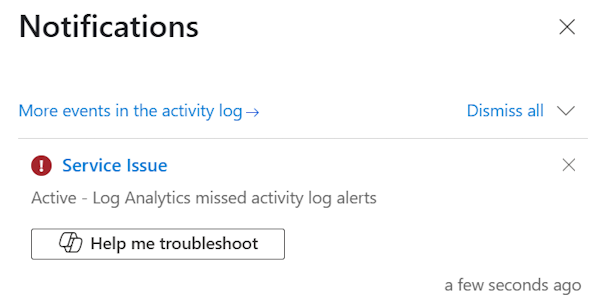
Azure Copilot can also help explain errors directly from the Notifications pane.
Find recommendations
Azure Copilot can show Azure Advisor recommendations across the Well Architected Framework pillars: Reliability, Cost Optimization, Operational Excellence, Performance Efficiency, and Security. You can ask about general Advisor recommendations, or get specific recommendations related to cost savings, performance improvements, security enhancements, or other areas.
For example, you can say "Show me my reliability recommendations." Azure Copilot returns a list of top reliability recommendations for you, including links to each recommendation page in Advisor. You can optionally select specific resources for which to view associated recommendations.
You can also ask questions to get recommendations about services that help support your objectives. For instance, you can ask "What service would you recommend to implement distributed caching?" or "What are popular services used with Azure Container Apps?" Where applicable, Azure Copilot provides links to start working with the service or learn more. In some cases, you also see metrics about how often a service is used.
Navigate between services
Rather than searching for a service to open, ask Azure Copilot to open the service for you. If you can't remember the exact name, choose from the provided suggestions, or ask Azure Copilot which service to use for your intended task.
Manage portal settings
Use Azure Copilot to confirm your settings selection or change options, without opening the Settings pane. For example, you can ask Azure Copilot to change from Light to Dark theme, or vice versa.
Manage multiple conversations
Azure Copilot supports having multiple conversations at the same time. Select the Start a new chat icon  to enter a new prompt while an existing conversation is ongoing.
To see all of your conversations, open the navigation pane. You can switch between conversations, rename them, or delete ones you no longer need.

You can also view all conversations when using fullscreen mode.
Add context to a conversation
Share more context in your prompts by selecting the Add icon in the chat pane. Select one or more resources, subscriptions, service groups, or resource groups related to your request to help Azure Copilot provide more relevant responses.

Tip
If your tenant has access to agents (preview) in Azure Copilot, selecting the agent mode icon provides access to agent capabilities. For more information, see Agents (preview) in Azure Copilot.
Current limitations
While Azure Copilot can perform many types of tasks, it might not be able to complete all requests. In these cases, Azure Copilot typically explains the limitation and provides information about how you can carry out the intended action.
Keep in mind these general current limitations:
- You can't continue the same conversation beyond 24 hours.
- Actions taken on more than 10 resources must be performed outside of Azure Copilot.
- Some responses that display lists are limited to the top five items.
- For some tasks and queries, using a resource's name doesn't work, and you must provide the Azure resource ID or use the Add icon to select the resource.
- Excessive use of Azure Copilot might temporarily throttle your access to Azure Copilot.
Next steps
- Get tips for writing effective prompts to use with Azure Copilot.
- Learn about managing access to Azure Copilot in your organization.
- Learn how to use Azure Copilot with AI Shell or in the Azure mobile app.