Note
Access to this page requires authorization. You can try signing in or changing directories.
Access to this page requires authorization. You can try changing directories.
Azure Copilot can help you work more effectively with Azure Load Balancer. You can ask Azure Copilot to help you understand what type of load balancer is right for your requirements. You can also get help if you need to upgrade from Basic Load Balancer to Standard Load Balancer.
Tip
The tasks and sample prompts listed here show a few of the areas where Azure Copilot can be especially helpful. However, this isn't a complete list of all the things you can do. We encourage you to experiment with your own prompts and see how Azure Copilot can help you manage your Azure resources and environment.
Choose the right load balancer
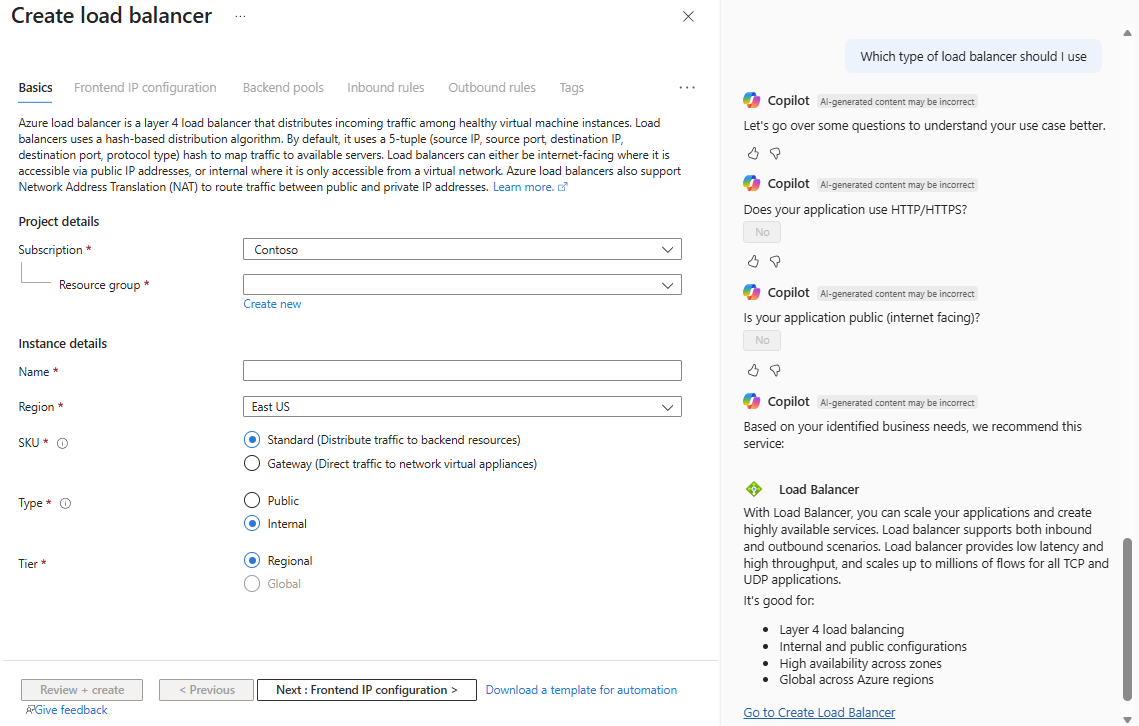
Azure Copilot can recommend the best type of load balancer to fit your scenario. When you ask for help choosing a load balancer, Azure Copilot asks questions to help understand your needs, then provides recommendations. Azure Copilot also gives you the option to go directly to the Create load balancer experience to set up the load balancer.
Load balancer recommendation sample prompts
Here are a few examples of the kinds of prompts you can use to get load balancer recommendations. Modify these prompts based on your real-life scenarios, or try additional prompts to create different kinds of queries.
- "Which type of load balancer should I use"
- "Can you help me to choose a load balancer"
- "Which type of load balancer fit my scenario best"
- "I want to know which type of load balancer should I use"
- "Help me choose a load balancer by providing me a questionnaire"
Load balancer recommendation example
When you say "Which type of load balancer should I use", Azure Copilot asks questions to better understand your scenario. After that, it provides a recommendation, along with a link to create your load balancer.
Upgrade to Standard Load Balancer
As of September 30, 2025, Basic Load Balancer is retired. If you still use Basic Load Balancer, Azure Copilot can help you understand how to migrate from Basic to Standard so that you can upgrade as soon as possible.
To get help upgrading to Standard Load Balancer, navigate to your Basic Load Balancer, then select the banner that appears near the top of the pane. Select one of the provided prompts to get assistance from Azure Copilot. You can also enter prompts directly, such as "What are the benefits of a Standard SKU Load Balancer?" or "Help me upgrade to a Standard SKU Load Balancer."
Next steps
- Explore capabilities of Azure Copilot.
- Get tips for writing effective prompts to use with Azure Copilot.