Note
Access to this page requires authorization. You can try signing in or changing directories.
Access to this page requires authorization. You can try changing directories.
Important
Some information in this article relates to a prereleased product which may be substantially modified before it's commercially released. Microsoft makes no warranties, expressed or implied, with respect to the information provided here.
Custom data collection (Preview) enables organizations to expand and customize telemetry collection beyond default configurations to support specialized threat hunting and security monitoring needs. This feature allows security teams to define specific collection rules with tailored filters for event properties such as folder paths, process names, and network connections.
This article provides an overview of custom data collection so that you can understand the feature's capabilities and how it enhances your security visibility and threat hunting operations.
How custom data collection works
Custom data collection uses rule-based filtering to capture specific events from endpoint devices and route them to your Microsoft Sentinel workspace for analysis and threat hunting.
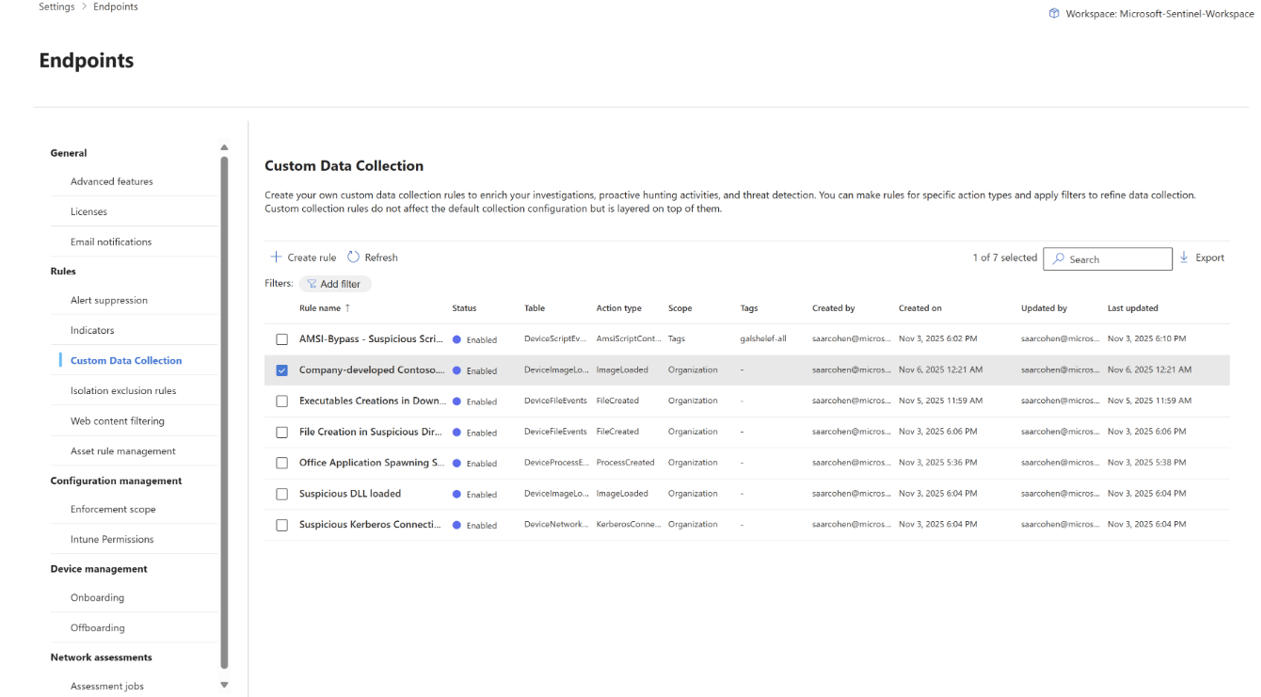
Custom collection rules allow you to define the specific events you want to capture and the conditions under which they should be collected.
To create custom data collection rules, see Create custom data collection rules.
Supported event tables
Custom data collection supports the following event tables.
| Table name | Description | Learn more |
|---|---|---|
| DeviceCustomProcessEvents | Stores data on process creation, termination, and other process-related activities. | In-portal schema reference or DeviceProcessEvents table reference |
| DeviceCustomImageLoadEvents | Stores data on image loading events, including details about the loaded images and their origins. | In-portal schema reference or DeviceImageLoadEvents table reference |
| DeviceCustomFileEvents | Stores data on file creation, modification, deletion, and access activities. | In-portal schema reference or DeviceFileEvents table reference |
| DeviceCustomNetworkEvents | Stores data on network connection events, including IP addresses, ports, and protocols. | In-portal schema reference or DeviceNetworkEvents table reference |
| DeviceCustomScriptEvents | Stores data on script execution and process details related to any explicit customer request for collection. This table is a new addition and does not have a reference in the default event tables. | In-portal schema reference |
Data flow and integration
This is the typical data flow for custom data collection:
- Define collection rules in the Microsoft Defender portal with specific filters and device targets.
- Rules are transmitted to targeted endpoints, typically within 20 minutes to one hour.
- Endpoints collect events matching your rule criteria alongside default telemetry.
- Custom event data flows to your connected Microsoft Sentinel workspace.
- Query custom data using the supported event tables to learn about specific activities on your endpoints.
Frequently asked questions
Does custom data collection affect the default Defender for Endpoint configuration?
No, custom data collection rules live side-by-side with the Defender for Endpoint out-of-the-box configuration.
Is a Microsoft Sentinel workspace required?
Yes, you need a connected Microsoft Sentinel workspace to create custom data collection rules. For more information, see the prerequisites.
How can I know if a rule has reached the endpoint?
You can query for events collected by the relevant rule, for the specific endpoint. For example, the following query returns all effective rules on the endpoint (now and in the past), counting the rules' collected events.
search in (DeviceCustomFileEvents, DeviceCustomScriptEvents, DeviceCustomNetworkEvents) "your_device_id"
| where DeviceId == "your_device_id"
| summarize count() by RuleName, RuleLastModificationTime, $table
Does custom data collection incur additional costs?
See data costs.
What client versions and operating systems are currently supported?
See supported operating systems. To query your client version, in advanced hunting, use the ClientVersion column in the DeviceInfo table.
Are manual (static) tags supported?
No, we currently only support dynamic tags. However, you can create dynamic tags out of manual tags in Settings > Microsoft Defender XDR > Asset rule management. For more information, see Configure dynamic rules for devices in asset rule management.
How can I collect all events for a specific event type?
Next steps
- Learn how to create and manage custom data collection rules
Tip
Do you want to learn more? Engage with the Microsoft Security community in our Tech Community: Microsoft Defender XDR Tech Community.