Note
Access to this page requires authorization. You can try signing in or changing directories.
Access to this page requires authorization. You can try changing directories.
Note
The Vulnerability Management section in the Microsoft Defender portal is now located under Exposure management. With this change, you can now consume and manage security exposure data and vulnerability data in a unified location, to enhance your existing Vulnerability Management features. Learn more.
These changes are relevant for Preview customers (Microsoft Defender XDR + Microsoft Defender for Identity preview option).
In this article, you'll learn about the Microsoft Defender Vulnerability Management overview page and how it can help you understand and manage your organization's security exposure.
Tip
Did you know you can try all the features in Microsoft Defender Vulnerability Management for free? Find out how to sign up for a free trial.
Defender Vulnerability Management overview page
Note
This section describes the Microsoft Defender Vulnerability Management experience for customers using the Microsoft Defender XDR + Microsoft Defender for Identity preview. This experience is part of the integration of Microsoft Defender Vulnerability Management into Microsoft Security Exposure Management. Learn more.
You can use the Exposure management > Vulnerability management > Overview page in the Microsoft Defender portal to:
- Endpoint insights, including endpoint exposure score, endpoint recommendations, event timeline, vulnerable software, remediation activities, and exposed devices.
- Correlate EDR insights with endpoint vulnerabilities and process them.
- Select remediation options to triage and track the remediation tasks.
- Select exception options and track active exceptions.
You can view misconfiguration and secure score information in the Exposure management > Recommendations page.
Note
Devices that aren't active in the last 30 days aren't factored in on the data that reflects your organization's vulnerability management exposure score and Microsoft Secure Score for Devices. In addition, CVEs marked as "won't fix" are not shown in the Microsoft Defender portal, and they're not included in vulnerability recommendations or scoring.
Overview page elements
Note
This section describes the Microsoft Defender Vulnerability Management experience for customers using the Microsoft Defender XDR + Microsoft Defender for Identity preview. This experience is part of the integration of Microsoft Defender Vulnerability Management into Microsoft Security Exposure Management. Learn more.
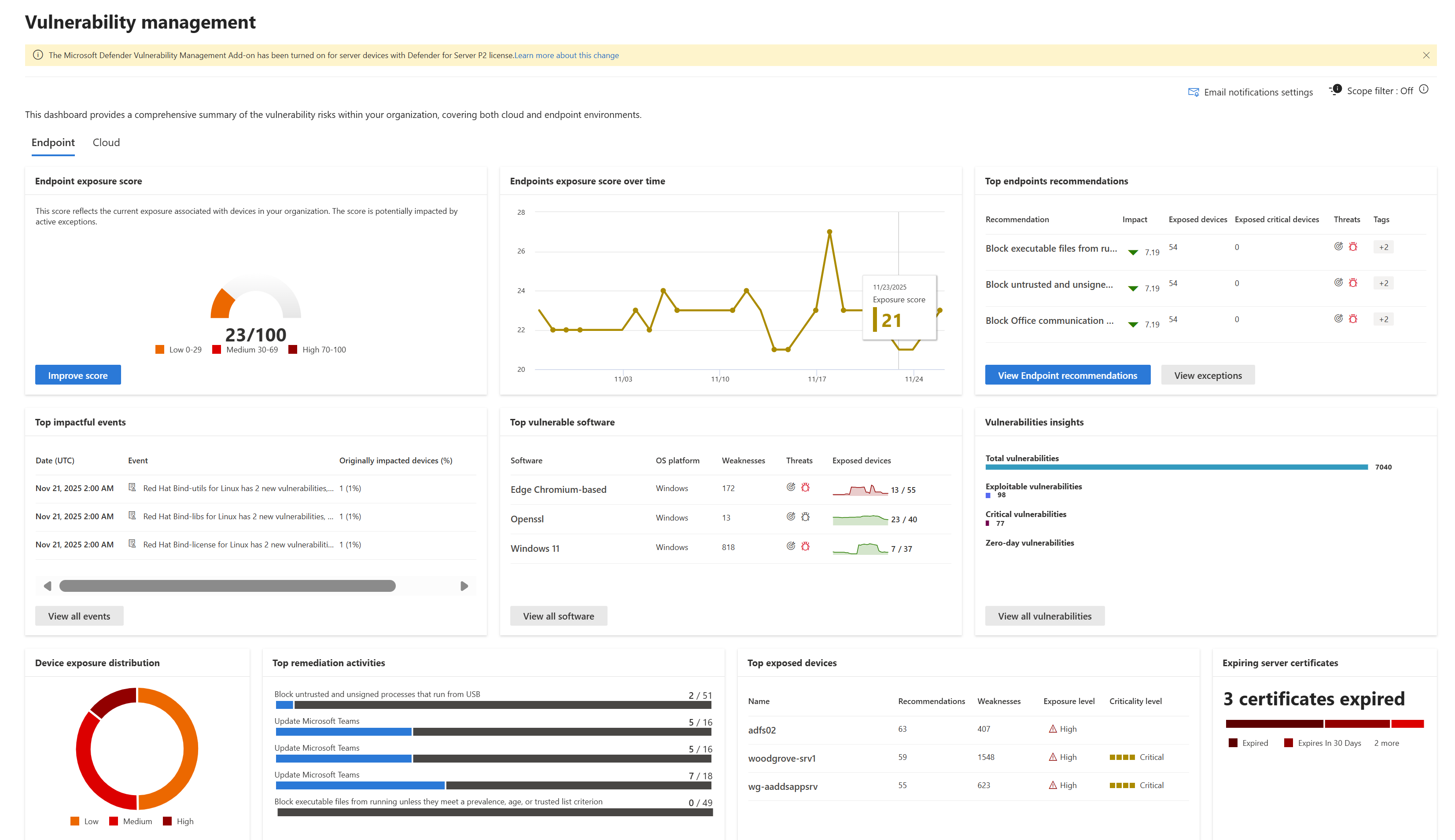
| Area | Description |
|---|---|
| Scope filter: On (#/#) or Off | Filter the vulnerability management data you want to see in the overview page and cards by device groups. What you select in the filter applies throughout the vulnerability management pages. |
| Endpoint exposure score | See the current state of your organization's device exposure to threats and vulnerabilities. Several factors affect your organization's exposure score: vulnerabilities discovered in your devices, likelihood of your devices to be breached, value of the devices to your organization, and relevant alerts discovered with your devices. The goal is to lower the exposure score of your organization to be more secure. To reduce the score, you need to remediate the related security configuration issues listed in the security recommendations. |
| Device exposure distribution | See how many devices are exposed based on their exposure level. Select a section in the doughnut chart to go to the Devices list page and view the affected device names, exposure level, risk level, and other details such as domain, operating system platform, its health state, when it was last seen, and its tags. |
| Expiring server certificates | See how many certificates are expired or are due to expire in the next 30, 60 or 90 days. |
| Top endpoints recommendations | See the collated security recommendations that are sorted and prioritized based on your organization's risk exposure and the urgency that it requires. Select View Endpoint recommendations to see the rest of the security recommendations in the list. Select View exceptions for the list of recommendations that have an exception. |
| Top vulnerable software | Get real-time visibility into your organization's software inventory with a stack-ranked list of vulnerable software installed on your network's devices and how they impact your organizational exposure score. Select an item for details or View all software to see the rest of the vulnerable software list in the Software inventory page. |
| Vulnerabilities insights | View the total number of vulnerabilities, and a breakdown into types of vulnerabilities: Exploitable, critical, and zero-day vulnerabilities. Select View all vulnerabilities to go to the Vulnerabilities page and drill down into specific vulnerabilities. |
| Top remediation activities | Track the remediation activities generated from the security recommendations. You can select each item on the list to see the details in the Remediation page or select View all remediation activities to view the rest of the remediation activities, and active exceptions. |
| Top exposed devices | View exposed device names and their exposure level. Select a device name from the list to go to the device page where you can view the alerts, risks, incidents, security recommendations, installed software, and discovered vulnerabilities associated with the exposed devices. Select View all devices to see the rest of the exposed devices list. From the devices list, you can manage tags, initiate automated investigations, initiate a live response session, collect an investigation package, run antivirus scan, restrict app execution, and isolate device. |
| Top impactful events | View the top events and the number of impacted devices in your organization in the last seven days. Select View all events to open the Event timeline and view and filter all events, including new vulnerabilities, new exploitable vulnerabilities, and new configuration assessments. |