Note
Access to this page requires authorization. You can try signing in or changing directories.
Access to this page requires authorization. You can try changing directories.
Learn how Git integration and deployment pipelines work with API for GraphQL in Microsoft Fabric. This article helps you to understand how to set up a connection to your repository, manage your API for GraphQL, and deploy them across different environments.
Who uses source control and deployment
Git integration and deployment pipelines are essential for:
- Data engineers managing Fabric GraphQL API configurations through version control and CI/CD workflows
- Fabric workspace admins coordinating deployments across development, test, and production Fabric workspaces
- DevOps teams implementing deployment pipelines for Fabric APIs across multiple environments and capacities
- Platform teams requiring governance, tracking, and rollback capabilities for Fabric API changes
Use source control and deployment pipelines when you need to manage GraphQL APIs as part of a structured development lifecycle with multiple environments.
Note
API for GraphQL source control and deployment is currently in preview.
Prerequisites
- You must have an API for GraphQL in Fabric. For more information, see Create an API for GraphQL in Fabric and add data.
Overview
Fabric offers powerful tools for CI/CD (continuous integration and continuous deployment) and development lifecycle management through two main components: Git integration (CI) and deployment pipelines (CD). Workspaces serve as central components for both Git synchronization and deployment stages.
Git integration (CI): Synchronizes workspace items (for example, code, configurations, APIs) with version control repositories, enabling version control and change tracking via Git.
Deployment pipelines (CD): Enables the creation of stages (for example, Development, Test, Production) with linked workspaces. Items supported in each stage are automatically replicated to subsequent stages, and changes in a workspace trigger deployment in a release pipeline. You can configure the pipeline to ensure that changes are tested and deployed efficiently across environments.
Fabric supports various CI/CD workflows tailored to common scenarios. For more information, see CI/CD workflow options in Fabric.
Note
Only metadata is copied during deployment; and data isn't copied.
Items from workspace are stored in the associated Git repository as Infrastructure as Code (IaC). Code changes in the repository can trigger the deployment in pipelines. This method allows you to have code changes automatically replicated across stages for testing and production release purposes.
Data source authentication methods
When creating your API for GraphQL, you choose how clients authenticate and access your data sources. This choice has significant implications for deployment pipelines and autobinding behavior. Understanding these authentication methods is essential for planning your CI/CD workflow. For more information about autobinding and the deployment process, see Understand the deployment process.
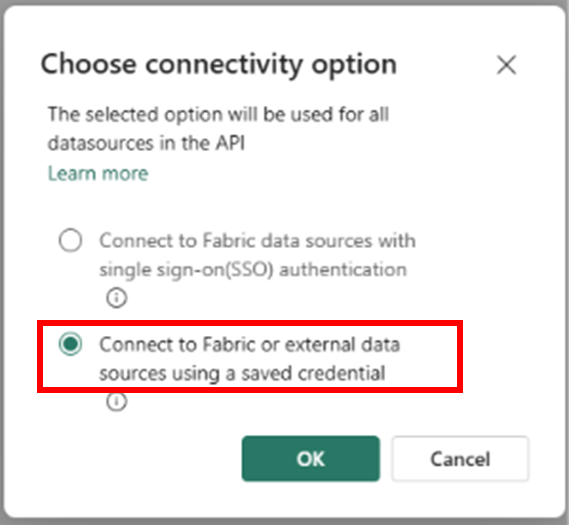
There are two connectivity options available when connecting data sources to your API for GraphQL: Single sign-on (SSO) and Saved credentials.
Single sign-on (SSO)
With SSO, API clients use their own credentials to access data sources. The authenticated API user must have permissions to both the API and the underlying data source.
Use SSO when:
- Exposing Fabric data sources (lakehouses, warehouses, SQL analytics endpoints)
- You want users to access data based on their individual permissions
- You need row-level security or other data access policies to apply per user
Permission requirements:
- API users need Execute permissions on the GraphQL API (Run Queries and Mutations)
- API users need read or write permissions on the data source
- Alternatively, add users as workspace members with Contributor role where both API and data source are located
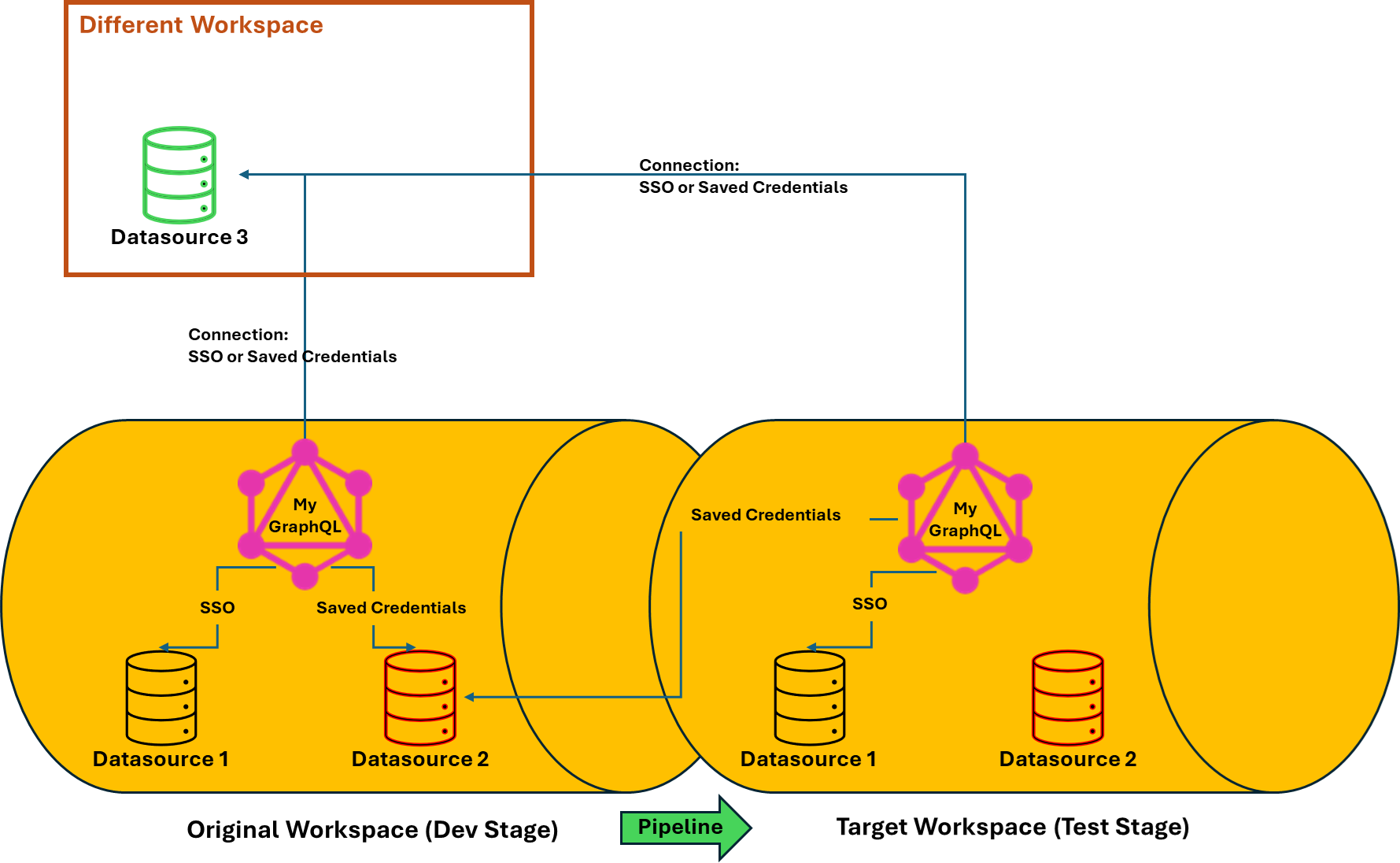
Autobinding behavior in deployment pipelines: When you deploy an API using SSO from the source workspace (for example, Dev) to the target workspace (for example, Test):
- The data source and GraphQL API are both deployed to the target workspace
- The API in the target workspace automatically binds to the local data source copy in the target workspace
- Each environment (Dev, Test, Production) uses its own data source instance
Note
There are specific limitations when using SSO with SQL Analytics Endpoints. See Current limitations for details.
Saved credentials
With saved credentials, a single shared credential authenticates between the API and data sources. API users only need access to the API itself, not the underlying data sources.
Use saved credentials when:
- Exposing Azure data sources (Azure SQL Database, external databases)
- You want simplified permission management (users only need API access)
- All API users should access the same data with the same permissions
- You need consistent credentials across all API requests
Permission requirements:
- API users need only Execute permissions on the GraphQL API (Run Queries and Mutations)
- The saved credential itself must have appropriate permissions on the data source
- Developers deploying the API must have access to the saved credential
Autobinding behavior in deployment pipelines: When you deploy an API using saved credentials from the source workspace (Dev) to the target workspace (Test):
- The data source is deployed to the target workspace
- The API in the target workspace remains connected to the data source in the source workspace (Dev)
- Autobinding doesn't occur - the deployed API continues using the saved credential pointing to the original data source
- You must manually reconfigure connections or create new saved credentials in each target environment
Important
Once you choose an authentication method for your API, it applies to all data sources added to that API. You can't mix SSO and saved credentials in the same API.
Cross-workspace connections
If your API in the source workspace (Dev) connects to a data source in a different workspace, the deployed API in the target workspace (Test) remains connected to that external data source regardless of the authentication method. Autobinding only works when both the API and data source are in the same source workspace.
The following diagram illustrates these deployment scenarios:
For more information on setting up these authentication methods when creating your API, see Connect to a data source.
API for GraphQL Git integration
Fabric API for GraphQL supports Git integration, enabling you to manage your GraphQL APIs as code within your version control system. This integration provides version history, collaboration through branches and pull requests, the ability to revert changes, and a complete audit trail of API modifications. By treating your GraphQL API configuration as Infrastructure as Code (IaC), you can apply software development best practices to your data access layer.
Git integration is essential for:
- Version control: Track all changes to your GraphQL schema, data source connections, and relationships over time
- Collaboration: Work with team members using branches, pull requests, and code reviews
- Rollback capability: Revert to previous API configurations when issues arise
- Environment promotion: Use Git as the source of truth for deploying APIs across environments
Connect your workspace to Git
To enable Git integration for your GraphQL APIs:
- Open Workspace settings for the workspace containing your API for GraphQL
- Configure the Git connection to your repository (Azure DevOps, GitHub, or other Git provider)
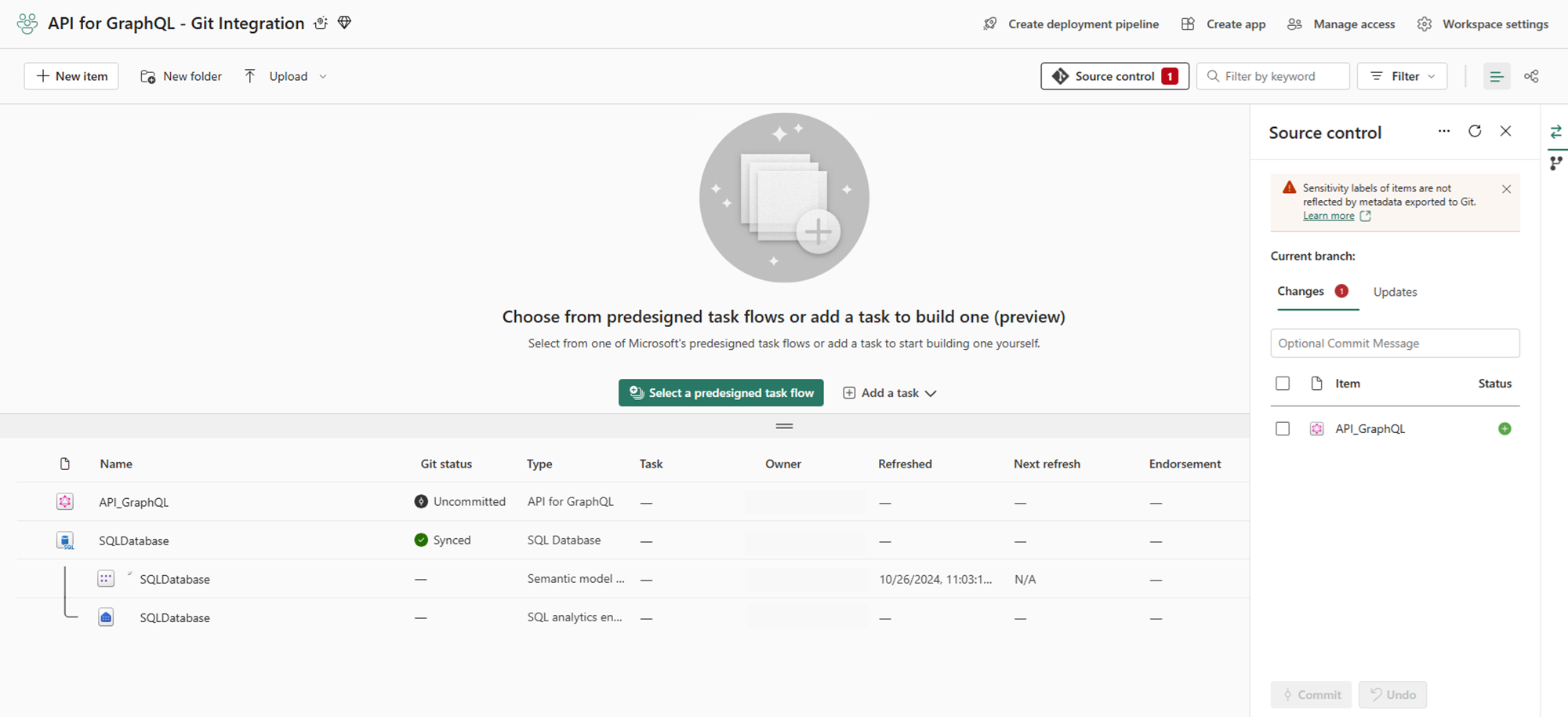
- Once connected, all workspace items, including APIs for GraphQL, appear in the Source control panel
For detailed setup instructions, see Get started with Git integration.
Commit and sync your GraphQL APIs
After connecting to Git, you can commit your API for GraphQL configurations to the repository. Each commit creates a snapshot of your API definition, including:
- GraphQL schema definitions
- Data source connections and authentication settings
- Relationship configurations
- Query and mutation definitions
Once committed, your GraphQL APIs appear in your Git repository with a structured folder hierarchy. From this point, you can leverage standard Git workflows like creating pull requests, managing branches, and collaborating with your team through code reviews. For more information about working with branches, see Manage branches.
GraphQL API representation in Git
Each API for GraphQL item is stored in Git with a well-defined folder structure that represents all aspects of your API configuration:
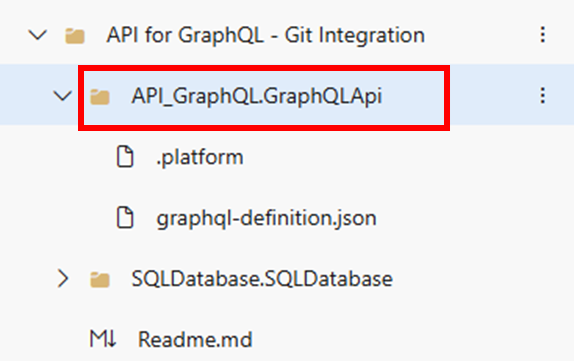
The API definition files contain all the metadata needed to recreate your GraphQL API in any Fabric workspace. This includes schema definitions, data source mappings, and configuration settings. When you sync from Git back to a Fabric workspace, the system uses these definition files to restore your API precisely as it was when committed:
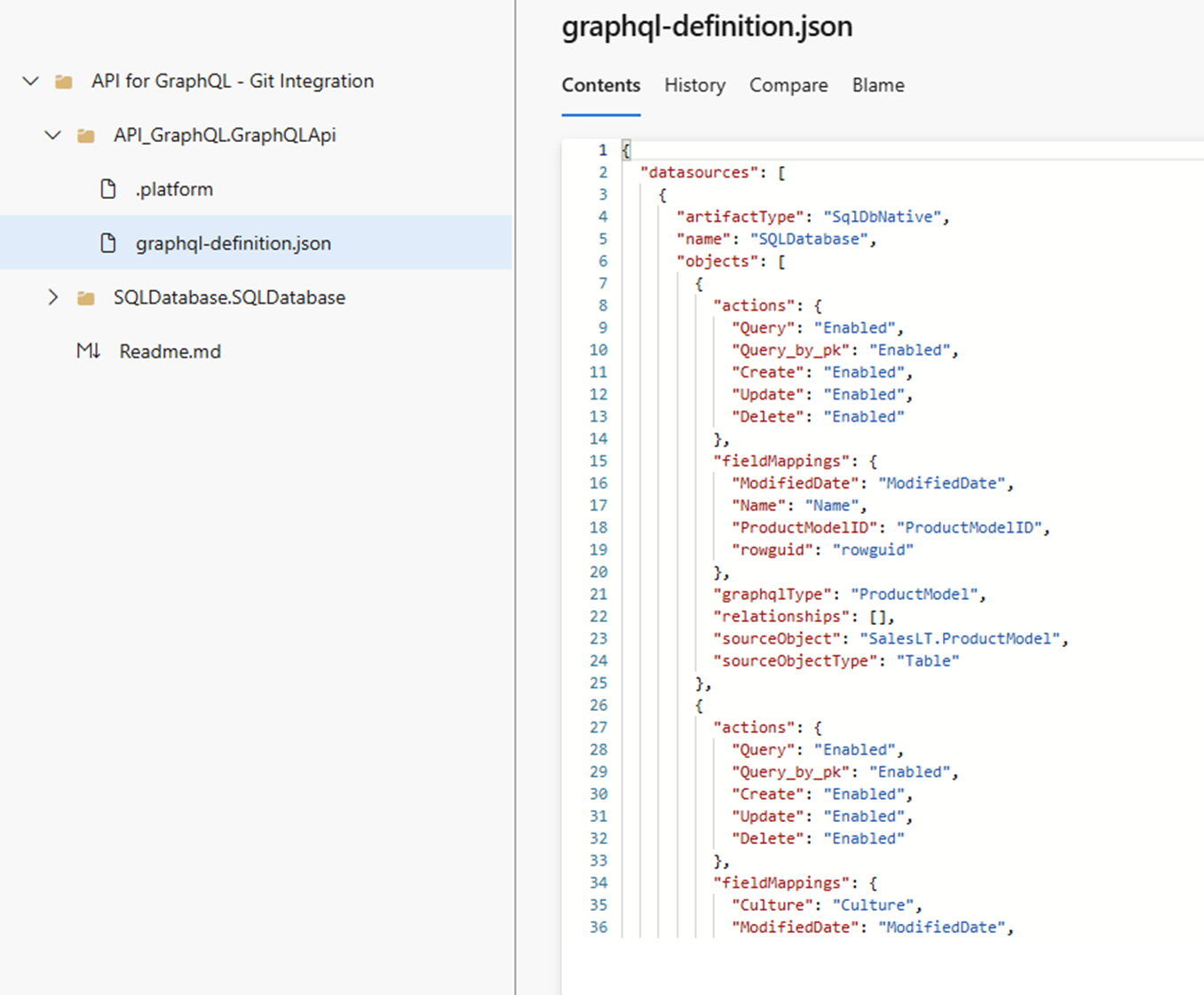
Working with API definition files:
The GraphQL API definition format follows Fabric's Infrastructure as Code (IaC) standards. You can view and edit these files directly in your Git repository, though most modifications should be made through the Fabric portal to ensure schema validity. The definition files are particularly useful for:
- Code reviews: Team members can review API changes in pull requests
- Documentation: The files serve as documentation of your API structure
- Automation: CI/CD pipelines can read these files to understand API configurations
- Disaster recovery: Complete API definitions are preserved in version control
For detailed information about the GraphQL API definition format, syntax, and examples, see the Fabric control plane APIs documentation:
API for GraphQL in deployment pipeline
Deployment pipelines enable you to promote your API for GraphQL configurations across environments (typically Development, Test, and Production). When you deploy an API for GraphQL through a pipeline, only the API metadata is copied—including schema definitions, data source connections, and relationship configurations. The actual data remains in the connected data sources and isn't copied during deployment.
Key deployment considerations:
Before deploying, understand how authentication methods and workspace organization affect your deployment:
- APIs using Single Sign-On (SSO) can autobind to local data sources in the target workspace (when the data source was also deployed from the same source workspace)
- APIs using Saved Credentials don't autobind and remain connected to the source workspace's data source
- Cross-workspace data sources never autobind, regardless of authentication method
For a comprehensive understanding of the deployment process, see Understand the deployment process.
Deploy your API for GraphQL
To deploy your API for GraphQL using deployment pipelines:
Create a new deployment pipeline or open an existing one. For detailed instructions, see Get started with deployment pipelines.
Assign workspaces to the pipeline stages (Development, Test, Production) based on your deployment strategy. Each stage should have a dedicated workspace.
Review and compare items between stages. The pipeline shows which APIs for GraphQL have changed, indicated by item counts in the highlighted areas. This comparison helps you understand what will be affected by the deployment.
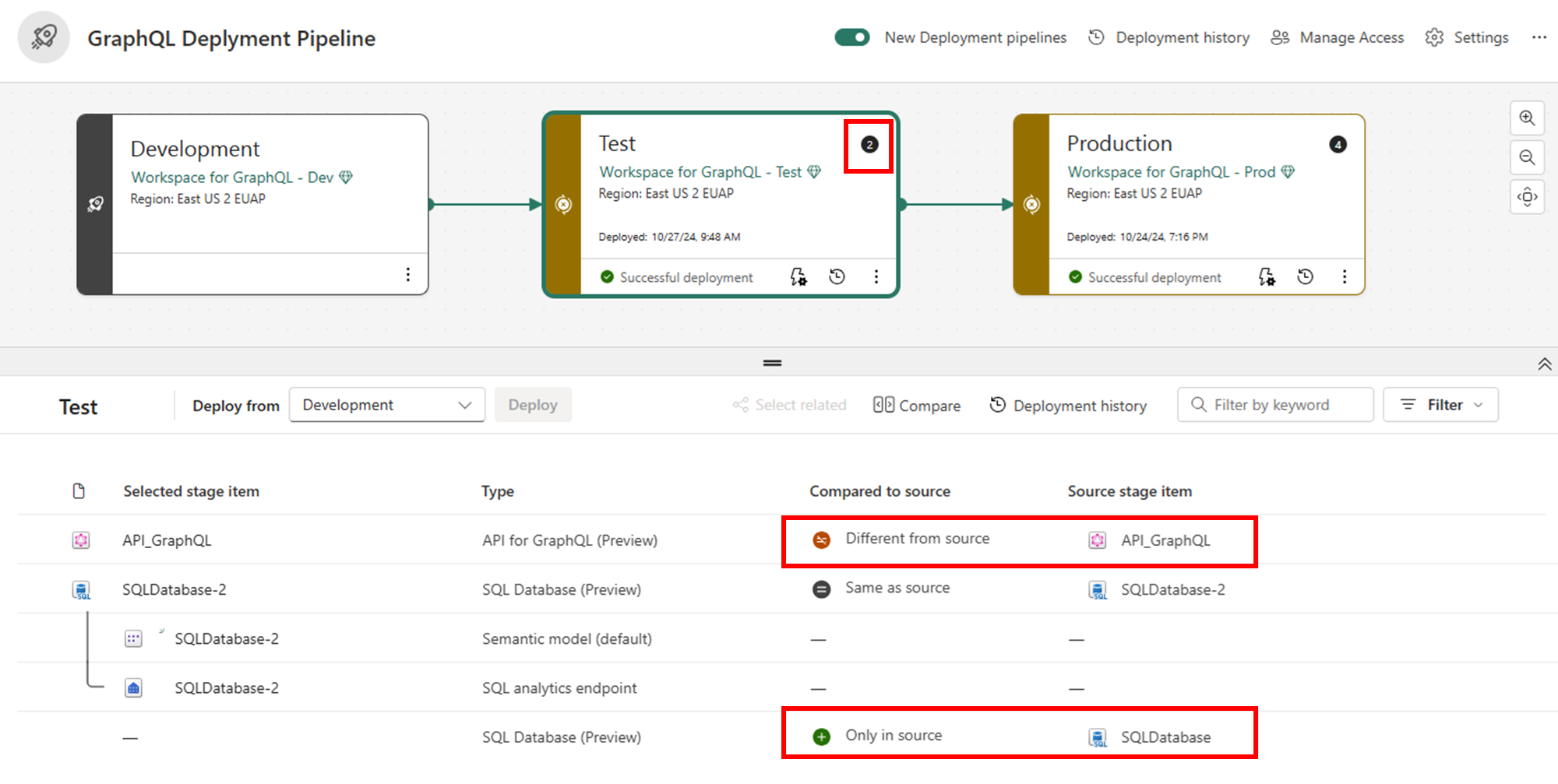
Select the APIs for GraphQL and any related items (such as connected data sources) that you want to deploy. Then select Deploy to move them to the next stage.

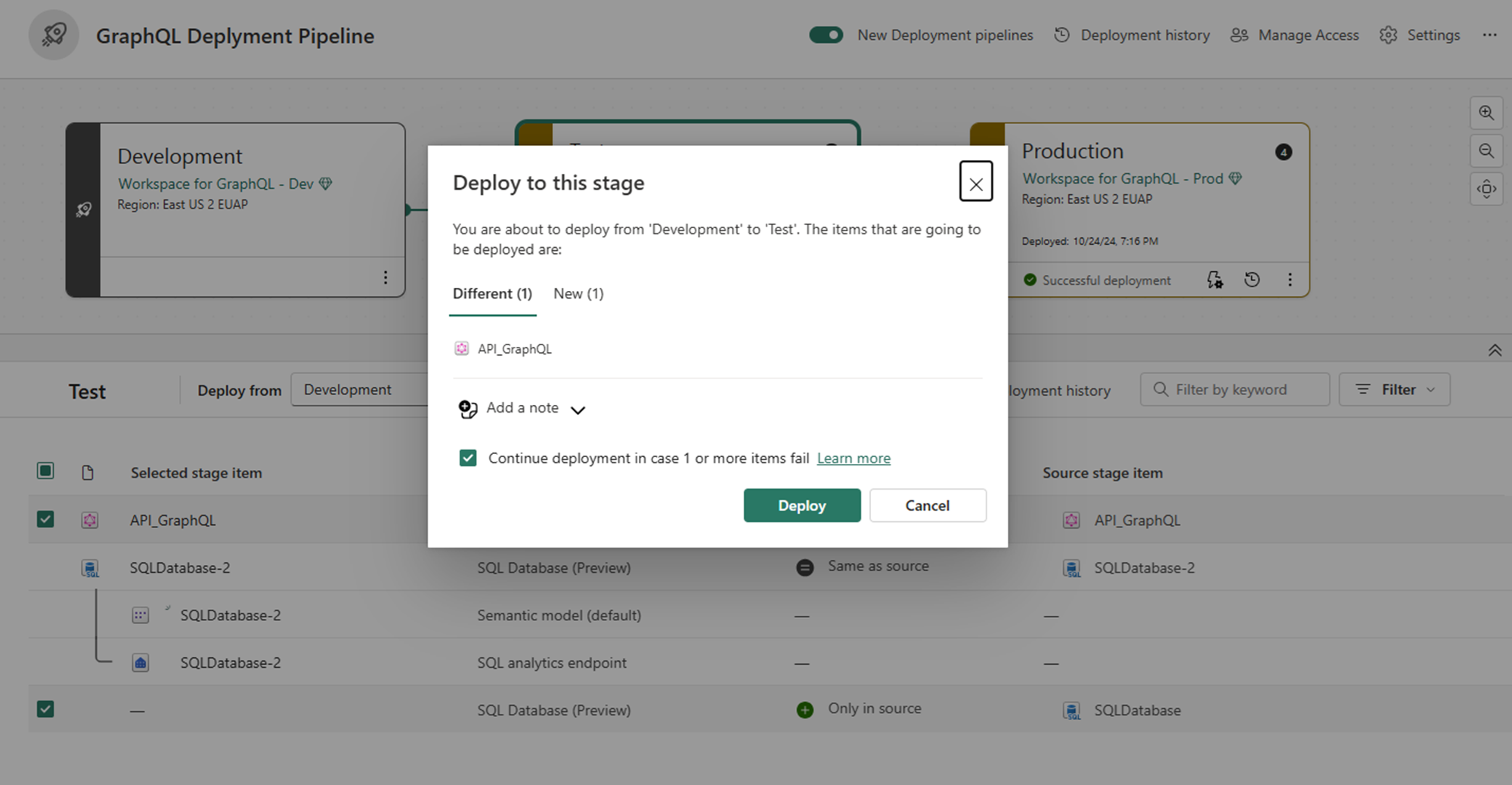
Review the deployment confirmation dialog, which shows all items about to be deployed. Select Deploy to proceed.

Current limitations
When deploying APIs for GraphQL through deployment pipelines, autobinding has the following limitations:
Child items: Autobinding doesn't work when the API connects to a SQL Analytics Endpoint that's a child of a parent data source (such as a Lakehouse). The deployed API remains connected to the source workspace's endpoint.
Saved Credentials: APIs using the Saved Credentials authentication method don't support autobinding. The API remains connected to the source workspace's data source after deployment.
For detailed information about authentication methods and their autobinding behavior, see Data source authentication methods.