Note
Access to this page requires authorization. You can try signing in or changing directories.
Access to this page requires authorization. You can try changing directories.
The medallion lakehouse architecture, commonly known as medallion architecture, is a design pattern that's used to organize data in a lakehouse. It's the recommended design approach for Fabric. Since OneLake is the data lake for Fabric, medallion architecture is implemented by creating lakehouses in OneLake.
Medallion architecture comprises three distinct layers. The three medallion layers are: bronze (raw data), silver (enriched data), and gold (curated data). Each layer indicates the quality of data stored in the lakehouse, with higher levels representing higher quality.
Medallion architecture helps your data stay accurate and reliable according to the principles of atomicity, consistency, isolation, and durability (ACID). Your data starts in its raw form, and the original copies are preserved as a source of truth while your pipelines of validations and transformations prepares the data for analytics.
For more information, see What is the medallion lakehouse architecture?.
Audience
This article introduces medallion lake architecture and describes how you can implement the design pattern in Microsoft Fabric. It's targeted at multiple audiences:
- Data engineers: Technical staff who design, build, and maintain infrastructures and systems that enable their organization to collect, store, process, and analyze large volumes of data.
- Center of Excellence, IT, and BI teams: The teams that are responsible for overseeing analytics throughout the organization.
- Fabric administrators: The administrators who are responsible for overseeing Fabric in the organization.
What is medallion architecture?
The goal of medallion architecture is to incrementally improve the structure and quality of data. Think of medallion architecture as a three-stage cleaning and organizing process for your data. Each layer makes your data more reliable and easier to use.
- Bronze (Raw): Store everything exactly as it arrives. No changes are allowed.
- Silver (Enriched): Fix errors, standardize formats, and remove duplicates.
- Gold (Curated): Organize for reports and dashboards.
Keep each layer separated in its own lakehouse or data warehouse in OneLake, with data moving between the layers as it's transformed and refined.
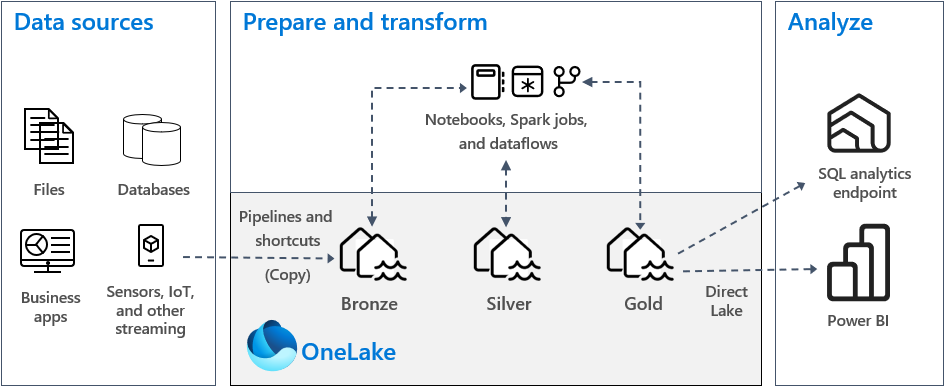
In a typical medallion architecture implementation in Fabric, the bronze layer stores the data in the same format as the data source. When the data source is a relational database, Delta tables are a good choice. The silver and gold layers should contain Delta tables.
Tip
To learn how to create a lakehouse, work through the Lakehouse end-to-end scenario tutorial.
Real-world example
Consider the following example of an e-commerce company that applies medallion architecture to its data:
Bronze Layer:
- Store raw sales data from website (JSON)
- Store raw inventory data from warehouse (CSV)
- Store raw customer data from CRM (SQL export)
Silver Layer:
- Standardize date formats across all sources
- Convert all currency to USD
- Remove test transactions
- Match customer records across systems
Gold Layer:
- Create daily sales dashboard table
- Build customer lifetime value table
- Generate inventory forecasting table
Medallion architecture in OneLake
The basis of a modern data warehouse is a data lake. Microsoft OneLake is a single, unified, logical data lake for your entire organization. It comes automatically provisioned with every Fabric tenant, and it's the single location for all your analytics data.
To store data in OneLake, you create a lakehouse in Fabric. A lakehouse is a data architecture platform for storing, managing, and analyzing structured and unstructured data in a single location. It can scale to large data volumes of all file types and sizes, and because the data is stored in a single location, it can be shared and reused across the organization.
For more information, see What is a lakehouse in Microsoft Fabric?.
Tables and files
When you create a lakehouse in OneLake, two physical storage locations are provisioned automatically:
- Tables stores tables of all formats in Apache Spark (CSV, Parquet, or Delta).
- Files stores data in any file format. If you want to create a table based on data in the files area, you can create a shortcut that points to the folder that contains the table files.
In the bronze layer, you store data in its original format, which might be either tables or files. If the source data is from OneLake, Azure Data Lake Store Gen2 (ADLS Gen2), Amazon S3, or Google, create a shortcut in the bronze layer instead of copying the data across.
In the silver and gold layers, you typically store data in Delta tables. However, you can also store data in Parquet or CSV files. If you do that, you must explicitly create a shortcut or an external table with a location that points to the unmanaged folder that contains the Delta Lake files in Apache Spark.
In Microsoft Fabric, the Lakehouse explorer provides a unified graphical representation of the whole Lakehouse for users to navigate, access, and update their data.
Delta Lake storage
Delta Lake is an optimized storage layer that provides the foundation for storing data and tables. It supports ACID transactions for big data workloads, and for this reason it's the default storage format in a Fabric lakehouse.
Delta Lake delivers reliability, security, and performance in the lakehouse for both streaming and batch operations. Internally, it stores data in Parquet file format, however, it also maintains transaction logs and statistics that provide features and performance improvement over the standard Parquet format.
Delta Lake format delivers the following benefits compared to generic file formats:
- Support for ACID properties, especially durability to prevent data corruption.
- Faster read queries.
- Increased data freshness.
- Support for both batch and streaming workloads.
- Support for data rollback by using Delta Lake time travel.
- Enhanced regulatory compliance and audit by using Delta Lake table history.
Fabric standardizes storage file format with Delta Lake. By default, every workload engine in Fabric creates Delta tables when you write data to a new table. For more information, see Lakehouse and Delta Lake tables.
Deployment model
To implement medallion architecture in Fabric, you can either use lakehouses (one for each layer), a data warehouse, or combination of both. Your decision should be based on your preference and the expertise of your team. With Fabric, you can use different analytic engines that work on the one copy of your data in OneLake.
Here are two patterns to consider:
- Pattern 1: Create each layer as a lakehouse. In this case, business users access data by using the SQL analytics endpoint.
- Pattern 2: Create the bronze and silver layers as lakehouses, and the gold layer as a data warehouse. In this case, business users access data by using the data warehouse endpoint.
While you can create all lakehouses in a single Fabric workspace, we recommend that you create each lakehouse in its own, separate workspace. This approach provides you with more control and better governance at the layer level.
For the bronze layer, we recommend that you store the data in its original format, or use Parquet or Delta Lake. Whenever possible, keep the data in its original format. If the source data is from OneLake, Azure Data Lake Store Gen2 (ADLS Gen2), Amazon S3, or Google, create a shortcut in the bronze layer instead of copying the data across.
For the silver and gold layers, we recommend that you use Delta tables because of the extra capabilities and performance enhancements they provide. Fabric standardizes on Delta Lake format, and by default every engine in Fabric writes data in this format. Further, these engines use V-Order write-time optimization to the Parquet file format. That optimization enables fast reads by Fabric compute engines, such as Power BI, SQL, Apache Spark, and others. For more information, see Delta Lake table optimization and V-Order.
Lastly, today many organizations face massive growth in data volumes, together with an increasing need to organize and manage that data in a logical way while facilitating more targeted and efficient use and governance. That can lead you to establish and manage a decentralized or federated data organization with governance. To meet this objective, consider implementing a data mesh architecture. Data mesh is an architectural pattern that focuses on creating data domains that offer data as a product.
You can create a data mesh architecture for your data estate in Fabric by creating data domains. You might create domains that map to your business domains, for example, marketing, sales, inventory, human resources, and others. You can then implement medallion architecture by setting up data layers within each of your domains. For more information about domains, see Domains.
Use materialized lake views for medallion architecture
Materialized lake views in Microsoft Fabric help you to implement medallion architecture in your lakehouse. Rather than building complex pipelines to transform data between bronze, silver, and gold layers, you can define materialized lake views that automatically manage the transformations.
Key benefits of using materialized lake views for medallion architecture include:
- Declarative pipelines: Define data transformations using SQL statements rather than building manual pipelines between layers.
- Automatic dependency management: Fabric automatically determines the correct execution order based on view dependencies.
- Data quality rules: Built-in support for defining and enforcing data quality constraints as data moves through layers.
- Optimal refresh: The system automatically determines whether to perform incremental, full, or no refresh for each view.
- Visualization and monitoring: View lineage across all layers and track execution progress.
For example, you can create a silver layer view that cleanses and joins data from bronze tables, and then create gold layer views that aggregate the silver layer data for reporting. The system handles the refresh orchestration automatically.
For more information, see Implement medallion architecture with materialized lake views.
Understand Delta table data storage
This section describes other guidance related to implementing a medallion lakehouse architecture in Fabric.
File size
Generally, a big data platform performs better when it has a few large files rather than many small files. Performance degradation occurs when the compute engine has many metadata and file operations to manage. For better query performance, we recommend that you aim for data files that are approximately 1 GB in size.
Delta Lake has a feature called predictive optimization. Predictive optimization automates maintenance operations for Delta tables. When this feature is enabled, Delta Lake identifies tables that would benefit from maintenance operations and then optimizes their storage. While this feature should form part of your operational excellence and your data preparation work, Fabric can optimize data files during data write, too. For more information, see Predictive optimization for Delta Lake.
Historical retention
By default, Delta Lake maintains a history of all changes made, so the size of historical metadata grows over time. Based on your business requirements, keep historical data only for a certain period of time to reduce your storage costs. Consider retaining historical data for only the last month, or other appropriate period of time.
You can remove older historical data from a Delta table by using the VACUUM command. However, by default you can't delete historical data within the last seven days. That restriction maintains the consistency in data. Configure the default number of days with the table property delta.deletedFileRetentionDuration = "interval <interval>". That property determines the period of time that a file must be deleted before it can be considered a candidate for a vacuum operation.
Table partitions
When you store data in each layer, we recommended that you use a partitioned folder structure wherever applicable. This technique improves data manageability and query performance. Generally, partitioned data in a folder structure results in faster search for specific data entries because of partition pruning/elimination.
Typically, you append data to your target table as new data arrives. However, in some cases you might merge data because you need to update existing data at the same time. In that case, you can perform an upsert operation by using the MERGE command. When your target table is partitioned, be sure to use a partition filter to speed up the operation. That way, the engine can eliminate partitions that don't require updating.
Data access
You should plan and control who needs access to specific data in the lakehouse. You should also understand the various transaction patterns they're going to use while accessing this data. You can then define the right table partitioning scheme, and data collocation with Delta Lake Z-order indexes.
Related content
For more information about implementing medallion lakehouse architecture, see the following resources.
- Tutorial: Lakehouse end-to-end scenario
- Tutorial: Implement medallion architecture with materialized lake views
- Lakehouse and Delta Lake tables
- Microsoft Fabric decision guide: choose a data store
- The need for optimize write on Apache Spark
- Questions? Try asking the Fabric community.
- Suggestions? Contribute ideas to improve Fabric.