Remarque
L’accès à cette page nécessite une autorisation. Vous pouvez essayer de vous connecter ou de modifier des répertoires.
L’accès à cette page nécessite une autorisation. Vous pouvez essayer de modifier des répertoires.
Vue d’ensemble
L’API et les services Yield Analytics sont exposés via une interface REST. Il est destiné à faciliter le développement de fonctionnalités personnalisées aux développeurs expérimentés avec les plateformes de développement web 2.0, AJAX, REST et orientées service. Les développeurs doivent être familiarisés avec les paradigmes d’application web, notamment AJAX, XML, JSON et le protocole HTTP(S) avant de tenter de développer avec l’API et les services Yield Analytics.
Le service d’ordre d’insertion expose actuellement des interfaces liées à :
- Garantie de livraison et de capacité des articles de ligne au niveau de la commande
- Livraison historique des articles de ligne au niveau de la commande
Types de contenu
L’API REST de service est actuellement conçue pour prendre en charge le type de contenu suivant :
- JSON - utilisation de
Content-type: application/json
La sélection du type de contenu souhaité est un choix que le développeur d’API doit faire au cas par cas. La fonctionnalité d’API est symétrique entre les types de contenu. Les développeurs d’API peuvent spécifier le type de contenu souhaité dans les paramètres de la méthode HTTP GET ou POST ou via leur bibliothèque de client AJAX ou HTTP.
Vérification des erreurs et codes status
Les développeurs d’API doivent case activée les codes de réponse HTTP retournés par l’API REST du service pour détecter les erreurs propagées à partir des appels d’API. Les appels réussis au service entraînent l’utilisation de 200 codes de réponse de plage. Les réponses HTTP de plage 400 et 500 indiquent des erreurs. Les codes de réponse et le texte spécifiques seront probablement modifiés pendant le développement BÊTA de l’API, mais pas les plages.
Sécurité
L’API de service expose les données d’application de manière sécurisée. L’utilisation des fonctionnalités d’API est limitée aux utilisateurs authentifiés et est exposée via des protocoles de transport sécurisés. L’accès à l’API doit avoir lieu dans le contexte suivant :
Exemple d’authentification cURL
L’authentification se produit en transmettant des informations d’identification via des en-têtes HTTP sur chaque requête.
- username: curl -H "username:username"
- password: curl -H "password:password"
- source: curl -H "source:client_id"
Exemple d’authentification HTTPS
GET /api/v1/rest/
HTTPS/1.1
Host: yieldanalytics.xandr.com
Accept: application/xml, application/json
Content-Type: application/json
username: {{username}}
password: {{password}}
source: {{client_id}}
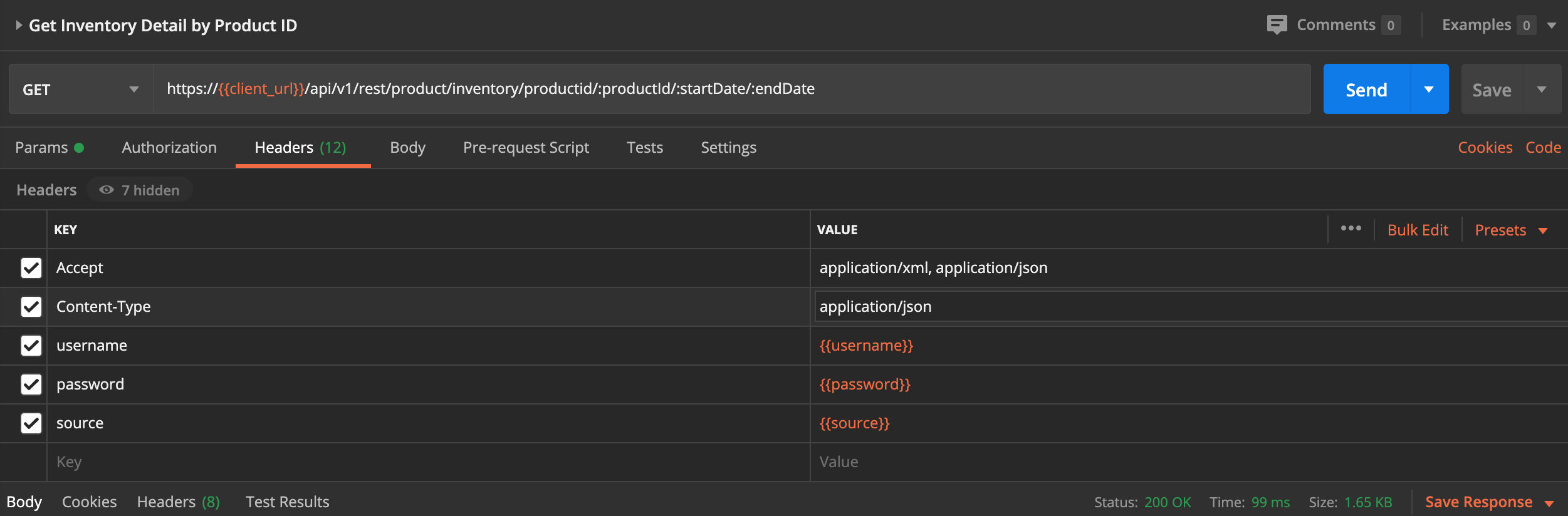
Exemple d’authentification POSTMAN
Recherchez un exemple de paramètres d’en-tête dans Postman ci-dessous :
Remarque
- 'Authorization' est défini sur « No Auth » ; Les paramètres ci-dessous doivent être placés sous l’onglet « En-têtes ».
- Pour obtenir un didacticiel plus approfondi sur l’utilisation de Postman, consultez Utilisation de Postman avec l’API Yield Analytics.
Confidentialité
La confidentialité est maintenue à l’aide de la communication basée sur la couche de sockets sécurisés pour interagir avec l’API Yield Analytics. Les développeurs d’API doivent préférer l’utilisation du protocole HTTPS à la communication http non sécurisée dans la mesure du possible. Consultez votre bibliothèque cliente HTTP pour savoir comment activer HTTP sur SSL lors du développement en dehors d’un contexte de navigateur web.
Paths
Obtenir une capacité garantie pour une commande unique
GET /api/v1/rest/order/capacity/future/{externalId}/{nbDays}
Description
Obtenez une capacité dynamique de livraison garantie au format CSV pour un fuseau horaire particulier.
Paramètres
Type Nom Description Obligatoire Schéma PathParameter timeZone timeZone true string PathParameter nbDays nbDays true integer (int32) HeaderParameter username Votre nom d’utilisateur pour accéder à l’API Yield Analytics true string HeaderParameter mot de passe Votre mot de passe pour accéder à l’API Yield Analytics true chaîne HeaderParameter source Votre source cliente pour accéder à l’API Yield Analytics true string Réponses
HTTP Code Description Schéma 200 OK Tableau InsertionOrderResponse Consomme
application/json
Produit
application/json
Tags
Points de terminaison de service d’ordre d’insertion
Exemple de demande cURL
$ curl 'https://{{client_url}}/api/v1/rest/v1/rest/order/capacity/future/1/1' -i -H 'Content-Type: application/json'
  -H 'Accept: application/json' -H 'username: {{username}}' -H 'password: {{password}}' -H 'source: {{source}}'
Exemple de requête HTTP
GET /api/v1/rest/order/capacity/future/1/1 HTTP/1.1
Content-Type: application/json
Accept: application/json
username: {{username}}
password: {{password}}
source: {{source}}
Host: https://{{client_url}}/api/v1/rest
Exemple de réponse HTTP
HTTP/1.1 200 OK
Content-Type: application/json;charset=UTF-8
Content-Length: 2567

[ {
"externalId" : "1",
"nextHours" : {
"20200619T05:00+1000" : 1000,
"20200619T12:00+1000" : 1000,
"20200619T06:00+1000" : 1000,
"20200619T13:00+1000" : 1000,
"20200619T20:00+1000" : 1000,
"20200619T04:00+1000" : 1000,
"20200619T07:00+1000" : 1000,
"20200619T21:00+1000" : 1000,
"20200619T03:00+1000" : 1000,
"20200619T10:00+1000" : 1000,
"20200619T08:00+1000" : 1000,
"20200619T11:00+1000" : 1000,
"20200619T02:00+1000" : 1000,
"20200619T17:00+1000" : 1000,
"20200619T00:00+1000" : 1000,
"20200619T09:00+1000" : 1000,
"20200619T16:00+1000" : 1000,
"20200619T23:00+1000" : 1000,
"20200619T18:00+1000" : 1000,
"20200619T15:00+1000" : 1000,
"20200619T01:00+1000" : 1000,
"20200619T19:00+1000" : 1000,
"20200619T14:00+1000" : 1000,
"20200619T22:00+1000" : 1000
},
"nextDays" : {
"20200619T00:00+1000" : 240000
},
"targetings" : [ {
"start" : "2020-03-19",
"end" : "2020-06-19",
"expression" : "country in ('australia') and size in ('160x600') and site in ('outlook au desktop') and segment-3222986 in ('true')
and segment-4836884 in ('true') and segment-4860903 in ('true') or country in ('australia') and size in ('160x600') and
site in ('outlook au desktop') and segment-3222986 in ('true') and segment-4836884 in ('true') and segment-4860908 in ('true')
or country in ('australia') and size in ('160x600') and site in ('outlook au desktop') and segment-3222986 in ('true') and
segment-4860903 in ('true') and segment-4860941 in ('true') or country in ('australia') and size in ('160x600') and
site in ('outlook au desktop') and segment-3222986 in ('true') and segment-4860908 in ('true') and
segment-4860941 in ('true') or country in ('australia') and size in ('160x600') and site in ('outlook au desktop') and
segment-3222990 in ('true') and segment-4836884 in ('true') and segment-4860903 in ('true') or country in ('australia') and
size in ('160x600') and site in ('outlook au desktop') and segment-3222990 in ('true') and segment-4836884 in ('true') and
segment-4860908 in ('true') or country in ('australia') and size in ('160x600') and site in ('outlook au desktop') and
segment-3222990 in ('true') and segment-4860903 in ('true') and segment-4860941 in ('true') or country in ('australia') and
size in ('160x600') and site in ('outlook au desktop') and segment-3222990 in ('true') and segment-4860908 in ('true') and
segment-4860941 in ('true')",
"impressionCap" : 5,
"impressionCapPeriod" : 77,
"dynamic" : false
} ]
} ]
Obtenir une capacité dynamique de livraison garantie au format CSV pour un fuseau horaire unique
GET /api/v1/rest/order/capacity/guaranteed/future/csv/{nbDays}/{timeZone}
Description
Obtenez une capacité dynamique de livraison garantie au format CSV pour un fuseau horaire particulier.
Paramètres
Type Nom Description Obligatoire Schéma PathParameter timeZone timeZone true string PathParameter nbDays nbDays true integer (int32) HeaderParameter username Votre nom d’utilisateur pour accéder à l’API Yield Analytics true string HeaderParameter mot de passe Votre mot de passe pour accéder à l’API Yield Analytics true string HeaderParameter source Votre source cliente pour accéder à l’API Yield Analytics true string Réponses
HTTP Code Description Schéma 200 OK string Consomme
test/csv
Produit
test/csv
Tags
Points de terminaison de service d’ordre d’insertion
Obtenir une capacité dynamique de livraison garantie au format CSV par groupe d’ID de commande pour le fuseau horaire double
POST /api/v1/rest/order/capacity/guaranteed/future/orderids/csv/{nbDays}/{timeZone}/{timeZoneSecond}
Description
Obtenez une capacité dynamique de livraison garantie au format CSV pour un groupe de commandes dans un fuseau horaire.
Paramètres
Type Nom Description Obligatoire Schéma PathParameter timeZone timeZone true string PathParameter timeZoneSecond timeZoneSecond true string PathParameter nbDays nbDays true integer (int32) BodyParameter externalOrderIdPool externalOrderIdPool true ExternalOrderIdPool HeaderParameter username Votre nom d’utilisateur pour accéder à l’API Yield Analytics true string HeaderParameter mot de passe Votre mot de passe pour accéder à l’API Yield Analytics true string HeaderParameter source Votre source cliente pour accéder à l’API Yield Analytics true string Réponses
HTTP Code Description Schéma 200 OK string Consomme
test/csv
Produit
test/csv
Tags
Points de terminaison de service d’ordre d’insertion
Obtenir une capacité dynamique de livraison garantie au format CSV par groupe d’ID de commande pour un fuseau horaire unique
POST /api/v1/rest/order/capacity/guaranteed/future/orderids/csv/{nbDays}/{timeZone}
Description
Obtenez une capacité dynamique de livraison garantie au format CSV pour un groupe de commandes dans un fuseau horaire.
Paramètres
Type Nom Description Obligatoire Schéma PathParameter timeZone timeZone true string PathParameter nbDays nbDays true integer (int32) BodyParameter externalOrderIdPool externalOrderIdPool true ExternalOrderIdPool HeaderParameter username Votre nom d’utilisateur pour accéder à l’API Yield Analytics true string HeaderParameter mot de passe Votre mot de passe pour accéder à l’API Yield Analytics true string HeaderParameter source Votre source cliente pour accéder à l’API Yield Analytics true string Réponses
HTTP Code Description Schéma 200 OK string Consomme
application/json
Produit
test/csv
Tags
Points de terminaison de service d’ordre d’insertion
Obtenir une capacité dynamique de livraison garantie au format CSV par groupe d’ID de commande pour le fuseau horaire double
POST /api/v1/rest/order/capacity/guaranteed/future/orderids/csv/{nbDays}/{timeZone}/{timeZoneSecond}
Description
Obtenez une capacité dynamique de livraison garantie au format CSV pour un groupe de commandes pour un fuseau horaire double.
Paramètres
Type Nom Description Obligatoire Schéma PathParameter timeZone timeZone true string PathParameter timeZoneSecond timeZoneSecond true chaîne PathParameter nbDays nbDays true integer (int32) BodyParameter externalOrderIdPool externalOrderIdPool true ExternalOrderIdPool HeaderParameter username Votre nom d’utilisateur pour accéder à l’API Yield Analytics true string HeaderParameter mot de passe Votre mot de passe pour accéder à l’API Yield Analytics true string HeaderParameter source Votre source cliente pour accéder à l’API Yield Analytics true string Réponses
HTTP Code Description Schéma 200 OK string Consomme
application/json
Produit
test/csv
Tags
Points de terminaison de service d’ordre d’insertion
Obtenir une capacité dynamique de livraison garantie au format CSV par groupe d’ID de commande pour un fuseau horaire unique
POST /api/v1/rest/order/capacity/guaranteed/future/orderids/{nbDays}/{timeZone}
Description
Obtenez une capacité garantie pour un groupe de commandes dans un fuseau horaire.
Paramètres
Type Nom Description Obligatoire Schéma PathParameter timeZone timeZone true string PathParameter nbDays nbDays true integer (int32) BodyParameter externalOrderIdPool externalOrderIdPool true ExternalOrderIdPool HeaderParameter username Votre nom d’utilisateur pour accéder à l’API Yield Analytics true chaîne HeaderParameter mot de passe Votre mot de passe pour accéder à l’API Yield Analytics true string HeaderParameter source Votre source cliente pour accéder à l’API Yield Analytics true string Réponses
HTTP Code Description Schéma 200 OK Tableau InsertionOrderResponse Consomme
application/json
Produit
test/csv
Tags
Points de terminaison de service d’ordre d’insertion
Exemple de demande cURL
$ curl 'https://{{client_url}}/api/v1/rest/v1/rest/order/capacity/guaranteed/future/orderids/1/EST' -i -X
POST -H 'Content-Type: application/json;charset=UTF-8' -d '{
"externalOrderIdPool" :
{
"orderIds" : [ "1" ]
}
}'
Exemple de requête HTTP
POST /api/v1/rest/order/capacity/guaranteed/future/orderids/1/EST HTTP/1.1
Content-Type: application/json;charset=UTF-8
Host: https://{{client_url}}/api/v1/rest
Content-Length: 60

{
"externalOrderIdPool" : {
"orderIds" : [ "1" ]
}
}
Exemple de réponse HTTP
HTTP/1.1 200 OK
Content-Type: application/json;charset=UTF-8
Content-Length: 2567

[ {
"externalId" : "1",
"nextHours" : {
"20200619T05:00+1000" : 1000,
"20200619T12:00+1000" : 1000,
"20200619T06:00+1000" : 1000,
"20200619T13:00+1000" : 1000,
"20200619T20:00+1000" : 1000,
"20200619T04:00+1000" : 1000,
"20200619T07:00+1000" : 1000,
"20200619T21:00+1000" : 1000,
"20200619T03:00+1000" : 1000,
"20200619T10:00+1000" : 1000,
"20200619T08:00+1000" : 1000,
"20200619T11:00+1000" : 1000,
"20200619T02:00+1000" : 1000,
"20200619T17:00+1000" : 1000,
"20200619T00:00+1000" : 1000,
"20200619T09:00+1000" : 1000,
"20200619T16:00+1000" : 1000,
"20200619T23:00+1000" : 1000,
"20200619T18:00+1000" : 1000,
"20200619T15:00+1000" : 1000,
"20200619T01:00+1000" : 1000,
"20200619T19:00+1000" : 1000,
"20200619T14:00+1000" : 1000,
"20200619T22:00+1000" : 1000
},
"nextDays" : {
"20200619T00:00+1000" : 240000
},
"targetings" : [ {
"start" : "2020-03-19",
"end" : "2020-06-19",
"expression" : "country in ('australia') and size in ('160x600') and site in ('outlook au desktop') and segment-3222986 in ('true')
and segment-4836884 in ('true') and segment-4860903 in ('true') or country in ('australia') and size in ('160x600') and
site in ('outlook au desktop') and segment-3222986 in ('true') and segment-4836884 in ('true') and segment-4860908 in ('true') or
country in ('australia') and size in ('160x600') and site in ('outlook au desktop') and segment-3222986 in ('true') and
segment-4860903 in ('true') and segment-4860941 in ('true') or country in ('australia') and size in ('160x600') and
site in ('outlook au desktop') and segment-3222986 in ('true') and segment-4860908 in ('true') and segment-4860941 in ('true') or
country in ('australia') and size in ('160x600') and site in ('outlook au desktop') and segment-3222990 in ('true') and
segment-4836884 in ('true') and segment-4860903 in ('true') or country in ('australia') and size in ('160x600') and
site in ('outlook au desktop') and segment-3222990 in ('true') and segment-4836884 in ('true') and segment-4860908 in ('true') or
country in ('australia') and size in ('160x600') and site in ('outlook au desktop') and segment-3222990 in ('true') and
segment-4860903 in ('true') and segment-4860941 in ('true') or country in ('australia') and size in ('160x600') and
site in ('outlook au desktop') and segment-3222990 in ('true') and segment-4860908 in ('true') and segment-4860941 in ('true')",
"impressionCap" : 5,
"impressionCapPeriod" : 77,
"dynamic" : false
} ]
} ]
Obtenir une capacité dynamique de livraison garantie par groupe d’ID de commande pour le fuseau horaire double
POST /api/v1/rest/order/capacity/guaranteed/future/orderids/{nbDays}/{timeZone}/{timeZoneSecond}
Description
Obtenez une capacité garantie pour un groupe de commandes pour un fuseau horaire double.
Paramètres
Type Nom Description Obligatoire Schéma PathParameter timeZone timeZone true string PathParameter timeZoneSecond timeZoneSecond true string PathParameter nbDays nbDays true integer (int32) BodyParameter externalOrderIdPool externalOrderIdPool true ExternalOrderIdPool HeaderParameter username Votre nom d’utilisateur pour accéder à l’API Yield Analytics true chaîne HeaderParameter mot de passe Votre mot de passe pour accéder à l’API Yield Analytics true chaîne HeaderParameter source Votre source cliente pour accéder à l’API Yield Analytics true string Réponses
HTTP Code Description Schéma 200 OK Tableau InsertionOrderResponse Consomme
application/json
Produit
application/json
Tags
Points de terminaison de service d’ordre d’insertion
Exemple de demande cURL
$ curl 'https://{{client_url}}/api/v1/rest/v1/rest/order/capacity/guaranteed/future/orderids/1/Australia/Sydney' -i -X
  POST -H 'Content-Type: application/json;charset=UTF-8' -d '{
  "externalOrderIdPool" :
  {
    "orderIds" : [ "1" ]
  }
}'
Exemple de requête HTTP
POST /api/v1/rest/order/capacity/guaranteed/future/orderids/1/Australia/Sydney HTTP/1.1
Content-Type: application/json;charset=UTF-8
Host: https://{{client_url}}/api/v1/rest
Content-Length: 60

{
  "externalOrderIdPool" : {
    "orderIds" : [ "1" ]
  }
}
Exemple de réponse HTTP
HTTP/1.1 200 OK
Content-Type: application/json;charset=UTF-8
Content-Length: 2567

[ {
  "externalId" : "1",
  "nextHours" : {
    "20200619T05:00+1000" : 1000,
    "20200619T12:00+1000" : 1000,
    "20200619T06:00+1000" : 1000,
    "20200619T13:00+1000" : 1000,
    "20200619T20:00+1000" : 1000,
    "20200619T04:00+1000" : 1000,
    "20200619T07:00+1000" : 1000,
    "20200619T21:00+1000" : 1000,
    "20200619T03:00+1000" : 1000,
    "20200619T10:00+1000" : 1000,
    "20200619T08:00+1000" : 1000,
    "20200619T11:00+1000" : 1000,
    "20200619T02:00+1000" : 1000,
    "20200619T17:00+1000" : 1000,
    "20200619T00:00+1000" : 1000,
    "20200619T09:00+1000" : 1000,
    "20200619T16:00+1000" : 1000,
    "20200619T23:00+1000" : 1000,
    "20200619T18:00+1000" : 1000,
    "20200619T15:00+1000" : 1000,
    "20200619T01:00+1000" : 1000,
    "20200619T19:00+1000" : 1000,
    "20200619T14:00+1000" : 1000,
    "20200619T22:00+1000" : 1000
  },
  "nextDays" : {
    "20200619T00:00+1000" : 240000
  },
  "targetings" : [ {
    "start" : "2020-03-19",
    "end" : "2020-06-19",
    "expression" : "country in ('australia') and size in ('160x600') and site in ('outlook au desktop') and segment-3222986 in ('true') and
     segment-4836884 in ('true') and segment-4860903 in ('true') or country in ('australia') and size in ('160x600') and
     site in ('outlook au desktop') and segment-3222986 in ('true') and segment-4836884 in ('true') and segment-4860908 in ('true') or
     country in ('australia') and size in ('160x600') and site in ('outlook au desktop') and segment-3222986 in ('true') and
     segment-4860903 in ('true') and segment-4860941 in ('true') or country in ('australia') and size in ('160x600') and
     site in ('outlook au desktop') and segment-3222986 in ('true') and segment-4860908 in ('true') and
     segment-4860941 in ('true') or country in ('australia') and size in ('160x600') and site in ('outlook au desktop') and
     segment-3222990 in ('true') and segment-4836884 in ('true') and segment-4860903 in ('true') or country in ('australia') and
     size in ('160x600') and site in ('outlook au desktop') and segment-3222990 in ('true') and segment-4836884 in ('true') and
     segment-4860908 in ('true') or country in ('australia') and size in ('160x600') and site in ('outlook au desktop') and
     segment-3222990 in ('true') and segment-4860903 in ('true') and segment-4860941 in ('true') or country in ('australia') and
     size in ('160x600') and site in ('outlook au desktop') and segment-3222990 in ('true') and segment-4860908 in ('true') and
     segment-4860941 in ('true')",
    "impressionCap" : 5,
    "impressionCapPeriod" : 77,
    "dynamic" : false
  } ]
} ]
Obtenir une capacité dynamique de livraison garantie par groupe d’ID de commande pour un fuseau horaire unique
GET /api/v1/rest/order/capacity/guaranteed/future/{nbDays}/{timeZone}
Description
Obtenez une capacité garantie pour un groupe de commandes dans un fuseau horaire.
Paramètres
Type Nom Description Obligatoire Schéma PathParameter timeZone timeZone true string PathParameter nbDays nbDays true integer (int32) BodyParameter externalOrderIdPool externalOrderIdPool true ExternalOrderIdPool HeaderParameter username Votre nom d’utilisateur pour accéder à l’API Yield Analytics true string HeaderParameter mot de passe Votre mot de passe pour accéder à l’API Yield Analytics true string HeaderParameter source Votre source cliente pour accéder à l’API Yield Analytics true string Réponses
HTTP Code Description Schéma 200 OK Tableau InsertionOrderResponse Consomme
application/json
Produit
application/json
Tags
Points de terminaison de service d’ordre d’insertion
Exemple de demande cURL
$ curl 'https://{{client_url}}/api/v1/rest/v1/rest/order/capacity/guaranteed/future/orderids/1/EST' -i -X POST
   -H 'Content-Type: application/json;charset=UTF-8' -d '{
   "externalOrderIdPool" :
  {
    "orderIds" : [ "1" ]
  }
}'
Exemple de requête HTTP
POST /api/v1/rest/order/capacity/guaranteed/future/orderids/1/EST HTTP/1.1
Content-Type: application/json;charset=UTF-8
Host: https://{{client_url}}/api/v1/rest
Content-Length: 60

{
  "externalOrderIdPool" : {
    "orderIds" : [ "1" ]
  }
}
Exemple de réponse HTTP
HTTP/1.1 200 OK
Content-Type: application/json;charset=UTF-8
Content-Length: 2567

[ {
  "externalId" : "1",
  "nextHours" : {
    "20200619T05:00+1000" : 1000,
    "20200619T12:00+1000" : 1000,
    "20200619T06:00+1000" : 1000,
    "20200619T13:00+1000" : 1000,
    "20200619T20:00+1000" : 1000,
    "20200619T04:00+1000" : 1000,
    "20200619T07:00+1000" : 1000,
    "20200619T21:00+1000" : 1000,
    "20200619T03:00+1000" : 1000,
    "20200619T10:00+1000" : 1000,
    "20200619T08:00+1000" : 1000,
    "20200619T11:00+1000" : 1000,
    "20200619T02:00+1000" : 1000,
    "20200619T17:00+1000" : 1000,
    "20200619T00:00+1000" : 1000,
    "20200619T09:00+1000" : 1000,
    "20200619T16:00+1000" : 1000,
    "20200619T23:00+1000" : 1000,
    "20200619T18:00+1000" : 1000,
    "20200619T15:00+1000" : 1000,
    "20200619T01:00+1000" : 1000,
    "20200619T19:00+1000" : 1000,
    "20200619T14:00+1000" : 1000,
    "20200619T22:00+1000" : 1000
  },
  "nextDays" : {
    "20200619T00:00+1000" : 240000
  },
  "targetings" : [ {
    "start" : "2020-03-19",
    "end" : "2020-06-19",
    "expression" : "country in ('australia') and size in ('160x600') and site in ('outlook au desktop') and segment-3222986 in ('true')
     and segment-4836884 in ('true') and segment-4860903 in ('true') or country in ('australia') and size in ('160x600') and
     site in ('outlook au desktop') and segment-3222986 in ('true') and segment-4836884 in ('true') and segment-4860908 in ('true') or
     country in ('australia') and size in ('160x600') and site in ('outlook au desktop') and segment-3222986 in ('true') and
     segment-4860903 in ('true') and segment-4860941 in ('true') or country in ('australia') and size in ('160x600') and
     site in ('outlook au desktop') and segment-3222986 in ('true') and segment-4860908 in ('true') and segment-4860941 in ('true') or
     country in ('australia') and size in ('160x600') and site in ('outlook au desktop') and segment-3222990 in ('true') and
     segment-4836884 in ('true') and segment-4860903 in ('true') or country in ('australia') and size in ('160x600') and
     site in ('outlook au desktop') and segment-3222990 in ('true') and segment-4836884 in ('true') and segment-4860908 in ('true') or
     country in ('australia') and size in ('160x600') and site in ('outlook au desktop') and segment-3222990 in ('true') and
     segment-4860903 in ('true') and segment-4860941 in ('true') or country in ('australia') and size in ('160x600') and
     site in ('outlook au desktop') and segment-3222990 in ('true') and segment-4860908 in ('true') and segment-4860941 in ('true')",
    "impressionCap" : 5,
    "impressionCapPeriod" : 77,
    "dynamic" : false
  } ]
} ]
Obtenir une capacité dynamique de livraison garantie pour le double fuseau horaire
GET /api/v1/rest/order/capacity/guaranteed/future/{nbDays}/{timeZone}/{timeZoneSecond}
Description
Obtenez une capacité garantie pour un groupe de commandes pour un fuseau horaire double.
Paramètres
Type Nom Description Obligatoire Schéma PathParameter timeZone timeZone true string PathParameter timeZoneSecond timeZoneSecond true chaîne PathParameter nbDays nbDays true integer (int32) BodyParameter externalOrderIdPool externalOrderIdPool true ExternalOrderIdPool HeaderParameter username Votre nom d’utilisateur pour accéder à l’API Yield Analytics true string HeaderParameter mot de passe Votre mot de passe pour accéder à l’API Yield Analytics true string HeaderParameter source Votre source cliente pour accéder à l’API Yield Analytics true string Réponses
HTTP Code Description Schéma 200 OK Tableau InsertionOrderResponse Consomme
application/json
Produit
application/json
Tags
Points de terminaison de service d’ordre d’insertion
Exemple de demande cURL
$ curl 'https://{{client_url}}/api/v1/rest/v1/rest/order/capacity/guaranteed/future/1/Australia/Sydney'
-i -H 'Content-Type: application/json' -H 'Accept: application/json'
-H 'username: {{username}}' -H 'password: {{password}}' -H 'source: {{source}}'
Exemple de requête HTTP
GET /api/v1/rest/order/capacity/guaranteed/future/1/Australia/Sydney HTTP/1.1
Content-Type: application/json
Accept: application/json
username: {{username}}
password: {{password}}
source: {{source}}
Host: https://{{client_url}}/api/v1/rest
Exemple de réponse HTTP
HTTP/1.1 200 OK
Content-Type: application/json;charset=UTF-8
Content-Length: 2567

[ {
  "externalId" : "1",
  "nextHours" : {
    "20200619T05:00+1000" : 1000,
    "20200619T12:00+1000" : 1000,
    "20200619T06:00+1000" : 1000,
    "20200619T13:00+1000" : 1000,
    "20200619T20:00+1000" : 1000,
    "20200619T04:00+1000" : 1000,
    "20200619T07:00+1000" : 1000,
    "20200619T21:00+1000" : 1000,
    "20200619T03:00+1000" : 1000,
    "20200619T10:00+1000" : 1000,
    "20200619T08:00+1000" : 1000,
    "20200619T11:00+1000" : 1000,
    "20200619T02:00+1000" : 1000,
    "20200619T17:00+1000" : 1000,
    "20200619T00:00+1000" : 1000,
    "20200619T09:00+1000" : 1000,
    "20200619T16:00+1000" : 1000,
    "20200619T23:00+1000" : 1000,
    "20200619T18:00+1000" : 1000,
    "20200619T15:00+1000" : 1000,
    "20200619T01:00+1000" : 1000,
    "20200619T19:00+1000" : 1000,
    "20200619T14:00+1000" : 1000,
    "20200619T22:00+1000" : 1000
  },
  "nextDays" : {
    "20200619T00:00+1000" : 240000
  },
  "targetings" : [ {
    "start" : "2020-03-19",
    "end" : "2020-06-19",
    "expression" : "country in ('australia') and size in ('160x600') and site in ('outlook au desktop') and segment-3222986 in ('true')
     and segment-4836884 in ('true') and segment-4860903 in ('true') or country in ('australia') and size in ('160x600') and
     site in ('outlook au desktop') and segment-3222986 in ('true') and segment-4836884 in ('true') and segment-4860908 in ('true') or
     country in ('australia') and size in ('160x600') and site in ('outlook au desktop') and segment-3222986 in ('true') and
     segment-4860903 in ('true') and segment-4860941 in ('true') or country in ('australia') and size in ('160x600') and
     site in ('outlook au desktop') and segment-3222986 in ('true') and segment-4860908 in ('true') and segment-4860941 in ('true') or
     country in ('australia') and size in ('160x600') and site in ('outlook au desktop') and segment-3222990 in ('true') and
     segment-4836884 in ('true') and segment-4860903 in ('true') or country in ('australia') and size in ('160x600') and
     site in ('outlook au desktop') and segment-3222990 in ('true') and segment-4836884 in ('true') and
     segment-4860908 in ('true') or country in ('australia') and size in ('160x600') and site in ('outlook au desktop') and
     segment-3222990 in ('true') and segment-4860903 in ('true') and segment-4860941 in ('true') or country in ('australia') and
     size in ('160x600') and site in ('outlook au desktop') and segment-3222990 in ('true') and segment-4860908 in ('true')
     and segment-4860941 in ('true')",
    "impressionCap" : 5,
    "impressionCapPeriod" : 77,
    "dynamic" : false
  } ]
} ]
Obtenir une capacité d’historique de livraison garantie au format JSON
Paramètres
Type Nom Description Obligatoire Schéma PathParameter externalId externalId true string PathParameter startDate startDate true string PathParameter endDate endDate true string HeaderParameter username Votre nom d’utilisateur pour accéder à l’API Yield Analytics true chaîne HeaderParameter mot de passe Votre mot de passe pour accéder à l’API Yield Analytics true string HeaderParameter source Votre source cliente pour accéder à l’API Yield Analytics true chaîne Réponses
HTTP Code Description Schéma 200 OK OrderDeliveryInfo Consomme
application/json
Produit
application/json
Tags
Points de terminaison de service d’ordre d’insertion
Exemple de demande cURL
$ curl 'https://{{client_url}}/api/v1/rest/v1/rest/order/delivery/1/2016-06-01/2016-07-01' -i -H
'Content-Type: application/json' -H 'Accept: application/json'
-H 'username: {{username}}' -H 'password: {{password}}' -H 'source: {{source}}'
Exemple de requête HTTP
GET /api/v1/rest/order/delivery/1/2016-06-01/2016-07-01 HTTP/1.1
Content-Type: application/json
Accept: application/json
username: {{username}}
password: {{password}}
source: {{source}}
Host: https://{{client_url}}/api/v1/rest
Exemple de réponse HTTP
HTTP/1.1 200 OK
Content-Type: application/json;charset=UTF-8
Content-Length: 241

{
  "externalOrderId" : "1",
  "impressions" : 20,
  "orderLineDeliveryDetail" : {
    "1" : [ {
      "impressions" : 10,
      "date" : "05/19/2020"
    } ],
    "2" : [ {
      "impressions" : 10,
      "date" : "06/19/2020"
    } ]
  }
}
Obtenir l’inventaire des commandes d’insertion avec JSON
POST /api/v1/rest/order/inventory/apas/{startDate}/{endDate}/{consumptionFilter}
Description
Obtenir l’inventaire des commandes d’insertion avec JSON.
Paramètres
Type Nom Description Obligatoire Schéma PathParameter startDate startDate true string PathParameter endDate endDate true string PathParameter consumptionFilter consumptionFilter true string PathParameter matrixVars matrixVars false objet BodyParameter body body true string HeaderParameter username Votre nom d’utilisateur pour accéder à l’API Yield Analytics true string HeaderParameter mot de passe Votre mot de passe pour accéder à l’API Yield Analytics true string HeaderParameter source Votre source cliente pour accéder à l’API Yield Analytics true string Réponses
HTTP Code Description Schéma 200 OK Tableau InsertionOrderResponse Consomme
application/json
Produit
application/json
Tags
Points de terminaison de service d’ordre d’insertion
Obtenir l’inventaire et la contention des ordres d’insertion avec JSON
POST /api/v1/rest/order/inventoryandcontention/apas/{startDate}/{endDate}/{consumptionFilter}
Description
Obtenir l’inventaire et la contention de l’ordre d’insertion avec JSON.
Paramètres
Type Nom Description Obligatoire Schéma PathParameter startDate startDate true string PathParameter endDate endDate true chaîne PathParameter consumptionFilter consumptionFilter true string PathParameter matrixVars matrixVars false objet BodyParameter body body true chaîne HeaderParameter username Votre nom d’utilisateur pour accéder à l’API Yield Analytics true string HeaderParameter mot de passe Votre mot de passe pour accéder à l’API Yield Analytics true string HeaderParameter source Votre source cliente pour accéder à l’API Yield Analytics true string Réponses
HTTP Code Description Schéma 200 OK Tableau InsertionOrderResponse Consomme
application/json
Produit
application/json
Tags
Points de terminaison de service d’ordre d’insertion
Exemple de demande cURL
$ curl 'https://{{client_url}}/api/v1/rest/v1/rest/order/inventoryandcontention/apas/2017-03-01/2017-03-31/consumptionFilter;
INVENTORY_CLASS=GUARANTEED;CONSUMPTION_TYPE=DIRECT;CONSUMPTION_TYPE=CONTAINED;PRIORITY%3E=5' -i -X POST -H
'Content-Type: application/json;charset=UTF-8' -d
'{
  "expression" : "ad_server in ('TEST')"
}'
Exemple de requête HTTP
POST /api/v1/rest/order/inventoryandcontention/apas/2017-03-01/2017-03-31/consumptionFilter;
INVENTORY_CLASS=GUARANTEED;CONSUMPTION_TYPE=DIRECT;CONSUMPTION_TYPE=CONTAINED;PRIORITY%3E=5 HTTP/1.1
Content-Type: application/json;charset=UTF-8
Host: https://{{client_url}}/api/v1/rest
Content-Length: 44

{
  "expression" : "ad_server in ('TEST')"
}
Exemple de réponse HTTP
HTTP/1.1 200 OK
Content-Type: application/json;charset=UTF-8
Content-Length: 2567

[ {
  "externalId" : "1",
  "nextHours" : {
    "20200619T05:00+1000" : 1000,
    "20200619T12:00+1000" : 1000,
    "20200619T06:00+1000" : 1000,
    "20200619T13:00+1000" : 1000,
    "20200619T20:00+1000" : 1000,
    "20200619T04:00+1000" : 1000,
    "20200619T07:00+1000" : 1000,
    "20200619T21:00+1000" : 1000,
    "20200619T03:00+1000" : 1000,
    "20200619T10:00+1000" : 1000,
    "20200619T08:00+1000" : 1000,
    "20200619T11:00+1000" : 1000,
    "20200619T02:00+1000" : 1000,
    "20200619T17:00+1000" : 1000,
    "20200619T00:00+1000" : 1000,
    "20200619T09:00+1000" : 1000,
    "20200619T16:00+1000" : 1000,
    "20200619T23:00+1000" : 1000,
    "20200619T18:00+1000" : 1000,
    "20200619T15:00+1000" : 1000,
    "20200619T01:00+1000" : 1000,
    "20200619T19:00+1000" : 1000,
    "20200619T14:00+1000" : 1000,
    "20200619T22:00+1000" : 1000
  },
  "nextDays" : {
    "20200619T00:00+1000" : 240000
  },
  "targetings" : [ {
    "start" : "2020-03-19",
    "end" : "2020-06-19",
    "expression" : "country in ('australia') and size in ('160x600') and site in ('outlook au desktop') and segment-3222986 in ('true')
     and segment-4836884 in ('true') and segment-4860903 in ('true') or country in ('australia') and size in ('160x600') and
     site in ('outlook au desktop') and segment-3222986 in ('true') and segment-4836884 in ('true') and segment-4860908 in ('true') or
     country in ('australia') and size in ('160x600') and site in ('outlook au desktop') and segment-3222986 in ('true') and
     segment-4860903 in ('true') and segment-4860941 in ('true') or country in ('australia') and size in ('160x600') and
     site in ('outlook au desktop') and segment-3222986 in ('true') and segment-4860908 in ('true') and segment-4860941 in ('true') or
     country in ('australia') and size in ('160x600') and site in ('outlook au desktop') and segment-3222990 in ('true') and
     segment-4836884 in ('true') and segment-4860903 in ('true') or country in ('australia') and size in ('160x600') and
     site in ('outlook au desktop') and segment-3222990 in ('true') and segment-4836884 in ('true') and segment-4860908 in ('true') or
     country in ('australia') and size in ('160x600') and site in ('outlook au desktop') and segment-3222990 in ('true') and
     segment-4860903 in ('true') and segment-4860941 in ('true') or country in ('australia') and size in ('160x600') and
     site in ('outlook au desktop') and segment-3222990 in ('true') and segment-4860908 in ('true') and segment-4860941 in ('true')",
    "impressionCap" : 5,
    "impressionCapPeriod" : 77,
    "dynamic" : false
  } ]
} ]
Définitions
ExternalOrderIdPool
| Nom | Description | Obligatoire | Schéma |
|---|---|---|---|
| externalOrderIdPool | false | ExternalOrderIdPool | |
| orderIds | Collection d’ID de commande | true | tableau de chaînes |
InsertionOrderResponse
Objet JSON pour contenir les résultats de l’exécution de l’ordre d’insertion.
| Nom | Description | Obligatoire | Schéma |
|---|---|---|---|
| externalId | ID externe de la réponse d’ordre d’insertion | true | string |
| nextDays | Carte de la clé aux jours suivants | true | objet |
| nextHours | Carte de la clé aux heures suivantes | true | objet |
| ciblages | Collection de réponses de ciblage de l’ordre d’insertion | true | Tableau InsertionOrderTargetingResponse |
InsertionOrderTargetingResponse
Objet JSON pour contenir les résultats d’un ciblage dans la réponse de l’ordre d’insertion.
| Nom | Description | Obligatoire | Schéma |
|---|---|---|---|
| Dynamique | Dynamique de la réponse de ciblage de l’ordre d’insertion | true | valeur booléenne |
| end | Fin de la réponse de ciblage de l’ordre d’insertion | true | string |
| expression | Expression de la réponse de ciblage de l’ordre d’insertion | true | string |
| impressionCap | Limite d’impression de la réponse de ciblage de l’ordre d’insertion | false | integer (int64) |
| impressionCapPeriod | Période de limite d’impression de la réponse de ciblage de l’ordre d’insertion | false | integer (int64) |
| start | Début de la réponse de ciblage de l’ordre d’insertion | true | string |
OrderDeliveryInfo
Objet JSON pour contenir les informations de remise de commande.
| Nom | Description | Obligatoire | Schéma |
|---|---|---|---|
| externalOrderId | ID de commande externe des informations de livraison de commande | true | string |
| Impressions | Les impressions des informations de livraison de commande | true | integer (int64) |
| orderLineDeliveryDetail | Carte de la clé à un ensemble de détails de livraison de ligne de commande | false | objet |
OrderLineDeliveryDetail
Objet JSON pour contenir les informations de détail de remise de ligne de commande.
| Nom | Description | Obligatoire | Schéma |
|---|---|---|---|
| date | Date du détail de livraison de la ligne de commande | true | string |
| Impressions | L’impression du détail de livraison de la ligne de commande | true | integer (int64) |