중요합니다
에이전트 프레임워크의 에이전트 오케스트레이션 기능은 실험적 단계에 있습니다. 현재 개발 중이며 미리 보기 또는 릴리스 후보 단계로 넘어가기 전에 크게 변경될 수 있습니다.
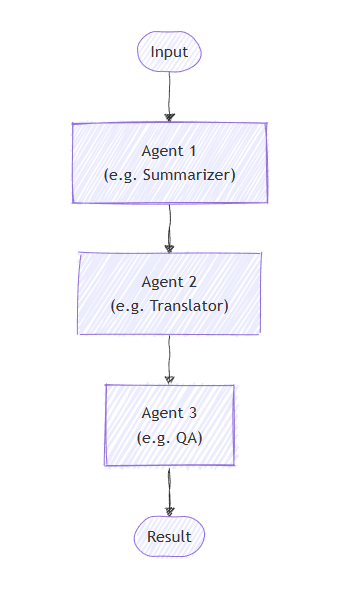
순차 오케스트레이션에서 에이전트는 파이프라인에 배치됩니다. 각 에이전트는 차례로 작업을 처리하여 순서대로 다음 에이전트에 출력을 전달합니다. 이는 문서 검토, 데이터 처리 파이프라인 또는 다단계 추론과 같이 각 단계가 이전 단계를 기반으로 빌드되는 워크플로에 적합합니다.
패턴을 사용하는 시기 또는 워크로드에서 패턴을 피해야 하는 경우와 같은 패턴에 대한 자세한 내용은 순차 오케스트레이션을 참조하세요.
일반 사용 예
문서는 요약 에이전트를 거쳐 번역 에이전트를 거친 후 마지막으로 품질 보증 에이전트를 거치면서 각 단계의 결과물을 개선합니다.
학습 내용
- 각각 특수한 역할이 있는 에이전트 시퀀스를 정의하는 방법
- 각 에이전트가 이전 에이전트의 출력을 처리하도록 이러한 에이전트를 오케스트레이션하는 방법
- 중간 출력을 관찰하고 최종 결과를 수집하는 방법
에이전트를 정의하십시오
에이전트는 작업을 순서대로 처리하는 특수 엔터티입니다. 여기서는 분석가, 카피라이터 및 편집자의 세 가지 에이전트를 정의합니다.
팁 (조언)
여기서 ChatCompletionAgent 는 사용되지만 모든 에이전트 유형을 사용할 수 있습니다.
using Microsoft.SemanticKernel;
using Microsoft.SemanticKernel.Agents;
using Microsoft.SemanticKernel.Agents.Orchestration;
using Microsoft.SemanticKernel.Agents.Orchestration.Sequential;
using Microsoft.SemanticKernel.Agents.Runtime.InProcess;

// Create a kernel with an AI service
Kernel kernel = ...;

ChatCompletionAgent analystAgent = new ChatCompletionAgent {
    Name = "Analyst",
    Instructions = "You are a marketing analyst. Given a product description, identify:\n- Key features\n- Target audience\n- Unique selling points",
    Kernel = kernel,
};

ChatCompletionAgent writerAgent = new ChatCompletionAgent {
    Name = "Copywriter",
    Instructions = "You are a marketing copywriter. Given a block of text describing features, audience, and USPs, compose a compelling marketing copy (like a newsletter section) that highlights these points. Output should be short (around 150 words), output just the copy as a single text block.",
    Kernel = kernel,
};

ChatCompletionAgent editorAgent = new ChatCompletionAgent {
    Name = "Editor",
    Instructions = "You are an editor. Given the draft copy, correct grammar, improve clarity, ensure consistent tone, give format and make it polished. Output the final improved copy as a single text block.",
    Kernel = kernel,
};
선택 사항: 에이전트 응답 관찰
속성을 통해 시퀀스가 진행됨에 따라 에이전트 응답을 캡처하는 콜백을 ResponseCallback 만들 수 있습니다.
ChatHistory history = [];

ValueTask responseCallback(ChatMessageContent response)
{
    history.Add(response);
    return ValueTask.CompletedTask;
}
순차 오케스트레이션 설정
SequentialOrchestration 에이전트 및 선택적 응답 콜백을 전달하는 개체를 만듭니다.
SequentialOrchestration orchestration = new(analystAgent, writerAgent, editorAgent)
{
    ResponseCallback = responseCallback,
};
런타임 시작
에이전트 실행을 관리하려면 런타임이 필요합니다. 여기서는 오케스트레이션을 호출하기 전에 InProcessRuntime를 사용하고 시작합니다.
InProcessRuntime runtime = new InProcessRuntime();
await runtime.StartAsync();
오케스트레이션 호출
초기 작업(예: 제품 설명)을 사용하여 오케스트레이션을 호출합니다. 출력은 각 에이전트를 순서대로 통과합니다.
var result = await orchestration.InvokeAsync(
    "An eco-friendly stainless steel water bottle that keeps drinks cold for 24 hours",
    runtime);
결과 수집
오케스트레이션이 완료되고 최종 출력을 가져올 때까지 기다립니다.
string output = await result.GetValueAsync(TimeSpan.FromSeconds(20));
Console.WriteLine($"\n# RESULT: {text}");
Console.WriteLine("\n\nORCHESTRATION HISTORY");
foreach (ChatMessageContent message in history)
{
    this.WriteAgentChatMessage(message);
}
선택 사항: 런타임 중지
처리가 완료되면 런타임을 중지하여 리소스를 정리합니다.
await runtime.RunUntilIdleAsync();
샘플 출력
# RESULT: Introducing our Eco-Friendly Stainless Steel Water Bottles – the perfect companion for those who care about the planet while staying hydrated! Our bottles ...


ORCHESTRATION HISTORY

# Assistant - Analyst: **Key Features:**
- Made from eco-friendly stainless steel
- Insulation technology that maintains cold temperatures for up to 24 hours
- Reusable and sustainable design
- Various sizes and colors available (assumed based on typical offerings)
- Leak-proof cap
- BPA-free ...

# Assistant - copywriter: Introducing our Eco-Friendly Stainless ...

# Assistant - editor: Introducing our Eco-Friendly Stainless Steel Water Bottles – the perfect companion for those who care about the planet while staying hydrated! Our bottles ...
팁 (조언)
전체 샘플 코드는 여기에서 사용할 수 있습니다.
에이전트를 정의하십시오
시퀀스의 각 에이전트에는 특정 책임이 있습니다. 이 예제에서는 다음을 수행합니다.
- ConceptExtractorAgent: 제품 설명에서 주요 기능, 대상 그룹 및 고유한 판매 포인트를 추출합니다.
- WriterAgent: 추출된 정보를 기반으로 마케팅 복사본을 작성합니다.
- FormatProofAgent: 명확성과 일관성을 위해 초안 복사본을 편집하고 연마합니다.
팁 (조언)
ChatCompletionAgent 여기서는 Azure OpenAI와 함께 사용되지만 에이전트 유형 또는 모델 서비스를 사용할 수 있습니다.
from semantic_kernel.agents import Agent, ChatCompletionAgent
from semantic_kernel.connectors.ai.open_ai import AzureChatCompletion

def get_agents() -> list[Agent]:
    concept_extractor_agent = ChatCompletionAgent(
        name="ConceptExtractorAgent",
        instructions=(
            "You are a marketing analyst. Given a product description, identify:\n"
            "- Key features\n"
            "- Target audience\n"
            "- Unique selling points\n\n"
        ),
        service=AzureChatCompletion(),
    )
    writer_agent = ChatCompletionAgent(
        name="WriterAgent",
        instructions=(
            "You are a marketing copywriter. Given a block of text describing features, audience, and USPs, "
            "compose a compelling marketing copy (like a newsletter section) that highlights these points. "
            "Output should be short (around 150 words), output just the copy as a single text block."
        ),
        service=AzureChatCompletion(),
    )
    format_proof_agent = ChatCompletionAgent(
        name="FormatProofAgent",
        instructions=(
            "You are an editor. Given the draft copy, correct grammar, improve clarity, ensure consistent tone, "
            "give format and make it polished. Output the final improved copy as a single text block."
        ),
        service=AzureChatCompletion(),
    )
    return [concept_extractor_agent, writer_agent, format_proof_agent]
선택 사항: 에이전트 응답 관찰
시퀀스가 진행됨에 따라 각 에이전트의 출력을 관찰하고 인쇄하는 콜백을 정의할 수 있습니다.
from semantic_kernel.contents import ChatMessageContent

def agent_response_callback(message: ChatMessageContent) -> None:
    print(f"# {message.name}\n{message.content}")
순차 오케스트레이션 설정
에이전트와 선택적 응답 콜백을 전달하여 SequentialOrchestration 객체를 생성합니다.
from semantic_kernel.agents import SequentialOrchestration

agents = get_agents()
sequential_orchestration = SequentialOrchestration(
    members=agents,
    agent_response_callback=agent_response_callback,
)
런타임 시작
런타임을 시작하여 에이전트 실행을 관리합니다.
from semantic_kernel.agents.runtime import InProcessRuntime

runtime = InProcessRuntime()
runtime.start()
오케스트레이션 호출
초기 작업(예: 제품 설명)을 사용하여 오케스트레이션을 호출합니다. 출력은 각 에이전트를 순서대로 통과합니다.
orchestration_result = await sequential_orchestration.invoke(
    task="An eco-friendly stainless steel water bottle that keeps drinks cold for 24 hours",
    runtime=runtime,
)
결과 수집
오케스트레이션이 완료되기를 기다립니다.
value = await orchestration_result.get(timeout=20)
print(f"***** Final Result *****\n{value}")
선택 사항: 런타임 중지
처리가 완료되면 런타임을 중지하여 리소스를 정리합니다.
await runtime.stop_when_idle()
샘플 출력
# ConceptExtractorAgent
- Key Features:
- Made of eco-friendly stainless steel
- Keeps drinks cold for 24 hours
...
# WriterAgent
Keep your beverages refreshingly chilled all day long with our eco-friendly stainless steel bottles...
# FormatProofAgent
Keep your beverages refreshingly chilled all day long with our eco-friendly stainless steel bottles...
***** Final Result *****
Keep your beverages refreshingly chilled all day long with our eco-friendly stainless steel bottles...
팁 (조언)
전체 샘플 코드는 여기에서 사용할 수 있습니다.
비고
에이전트 오케스트레이션은 Java SDK에서 아직 사용할 수 없습니다.