Nuta
Dostęp do tej strony wymaga autoryzacji. Możesz spróbować się zalogować lub zmienić katalog.
Dostęp do tej strony wymaga autoryzacji. Możesz spróbować zmienić katalogi.
Applies to:✅ SQL analytics endpoint and Warehouse in Microsoft Fabric
Z tego samouczka dowiesz się, jak utworzyć procedurę składowaną w magazynie w celu przekształcenia danych w tabeli.
Notatka
This tutorial forms part of an end-to-end scenario. Aby ukończyć ten samouczek, należy najpierw wykonać następujące samouczki:
- Tworzenie obszaru roboczego
- Tworzenie magazynu
- Ingest data into a Warehouse
Create a stored procedure
In this task, learn how to create a stored procedure to transform data in a warehouse table.
Ensure that the workspace you created in the first tutorial is open.
On the Home ribbon, select New SQL query.

In the query editor, paste the following code. Kod pominie procedurę składowaną (jeśli istnieje), a następnie tworzy procedurę składowaną o nazwie
populate_aggregate_sale_by_city. Logika procedury składowanej tworzy tabelę o nazwieaggregate_sale_by_date_cityi wstawia do niej dane za pomocą zapytania grupowania, które łączy tabelefact_saleidimension_city.--Drop the stored procedure if it already exists. DROP PROCEDURE IF EXISTS [dbo].[populate_aggregate_sale_by_city]; GO --Create the populate_aggregate_sale_by_city stored procedure. CREATE PROCEDURE [dbo].[populate_aggregate_sale_by_city] AS BEGIN --Drop the aggregate table if it already exists. DROP TABLE IF EXISTS [dbo].[aggregate_sale_by_date_city]; --Create the aggregate table. CREATE TABLE [dbo].[aggregate_sale_by_date_city] ( [Date] [DATETIME2](6), [City] [VARCHAR](8000), [StateProvince] [VARCHAR](8000), [SalesTerritory] [VARCHAR](8000), [SumOfTotalExcludingTax] [DECIMAL](38,2), [SumOfTaxAmount] [DECIMAL](38,6), [SumOfTotalIncludingTax] [DECIMAL](38,6), [SumOfProfit] [DECIMAL](38,2) ); --Load aggregated data into the table. INSERT INTO [dbo].[aggregate_sale_by_date_city] SELECT FS.[InvoiceDateKey] AS [Date], DC.[City], DC.[StateProvince], DC.[SalesTerritory], SUM(FS.[TotalExcludingTax]) AS [SumOfTotalExcludingTax], SUM(FS.[TaxAmount]) AS [SumOfTaxAmount], SUM(FS.[TotalIncludingTax]) AS [SumOfTotalIncludingTax], SUM(FS.[Profit]) AS [SumOfProfit] FROM [dbo].[fact_sale] AS FS INNER JOIN [dbo].[dimension_city] AS DC ON FS.[CityKey] = DC.[CityKey] GROUP BY FS.[InvoiceDateKey], DC.[City], DC.[StateProvince], DC.[SalesTerritory] ORDER BY FS.[InvoiceDateKey], DC.[StateProvince], DC.[City]; END;Aby wykonać zapytanie, na wstążce projektanta zapytań wybierz pozycję Uruchom.
Po zakończeniu wykonywania zmień nazwę zapytania na
Create Aggregate Procedure.In the Explorer pane, from inside the Stored Procedures folder for the
dboschema, verify that theaggregate_sale_by_date_citystored procedure exists.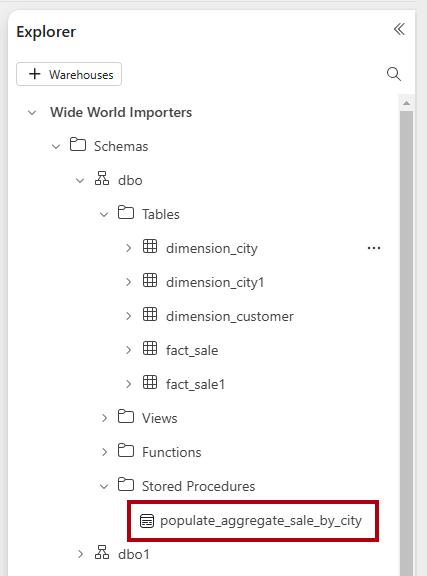
Run the stored procedure
In this task, learn how to execute the stored procedure to transform data in a warehouse table.
Utwórz nowe zapytanie.
In the query editor, paste the following code. Kod wykonuje składowaną procedurę o nazwie
populate_aggregate_sale_by_city.--Execute the stored procedure to create and load aggregated data. EXEC [dbo].[populate_aggregate_sale_by_city];Uruchom zapytanie.
Po zakończeniu wykonywania zmień nazwę zapytania na
Run Aggregate Procedure.Aby wyświetlić podgląd zagregowanych danych, w okienku Eksploratora
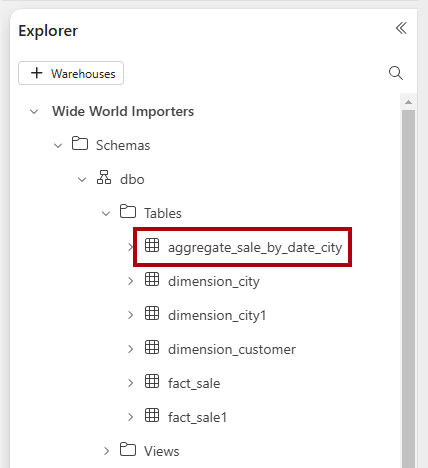
wybierz tabelę . Notatka
If the table doesn't appear, select the ellipsis (…) for the Tables folder, and then select Refresh.