Nuta
Dostęp do tej strony wymaga autoryzacji. Możesz spróbować się zalogować lub zmienić katalog.
Dostęp do tej strony wymaga autoryzacji. Możesz spróbować zmienić katalogi.
Dotyczy: programu SQL Server
W tym artykule opisano sposoby identyfikowania rozszerzeń w złej kondycji, które nie są poprawnie zainstalowane, działają prawidłowo lub nie są połączone z platformą Azure.
Identyfikowanie niezdrowych rozszerzeń
Korzystaj z wbudowanego pulpitu nawigacyjnego kondycji rozszerzenia w portalu Azure.
Możesz użyć wbudowanego pulpitu nawigacyjnego stanu rozszerzenia w portalu Azure, aby wyświetlić stan wszystkich wdrożonych rozszerzeń Azure dla SQL Server.
Napiwek
Utwórz niestandardowy pulpit nawigacyjny z tego pliku z repozytorium GitHub sql-server-samples: SQL Server z obsługą Arc Health.json.
Wykonywanie zapytań dotyczących rozszerzeń w złej kondycji przy użyciu usługi Azure Resource Graph
Użyj usługi Azure Resource Graph, aby zidentyfikować stan rozszerzenia platformy Azure dla programu SQL Server na serwerach z obsługą usługi Azure Arc.
Napiwek
Jeśli jeszcze nie znasz, dowiedz się więcej o usłudze Azure Resource Graph:
To zapytanie zwraca wystąpienia programu SQL Server na serwerach z zainstalowanymi rozszerzeniami, ale nie w dobrej kondycji.
resources
| where type == "microsoft.hybridcompute/machines/extensions"
| where properties.type in ("WindowsAgent.SqlServer", "LinuxAgent.SqlServer")
| extend targetMachineName = tolower(tostring(split(id, '/')[8])) // Extract the machine name from the extension's id
| join kind=leftouter (
    resources
    | where type == "microsoft.hybridcompute/machines"
    | project machineId = id, MachineName = name, subscriptionId, LowerMachineName = tolower(name), resourceGroup , MachineStatus= properties.status , MachineProvisioningStatus= properties.provisioningState, MachineErrors = properties.errorDetails //Project relevant machine health information.
) on $left.targetMachineName == $right.LowerMachineName and $left.resourceGroup == $right.resourceGroup and $left.subscriptionId == $right.subscriptionId // Join Based on MachineName in the id and the machine's name, the resource group, and the subscription. This join allows us to present the data of the machine as well as the extension in the final output.
| extend statusExpirationLengthRange = 3d // Change this value to change the acceptable range for the last time an extension should have reported its status.
| extend startDate = startofday(now() - statusExpirationLengthRange), endDate = startofday(now()) // Get the start and end position for the given range.
| extend extractedDateString = extract("timestampUTC : (\\d{4}\\W\\d{2}\\W\\d{2})", 1, tostring(properties.instanceView.status.message)) // Extracting the date string for the LastUploadTimestamp. Is empty if none is found.
| extend extractedDateStringYear = split(extractedDateString, '/')[0], extractedDateStringMonth = split(extractedDateString, '/')[1], extractedDateStringDay = split(extractedDateString, '/')[2] // Identifying each of the parts of the date that was extracted from the message.
| extend extractedDate = todatetime(strcat(extractedDateStringYear,"-",extractedDateStringMonth,"-",extractedDateStringDay,"T00:00:00Z")) // Converting to a datetime object and rewriting string into ISO format because todatetime() does not work using the previous format.
| extend isNotInDateRange = not(extractedDate >= startDate and extractedDate <= endDate) // Created bool which is true if the date we extracted from the message is not within the specified range. This bool will also be true if the date was not found in the message.
| where properties.instanceView.status.message !contains "SQL Server Extension Agent: Healthy" // Begin searching for unhealthy extensions using the following 1. Does extension report being healthy. 2. Is last upload within the given range. 3. Is the upload status in an OK state. 4. Is provisioning state not in a succeeded state.
    or isNotInDateRange
    or properties.instanceView.status.message !contains "uploadStatus : OK"
    or properties.provisioningState != "Succeeded"
    or MachineStatus != "Connected"
| extend FailureReasons = strcat( // Makes a String to list all the reason that this resource got flagged for
        iif(MachineStatus != "Connected",strcat("- Machine's status is ", MachineStatus," -"),"") ,
        iif(MachineErrors != "[]","- Machine reports errors -", ""),
        iif(properties.instanceView.status.message !contains "SQL Server Extension Agent: Healthy","- Extension reported unhealthy -",""),
        iif(isNotInDateRange,"- Last upload outside acceptable range -",""),
        iif(properties.instanceView.status.message !contains "uploadStatus : OK","- Upload status is not reported OK -",""),
        iif(properties.provisioningState != "Succeeded",strcat("- Extension provisiong state is ", properties.provisioningState," -"),"")
    )
| extend RecommendedAction = //Attempt to Identify RootCause based on information gathered, and point customer to what they should investigate first.
    iif(MachineStatus == "Disconnected", "Machine is disconnected. Please reconnect the machine.",
        iif(MachineStatus == "Expired", "Machine cert is expired. Go to the machine on the Azure portal for more information on how to resolve this issue.",
            iif(MachineStatus != "Connected", strcat("Machine status is ", MachineStatus,". Investigate and resolve this issue."),
                iif(MachineProvisioningStatus != "Succeeded", strcat("Machine provisioning status is ", MachineProvisioningStatus, ". Investigate and resolve machine provisioning status"),
                    iff(MachineErrors != "[]", "Machine is reporting errors. Investigate and resolve machine errors",
                        iif(properties.provisioningState != "Succeeded", strcat("Extension provisioning status is ", properties.provisioningState,". Investigate and resolve extension provisioning state."),
                            iff(properties.instanceView.status.message !contains "SQL Server Extension Agent:" and properties.instanceView.status.message contains "SQL Server Extension Agent Deployer", "SQL Server extension employer ran. However, SQL Server extension seems to not be running. Verify that the extension is currently running.",
                                iff(properties.instanceView.status.message !contains "uploadStatus : OK" or isNotInDateRange or properties.instanceView.status.message !contains "SQL Server Extension Agent: Healthy", "Extension reported as unhealthy. View FailureReasons and LastExtensionStatusMessage for more information as to the cause of the failure.",
                                    "Unable to recommend actions. Please view FailureReasons."
                                )
                            )
                        )
                    )
                )
            )
        )
    )
| project ID = id, MachineName, ResourceGroup = resourceGroup, SubscriptionID = subscriptionId, Location = location, RecommendedAction, FailureReasons, LicenseType = properties.settings.LicenseType,
    LastReportedExtensionHealth = iif(properties.instanceView.status.message !contains "SQL Server Extension Agent: Healthy", "Unhealthy", "Healthy"),
    LastExtensionUploadTimestamp = iif(indexof(properties.instanceView.status.message, "timestampUTC : ") > 0,
        substring(properties.instanceView.status.message, indexof(properties.instanceView.status.message, "timestampUTC : ") + 15, 10),
        "no timestamp"),
    LastExtensionUploadStatus = iif(indexof(properties.instanceView.status.message, "uploadStatus : OK") > 0, "OK", "Unhealthy"),
    ExtensionProvisioningState = properties.provisioningState,
    MachineStatus, MachineErrors, MachineProvisioningStatus,MachineId = machineId,
    LastExtensionStatusMessage = properties.instanceView.status.message
Aby zidentyfikować możliwe problemy, przejrzyj wartość w kolumnie RecommendedAction lub FailureReasons. Kolumna RecommendedAction zawiera możliwe pierwsze kroki rozwiązywania problemu lub wskazówek dotyczących tego, co należy najpierw sprawdzić. Kolumna FailureReasons zawiera listę przyczyn, dla których zasób został uznany za w złej kondycji. Na koniec sprawdź LastExtensionStatusMessage, aby zobaczyć ostatni komunikat zgłoszony przez agenta.
Rekomendacje
| Zalecana akcja | Szczegóły akcji |
|---|---|
| Certyfikat maszyny wygasł. Przejdź do maszyny w portalu Azure, aby uzyskać więcej informacji o rozwiązaniu tego problemu. |
Maszyna z obsługą usługi Arc musi zostać ponownie dołączona do usługi Arc, ponieważ certyfikat używany do uwierzytelniania na platformie Azure wygasł. Stan maszyny usługi Arc to Wygasła w portalu Azure. Agent można odinstalować , a następnie ponownie dołączyć. Nie trzeba usuwać zasobów SQL Server obsługiwanych przez Arc w portalu, jeśli dokonujesz ponownego wdrożenia. Rozszerzenie SQL jest automatycznie instalowane ponownie, o ile automatyczne dołączanie jest włączone (ustawienie domyślne). |
| Maszyna jest odłączona. Ponownie połącz maszynę. |
Maszyna Arc znajduje się w state = Disconnected. Ten stan może być z różnych powodów:Agent maszyny połączonej z usługą Arc jest zatrzymywany, wyłączony lub stale ulega awarii lub Łączność między agentem a platformą Azure jest blokowana. Sprawdź stan usług/demonów maszyn połączonych z Arc, aby upewnić się, że są one włączone i działają. Sprawdź łączność. Rozwiązywanie problemów z agentem przy użyciu szczegółowego dziennika. |
| Rozszerzenie zgłoszono jako niesprawne. Wyświetl FailureReasons i LastExtensionStatusMessage, aby uzyskać więcej informacji na temat przyczyny awarii. Ostatnie przekazywanie poza dopuszczalnym zakresem (w ciągu ostatnich trzech dni). |
Sprawdź kolumnę LastExtensionUploadTimestamp. Jeśli nie ma znacznika czasu, nigdy nie zgłosił danych o zapasach ani o wykorzystaniu do Azure.
Rozwiązywanie problemów z łącznością z usługą przetwarzania danych i punktami końcowymi telemetrii. Jeśli ostatnie przekazanie wykracza poza dopuszczalny zakres (w ciągu ostatnich trzech dni) i wszystkie inne elementy wyglądają ok, takie jak LastExtensionUploadStatus, ExtensionProvisioningState i MachineStatus, możliwe, że rozszerzenie platformy Azure dla usługi/demona programu SQL Server zostanie zatrzymane. Dowiedz się, dlaczego jest zatrzymany i uruchom go ponownie. Sprawdź LastExtensionStatusMessage, aby uzyskać inne wskazówki dotyczące problemu. |
| Status wdrażania rozszerzenia to Niepowodzenie. Zbadaj i rozwiąż problem ze stanem aprowizacji rozszerzenia. |
Początkowa instalacja rozszerzenia SQL lub aktualizacja nie powiodła się. Rozwiązywanie problemów z rozszerzeniem platformy Azure dla wdrożenia programu SQL Server. Sprawdź wartość w LastExtensionStatusMessage. |
| Stan przekazywania nie jest zgłaszany ok | Sprawdź kolumnę LastExtensionMessage na pulpicie nawigacyjnym, a następnie zobacz wartość uploadStatus oraz wartość uploadMessage (jeśli jest dostępna, w zależności od wersji). Wartość uploadStatus jest zazwyczaj kodem błędu HTTP. Przejrzyj Rozwiąż problemy z kodami błędów. Komunikat uploadMessage może zawierać bardziej szczegółowe informacje. Rozwiązywanie problemów z łącznością z usługą przetwarzania danych i punktami końcowymi telemetrii. |
| Stan konfigurowania rozszerzenia to Aktualizowanie lub Stan przydzielania rozszerzenia to Tworzenie lub Stan aprowizacji rozszerzenia jest Niepowodzenie lub Stan przygotowania rozszerzenia to Usuwanie |
Jeśli dane rozszerzenie pozostanie w jednym z tych stanów przez ponad 30 minut, prawdopodobnie wystąpi problem z konfigurowaniem. Odinstaluj rozszerzenie i zainstaluj je ponownie przy użyciu interfejsu wiersza polecenia lub portalu. Jeśli problem będzie się powtarzać, należy sprawdzić dzienniki wdrażania i rozszerzeń. Jeśli tworzenie rozszerzenia nie powiedzie się, sprawdź, czy agent jest połączony, a skojarzone usługi agenta są uruchomione. Jeśli usuwanie zakończy się niepowodzeniem, spróbuj odinstalować agenta i usunąć zasób maszyny usługi Arc w portalu, jeśli to konieczne, a następnie ponownie wdrożyć. Agent można odinstalować , a następnie ponownie dołączyć. |
Identyfikacja problematycznego rozszerzenia (PowerShell)
Ten przykład jest uruchamiany w programie PowerShell. Przykład zwraca ten sam wynik co poprzednie zapytanie, ale za pomocą skryptu programu PowerShell.
# PowerShell script to execute an Azure Resource Graph query using Azure CLI
# where the extension status is unhealthy or the extension last upload time isn't in this month or the previous month.

# Requires the Az.ResourceGraph PowerShell module

# Login to Azure if needed
#az login

# Define the Azure Resource Graph query
$query = @"
resources
| where type == "microsoft.hybridcompute/machines/extensions"
| where properties.type in ("WindowsAgent.SqlServer", "LinuxAgent.SqlServer")
| extend targetMachineName = tolower(tostring(split(id, '/')[8])) // Extract the machine name from the extension's id
| join kind=leftouter (
    resources
    | where type == "microsoft.hybridcompute/machines"
    | project machineId = id, MachineName = name, subscriptionId, LowerMachineName = tolower(name), resourceGroup , MachineStatus= properties.status , MachineProvisioningStatus= properties.provisioningState, MachineErrors = properties.errorDetails //Project relevant machine health information.
) on $left.targetMachineName == $right.LowerMachineName and $left.resourceGroup == $right.resourceGroup and $left.subscriptionId == $right.subscriptionId // Join Based on MachineName in the id and the machine's name, the resource group, and the subscription. This join allows us to present the data of the machine as well as the extension in the final output.
| extend statusExpirationLengthRange = 3d // Change this value to change the acceptable range for the last time an extension should have reported its status.
| extend startDate = startofday(now() - statusExpirationLengthRange), endDate = startofday(now()) // Get the start and end position for the given range.
| extend extractedDateString = extract("timestampUTC : (\\d{4}\\W\\d{2}\\W\\d{2})", 1, tostring(properties.instanceView.status.message)) // Extracting the date string for the LastUploadTimestamp. Is empty if none is found.
| extend extractedDateStringYear = split(extractedDateString, '/')[0], extractedDateStringMonth = split(extractedDateString, '/')[1], extractedDateStringDay = split(extractedDateString, '/')[2] // Identifying each of the parts of the date that was extracted from the message.
| extend extractedDate = todatetime(strcat(extractedDateStringYear,"-",extractedDateStringMonth,"-",extractedDateStringDay,"T00:00:00Z")) // Converting to a datetime object and rewriting string into ISO format because todatetime() does not work using the previous format.
| extend isNotInDateRange = not(extractedDate >= startDate and extractedDate <= endDate) // Created bool which is true if the date we extracted from the message is not within the specified range. This bool will also be true if the date was not found in the message.
| where properties.instanceView.status.message !contains "SQL Server Extension Agent: Healthy" // Begin searching for unhealthy extensions using the following 1. Does extension report being healthy. 2. Is last upload within the given range. 3. Is the upload status in an OK state. 4. Is provisioning state not in a succeeded state.
    or isNotInDateRange
    or properties.instanceView.status.message !contains "uploadStatus : OK"
    or properties.provisioningState != "Succeeded"
    or MachineStatus != "Connected"
| extend FailureReasons = strcat( // Makes a String to list all the reason that this resource got flagged for
        iif(MachineStatus != "Connected",strcat("- Machine's status is ", MachineStatus," -"),"") ,
        iif(MachineErrors != "[]","- Machine reports errors -", ""),
        iif(properties.instanceView.status.message !contains "SQL Server Extension Agent: Healthy","- Extension reported unhealthy -",""),
        iif(isNotInDateRange,"- Last upload outside acceptable range -",""),
        iif(properties.instanceView.status.message !contains "uploadStatus : OK","- Upload status is not reported OK -",""),
        iif(properties.provisioningState != "Succeeded",strcat("- Extension provisiong state is ", properties.provisioningState," -"),"")
    )
| extend RecommendedAction = //Attempt to Identify RootCause based on information gathered, and point customer to what they should investigate first.
    iif(MachineStatus == "Disconnected", "Machine is disconnected. Please reconnect the machine.",
        iif(MachineStatus == "Expired", "Machine cert is expired. Go to the machine on the Azure portal for more information on how to resolve this issue.",
            iif(MachineStatus != "Connected", strcat("Machine status is ", MachineStatus,". Investigate and resolve this issue."),
                iif(MachineProvisioningStatus != "Succeeded", strcat("Machine provisioning status is ", MachineProvisioningStatus, ". Investigate and resolve machine provisioning status"),
                    iff(MachineErrors != "[]", "Machine is reporting errors. Investigate and resolve machine errors",
                        iif(properties.provisioningState != "Succeeded", strcat("Extension provisioning status is ", properties.provisioningState,". Investigate and resolve extension provisioning state."),
                            iff(properties.instanceView.status.message !contains "SQL Server Extension Agent:" and properties.instanceView.status.message contains "SQL Server Extension Agent Deployer", "SQL Server extension employer ran. However, SQL Server extension seems to not be running. Verify that the extension is currently running.",
                                iff(properties.instanceView.status.message !contains "uploadStatus : OK" or isNotInDateRange or properties.instanceView.status.message !contains "SQL Server Extension Agent: Healthy", "Extension reported as unhealthy. View FailureReasons and LastExtensionStatusMessage for more information as to the cause of the failure.",
                                    "Unable to recommend actions. Please view FailureReasons."
                                )
                            )
                        )
                    )
                )
            )
        )
    )
| project ID = id, MachineName, ResourceGroup = resourceGroup, SubscriptionID = subscriptionId, Location = location, RecommendedAction, FailureReasons, LicenseType = properties.settings.LicenseType,
    LastReportedExtensionHealth = iif(properties.instanceView.status.message !contains "SQL Server Extension Agent: Healthy", "Unhealthy", "Healthy"),
    LastExtensionUploadTimestamp = iif(indexof(properties.instanceView.status.message, "timestampUTC : ") > 0,
        substring(properties.instanceView.status.message, indexof(properties.instanceView.status.message, "timestampUTC : ") + 15, 10),
        "no timestamp"),
    LastExtensionUploadStatus = iif(indexof(properties.instanceView.status.message, "uploadStatus : OK") > 0, "OK", "Unhealthy"),
    ExtensionProvisioningState = properties.provisioningState,
    MachineStatus, MachineErrors, MachineProvisioningStatus,MachineId = machineId,
    LastExtensionStatusMessage = properties.instanceView.status.message
"@

# Execute the Azure Resource Graph query
$result = Search-AzGraph -Query $query

# Output the results
$result | Format-Table -Property ExtensionHealth, LastUploadTimestamp, LastUploadStatus, Message
Aby zidentyfikować możliwe problemy, przejrzyj wartość w kolumnie RecommendedAction lub FailureReasons. Kolumna RecommendedAction zawiera możliwe pierwsze kroki rozwiązywania problemu lub wskazówek dotyczących tego, co należy najpierw sprawdzić. Kolumna FailureReasons zawiera listę przyczyn, dla których zasób został uznany za w złej kondycji. Na koniec sprawdź LastExtensionStatusMessage, aby zobaczyć ostatni komunikat zgłoszony przez agenta.
Identyfikowanie brakujących aktualizacji rozszerzeń
Identyfikowanie rozszerzeń bez ostatnich aktualizacji statusu. To zapytanie zwraca listę rozszerzeń platformy Azure dla programu SQL Server uporządkowaną według liczby dni od ostatniego zaktualizowania stanu rozszerzenia. Wartość "-1" wskazuje, że rozszerzenie uległo awarii i w statusie rozszerzenia znajduje się stos wywołań.
// Show the timestamp extracted
// If an extension has crashed (i.e. no heartbeat), fill timestamp with "1900/01/01, 00:00:00.000"
//
resources
| where type =~ 'microsoft.hybridcompute/machines/extensions'
| extend extensionStatus = parse_json(properties).instanceView.status.message
| extend timestampExtracted = extract(@"timestampUTC\s*:\s*(\d{4}/\d{2}/\d{2}, \d{2}:\d{2}:\d{2}\.\d{3})", 1, tostring(extensionStatus))
| extend timestampNullFilled = iff(isnull(timestampExtracted) or timestampExtracted == "", "1900/01/01, 00:00:00.000", timestampExtracted)
| extend timestampKustoFormattedString = strcat(replace(",", "", replace("/", "-", replace("/", "-", timestampNullFilled))), "Z")
| extend agentHeartbeatUtcTimestamp = todatetime(timestampKustoFormattedString)
| extend agentHeartbeatLagInDays = datetime_diff('day', now(), agentHeartbeatUtcTimestamp)
| project id, extensionStatus, agentHeartbeatUtcTimestamp, agentHeartbeatLagInDays
| limit 100
| order by ['agentHeartbeatLagInDays'] asc
To zapytanie zwraca liczbę rozszerzeń pogrupowanych według liczby dni od ostatniego zaktualizowania stanu rozszerzenia. Wartość "-1" wskazuje, że rozszerzenie uległo awarii i w statusie rozszerzenia znajduje się stos wywołań.
// Aggregate by timestamp
//
// -1: Crashed extension with no heartbeat, we got a stacktrace instead
//  0: Healthy
// >1: Stale/Offline
//
resources
| where type =~ 'microsoft.hybridcompute/machines/extensions'
| extend extensionStatus = parse_json(properties).instanceView.status.message
| extend timestampExtracted = extract(@"timestampUTC\s*:\s*(\d{4}/\d{2}/\d{2}, \d{2}:\d{2}:\d{2}\.\d{3})", 1, tostring(extensionStatus))
| extend timestampNullFilled = iff(isnull(timestampExtracted) or timestampExtracted == "", "1900/01/01, 00:00:00.000", timestampExtracted)
| extend timestampKustoFormattedString = strcat(replace(",", "", replace("/", "-", replace("/", "-", timestampNullFilled))), "Z")
| extend agentHeartbeatUtcTimestamp = todatetime(timestampKustoFormattedString)
| extend agentHeartbeatLagInDays = iff(agentHeartbeatUtcTimestamp == todatetime("1900/01/01, 00:00:00.000Z"), -1, datetime_diff('day', now(), agentHeartbeatUtcTimestamp))
| summarize numExtensions = count() by agentHeartbeatLagInDays
| order by numExtensions desc
Uaktualnianie rozszerzenia
Aby określić wersję bieżącej wersji rozszerzenia, zapoznaj się z informacjami o wersji.
Aby sprawdzić wersję rozszerzenia, użyj następującego polecenia programu PowerShell:
azcmagent version
Aby uprościć uaktualnienia rozszerzeń, pamiętaj o włączeniu aktualizacji automatycznych. Możesz również ręcznie uaktualnić rozszerzenie przy użyciu witryny Azure Portal, programu PowerShell i interfejsu wiersza polecenia platformy Azure.
Aby uaktualnić rozszerzenie w witrynie Azure Portal, wykonaj następujące kroki:
W witrynie Azure Portal przejdź do pozycji Maszyny — Azure Arc.
Wybierz nazwę maszyny, na której zainstalowano program SQL Server, aby otworzyć okienko Przegląd serwera.
W obszarze Ustawienia wybierz pozycję Rozszerzenia.
Zaznacz pole wyboru
WindowsAgent.SqlServerrozszerzenia, a następnie wybierz pozycję Aktualizuj z menu nawigacji.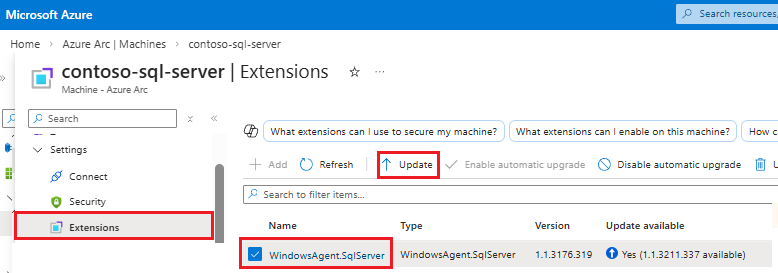
Wybierz pozycję Tak w oknie dialogowym Potwierdzenie rozszerzenia aktualizacji , aby ukończyć uaktualnianie.
Aby uzyskać więcej informacji na temat uaktualniania rozszerzenia platformy Azure dla programu SQL Server, zobacz Uaktualnianie rozszerzenia.