หมายเหตุ
การเข้าถึงหน้านี้ต้องได้รับการอนุญาต คุณสามารถลอง ลงชื่อเข้าใช้หรือเปลี่ยนไดเรกทอรีได้
การเข้าถึงหน้านี้ต้องได้รับการอนุญาต คุณสามารถลองเปลี่ยนไดเรกทอรีได้
At a glance
Goal: Create TypeSpec from intercepted requests
Time: 10 minutes
Plugins: TypeSpecGeneratorPlugin
Prerequisites: Set up Dev Proxy
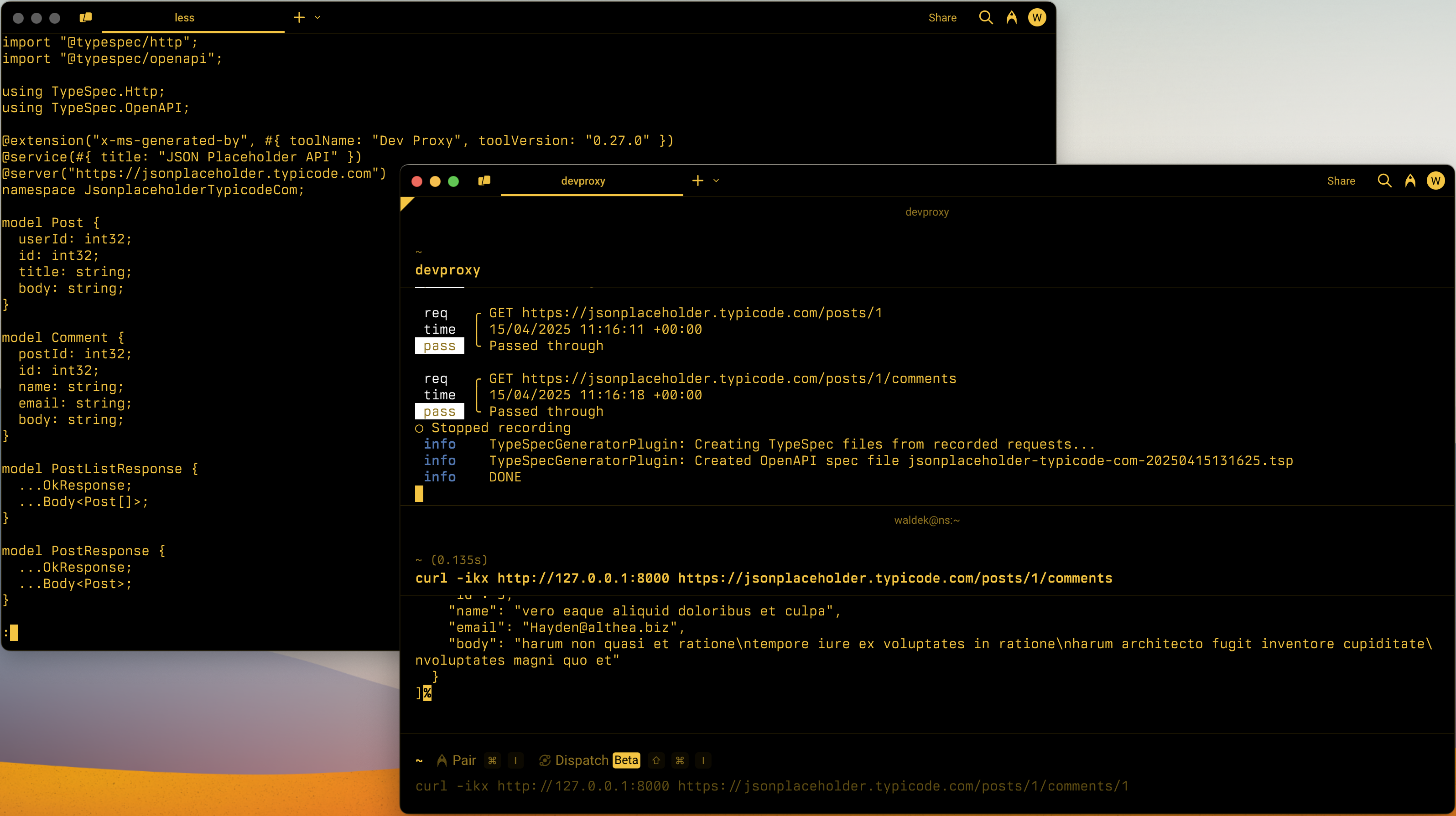
Dev Proxy allows you to generate a TypeSpec file from the intercepted API requests and responses. Using Dev Proxy you can quickly create a TypeSpec file for an existing API and benefit from the tooling that supports TypeSpec.
To generate a TypeSpec file using Dev Proxy:
In the configuration file, enable the
TypeSpecGeneratorPluginplugin:File: devproxyrc.json
{
  "$schema": "https://raw.githubusercontent.com/dotnet/dev-proxy/main/schemas/v2.0.0/rc.schema.json",
  "plugins": [
    {
      "name": "TypeSpecGeneratorPlugin",
      "enabled": true,
      "pluginPath": "~appFolder/plugins/DevProxy.Plugins.dll",
      "configSection": "typeSpecGeneratorPlugin"
    }
  ],
  "urlsToWatch": [
    "https://api.example.com/*"
  ],
  "typeSpecGeneratorPlugin": {
    "$schema": "https://raw.githubusercontent.com/dotnet/dev-proxy/main/schemas/v2.0.0/typespecgeneratorplugin.schema.json",
    "ignoreResponseTypes": false
  }
}
Optionally, configure the
typeSpecGeneratorPluginsection. SetignoreResponseTypestofalse(default) to have the plugin generate response types.In the configuration file, to the list of URLs to watch, add the URL of the API for which you want to generate a TypeSpec file.
Tip
To create better TypeSpec files, consider using a local language model with Dev Proxy. Using a local language model, the TypeSpecGeneratorPlugin generates clearer operation IDs and descriptions, giving you a better starting point for your TypeSpec file. For more information, see Use a local language model.
Start Dev Proxy:
devproxyStart recording requests by pressing
rPerform the requests you want to include in the TypeSpec file
Stop recording requests by pressing
sDev Proxy generates a TypeSpec file and saves it to a file in the current directory. Dev Proxy names the file after the host name of the API followed by the current date and time, for example:
api.example.com-20231219091700.tsp.
Next steps
Learn more about the TypeSpecGeneratorPlugin.
See also
ทํางานร่วมกับเราใน GitHub
แหล่งที่มาสำหรับเนื้อหานี้สามารถพบได้บน GitHub ซึ่งคุณยังสามารถสร้างและตรวจสอบปัญหาและคำขอดึงข้อมูลได้ สำหรับข้อมูลเพิ่มเติม ให้ดูคู่มือผู้สนับสนุนของเรา

Dev Proxy