這很重要
在對生成式 AI 進行大量投資並增強 Microsoft Copilot 的整合後,Power Virtual Agents 的功能和特性現已成為 Microsoft Copilot Studio 的一部分。
我們更新文件和訓練內容時,部分文章和螢幕擷取畫面可能會參考 Power Virtual Agents。
內容變數的資料類型是具有兩個屬性isDisplayable 的 JSON 物件,以及 Value。 JSON 物件具有下列結構描述。
{
            "type": "object",
             "properties": {
                    "isDisplayable": {
                        " description": " Context variable should display in agent UI or not",
                        "type": "boolean"
                    },
                    "Value": {
                         " description": " Context variable value pass through bot , this can be string Boolean or number",
                        "type": "string or Boolean or Number"
                    }
                },
                "required": [ "isDisplayable", "Value" ]
        }
的 isDisplayable 輸入值是 布林值 (true 或 false)。 的 Value 輸入值可以是 布林值、 字串或 數字。
若要在 Copilot Studio 和 Azure 機器人的 交談摘要控制項 中顯示內容變數,請使用 isDisplayablesetContextProvider 方法主體中的屬性。
以下是範例:{\"isDisplayable\":\"true\"," +"\"Value\":\"context variable value as string\"}
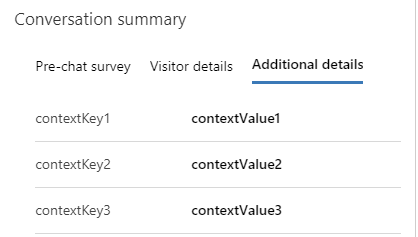
當屬性 isDisplayable 設定為 true時,會在交談的交談摘要控制項的第三個索引標籤上顯示內容變數。
Value JSON 物件的屬性包括使用者回應或字串、布林值或數字格式的任何其他資訊。