Customer Service 全通路提供一組展現 Dynamics 365 Customer Service Enterprise 強大威力的功能套件,讓組織可以立即與不同數位傳訊管道中的客戶進行聯繫和互動。 存取 Customer Service 全通路需要額外的授權。 如需詳細資訊,請參閱 Dynamics 365 Customer Service 定價概觀和 Dynamics 365 Customer Service 定價方案頁面。
設定即時聊天頻道的內容提供者。 叫用內容提供者函式時,會傳回要用來初始化聊天會話的內容。
這很重要
- setContextProvider 方法僅支援未經驗證的聊天。 對於已驗證的聊天,您必須使用 JSON Web 權杖 (JWT)。 其他資訊: 傳送驗證權杖
- 在每個聊天階段作業期間,您只能傳遞 100 個自訂內容變數。
- 應該在引發 lcw:ready 事件 之後叫用即時聊天 SDK 方法。 您可以在視窗物件上新增自己的事件接聽程式,以監聽此事件。
- 如果您使用
setContextProviderSDK API 來傳遞內容並初始化聊天會話,則不需要使用該startChat方法。
語法
Microsoft.Omnichannel.LiveChatWidget.SDK.setContextProvider(contextProvider);
參數
| 參數 | 類型 | Description |
|---|---|---|
| contextProvider | 功能 | 叫用時傳回自訂內容的函式 |
返回值
None
Example
window.addEventListener("lcw:ready", function handleLivechatReadyEvent(){
        // Set the custom context provider
        // Throws error if contextProvider is not a function
        Microsoft.Omnichannel.LiveChatWidget.SDK.setContextProvider(function contextProvider(){
                   //Here it is assumed that the corresponding work stream would have context variables with logical name of 'contextKey1', 'contextKey2', 'contextKey3'. If no context variable exists with a matching logical name, items are created assuming Type:string
	               return {
                             'contextKey1': {'value': 'contextValue1', 'isDisplayable': true},
                             'contextKey2': {'value': 12.34, 'isDisplayable': false},
                             'contextKey3': {'value': true}
                   };
        });
});
在上述範例程式碼中, value 屬性包含內容變數的值。
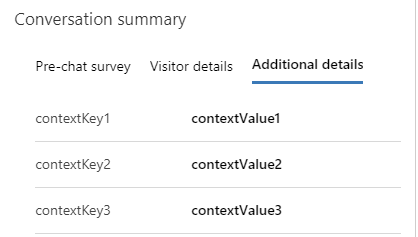
如果屬性 isDisplayable 設定為 true,則會在交談的 [交談摘要控制項] 上的第三個索引標籤中顯示傳遞的專案。
備註
如果未在即時工作流下建立具有相符邏輯名稱的內容變數,則會在執行階段建立類型為字串的變數。 其他資訊: 內容變數
將客戶的自助服務傳遞為上下文
您可以在與客戶對話開始時將客戶的自助服務傳遞為內容。 此 setContextProvider 方法會將最近的客戶動作傳遞為具有自助服務類型的內容的一部分,以進行客戶與客服人員之間的新交談。 會為每個自助服務動作建立訪客歷程記錄。
以下是示範如何使用該 setContextProvider 方法的範例程式碼。
window.addEventListener("lcw:ready", function handleLivechatReadyEvent(){

Microsoft.Omnichannel.LiveChatWidget.SDK.setContextProvider(function contextProvider(){
    return {
            'SelfService': { 'value' :
                '[ {"msdyn_displaytitle":"Page visited", "msdyn_starttime":"yyyy-mm-ddThh:mm:ssZ","msdyn_type":192350000}, \
                   {"msdyn_displaytitle":"Phrase searched", "msdyn_starttime":"yyyy-mm-ddThh:mm:ssZ","msdyn_type":192350001}, \
                   {"msdyn_displaytitle":"Knowledge article viewed", "msdyn_starttime":"yyyy-mm-ddThh:mm:ssZ","msdyn_type":192350002}, \
                   {"msdyn_displaytitle":"Custom action performed", "msdyn_starttime":"yyyy-mm-ddThh:mm:ssZ","msdyn_type":192350003} \
                 ]'
             }, // Additional context can be added as shown below
                //Here it is assumed that the corresponding work stream would have context variables with logical name of 'contextKey1', 'contextKey2', 'contextKey3'. If no context variable exists with a matching logical name, items are created assuming Type:string
                'contextKey1': {'value': 'contextValue1', 'isDisplayable': true},
                'contextKey2': {'value': 12.34, 'isDisplayable': false},
                'contextKey3': {'value': true}
         };
    });
});
如需追蹤可包含在自助服務入口網站中的自助服務動作的範例指令碼,請參閱 自助服務範例程式碼。
錯誤碼
此方法可能會發生下列錯誤。
| 錯誤碼 | 錯誤訊息 |
|---|---|
| 1 | 內容提供者方法執行失敗 |