
We have completely removed FSLogix as its just too unstable and the workaround of doing the reboot is not acceptable when you have 40 or 50 users on an RDS box
This browser is no longer supported.
Upgrade to Microsoft Edge to take advantage of the latest features, security updates, and technical support.
' cx='32' cy='32' r='32' /%3E%3Ctext x='50%25' y='55%25' dominant-baseline='middle' text-anchor='middle' fill='%23FFF' %3EMR%3C/text%3E%3C/svg%3E)
Problem is described by M4deman under unclean-logoff-causing-locked-files-until-server-reboot
It seems to have something to do with the 2009 version.
The latest version of FSLogix is installed whats-new
Description
After a user logoff, the "System" Process (PID 4) locks the following folders:
C:\Users\local_username\AppData\Local\Microsoft\Credentials
C:\Users\local_username\AppData\Roaming\Microsoft\Credentials
The user is completely logged of, according to Task Manager.
In the FSLogix Profile Log file I can see the following:
[07:53:55.601][tid:00000c90.0000ce44][ERROR:00000020] Delete profile failed for sid S-1-5-21-3364776539-3721753400-1968955100-1179, Cleaning up manually. (Der Prozess kann nicht auf die Datei zugreifen, da sie von einem anderen Prozess verwendet wird.)
The last sentence means that the process cannot access the file, because another process already uses it.
Also the whole "local_username" folder cannot be deleted:
[08:23:15.479][tid:00000c90.0000bcc4][WARN: 00000005] Failed to delete C:\Users\local_usename (Access is denied)
Access Denied
Does someone have any info on this behaviour?
' cx='32' cy='32' r='32' /%3E%3Ctext x='50%25' y='55%25' dominant-baseline='middle' text-anchor='middle' fill='%23FFF' %3EA%3C/text%3E%3C/svg%3E)
Hello @Much R
Did you check affected user has full control and Owner over their FSLogix Folder and the VHDX files ?
Thanks
Karlie
Hello,
Where is my answer from yesterday?
Why was this deleted?
How can I open a ticket at Microsoft now?
Thank you
Hello @Much R
sorry I was going to delete my comment as it wasn't helpful, and your comment is below mine, so it seems they were deleted together. I want to restore but it doesn't has this option.
FSLogix is supported for use with versions of Windows and Office that are still included in the Microsoft Support Lifecycle.
How to open a FSLogix Support Request
https://social.msdn.microsoft.com/Forums/en-US/14ea5f6f-760b-4ad2-83cf-23c3cbc1bcc4/how-to-open-a-fslogix-support-request?forum=FSLogix
Best regards
Karlie
' cx='32' cy='32' r='32' /%3E%3Ctext x='50%25' y='55%25' dominant-baseline='middle' text-anchor='middle' fill='%23FFF' %3EG%3C/text%3E%3C/svg%3E)
We are currently experiencing the same issue. The user VHDX is locked by system and can only be unlocked by rebooting the server.
Has Microsoft acknowledged this issue?
Currently using: 2.9.7654.46150
' cx='32' cy='32' r='32' /%3E%3Ctext x='50%25' y='55%25' dominant-baseline='middle' text-anchor='middle' fill='%23FFF' %3EBE%3C/text%3E%3C/svg%3E)
Did you activate the registry value HKEY_LOCAL_MACHINE\SOFTWARE\FSLogix\Apps\CleanupInvalidSessions (REG_DWORD, 0x1)?
Do you use Cloud Cache or not?
Also, maybe you can check with the frx command line tool if there are still some redirects pointing to the use VHDX file. You can then use that tool to delete them manually and detach the VHDX files afterwards using diskpart.
' cx='32' cy='32' r='32' /%3E%3Ctext x='50%25' y='55%25' dominant-baseline='middle' text-anchor='middle' fill='%23FFF' %3EMN%3C/text%3E%3C/svg%3E)
Hello,
we have the same problem.
We use on-premise terminalserver.:
Windows Server 2019
Citrix 1912 CU2 LTSR
FSLogix 2.9.7621.30127
I've tried the CleanupInvalidSessions RegKey, but it doesn't effect.
We don't use Cloud Cache.
FSLogix Configuration only local and not per gpo.
The frx command line tool dont show redirects pointing to the use VHDX file.
Permission are set correct. Users work correctly with the containers.
Luckily the problem occurs only randomly and not at every logoff.
In the FSLogix Configuration we include the group domain-users and exclude the domain-administrators.
Could it be a Problem?
Best Regards,
Marius
' cx='32' cy='32' r='32' /%3E%3Ctext x='50%25' y='55%25' dominant-baseline='middle' text-anchor='middle' fill='%23FFF' %3EI%3C/text%3E%3C/svg%3E)
When this happens are you left with multiple <USERNAME>.original folders? I've seen it go as high as <USERNAME>.original11 before I just manually delete all the folders.
' cx='32' cy='32' r='32' /%3E%3Ctext x='50%25' y='55%25' dominant-baseline='middle' text-anchor='middle' fill='%23FFF' %3EGR%3C/text%3E%3C/svg%3E)
Hello Everyone, For the Group Policy Access Denied, once you get an affected user, could you please modify the following registry? There's no reboot required.
HKLM\SOFTWARE\Microsoft\Windows NT\CurrentVersion\ProfileService\References\<SID affected user>
REG_BINARY: RefCount
Value: 0
' cx='32' cy='32' r='32' /%3E%3Ctext x='50%25' y='55%25' dominant-baseline='middle' text-anchor='middle' fill='%23FFF' %3EJM%3C/text%3E%3C/svg%3E)
This is the answer. Thank you.
' cx='32' cy='32' r='32' /%3E%3Ctext x='50%25' y='55%25' dominant-baseline='middle' text-anchor='middle' fill='%23FFF' %3EF%3C/text%3E%3C/svg%3E)
We are having the same issue. We have an RDS environment and time to time users get logged in with Temporary profile, when I check the FSlogix logs I am seeing the following error - Failed to open virtual disk: \server\Profiles\S-1-5-21-26711-2174_user\Profile_user.vhd (The process cannot access the file because it is being used by another process.)
What we done to try resolve this or at least try find the cause and reduce downtime is, we have removed AV from all RDS host, we have created a script which logs out all users at midnight but issue is still occurring. We have a case opened with Microsoft but unfortunately there has been no resolution.
Another issue we had is where users could not sign into their Outlook, teams, Office profile on the host.
Has anyone else experiencing this issue and has anyone managed to resolve this? Any help or suggestion would be much appreciated.
' cx='32' cy='32' r='32' /%3E%3Ctext x='50%25' y='55%25' dominant-baseline='middle' text-anchor='middle' fill='%23FFF' %3ESS%3C/text%3E%3C/svg%3E)
We have completely removed FSLogix as its just too unstable and the workaround of doing the reboot is not acceptable when you have 40 or 50 users on an RDS box
' cx='32' cy='32' r='32' /%3E%3Ctext x='50%25' y='55%25' dominant-baseline='middle' text-anchor='middle' fill='%23FFF' %3EA%3C/text%3E%3C/svg%3E)
This is sad to hear. We have 500 users. We switched from UPD and are now suffering a lot because of this critical problem.
@SMB Solutions Cloud Services Pty Ltd And what conclusion does Microsoft make in your application?
Use the latest build of FSLogix....which we did and the problem was not as frequent but still happened to at least 5 users every day - until the last Patch Tuesday when it went crazy again
Trying to explain to a user why they cant log on because of a "profile" and why we needed to reboot servers all the time is not viable as we are a cloud provider with 1000's of users and 30 RDS servers and most users dont understand IT and just want it to work....as we do...
But clearly it doesnt
We have gone through all the suggested approaches with AV exclusions, registry entries etc etc
The conclusion I can draw is that Microsoft cant fix it as there are so many people with the same issue - one of my RDS MVP colleagues says its even worse with Azure WVD...
:(
' cx='32' cy='32' r='32' /%3E%3Ctext x='50%25' y='55%25' dominant-baseline='middle' text-anchor='middle' fill='%23FFF' %3EMT%3C/text%3E%3C/svg%3E)
I was thinking of writing a script to help mitigate this issue.
It would be configured as a "task scheduled" script on Citrix VDA machines, and would follow the following steps.
I'm not sure how practical this is, but if Microsoft isn't going to be looking at fixing this issue anytime soon, it's time we either look for an alternative solution or try and put measures in place to mitigate this?
Does anyone see any potential reasons why a script of this nature wouldn't work?
Point 3 does not work. Only restarting the server helps. Some process doesn't allow to load the profile. I looked at fsmgmt.msc on the file server, the profile is not connected and not used. When a user logs into the server and encounters this problem, this is what I see: https://techcommunity.microsoft.com/t5/fslogix-blog/fslogix-2105-version-is-ga/bc-p/2594044/highlight/true#M46
Strange, I've found that I've always been able to remove their session entries from registry, dismount their VHDX, and close any open files/folders usually in my case it's the Credentials directory stopping it from cleaning up, and after deleting their profile folders under C:\Users, They are able to log back on.
II used to have to reboot the servers but tried this and it worked in my case.
Can you tell me more about the algorithm? I can't delete the Credentials folder
It would be cool if you could share a script to solve the problem temporarily.
Doing this allows them to sign back in for me, but it can be tedious when it's happening to a lot of users at a time, and in some cases can be easier to just restart.
' cx='32' cy='32' r='32' /%3E%3Ctext x='50%25' y='55%25' dominant-baseline='middle' text-anchor='middle' fill='%23FFF' %3EE%3C/text%3E%3C/svg%3E)
How are you going about with item 2: "Dismount the broken users VHDX for both Outlook/Profiles under Disk Management"? What process inside of Disk Management are you using to dismount the disk?
Hello. Have you tried writing a script to solve the problem?
' cx='32' cy='32' r='32' /%3E%3Ctext x='50%25' y='55%25' dominant-baseline='middle' text-anchor='middle' fill='%23FFF' %3EC%3C/text%3E%3C/svg%3E)
Im agree that help MS Support has given according to this Fslogix problem, is very bad.
But the 2105 preview version did solve our problem, we havent got accept from customer for upgrade to public version of 2105 yet.
Did also experience this problem on another customer, but a simple upgrade to the public version of 2105 version, did solve the problem. (here we experienced fslogix service go nuts, so the VDA lost connection and sense.
May some of you take a full screenshot of your GPO with Fslogix setting?
From my perspective, I would say MS has fixed the problem with 2105 release.
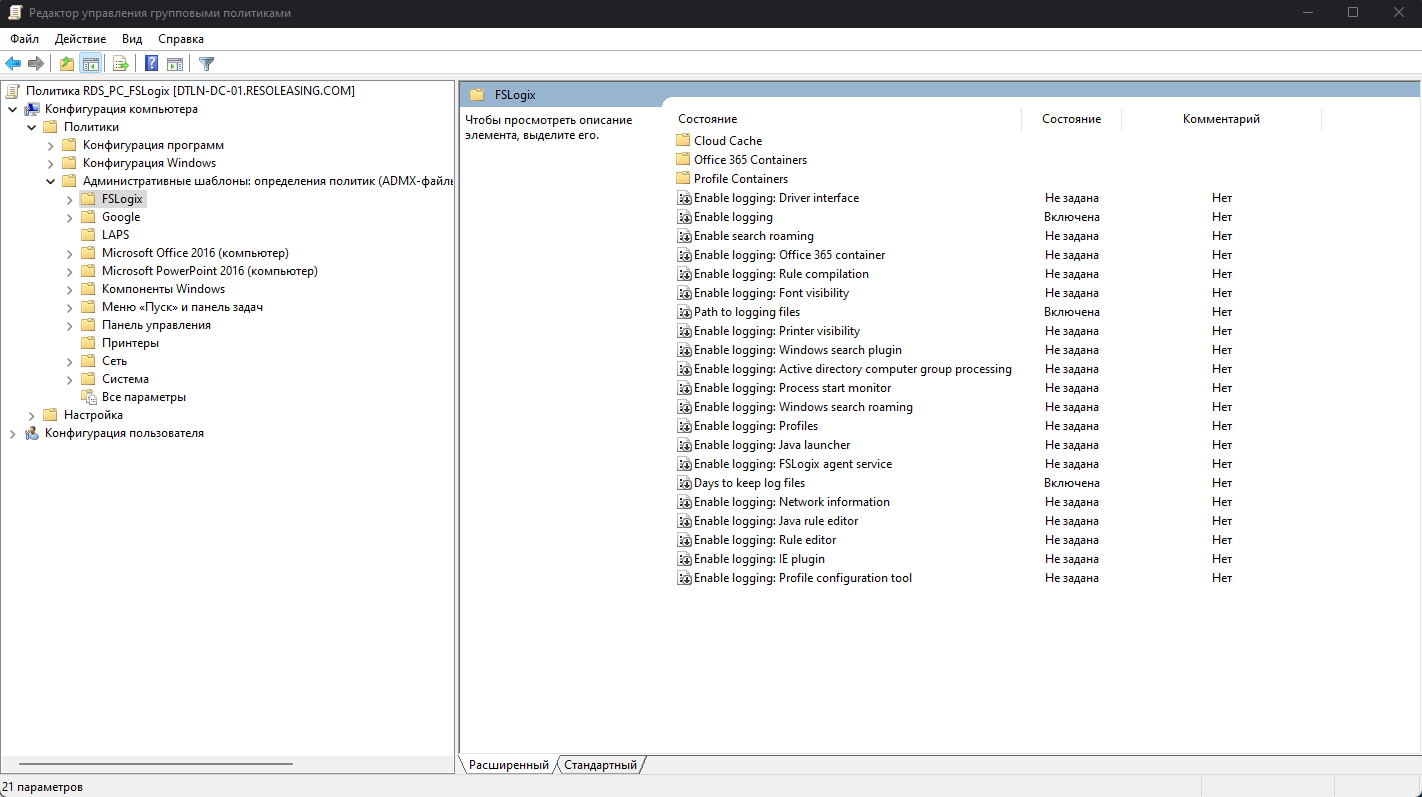
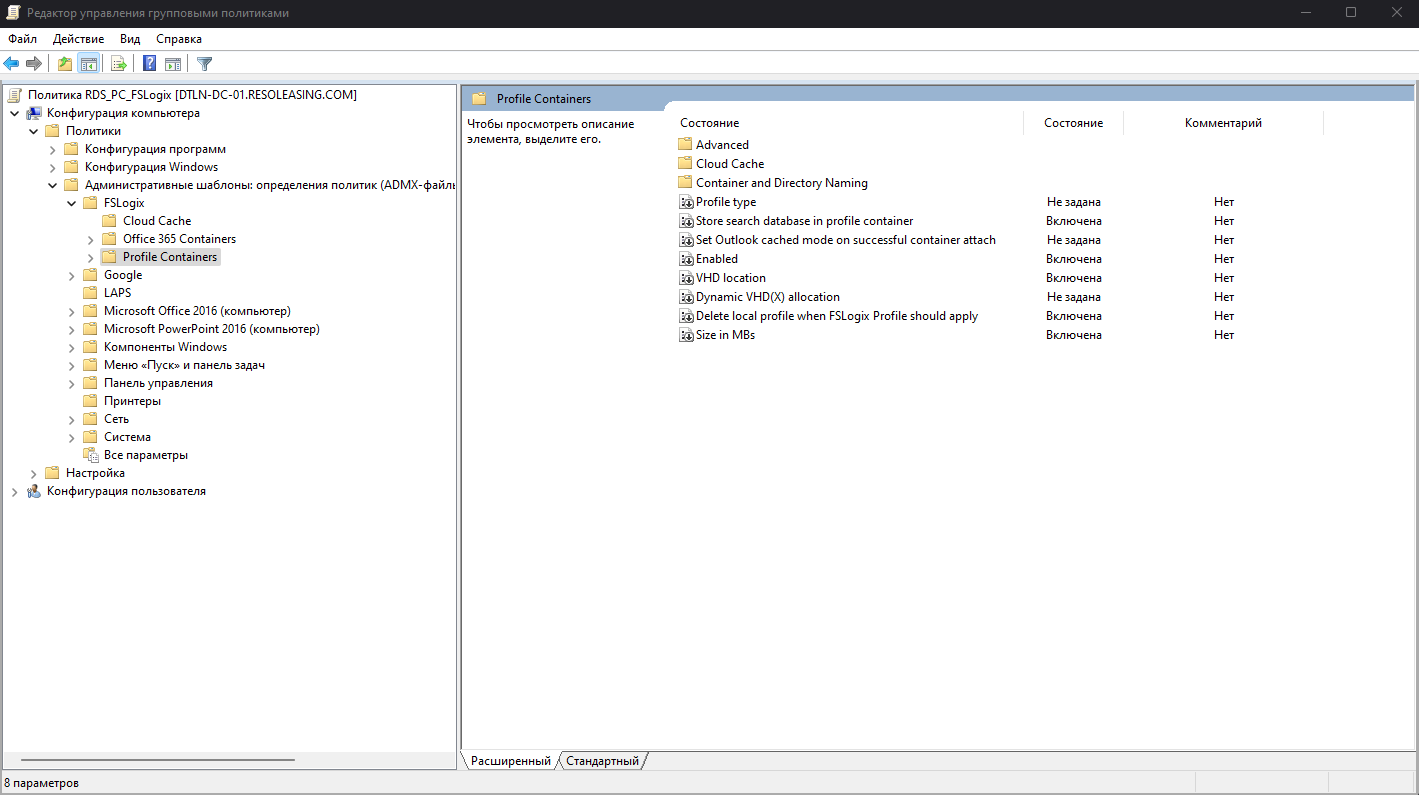
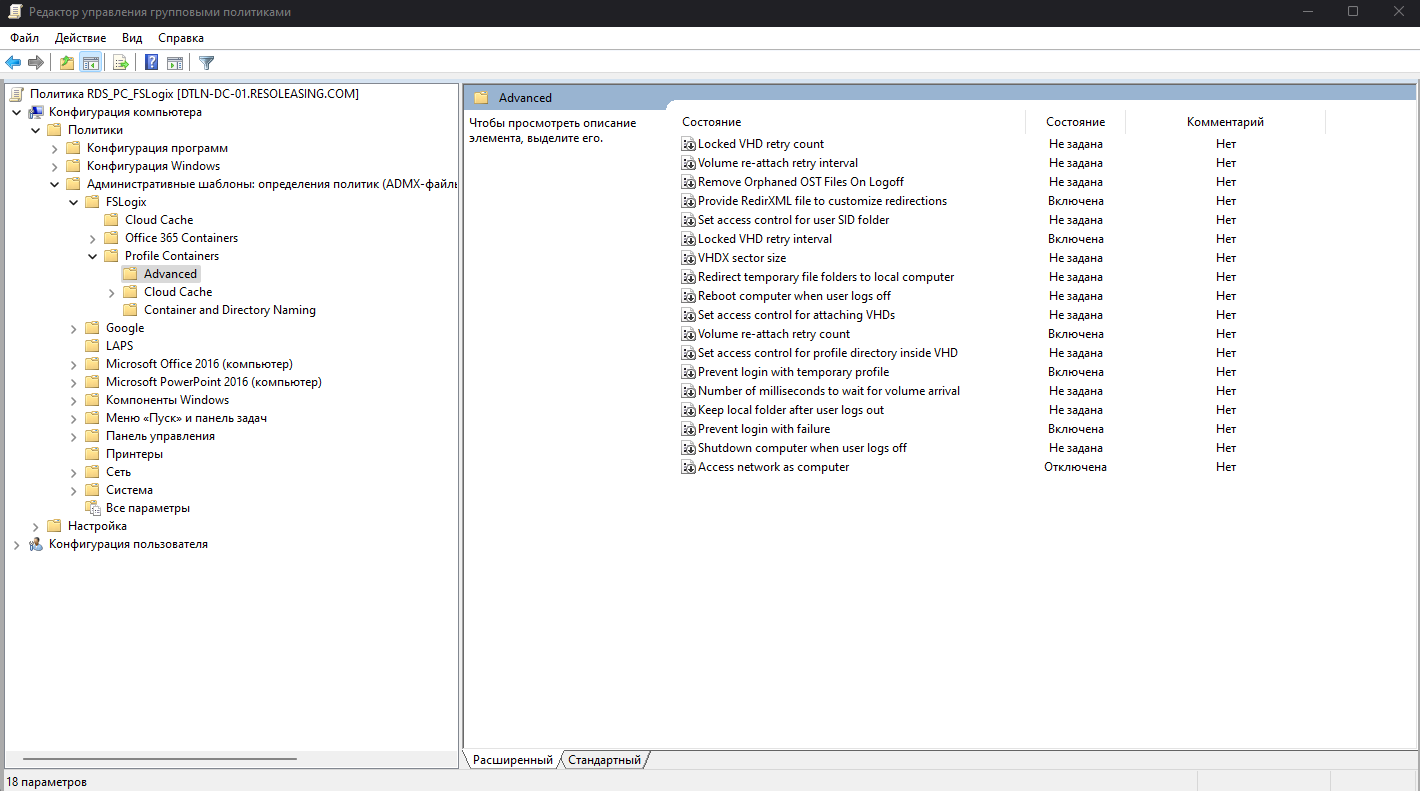
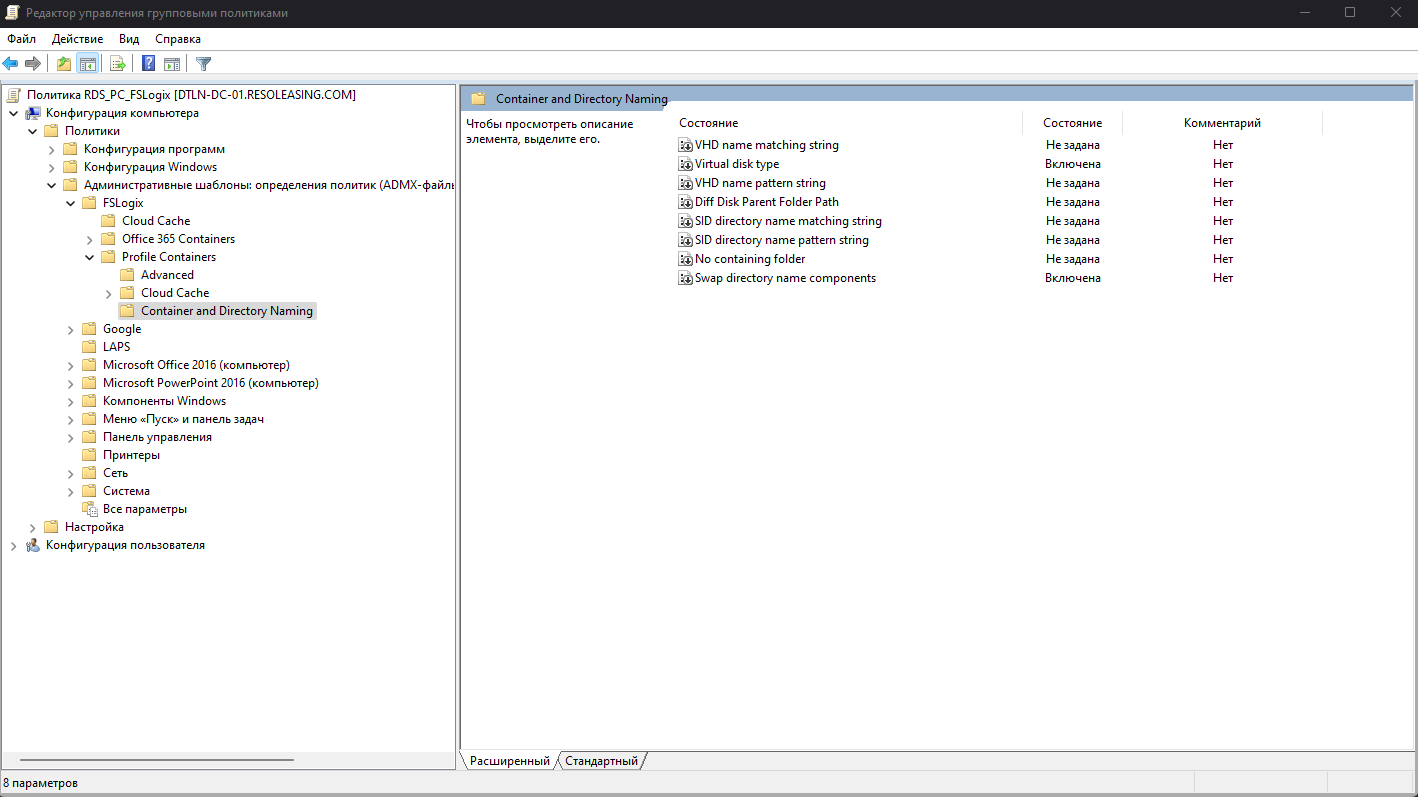
Forgive the Russian language.
What kind of Antivirus solution do people run here? Trend or Symantec? Defender?
Also try extend GPO refresh values to run refresh once a day or something, see if that may help?
We encountered this problem when we were using Defender, then we upgraded to Kaspersky. But all exceptions are added. You see, something is holding robocopy back.
Also try extend GPO refresh values to run refresh once a day or something, see if that may help?
Can you tell me more about this?