Note
Access to this page requires authorization. You can try signing in or changing directories.
Access to this page requires authorization. You can try changing directories.
Important
Microsoft Defender for Cloud is expanding to the Defender portal to provide a unified security experience across cloud and code environments. As part of this expansion, some features are now available in the Microsoft Defender Portal, and additional capabilities will be added to the Defender portal over time.
This change is designed to:
- Unlock new cloud and posture management experiences.
- Provide deep integration with other Microsoft security services.
- Empower security teams with streamlined workflows by bringing all tools together in one portal.
To identify documentation specific for the Defender Portal, look for the portal entry point at the top of the article. This pivot indicates whether the content applies to the Defender portal or the Azure portal.
Our documentation will be continuously updated to reflect these changes, so check back regularly for the latest guidance and feature availability.
Review the known limitations article to understand current gaps during the preview phase.
This article provides a comprehensive overview of Microsoft Defender for Cloud's integration with the Defender portal, covering key features, benefits, and capabilities available in this unified security experience.
Overview
Microsoft Defender for Cloud (MDC) is now deeply integrated into the Defender portal at security.microsoft.com and part of the broader Microsoft Security eco-system. With threat protection already deeply embedded into the Defender portal, this integration adds posture management—bringing together a complete cloud-native application protection platform (CNAPP) solution in one unified experience. This native-integration eliminates silos so security teams can see and act on threats across all cloud, hybrid and code environments - all from one place and eliminates the need to switch between tools and portals.
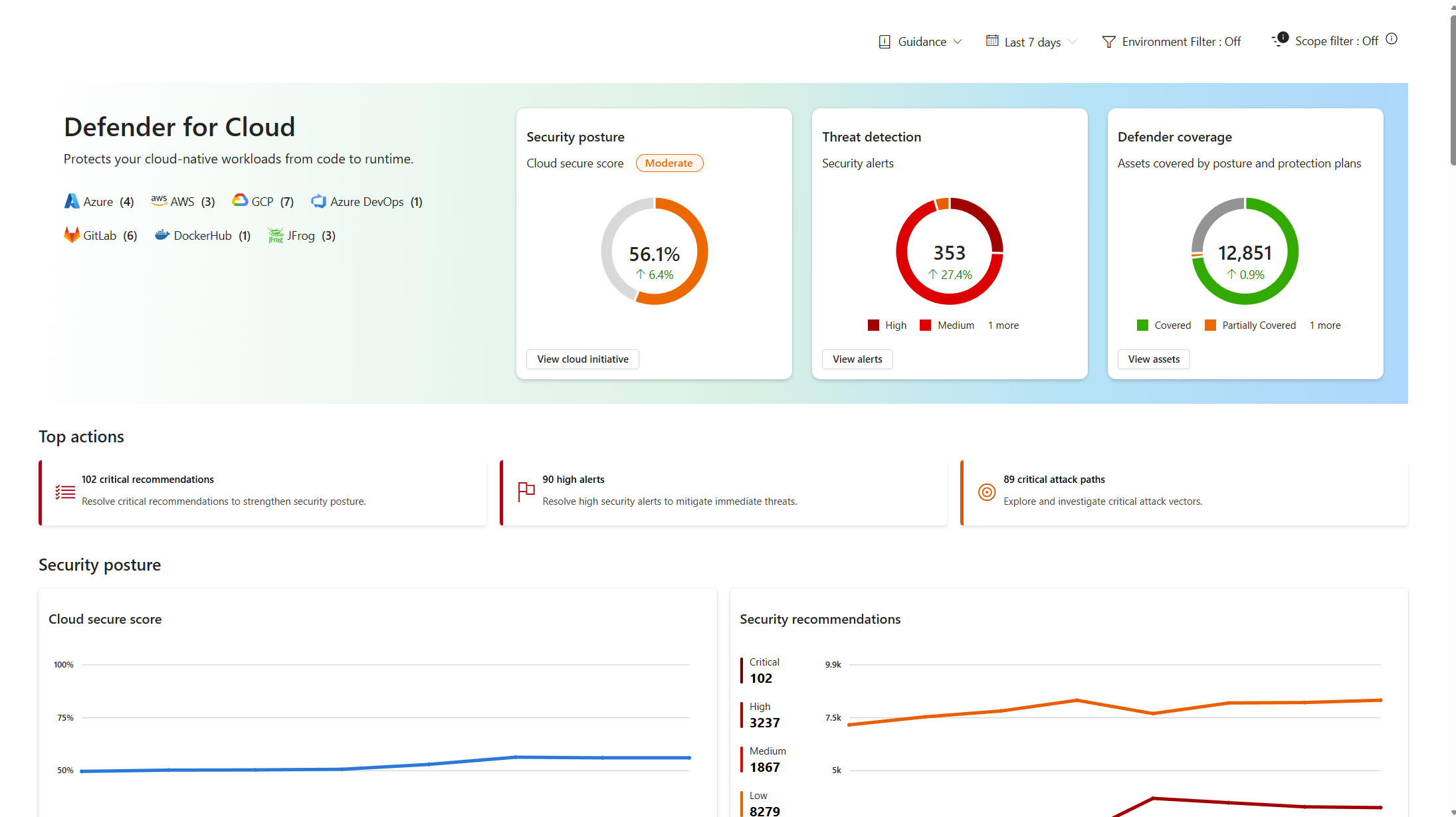
The cloud-agnostic expansion supports Azure, AWS, GCP, and other platforms in a single interface, making it ideal for hybrid and multi-cloud organizations seeking comprehensive exposure management too. In the first phase, the journey for new customers still starts in the Azure portal for initial onboarding, connecting environments for protection, and setting policies and configurations. Once this is complete, users can consume the data in the Defender portal. In a later phase, users will also be able to manage and configure settings directly in Defender, enabling them to perform all MDC end-to-end use cases within a single portal.
Supported experiences in the Defender portal
Cloud security data and signals can be accessed through several experiences. Some are exclusive to the cloud, while others are incorporated into broader Defender experiences like XDR and Exposure Management.
Cloud security
Posture Management
Threat Detection & Response
Configurations
Key values and benefits
Cloud overview dashboard - The Cloud overview dashboard centralizes both posture management and threat protection, giving security personas an overview of their environment. It also highlights the top improvement actions for risk reduction, workload-specific views with security insights and track security progress over time out of the box.
Cloud asset inventory – A complete inventory offers a comprehensive view of cloud and code assets across Azure, AWS, and GCP. Assets are categorized by workload, criticality, and coverage, with integrated health data, asset actions, and risk signals. Information security and SOC teams can easily access resource-specific views, exposure map, and metadata to address security recommendations and respond quickly to threats.
Unified cloud security posture capabilities – All the cloud security posture management (CSPM) capabilities unified into Microsoft Security Exposure Management (MSEM). Security personas can view secure scores, prioritized recommendations, attack paths and vulnerabilities, all in a single pane of glass, empowering them to reduce risk and get a holistic view of all their posture end-to-end including devices, identities, SaaS apps and data. For more information, see What's new in Microsoft Security Exposure Management.
Granular access management – Security teams can now provide targeted access to security content, so only relevant users see necessary information. This allows users to view security insights without direct resource permissions, enhancing operational security and compliance. Using a new cloud scopes capability, cloud accounts like Azure subscriptions, AWS accounts, and GCP projects can be organized into logical groups for improved data pivoting and RBAC, supporting segmentation by business unit, region, or workload with persistent filtering across dashboards and workflows.
Why integrate into the Defender portal?
The Microsoft Defender portal delivers a unified security operations experience across endpoints, identities, email, and cloud resources. By integrating Defender solutions, such as Defender for Cloud, Defender for Endpoint, and others, it provides comprehensive protection, detection, investigation, and response capabilities in one place. This unified approach streamlines threat detection, correlates insights, and strengthens your organization’s security posture. Powered by advanced AI and Microsoft’s global threat intelligence, it helps identify emerging risks faster and enables proactive defense against sophisticated attacks.
How to get started?
During the preview phase, Defender for Cloud customers with at any paid plan can access the consumption experiences in the Defender portal.
To enable the preview, follow the steps outlined in Enable preview features in the Defender portal
Read the known limitations
Read the FAQ
Once enabled, open Defender for Cloud by choosing Cloud infrastructure in the left menu or from within the Defender portal's cloud-integrated experiences.