Note
Access to this page requires authorization. You can try signing in or changing directories.
Access to this page requires authorization. You can try changing directories.
Applies to: ✅ Warehouse in Microsoft Fabric
Surrogate keys are identifiers used in data warehousing to uniquely distinguish rows, independent of their natural keys. In Fabric Data Warehouse, IDENTITY columns enable automatic generation of these surrogate keys when inserting new rows into a table. This article explains how to use IDENTITY columns in Fabric Data Warehouse to create and manage surrogate keys efficiently.
Why use an IDENTITY column?
IDENTITY columns eliminate the need for manual key assignment, reducing risk of errors and simplifying data ingestion. System-managed unique values are ideal as surrogate keys and primary keys. When compared to manual approaches to produce surrogate keys, IDENTITY columns offer superior performance as unique keys are generated automatically without extra logic on queries.
The bigint data type, required for IDENTITY columns, can store up to 9,223,372,036,854,775,807 positive integer values, ensuring that throughout a table's lifetime, each row receives a unique value in its IDENTITY column.
For a plan to migrate data with surrogate keys from other database platforms, see Migrate IDENTITY columns to Fabric Data Warehouse.
Syntax
To define an IDENTITY column in Fabric Data Warehouse, the IDENTITY property is used with the desired column. The syntax is as follows:
CREATE TABLE { warehouse_name.schema_name.table_name | schema_name.table_name | table_name } (
    [column_name] BIGINT IDENTITY,
    [ ,... n ]
    -- Other columns here
);
How IDENTITY columns work
Within Fabric Data Warehouse, you can't specify a custom starting value or increment; the system manages the values internally to ensure uniqueness. IDENTITY columns always produce positive integer values. Each new row receives a new value, and uniqueness is guaranteed for as long as the table exists. Once a value is used, IDENTITY doesn't use that same value again, preserving both key integrity and uniqueness. Gaps can appear on values that the IDENTITY column produces.
Allocation of values
Due to the distributed architecture of the warehouse engine, the IDENTITY property doesn't guarantee the order in which the surrogate values are allocated. The IDENTITY property is designed to scale out across compute nodes to maximize parallelism, without affecting load performance. As a result, value ranges on different ingestion tasks might have different sequence ranges.
To illustrate this behavior, consider the following example:
-- Create a table with an IDENTITY column
CREATE TABLE dbo.T1(
    C1 BIGINT IDENTITY,
    C2 VARCHAR(30) NULL
)

-- Ingestion task A
INSERT INTO dbo.T1
VALUES (NULL), (NULL), (NULL), (NULL);

-- Ingestion task B
INSERT INTO dbo.T1
VALUES (NULL), (NULL), (NULL), (NULL);

-- Reviewing the data
SELECT * FROM dbo.T1;
Sample result:
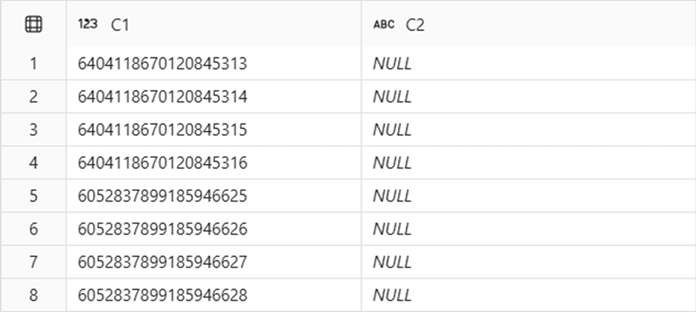
In this example, Ingestion task A and Ingestion task B are executed sequentially, as independent tasks. Although the tasks ran consecutively, the first and last four rows have different identity key ranges in dbo.T1.C1. In addition to that, as observed in this example, gaps in between the ranges assigned for task A and task B can occur.
IDENTITY in Fabric Data Warehouse guarantees that all values on an IDENTITY column are unique, but there can be gaps on the ranges produced for a given ingestion task.
System views
The sys.identity_columns catalog view can be used to list all identity columns on a warehouse. The following example lists all tables that contain an IDENTITY column on their definition, with their respective schema name, and the name of the IDENTITY column on that table:
SELECT
    s.name AS SchemaName,
    t.name AS TableName,
    c.name AS IdentityColumnName
FROM
    sys.identity_columns AS ic
INNER JOIN
    sys.columns AS c ON ic.[object_id] = c.[object_id]
    AND ic.column_id = c.column_id
INNER JOIN
    sys.tables AS t ON ic.[object_id] = t.[object_id]
INNER JOIN
    sys.schemas AS s ON t.[schema_id] = s.[schema_id]
ORDER BY
    s.name, t.name;
Limitations
- Only the bigint data type is supported for
IDENTITYcolumns in Fabric Data Warehouse. Attempting to use other data types result in an error. IDENTITY_INSERTisn't supported in Fabric Data Warehouse. Users can't update or manually insert column values on identity columns in Fabric Data Warehouse.- Defining a
seedandincrementisn't supported. As a result, reseeding theIDENTITYcolumn isn't supported. - Adding a new
IDENTITYcolumn to an existing table withALTER TABLEisn't supported. Consider using CREATE TABLE AS SELECT (CTAS) or SELECT... INTO as alternatives to create a copy of an existing table that adds anIDENTITYcolumn to its definition. - Some limitations apply to how
IDENTITYcolumns are preserved when creating a new table as a result of a select from a different table withCREATE TABLE AS SELECT (CTAS)orSELECT... INTO. For more information, see the Data Types section of SELECT - INTO Clause (Transact-SQL).
Examples
A. Create a table with an IDENTITY column
CREATE TABLE Employees (
    EmployeeID BIGINT IDENTITY,
    FirstName VARCHAR(50),
    LastName VARCHAR(50)
);
This statement creates an Employees table where every new row automatically receives a unique EmployeeID as a bigint value.
B. INSERT on a table with an identity column
When the first column is an IDENTITY column, you don't need to specify it in the column list.
INSERT INTO Employees (FirstName, LastName) VALUES ('Ensi','Vasala')
It's also possible to emit the column names, if values are provided for all columns of the destination table (except for the identity column):
INSERT INTO Employees VALUES ('Quarantino', 'Esposito')
C. Create a new table with an IDENTITY column using CREATE TABLE AS SELECT (CTAS)
Considering a simple table as an example:
CREATE TABLE Employees (
    EmployeeID BIGINT IDENTITY,
    FirstName VARCHAR(50),
    LastName VARCHAR(50)
);
We can use CREATE TABLE AS SELECT (CTAS) to create a copy of this table, persisting the IDENTITY property in the target table:
CREATE TABLE RetiredEmployees
AS SELECT * FROM Employees
The column on the target table inherits the IDENTITY property from the source table. For a list of limitations that apply to this scenario, refer to the Data Types section of SELECT - INTO Clause.
D. Create a new table with an IDENTITY column using SELECT... INTO
Considering a simple table as an example:
CREATE TABLE dbo.Employees (
    EmployeeID BIGINT IDENTITY,
    FirstName VARCHAR(50),
    LastName VARCHAR(50),
    Retired BIT
);
We can use SELECT... INTO to create a copy of this table, persisting the IDENTITY property in the target table:
SELECT *
INTO dbo.RetiredEmployees
FROM dbo.Employees
WHERE Retired = 1;
The column on the target table inherits the IDENTITY property from the source table. For a list of limitations that apply to this scenario, refer to the Data Types section of SELECT - INTO Clause.