Note
Access to this page requires authorization. You can try signing in or changing directories.
Access to this page requires authorization. You can try changing directories.
Applies to: ✅ Warehouse in Microsoft Fabric
This tutorial explains how to use IDENTITY columns in Fabric Data Warehouse to create and manage surrogate keys efficiently.
Prerequisites
- Have access to a Warehouse item in a workspace, with Contributor or higher permissions.
- Choose your query tool. This tutorial features the SQL query editor in the Microsoft Fabric portal, but you can use any T-SQL querying tool.
- Basic understanding of T-SQL.
What is an IDENTITY column?
An IDENTITY column is a numeric column that automatically generates unique values for new rows. This makes it ideal for implementing surrogate keys, as it ensures each row receives a unique identifier without manual input.
Create an IDENTITY column
To define an IDENTITY column, specify the keyword IDENTITY in the column definition of the CREATE TABLE T-SQL syntax:
CREATE TABLE { warehouse_name.schema_name.table_name | schema_name.table_name | table_name } (
    [column_name] BIGINT IDENTITY,
    [ ,... n ],
    -- Other columns here
);
Note
In Fabric Data Warehouse, bigint is the only supported data type for IDENTITY columns. Additionally, the seed and increment properties of T-SQL IDENTITY aren't supported. For more information, see IDENTITY columns and IDENTITY (Transact-SQL). For more information on creating tables, see Create tables in the Warehouse in Microsoft Fabric.
Create a table with an IDENTITY column
In this tutorial, we'll create a simpler version of the Trip table from the NY Taxi open dataset, and add a new TripID IDENTITY column to it. Each time a new row is inserted, TripID is assigned with a new value that's unique in the table.
Define a table with an
IDENTITYcolumn:CREATE TABLE dbo.Trip ( TripID BIGINT IDENTITY, DateID int, MedallionID int, HackneyLicenseID int, PickupTimeID int, DropoffTimeID int );Next, we use
COPY INTOto ingest some data into this table. When usingCOPY INTOwith anIDENTITYcolumns you must provide the column list, mapping to columns in the source data.COPY INTO Trip (DateID 1, MedallionID 2, HackneyLicenseID 3, PickupTimeID 4, DropoffTimeID 5) FROM 'https://nytaxiblob.blob.core.windows.net/2013/Trip2013' WITH ( FILE_TYPE = 'CSV', FIELDTERMINATOR = '|', COMPRESSION = 'GZIP' );We can preview the data and the values assigned to the
IDENTITYcolumn with a simple query:SELECT TOP 10 * FROM Trip;The output includes the automatically generated value for the
TripIDcolumn for each row.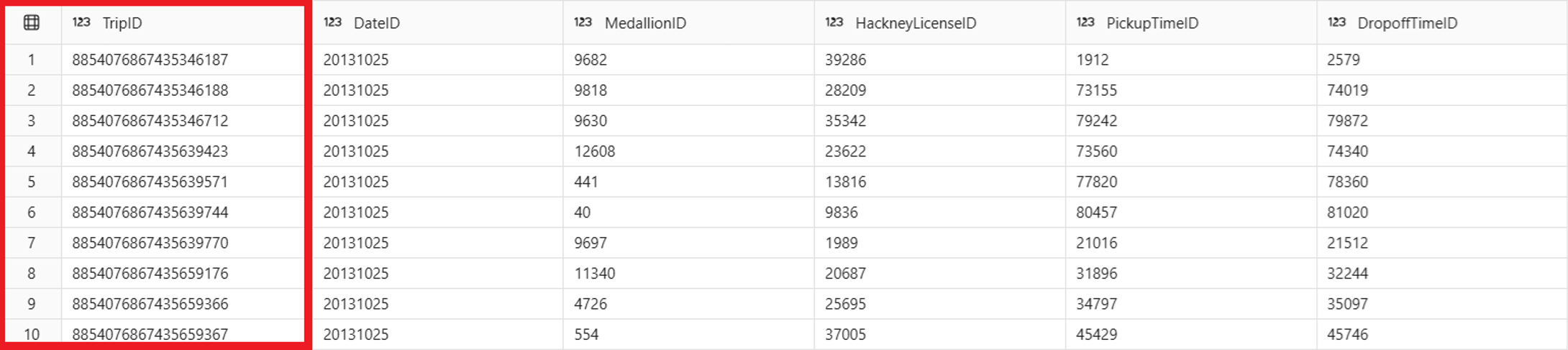
Important
Your values might be different from the ones observed in this article.
IDENTITYcolumns produce random values that are guaranteed to be unique, but there can be gaps in the sequences, and values might not be in order.You can also use
INSERT INTOto ingest new rows in your table.INSERT INTO dbo.Trip VALUES (20251104, 3524, 28804, 51931, 52252);The column list can be provided with
INSERT INTO, but it isn't required. When providing a column list, specify the name of all columns that you're providing input data for, except for theIDENTITYcolumn:INSERT INTO dbo.Trip (DateID, MedallionID, HackneyLicenseID, PickupTimeID, DropoffTimeID) VALUES (20251104, 8410, 24939, 74609, 49583);We can review the rows inserted with a simple query:
SELECT *
FROM dbo.Trip
WHERE DateID = 20251104;
Observe the values assigned to the new rows:
