Note
Access to this page requires authorization. You can try signing in or changing directories.
Access to this page requires authorization. You can try changing directories.
Note
This feature is currently in public preview. This preview is provided without a service-level agreement, and isn't recommended for production workloads. Certain features might not be supported or might have constrained capabilities. For more information, see Supplemental Terms of Use for Microsoft Azure Previews.
The GQL Graph Query Language is the ISO-standardized query language for graph databases. It helps you query and work with graph data efficiently.
GQL is developed by the same ISO working group that standardizes SQL, ensuring consistency and rigor. If you’re familiar with SQL, you’ll find many similarities in GQL (expressions, predicates, types) - making it easier to get started. This guide serves both newcomers learning GQL fundamentals and experienced users seeking advanced techniques and comprehensive reference information.
Note
The official International Standard for GQL is ISO/IEC 39075 Information Technology - Database Languages - GQL.
Prerequisites
Before diving into GQL, you should be familiar with these concepts:
- Basic understanding of databases - Experience with any database system (such as relational (SQL), NoSQL, or graph) is helpful
- Graph concepts - Understanding of nodes, edges, and relationships in connected data
- Query fundamentals - Knowledge of basic query concepts like filtering, sorting, and aggregation
Recommended background:
- Experience with SQL or openCypher languages makes learning GQL syntax easier (they are GQL's roots)
- Familiarity with data modeling helps with graph schema design
- Understanding of your specific use case for graph data
What you'll need:
- Access to Microsoft Fabric with graph capabilities
- Sample data or willingness to work with our social network examples
- Basic text editor for writing queries
Tip
If you're new to graph databases, start with the graph data models overview before continuing with this guide.
What makes GQL special
GQL is designed specifically for graph data. This makes it natural and intuitive to work with connected information.
Unlike SQL, which relies on table joins to express relationships, GQL uses visual graph patterns, which directly mirror how entities are connected, making queries easier to read and reason about.
Let’s say you want to find people and their friends (people who know each other) who were both born before 1999. Here’s how GQL expresses that using a visual graph pattern:
MATCH (person:Person)-[:knows]-(friend:Person)
WHERE person.birthday < 19990101
  AND friend.birthday < 19990101
RETURN person.firstName || ' ' || person.lastName AS person_name,
       friend.firstName || ' ' || friend.lastName AS friend_name
This query finds friends (people who know each other) who were both born before 1999. The pattern (person:Person)-[:knows]-(friend:Person) visually shows the relationship structure you're looking for—much like drawing a diagram of your data.
GQL fundamentals
Before diving into queries, understand these core concepts that form the foundation of GQL:
- Graphs store your data as nodes (entities) and edges (relationships), each with labels and properties
- Graph types act like schemas, defining what nodes and edges can exist in your graph
- Constraints are additional rules and restrictions imposed by graph types on graphs to enforce data integrity
- Queries use statements like
MATCH,FILTER, andRETURNto process data and show results - Patterns describe the graph structures you want to find using intuitive visual syntax
- Expressions perform calculations and comparisons on your data, similar to SQL expressions
- Predicates are boolean value expressions that are used to filter results within queries
- Value types define what kinds of values you can process and store
Understanding graph data
To work effectively with GQL, you need to understand how graph data is structured. This foundation helps you write better queries and model your data effectively.
Nodes and edges: the building blocks
In GQL, you work with labeled property graphs. A graph consists of two types of elements:
Nodes typically represent the entities (the "nouns") in your system—things like people, organizations, posts, or products. They're independent objects that exist in your domain. Nodes are sometimes also called vertices.
Edges represent relationships between entities (the "verbs")—how your entities connect and interact.
For example, people know each other (:knows), organizations that operate in specific regions (:operates), or customers who purchased products (:purchased).
Edges are sometimes also called relationships.
Every graph element has these characteristics:
- An internal ID that uniquely identifies it
- One or more labels—descriptive names like
Personorknows. In Microsoft Fabric, graph edges always have exactly one label. - Properties—name-value pairs that store data about the element (such as
firstName: "Alice"orbirthday: "19730108").
How graphs are structured
Each edge connects exactly two nodes: a source and a destination. This connection creates the graph's structure and shows how entities relate to each other. The direction of edges matters—a Person who follows another Person creates a directed relationship.
Note
Graph in Microsoft Fabric currently doesn't support undirected edges.
Property graphs as supported in Microsoft Fabric are always well-formed, meaning every edge connects two valid nodes. If you see an edge in a graph, both its endpoints exist in the same graph.
Graph models and graph types
The structure of a graph in Microsoft Fabric is described by its graph model, which acts like a database schema for your application domain. Graph models define:
- Which nodes and edges can exist
- What labels and properties they can have
- How nodes and edges can connect
Graph models also ensure data integrity through constraints, especially node key constraints that specify which properties uniquely identify each node.
Note
Graph models can be specified using GQL standard syntax, in which case they're called graph types.
A practical example: social network
Throughout this documentation, we use a social network example to illustrate GQL concepts. Understanding this domain helps you follow the examples and apply similar patterns to your own data.
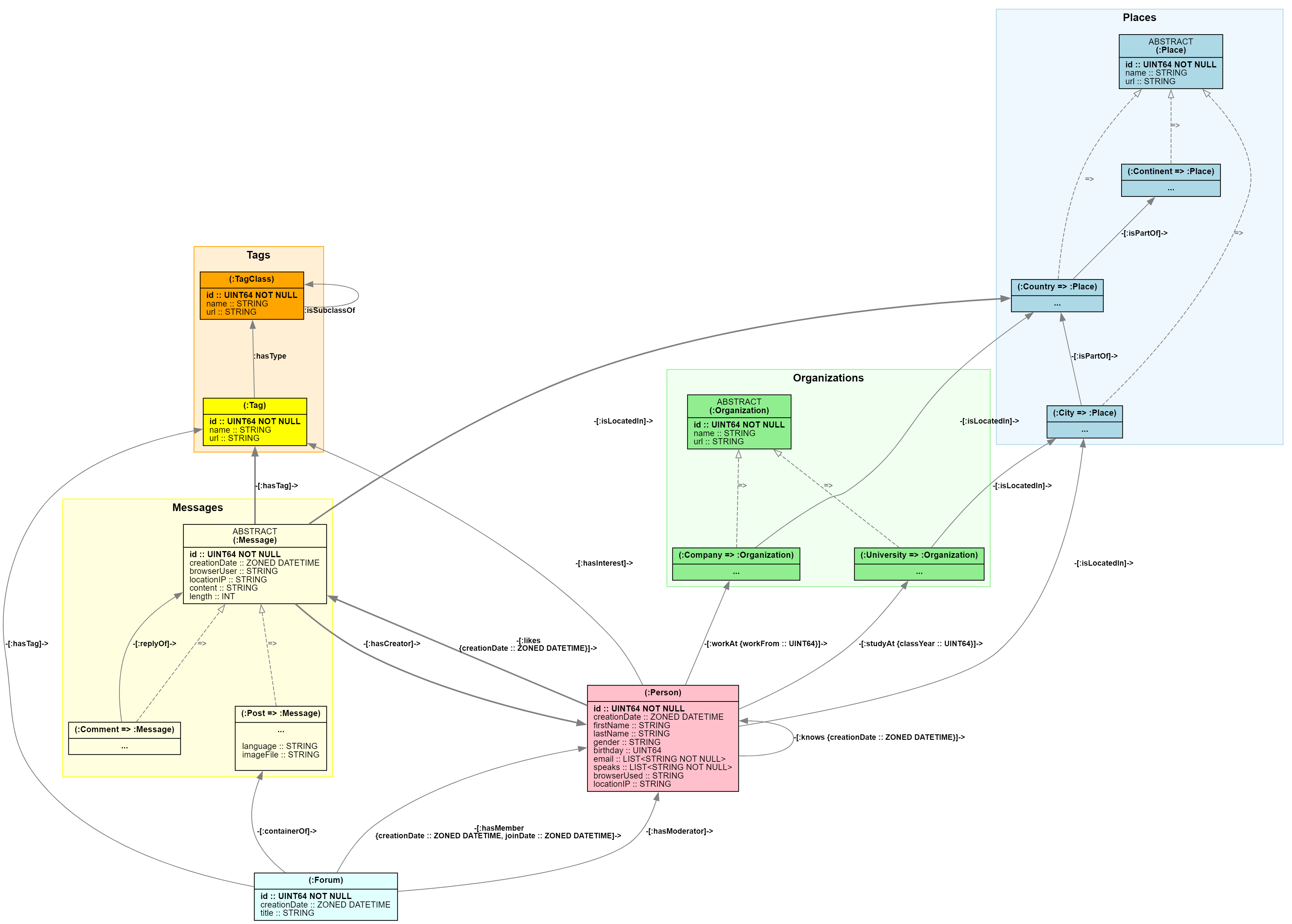
Note
The social network is example is derived from the LDBC SNB (LDBC Social Network Benchmark) published by the GDC (Graph Data Council). See the article "The LDBC Social Network Benchmark" for further details.
The social network entities
Our social network includes these main kinds of nodes, representing entities of the domain:
People have personal information like names, birthdays, and genders. They live in cities and form social connections.
Places form a geographic hierarchy:
- Cities like "New York" or "London"
- Countries/regions like "United States" or "United Kingdom"
- Continents like "North America" or "Europe"
Organizations where people spend time:
- Universities where people study
- Companies where people work
Content and discussions:
- Forums with titles that contain posts
- Posts with content, language, and optional images
- Comments that reply to posts or other comments
- Tags that categorize content and represent interests
How everything connects
The connections between entities make the network interesting:
- People know each other (friendships,
:knows) - People work at companies (
:workAt) or study at universities (:studyAt) - People create posts and comments (
:hasCreator) - People like posts and comments (
:likes) - Posts, Forums, Comments can have tags (
:hasTag) - People have interests in specific tags (
:hasInterest) - Forums contain posts (
:containerOf) and have members (:hasMember) and moderators (:hasModerator)
Graph edges represent domain relationships. This rich network creates many opportunities for interesting queries and analysis.
Your first GQL queries
Now that you understand graph basics, let's see how to query graph data using GQL. These examples build from simple to complex, showing you how GQL's approach makes graph queries intuitive and powerful.
Start simple: find all people
Let's begin with the most basic query possible, find the names (first name, last name) of all the people (:Persons) in the graph.
MATCH (p:Person)
RETURN p.firstName, p.lastName
This query is executed as follows:
MATCHfinds all nodes labeledPersonRETURNshows their first and last names
Add filtering: find specific people
Now let's find people with specific characteristics, in this case, everyone named Alice and show their names and birthdays.
MATCH (p:Person)
FILTER p.firstName = 'Annemarie'
RETURN p.firstName, p.lastName, p.birthday
This query is executed as follows:
MATCHfinds all nodes (p) labeled PersonFILTERnodes (p) whose first name is AliceRETURNshows their first, last name and birthday
Basic query structure
Basic GQL queries all follow a consistent pattern: a sequence of statements that work together to find, filter, and return data.
Most queries start with MATCH to find patterns in the graph and end with RETURN to specify the output.
Here's a simple query that finds pairs of people who know each other and share the same birthday, then returns the total count of those friend pairs.
MATCH (n:Person)-[:knows]-(m:Person)
FILTER n.birthday = m.birthday
RETURN count(*) AS same_age_friends
This query is executed as follows:
MATCHfinds all pairs ofPersonnodes that know each otherFILTERkeeps only the pairs where both people have the same birthdayRETURNcounts how many such friend pairs exist
Tip
Filtering can also be performed directly as part of a pattern by appending a WHERE clause.
For example, MATCH (n:Person WHERE n.age > 23) will only match Person nodes whose age property is greater than 23.
Note
GQL supports C-style // line comments, SQL-style -- line comments, and C-style /* */ block comments.
Common statements
MATCH: Identifies the graph pattern to search for—this is where you define the structure of the data you're interested in.LET: Assigns new variables or computed values based on matched data—adds derived columns to the result.FILTER: Narrows down the results by applying conditions—removes rows that don’t meet the criteria.ORDER BY: Sorts the filtered data—helps organize the output based on one or more fields.OFFSETandLIMIT: Restrict the number of rows returned—useful for pagination or top-k queries.RETURN: Specifies the final output—defines what data should be included in the result set and performs aggregation.
How statements work together
GQL statements form a pipeline, where each statement processes the output of the previous one. This sequential execution makes queries easy to read and debug because the execution order matches the reading order.
Key points:
- Statements effectively execute sequentially.
- Each statement transforms data and passes it to the next.
- This creates a clear, predictable data flow that simplifies complex queries.
Important
Internally, execution of statements can be re-ordered and individual statements can be executed in parallel by Microsoft Fabric to maximize performance. However, this will not impact correctness of results.
Example
The following GQL query finds the first 10 people working at companies with "Air" in their name, sorts them by full name, and returns their full name along with the name of their companies.
-- Data flows: Match → Let → Filter → Order → Limit → Return
MATCH (p:Person)-[:workAt]->(c:Company)           -- Input: unit table, Output: (p, c) table
LET fullName = p.firstName || ' ' || p.lastName   -- Input: (p, c) table, Output: (p, c, fullName) table
FILTER c.name CONTAINS 'Air'                      -- Input: (p, c, fullName) table, Output: filtered table
ORDER BY fullName                                 -- Input: filtered table, Output: sorted table
LIMIT 10                                          -- Input: sorted table, Output: top 10 rows table
RETURN fullName, c.name AS companyName            -- Input: top 10 rows table
                                                  -- Output: projected (fullName, companyName) result table
This query is executed as follows:
MATCHfinds people who work at companies with "Air" in their nameLETcreates full names by combining first and family namesFILTERkeeps only Contoso employeesORDER BYsorts by full nameLIMITtakes the first 10 resultsRETURNreturns names and company locations
Variables connect your data
Variables (like p, c, and fullName in the previous examples) carry data between statements. When you reuse a variable name, GQL automatically ensures it refers to the same data, creating powerful join conditions. Variables are sometimes also called binding variables.
Variables can be categorized in different ways:
By binding source:
- Pattern variables - bound by matching graph patterns
- Regular variables - bound by other language constructs
Pattern variable types:
- Element variables - bind to graph element reference values
- Node variables - bind to individual nodes
- Edge variables - bind to individual edges
- Path variables - bind to path values representing matched paths
By reference degree:
- Singleton variables - bind to individual element reference values from patterns
- Group variables - bind to lists of element reference values from variable-length patterns (see Advanced Aggregation Techniques)
Execution outcomes and results
When you run a query, you get back an execution outcome that consists of:
- An (optional) result table with the data from your
RETURNstatement. - Status information showing whether the query succeeded or not.
Result tables
The result table - if present - is the actual result of query execution.
A result table includes information about the name and type of its columns, a preferred column name sequence to be used for displaying results, whether the table is ordered, and the actual rows themselves.
Note
In case of execution failure, no result table is included in the execution outcome.
Status information
Various noteworthy conditions (such as errors or warnings) are detected during the execution of the query. Each such condition is recorded by a status object in the status information of the execution outcome.
The status information consists of a primary status object and a (possibly empty) list of additional status objects. The primary status object is always present and indicates whether query execution was successful or failed.
Every status object includes a 5-digit status code (called GQLSTATUS) that identifies the recorded condition as well as a message that describes it.
Success status codes:
| GQLSTATUS | Message | When |
|---|---|---|
| 00000 | note: successful completion | Success with at least one row |
| 00001 | note: successful completion - omitted result | Success with no table (currently unused) |
| 02000 | note: no data | Success with zero rows |
Other status codes indicate further errors or warnings that were detected during query execution.
Important
In application code, always rely on status codes to test for certain conditions. Status codes are guaranteed to be stable and their general meaning will not change in the future. Do not test for the contents of messages, as the concrete message reported for a status code can change in the future depending on the query or even between executions of the same query.
Additionally, status objects can contain an underlying cause status object and a diagnostic record with further information characterizing the recorded condition.
Essential concepts and statements
This section covers the core building blocks you need to write effective GQL queries. Each concept builds toward practical query writing skills.
Graph patterns: finding structure
Graph patterns are the heart of GQL queries. They let you describe the data structure you're looking for using intuitive, visual syntax that looks like the relationships you want to find.
Simple patterns:
Start with basic relationship patterns:
-- Find direct friendships
(p:Person)-[:knows]->(f:Person)

-- Find people working at any company
(p:Person)-[:workAt]->(c:Company)

-- Find cities in any country/region
(ci:City)-[:isPartOf]->(co:Country)
Patterns with specific data:
-- Find who works at Microsoft specifically
(p:Person)-[:workAt]->(c:Company)
WHERE p.firstName = 'Annemarie'

-- Find friends who are both young
(p:Person)-[:knows]->(f:Person)
WHERE p.birthday > 19950101 AND f.birthday > 19950101
Label expressions for flexible entity selection:
(:Person|Company)-[:isLocatedIn]->(p:City|Country)  -- OR with |
(:Place&City)                                       -- AND with &
(:Person&!Company)                                  -- NOT with !
Note
Graph models with multiple element labels are not yet supported (known issue).
Label expressions let you match different kinds of nodes in a single pattern, making your queries more flexible.
Variable reuse creates powerful joins:
-- Find coworkers: people who work at the same company
(c:Company)<-[:workAt]-(x:Person)-[:knows]-(y:Person)-[:workAt]->(c)
The reuse of variable c ensures both people work at the same company, creating an automatic join constraint. This pattern is a key pattern for expressing "same entity" relationships.
Important
Critical insight: Variable reuse in patterns creates structural constraints. This technique is how you express complex graph relationships like "friends who work at the same company" or "people in the same city."
Pattern-level filtering with WHERE:
-- Filter during pattern matching (more efficient)
(p:Person WHERE p.birthday < 19940101)-[:workAt]->(c:Company WHERE c.id > 1000)

-- Filter edges during matching
(p:Person)-[w:workAt WHERE w.workFrom >= 2000]->(c:Company)
Bounded variable-length patterns:
(:Person)-[:knows]->{1,3}(:Person) -- Friends up to 3 degrees away
TRAIL patterns for cycle-free traversal:
Use TRAIL patterns to prevent cycles during graph traversal, ensuring each edge is visited at most once:
-- Find paths without visiting the same :knows edge twice
MATCH TRAIL (src:Person)-[:knows]->{1,4}(dst:Person)
WHERE src.firstName = 'Alice' AND dst.firstName = 'Bob'
RETURN count(*) AS num_connections
-- Find acyclic paths in social networks
MATCH TRAIL (p:Person)-[e:knows]->{,3}(celebrity:Person)
RETURN
  p.firstName || ' ' || p.lastName AS person_name,
  celebrity.firstName || ' ' || celebrity.lastName AS celebrity_name,
  count(e) AS distance
LIMIT 1000
Variable-length edge binding:
In variable-length patterns, edge variables capture different information based on context:
-- Edge variable 'e' binds to a single edge for each result row
MATCH (p:Person)-[e:knows]->(friend:Person)
RETURN p.firstName, e.creationDate, friend.firstName  -- e refers to one specific relationship
LIMIT 1000

-- Edge variable 'e' binds to a group list of all edges in the path
MATCH (p:Person)-[e:knows]->{2,4}(friend:Person)
RETURN
  p.firstName || ' ' || p.lastName AS person_name,
  friend.firstName || ' ' || friend.lastName AS friend_name,
  -- e is a list
  size(e) AS num_edges
LIMIT 1000
This distinction is crucial for using edge variables correctly.
Complex patterns with multiple relationships:
MATCH (p:Person), (p)-[:workAt]->(c:Company), (p)-[:isLocatedIn]->(city:City)
RETURN p.firstName, p.lastName, c.name AS company_name, city.name AS city_name
LIMIT 1000
This pattern finds people along with both their workplace and residence, showing how one person connects to multiple other entities.
Core statements
GQL provides specific statement types that work together to process your graph data step by step. Understanding these statements is essential for building effective queries.
MATCH statement
Syntax:
MATCH <graph pattern>, <graph pattern>, ... [ WHERE <predicate> ]
The MATCH statement takes input data and finds graph patterns, joining input variables with pattern variables and outputting all matched combinations.
Input and output variables:
-- Input: unit table (no columns, one row)
-- Pattern variables: p, c
-- Output: table with (p, c) columns for each person-company match
MATCH (p:Person)-[:workAt]->(c:Company)
Statement-level filtering with WHERE:
-- Filter pattern matches
MATCH (p:Person)-[:workAt]->(c:Company) WHERE p.lastName = c.name
All matches can be post-filtered using WHERE, avoiding a separate FILTER statement.
Joining with input variables:
When MATCH isn't the first statement, it joins input data with pattern matches:
...
-- Input: table with 'targetCompany' column
-- Implicit join: targetCompany (equality join)
-- Output: table with (targetCompany, p, r) columns
MATCH (p:Person)-[r:workAt]->(targetCompany)
Important
Graph in Microsoft Fabric does not yet support arbitrary statement composition. See the article on current limitations.
Key joining behaviors:
How MATCH handles data joining:
- Variable equality: Input variables join with pattern variables using equality matching
- Inner join: Input rows without pattern matches are discarded (no left/right joins)
- Filtering order: Statement-level
WHEREfilters after pattern matching completes - Pattern connectivity: Multiple patterns must share at least one variable for proper joining
- Performance: Shared variables create efficient join constraints
Important
Restriction: If this MATCH isn't the first statement, at least one input variable must join with a pattern variable. Multiple patterns must have one variable in common.
Multiple patterns require shared variables:
-- Shared variable 'p' joins the two patterns
-- Output: people with both workplace and residence data
MATCH (p:Person)-[:workAt]->(c:Company),
      (p)-[:isLocatedIn]->(city:City)
LET statement
Syntax:
LET <variable> = <expression>, <variable> = <expression>, ...
The LET statement creates computed variables and enables data transformation within your query pipeline.
Basic variable creation:
MATCH (p:Person)
LET fullName = p.firstName || ' ' || p.lastName
RETURN *
LIMIT 1000
Complex calculations:
MATCH (p:Person)
LET adjustedAge = 2000 - (p.birthday / 10000),
    fullProfile = p.firstName || ' ' || p.lastName || ' (' || p.gender || ')'
RETURN *
LIMIT 1000
Key behaviors:
- Expressions are evaluated for every input row
- Results become new columns in the output table
- Variables can only reference existing variables from previous statements
- Multiple assignments in one
LETare evaluated in parallel (no cross-references)
FILTER statement
Syntax:
FILTER [ WHERE ] <predicate>
The FILTER statement provides precise control over which data proceeds through your query pipeline.
Basic filtering:
MATCH (p:Person)
FILTER p.birthday < 19980101 AND p.gender = 'female'
RETURN *
Complex logical conditions:
MATCH (p:Person)
FILTER (p.gender = 'male' AND p.birthday < 19940101)
  OR (p.gender = 'female' AND p.birthday < 19990101)
  OR p.browserUsed = 'Edge'
RETURN *
Null-aware filtering patterns:
Use these patterns to handle null values safely:
- Check for values:
p.firstName IS NOT NULL- has a first name - Validate data:
p.id > 0- valid ID - Handle missing data:
NOT coalesce(p.locationIP, '127.0.0.1') STARTS WITH '127.0.0'- didn't connect from local network - Combine conditions: Use
AND/ORwith explicit null checks for complex logic
Caution
Remember that conditions involving null values return UNKNOWN, which filters out those rows. Use explicit IS NULL checks when you need null-inclusive logic.
ORDER BY statement
Syntax:
ORDER BY <expression> [ ASC | DESC ], <expression> [ ASC | DESC ], ...
Multi-level sorting with computed expressions:
MATCH (p:Person)
RETURN *
ORDER BY p.firstName DESC,               -- Primary: by first name (Z-A)
         p.birthday ASC,                 -- Secondary: by age (oldest first)
         p.id DESC                       -- Tertiary: by ID (highest first)
Null handling in sorting:
ORDER BY coalesce(p.gender, 'not specified') DESC -- Treat NULL as 'not specified'
Sorting behavior details:
Understanding how ORDER BY works:
- Expression evaluation: Expressions are evaluated for each row, then results determine row order
- Multiple sort keys: Create hierarchical ordering (primary, secondary, tertiary, etc.)
- Null handling:
NULLis always treated as the smallest value in comparisons - Default order:
ASC(ascending) is default,DESC(descending) must be specified explicitly - Computed sorting: You can sort by calculated values, not just stored properties
Caution
The sort order established by ORDER BY is only visible to the immediately following statement.
Hence, ORDER BY followed by RETURN * does NOT produce an ordered result.
Compare:
MATCH (a:Person)-[r:knows]->(b:Person)
LET aName = a.firstName || ' ' || a.lastName
LET bName = b.firstName || ' ' || b.lastName
ORDER BY r.creationDate DESC
/* intermediary result _IS_ guaranteed to be ordered here */
RETURN aName, bName, r.creationDate AS since
/* final result _IS_ _NOT_ guaranteed to be ordered here  */
with:
MATCH (a:Person)-[r:knows]->(b:Person)
LET aName = a.firstName || ' ' || a.lastName
LET bName = b.firstName || ' ' || b.lastName
/* intermediary result _IS_ _NOT_ guaranteed to be ordered here */
RETURN aName, bName, r.creationDate AS since
ORDER BY r.creationDate DESC
/* final result _IS_ guaranteed to be ordered here              */
This has immediate consequences for "Top-k" queries:
LIMIT must always follow the ORDER BY statement that established
the intended sort order.
OFFSET and LIMIT statements
Syntax:
  OFFSET <offset> [ LIMIT <limit> ]
| LIMIT <limit>
Common patterns:
-- Basic top-N query
MATCH (p:Person)
RETURN *
ORDER BY p.id DESC
LIMIT 10                                 -- Top 10 by ID
Important
For predictable pagination results, always use ORDER BY before OFFSET and LIMIT to ensure consistent row ordering across queries.
RETURN: basic result projection
Syntax:
RETURN [ DISTINCT ] <expression> [ AS <alias> ], <expression> [ AS <alias> ], ...
[ ORDER BY <expression> [ ASC | DESC ], <expression> [ ASC | DESC ], ... ]
[ OFFSET <offset> ]
[ LIMIT <limit> ]
The RETURN statement produces your query's final output by specifying which data appears in the result table.
Basic output:
MATCH (p:Person)-[:workAt]->(c:Company)
RETURN p.firstName || ' ' || p.lastName AS name,
       p.birthday,
       c.name
Using aliases for clarity:
MATCH (p:Person)-[:workAt]->(c:Company)
RETURN p.firstName AS first_name,
       p.lastName AS last_name,
       c.name AS company_name
Combine with sorting and top-k:
MATCH (p:Person)-[:workAt]->(c:Company)
RETURN p.firstName || ' ' || p.lastName AS name,
       p.birthday AS birth_year,
       c.name AS company
ORDER BY birth_year ASC
LIMIT 10
Duplicate handling with DISTINCT:
-- Remove duplicate combinations
MATCH (p:Person)-[:workAt]->(c:Company)
RETURN DISTINCT p.gender, p.browserUsed, p.birthday AS birth_year
ORDER BY p.gender, p.browserUsed, birth_year
Combine with aggregation:
MATCH (p:Person)-[:workAt]->(c:Company)
RETURN count(DISTINCT p) AS employee_count
RETURN with GROUP BY: grouped result projection
Syntax:
RETURN [ DISTINCT ] <expression> [ AS <alias> ], <expression> [ AS <alias> ], ...
GROUP BY <variable>, <variable>, ...
[ ORDER BY <expression> [ ASC | DESC ], <expression> [ ASC | DESC ], ... ]
[ OFFSET <offset> ]
[ LIMIT <limit> ]
Use GROUP BY to group rows by shared values and compute aggregate functions within each group.
Basic grouping with aggregation:
MATCH (p:Person)-[:workAt]->(c:Company)
LET companyName = c.name
RETURN companyName,
       count(*) AS employeeCount,
       avg(p.birthday) AS avg_birth_year
GROUP BY companyName
ORDER BY employeeCount DESC
Multi-column grouping:
MATCH (p:Person)
LET gender = p.gender
LET browser = p.browserUsed
RETURN gender,
       browser,
       count(*) AS person_count,
       avg(p.birthday) AS avg_birth_year,
       min(p.creationDate) AS first_joined,
       max(p.id) AS highest_id
GROUP BY gender, browser
ORDER BY avg_birth_year DESC
LIMIT 10
Note
For advanced aggregation techniques including horizontal aggregation over variable-length patterns, see Advanced Aggregation Techniques.
Data types: working with values
GQL supports rich data types for storing and manipulating different kinds of information in your graph.
Basic value types:
- Numbers:
INT64,UINT64,DOUBLEfor calculations and measurements - Text:
STRINGfor names, descriptions, and textual data - Logic:
BOOLwith three values: TRUE, FALSE, and UNKNOWN (for null handling) - Time:
ZONED DATETIMEfor timestamps with timezone information - Collections:
LIST<T>for multiple values of the same typeT,PATHfor graph traversal results - Graph elements:
NODEandEDGEfor referencing graph data
Important
Certain value types are not supported as the types of property values. In particular, all values involving graph element reference values cannot be used as property values (such as lists of nodes or paths).
Example literals:
42                                     -- Integer literal
"Hello, graph!"                        -- String  literal
TRUE                                   -- Boolean literal
ZONED_DATETIME('2024-01-15T10:30:00Z') -- DateTime with timezone literakl
[1, 2, 3]                              -- Literal list of integers
Critical null handling patterns:
-- Equality predicates with NULL always returns UNKNOWN
5 = NULL                              -- Evaluates to UNKNOWN (not FALSE!)
NULL = NULL                           -- Evaluates to UNKNOWN (not TRUE!)

-- Use IS NULL predicates for explicit null testing
p.nickname IS NULL                    -- Evaluates to TRUE if nickname is null
p.nickname IS NOT NULL                -- Evaluates to TRUE if nickname has a value

-- Use the COALESCE function for null-safe value selection
coalesce(p.nickname, p.firstName, '???')  -- Evaluates to first non-null value
Three-valued logic implications:
-- In FILTER statements, only TRUE values pass through
FILTER p.birthday > 0        -- Removes rows where birthday is null or missing or zero

-- It's important to understand that NOT UNKNOWN = UNKNOWN
FILTER NOT (p.birthday > 0)  -- Removes rows where birthday is null or missing or positive

-- Use explicit null handling for inclusive filtering
FILTER p.birthday < 19980101 OR p.birthday IS NULL -- Includes null birthdays
Caution
Three-valued logic means NULL = NULL returns UNKNOWN, not TRUE. This behavior affects filtering and joins. Always use IS NULL for null tests.
Expressions: transforming and analyzing data
Expressions let you calculate, compare, and transform data within your queries. They're similar to expressions in SQL but have extra features for the handling of graph data.
Common expression types:
p.birthday < 19980101   -- Birth year comparison
p.firstName || ' ' || p.lastName               -- String concatenation
count(*)                                       -- Aggregation
p.firstName IN ['Alice', 'Bob']                -- List membership
coalesce(p.firstName, p.lastName)              -- Null handling
Complex predicate composition:
-- Combine conditions with proper precedence
FILTER (p.birthday > 19560101 AND p.birthday < 20061231)
  AND ((p.gender IN ['male', 'female']) OR (p.browserUsed IS NOT NULL))

-- Use parentheses for clarity and correctness
FILTER p.gender = 'female' AND (p.firstName STARTS WITH 'A' OR p.id > 1000)
String pattern matching:
-- Pattern matching with different operators
p.locationIP CONTAINS '192.168'      -- Substring search
p.firstName STARTS WITH 'John'       -- Prefix matching
p.lastName ENDS WITH 'son'           -- Suffix matching

-- Case-insensitive operations
upper(p.firstName) = 'ALICE'         -- Convert to uppercase for comparison
Built-in functions by category:
GQL provides these function categories for different data processing needs:
- Aggregate functions:
count(),sum(),avg(),min(),max()for summarizing data - String functions:
char_length(),upper(),lower(),trim()for text processing - Graph functions:
nodes(),edges(),labels()for analyzing graph structures - General functions:
coalesce()for handling null values gracefully
Operator precedence for complex expressions:
- Property access (
.) - Multiplication/Division (
*,/) - Addition/Subtraction (
+,-) - Comparison (
=,<>,<,>,<=,>=) - Logical negation (
NOT) - Logical conjunction (
AND) - Logical disjunction (
OR)
In above list, an operator with lower number "binds tighter" than an operator with a higher number.
Example: NOT n.prop OR m.prop is (NOT n.prop) OR m.prop but not `NOT (n.prop OR m.prop)
Tip
Use parentheses to make precedence explicit. Complex expressions are easier to read and debug when grouping is clear.
Advanced query techniques
This section covers sophisticated patterns and techniques for building complex, efficient graph queries. These patterns go beyond basic statement usage to help you compose powerful analytical queries.
Complex multi-statement composition
Important
Graph in Microsoft Fabric does not yet support arbitrary statement composition. See the article on current limitations.
Understanding how to compose complex queries efficiently is crucial for advanced graph querying.
Multi-step pattern progression:
-- Build complex analysis step by step
MATCH (company:Company)<-[:workAt]-(employee:Person)
LET companyName = company.name
MATCH (employee)-[:isLocatedIn]->(city:City)
FILTER employee.birthday < 19850101
LET cityName = city.name
RETURN companyName, cityName, avg(employee.birthday) AS avgBirthday, count(employee) AS employeeCount
GROUP BY companyName, cityName
ORDER BY avgBirthday DESC
This query progressively builds complexity: find companies, their employees, employee locations, filter companies with employees born before 1985, calculate average birthday, and summarize and sort results.
Use of horizontal aggregation:
-- Find people and their minimum distance to people working at Microsoft
MATCH TRAIL (p:Person)-[e:knows]->{,5}(:Person)-[:workAt]->(:Company { name: 'Microsoft'})
LET p_name = p.lastName || ', ' || p.firstName
RETURN p_name, min(count(e)) AS minDistance
GROUP BY p_name
ORDER BY minDistance DESC
Note
This query is not yet supported (known issue).
Variable scope and advanced flow control
Variables connect data across query statements and enable complex graph traversals. Understanding advanced scope rules helps you write sophisticated multi-statement queries.
Variable binding and scoping patterns:
-- Variables flow forward through subsequent statements
MATCH (p:Person)                                    -- Bind p
LET fullName = p.firstName || ' ' || p.lastName     -- Bind concatenation of p.firstName and p.lastName as fullNume
FILTER fullName CONTAINS 'Smith'                    -- Filter for fullNames with “Smith” substring (p is still bound)
RETURN p.id, fullName                               -- Only return p.id and fullName (p is dropped from scope)
Variable reuse for joins across statements:
-- Multi-statement joins using variable reuse
MATCH (p:Person)-[:workAt]->(:Company)          -- Find people with jobs
MATCH (p)-[:isLocatedIn]->(:City)               -- Same p: people with both job and residence
MATCH (p)-[:knows]->(friend:Person)             -- Same p: their social connections
RETURN *
Critical scoping rules and limitations:
-- ✅ Backward references work
MATCH (p:Person)
LET adult = p.birthday < 20061231  -- Can reference p from previous statement
RETURN *

-- ❌ Forward references don't work
LET adult = p.birthday < 20061231  -- Error: p not yet defined
MATCH (p:Person)
RETURN *

-- ❌ Variables in same LET statement can't reference each other
MATCH (p:Person)
LET name = p.firstName || ' ' || p.lastName,
    greeting = 'Hello, ' || name     -- Error: name not visible yet
RETURN *

-- ✅ Use separate statements for dependent variables
MATCH (p:Person)
LET name = p.firstName || ' ' || p.lastName
LET greeting = 'Hello, ' || name     -- Works: name now available
RETURN *
Variable visibility in complex queries:
-- Variables remain visible until overridden or query ends
MATCH (p:Person)                     -- p available from here
LET gender = p.gender                -- gender available from here
MATCH (p)-[:knows]->(e:Person)       -- p still refers to original person
                                     -- e is new variable for managed employee
RETURN p.firstName AS manager, e.firstName AS friend, gender
Caution
Variables in the same statement can't reference each other (except in graph patterns). Use separate statements for dependent variable creation.
Advanced Aggregation Techniques
GQL supports two distinct types of aggregation for analyzing data across groups and collections: vertical aggregation with GROUP BY and horizontal aggregation over variable-length patterns.
Vertical aggregation with GROUP BY
Vertical aggregation (covered in RETURN with GROUP BY) groups rows by shared values and computes aggregates within each group:
MATCH (p:Person)-[:workAt]->(c:Company)
RETURN c.name AS companyName,
       count(*) AS employee_count,
       avg(p.birthday) AS avg_birth_year
GROUP BY companyName
This approach creates one result row per company, aggregating all employees within each group.
Horizontal aggregation with group list variables
Horizontal aggregation computes aggregates over collections bound by variable-length patterns. When you use variable-length edges, the edge variable becomes a group list variable that holds all edges in each matched path:
-- Group list variable 'edges' enables horizontal aggregation
MATCH (p:Person)-[edges:knows]->{2,4}(friend:Person)
RETURN p.firstName || ' ' || p.lastName AS person_name,
       friend.firstName || ' ' || friend.lastName AS friend_name,
       size(edges) AS degrees_of_separation,
       avg(edges.creationDate) AS avg_connection_age,
       min(edges.creationDate) AS oldest_connection
Note
This query is not yet supported (known issue).
Key differences:
- Vertical aggregation summarizes across rows - or - groups rows and summarizes across rows in each group
- Horizontal aggregation summarizes elements within individual edge collections
- Group list variables only come from variable-length edge patterns
Variable-length edge binding contexts
Understanding how edge variables bind in variable-length patterns is crucial:
During pattern matching (singleton context):
-- Edge variable 'e' refers to each individual edge during filtering
MATCH (p:Person)-[e:knows WHERE e.creationDate > zoned_datetime('2000-01-01T00:00:00Z')]->{2,4}(friend:Person)
-- 'e' is evaluated for each edge in the path during matching
RETURN *
In result expressions (group context):
-- Edge variable 'edges' becomes a list of all qualifying edges
MATCH (p:Person)-[e:knows]->{2,4}(friend:Person)
RETURN size(e) AS num_edges,                    -- Number of edges in path
       e[0].creationDate AS first_edge,         -- First edge in path
       avg(e.creationDate) AS avg_age           -- Horizontal aggregation
Note
This query is not yet supported (known issue).
Combining vertical and horizontal aggregation
You can combine both aggregation types in sophisticated analysis patterns:
-- Find average connection age by city pairs
MATCH (p1:Person)-[:isLocatedIn]->(c1:City)
MATCH (p2:Person)-[:isLocatedIn]->(c2:City)
MATCH (p1)-[e:knows]->{1,3}(p2)
RETURN c1.name AS city1,
       c2.name AS city2,
       count(*) AS connection_paths,                  -- Vertical: count paths per city pair
       avg(size(e)) AS avg_degrees,                   -- Horizontal then vertical: path lengths
       avg(avg(e.creationDate)) AS avg_connection_age -- Horizontal then vertical: connection ages
GROUP BY city1, city2
Note
This query is not yet supported (known issue).
Tip
Horizontal aggregation always takes precedence over vertical aggregation. To convert a group list into a regular list, use collect_list(edges).
Note
For detailed aggregate function reference, see GQL expressions and functions.
Error handling strategies
Understanding common error patterns helps you write robust queries.
Handle missing data gracefully:
MATCH (p:Person)
-- Use COALESCE for missing properties
LET displayName = coalesce(p.firstName, p.lastName, 'Unknown')
LET contact = coalesce(p.locationIP, p.browserUsed, 'No info')
RETURN *
Use explicit null checks:
MATCH (p:Person)
-- Be explicit about null handling
FILTER p.id IS NOT NULL AND p.id > 0
-- Instead of just: FILTER p.id > 0
RETURN *
Additional information
GQLSTATUS codes
As explained in the section on query results, GQL reports rich status information related to the success or potential failure of execution. See the GQL status codes reference for the complete list.
Reserved words
GQL reserves certain keywords that you can't use as identifiers like variables, property names, or label names. See the GQL reserved words reference for the complete list.
If you need to use reserved words as identifiers, escape them with backticks: `match`, `return`.
To avoid escaping reserved words, use this naming convention:
- For single-word identifiers, append an underscore:
:Product_ - For multi-word identifiers, use camelCase or PascalCase:
:MyEntity,:hasAttribute,textColor
Next steps
Now that you understand GQL fundamentals, here's your recommended learning path:
Continue building your GQL skills
For beginners:
- Try the quickstart - Follow our hands-on tutorial for practical experience
- Practice basic queries - Try the examples from this guide with your own data
- Learn graph patterns - Master the comprehensive pattern syntax
- Explore data types - Understand GQL values and value types
For experienced users:
- Advanced expressions - Master GQL expressions and functions
- Schema design - Learn GQL graph types and constraints
- Explore data types - Understand GQL values and value types
Reference materials
Keep these references handy for quick lookups:
- GQL quick reference - Syntax quick reference
- GQL status codes - Complete error code reference
- GQL reserved words - Complete list of reserved keywords
Explore Microsoft Fabric
Learn the platform:
- Graph data models - Understanding graph concepts and modeling
- Graph vs relational databases - Choose the right approach
- Try Microsoft Fabric for free - Get hands-on experience
- End-to-end tutorials - Complete learning scenarios
Get involved
- Share feedback - Help improve our documentation and tools
- Join the community - Connect with other graph database practitioners
- Stay updated - Follow Microsoft Fabric announcements for new features
Tip
Start with the quickstart tutorial if you prefer learning by doing, or dive into graph patterns if you want to master the query language first.
Related content
Further details on key topics:
- Social network schema example - Complete working example of graph schema
- GQL graph patterns - Comprehensive pattern syntax and advanced matching techniques
- GQL expressions and functions - All expression types and built-in functions
- GQL graph types - Graph types and constraints
- GQL values and value types - Complete type system reference and value handling
Quick references:
- GQL abridged reference - Syntax quick reference
- GQL status codes - Complete error code reference
- GQL reserved words - Complete list of reserved keywords
Graph in Microsoft Fabric:
- Graph data models - Understanding graph concepts and modeling
- Graph and relational databases - Differences and when to use each
- Try Microsoft Fabric for free
- End-to-end tutorials in Microsoft Fabric