Note
Access to this page requires authorization. You can try signing in or changing directories.
Access to this page requires authorization. You can try changing directories.
Microsoft Fabric
Azure Cosmos DB
Real-Time Analytics
Azure Databricks
Azure Event Hubs
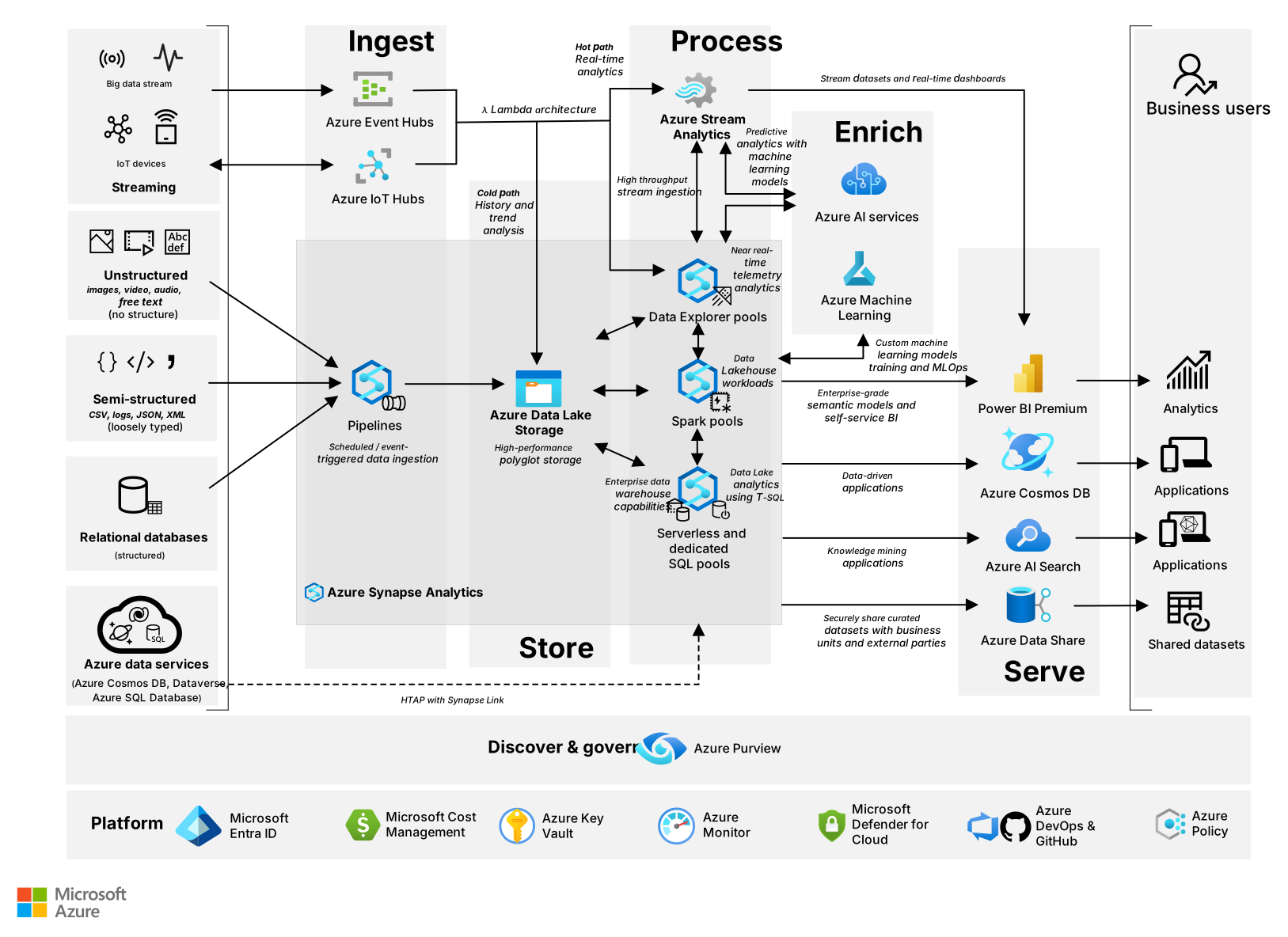
The solution in this article combines a range of Microsoft services that ingest, store, process, enrich, and serve data and insights from different sources. These sources include structured, semistructured, unstructured, and streaming formats.
Architecture
Amazon Simple Storage Service (AWS S3), Amazon Web Services (AWS), AWS Kinesis, Google Cloud Storage, Google Cloud, Google Cloud Pub/Sub, and Snowflake are either registered trademarks or trademarks of their respective owners. Apache® and Apache Kafka are either registered trademarks or trademarks of the Apache Software Foundation in the United States and/or other countries. No endorsement by the respective trademark owners is implied by the use of these marks.
Download a Visio file of this architecture.
Data flow
The following sections describe how OneLake serves as the home for data throughout various stages of the data life cycle. OneLake is the unified, enterprise-grade data lake built into Microsoft Fabric that serves as a centralized storage layer for all data workloads, including Fabric Data Engineer, Fabric Data Factory, Fabric Data Science, Fabric Data Warehouse, Fabric Real-Time Intelligence, Fabric Databases, and Power BI.
Lakehouse
Use a lakehouse when you need a unified, scalable, and flexible platform. It's ideal for managing structured, semistructured, and unstructured data to support analytics, machine learning, and reporting. Organize data with the medallion architecture, and use Bronze (raw), Silver (validated), and Gold (business-ready) layers across folders and files, databases, and tables.
Warehouse
Use Data Warehouse when you need a high-performance, fully managed, SQL-based analytics solution to manage structured and semistructured data by organizing it into databases, schemas, and tables. It has full T-SQL support, including the creation of stored procedures, views, and joins.
Eventhouse
Use an eventhouse to manage and analyze real-time, high-volume event data. It supports structured, semistructured, and unstructured data, like logs and telemetry, by organizing it into databases, schemas, and tables.
SQL database in Fabric
Use SQL database in Fabric when you need to unify transactional and analytical workloads. It runs on the same engine as Azure SQL Database, provides full T-SQL support, and enables integration with the broader Fabric ecosystem.
Azure databases, external data sources, and relational databases
This section explains how to bring data from Azure databases and platforms like Azure Databricks, as well as non-Microsoft platforms like Snowflake, into Fabric.
Ingest
Fabric provides multiple approaches for ingesting data from relational databases. Use mirroring to replicate your existing data estate into OneLake in near real-time without complex extract, transform, and load (ETL) processes. For more information, see Supported mirroring data sources.
You can also use Data Factory pipelines to ingest data from a wide range of databases, both on-premises and in the cloud. To ingest the data, you can use various approaches like a copy activity, a copy job, or Dataflow Gen2. These options also provide orchestration, transformation, and scheduling capabilities. For more information, see Supported connectors.
For SQL-based ingestion, use T-SQL capabilities to load data at scale from your existing lakehouses and warehouses. You can create new table versions that have aggregated data, filtered subsets, or results from complex queries.
Store
Use mirroring to create a read-only replica of your source database and continuously synchronize it with the source system through near real-time replication. Mirroring stores the data in Delta Lake format within OneLake.
You can also use a copy data activity or a copy job from the Data Factory pipeline to stage the data copied from relational databases into a lakehouse or data warehouse. The OneLake architecture uses Delta Lake format, which provides flexibility to implement lakehouses by using a medallion framework or use a warehouse model that aligns with your organizational needs.
Process
Each mirrored database includes an automatically generated SQL endpoint for querying. The read-only SQL analytics endpoint supports access through SQL Server Management Studio, Open Database Connectivity (ODBC), any query tool with the SQL connection string, or the MSSQL extension with Visual Studio Code (VS Code). Run complex aggregations by using T-SQL or explore data by using Apache Spark notebooks. Cross-database queries let you access data from mirrored databases and combine it with other Fabric data sources like lakehouses and warehouses. Stored procedures automate SQL logic for data transformations and aggregations, which improves reusability and centralizes logic for repetitive tasks.
Mirroring creates a full snapshot of selected tables from the source database. After the initial load, Fabric uses the source database's change data capture (CDC) to track inserts, updates, and deletes. It continuously replicates these changes into OneLake with low latency and near real-time synchronization. You can create shortcuts to mirrored tables in a lakehouse and query them via Spark notebooks.
Dataflow Gen2 cleans and shapes parsed data while detecting schema inconsistencies, nulls, or outliers. After you profile and transform the data, save the processed data to Data Warehouse tables.
Spark notebooks enrich data by loading it from lakehouses or warehouses. Train or load machine learning models by using libraries like scikit-learn, XGBoost, or SynapseML. Use MLflow to track experiments and register models. Score data with scalable batch predictions and real-time predictions.
Serve
A mirrored database generates a mirrored SQL database item and a SQL analytics endpoint that you can use to run read-only queries. View data through the data preview or explore directly in OneLake. The SQL query editor lets you create T-SQL queries against data in the mirrored database item. You can access mirrored data by using a lakehouse shortcut and Spark queries to process data.
Typically you'll want this data available in Power BI. To do this, create semantic models to simplify the analysis of business data and relationships. Business analysts use Power BI reports and dashboards to analyze data and derive business insights by using Direct Lake mode for a lakehouse or the SQL endpoint for Data Warehouse. Use Data Activator to set up alerts on Power BI visuals to monitor frequently changing metrics, define alert conditions, and receive email or Microsoft Teams notifications.
External data sharing in Fabric lets a user in one Fabric tenant (the provider) share data with a user in another Fabric tenant (the consumer). This feature supports cross-organization collaboration while maintaining governance and security boundaries. Data consumers access read-only data through OneLake shortcuts in their own lakehouses and data warehouses, and in SQL and mirrored databases. The Fabric API for GraphQL exposes data from supported Fabric data sources through a single, flexible API endpoint. This feature is ideal for building modern applications that require efficient, real-time access to structured data.
Machine learning models serve real-time predictions from any registered machine learning model by using secure, scalable machine learning online endpoints that are automatically configured. For a Fabric-native real-time deployment, these endpoints are built-in properties of most Fabric models. You can call them from other Fabric engines or external apps for broader, reliable consumption. A Fabric data agent enables a conversational interface with data from a lakehouse or warehouse by translating natural language queries into relevant queries. Copilot in Fabric transforms natural language questions into SQL, fixes errors, provides explanations for SQL queries, and assists with code completion.
Cloud-based data platform for Dataverse
This section explains how to bring data from Dataverse to Fabric.
Ingest
Dataverse Link to Fabric makes Dynamics 365 and Dataverse data available in near real time within Fabric, without requiring ETL or data copy. With Dataverse Link to Fabric, data engineers can query data by using SQL, apply AI, combine datasets, reshape information, and build summaries directly in Fabric.
Store
When you use Dataverse Link to Fabric, Dataverse creates a lakehouse in OneLake that has shortcuts to Dataverse tables, without requiring physical data movement.
Process
View the Dataverse-generated lakehouse to explore tables linked from your Dataverse environment. Query the Dataverse-generated lakehouse by using the SQL endpoint, explore data by using Spark notebooks, and access data through SQL Server Management Studio or the SQL editor. Reference Dataverse data across other lakehouses by using shortcuts to reuse the same data without copying or duplicating it.
Enrich data by using Data Wrangler, a low-code and no-code tool in Fabric notebooks. It lets you explore, prepare, and shape data for exploratory analysis. The operations generate code in either pandas or PySpark, and you can save the code in the notebook as a reusable function.
Serve
The shortcuts to Dataverse tables created in OneLake support the Delta Lake format. You can populate this data into a Power BI report from the default dataset that Dataverse generates in the Fabric workspace.
You can also use Data Activator to set up alerts on Power BI visuals, monitor frequently changing metrics, define alert conditions, and receive email or Teams notifications.
Semistructured and unstructured data sources
This section describes how to ingest semistructured and unstructured data into Fabric.
Ingest
Use Data Factory pipelines to pull data from a wide range of semistructured sources on-premises and in the cloud. To pull the data, you can use various approaches like a copy activity, a copy job, Dataflow Gen2, Spark notebooks, or lakehouse file upload. Consider the following supported sources:
Ingested data from file-based sources that contain CSV or JSON files
XML files from legacy systems
Parquet files from storage accounts
PDF, MP3, images, logs, documents, and other binary files
Fabric REST APIs as a data source for the pipeline
Use the COPY INTO statement to ingest data from an external storage account for high-throughput SQL workloads. The statement supports Parquet and CSV file formats. Create shortcuts in OneLake to external sources, including Azure Data Lake Storage, Amazon Simple Storage Service (AWS S3) storage accounts, Google Cloud Storage accounts, and other supported external storage options to enable zero-copy access and avoid duplication. Programmatically or manually upload files to the lakehouse folder. Trigger pipelines when new files arrive by using Fabric event-based orchestration.
Store
Organize your data within the Fabric OneLake unified data lake. Follow best practices for which layers to create, what folder structures to use in each layer, and which file formats to use for each analytics scenario. Store unstructured data in the Bronze zone to keep unprocessed data in its original format. Use an eventhouse to store telemetry, logs, or time-series data.
Process
Spark notebooks parse and transform semistructured data. For example, you can flatten nested JSON structures, convert XML to tabular format, or extract key fields from log files. Spark notebooks also extract content and transform unstructured data via Spark DataFrames.
T-SQL ingestion loads data from existing tables in Fabric lakehouses or warehouses. Dataflow Gen2 cleans and shapes parsed data while it detects schema inconsistencies, nulls, or outliers. After you profile and transform the data, save it into lakehouse tables. Internal shortcuts in Fabric reference data stored in a lakehouse.
Spark notebooks enrich data as you process it. Load data from lakehouses or warehouses, then train or load machine learning models by using libraries like scikit-learn, XGBoost, or SynapseML. MLflow tracks experiments and registers models. Score data by using scalable batch predictions or real-time predictions.
Serve
T-SQL queries lakehouse tables through the Fabric SQL analytics endpoint. The SQL analytics endpoint supports semantic models and Power BI reports. Direct Lake mode delivers high-performance analytics. You can also set up alerts on Power BI visuals by using Data Activator to monitor frequently changing metrics, define alert conditions, and receive email or Teams notifications.
External data sharing in Fabric lets a user in one Fabric tenant (the provider) share data with a user in another Fabric tenant (the consumer). This feature supports cross-organization collaboration while it maintains governance and security boundaries. Data consumers access read-only data by using OneLake shortcuts in their own lakehouses.
The Fabric API for GraphQL exposes data from supported Fabric data sources through a single, flexible API endpoint. This approach is ideal for building modern applications that need efficient, real-time access to structured data.
Serve real-time predictions from any registered machine learning model by using secure, scalable machine learning online endpoints that are automatically configured. For Fabric-native real-time deployment, use these endpoints as built-in properties of most Fabric models. Call them from other Fabric engines or external apps for reliable, broad consumption. Create a semantic model from prediction data and visualize results in a Power BI report.
A Fabric data agent is a customizable AI-powered conversational interface that translates natural language queries into actionable insights for your OneLake data. Copilot simplifies data analysis and visualization tasks. Ask questions about lakehouse tables, pandas, and Spark DataFrames directly within notebooks. Copilot responds with natural language explanations. Business users can use the Copilot pane to ask questions about report content and quickly summarize key insights. They can also use the Copilot section to discover information that they already have access to.
Streaming
This section explains how to bring high-volume time-series streaming data into Fabric.
Ingest
Use Real-Time Intelligence to collect data for real-time ingestion via an eventstream. Get the data from a wide range of data sources like Internet of Things (IoT) devices, applications, external event hubs, and Fabric events like workspace item events, OneLake events, and job events. If you need to reference a source Kusto Query Language (KQL) database like an existing Azure Data Explorer database in Real-Time Intelligence, you can create a database shortcut to access the data without duplicating or reingesting it.
Store
Eventstream supports routing data to different destinations. Store large volumes of data in an eventhouse, which is a high-performance, optimized, and scalable storage solution. You can create a KQL database within an eventhouse that's a specialized database designed for event-driven data analysis by using KQL.
Process
Use a KQL queryset to write, run, and manage KQL queries across various real-time data sources. A KQL queryset is a central tool in the Real-Time Intelligence experience. It lets users explore, analyze, and visualize streaming or time-series data. You can use T-SQL in Real-Time Intelligence to query streaming data stored in KQL databases. KQL is the primary language for real-time analytics, but Fabric also supports T-SQL for users familiar with SQL-based analytics.
For cross-engine processing, turn on OneLake availability to create a logical copy of KQL database data. You can query the data in Delta Lake format from other Fabric engines like Direct Lake mode in Power BI, warehouses, lakehouses, and notebooks.
Serve
Business analysts can create a Real-Time Intelligence dashboard, which is a collection of tiles driven by KQL queries. You can organize tiles into pages and connect them to data sources. The dashboard updates automatically, which provides near-instant visibility into data as it flows through the system. You can also add Data Activator to a dashboard tile to monitor frequently changing metrics, define alert conditions, and receive email or Teams notifications. Create a Power BI report to generate reports from semantic models built from the KQL database as a source.
Fabric external data sharing lets a user in one Fabric tenant (the provider) share data with a user in another Fabric tenant (the consumer). It supports cross-organization collaboration while maintaining governance and security boundaries. Data consumers access read-only data through OneLake shortcuts in their own KQL databases.
A Fabric data agent can work with KQL databases to let users ask questions, which makes real-time data easy to use for nontechnical users. Copilot can translate natural language queries into KQL that you can run.
Components
This architecture uses the following Fabric and Azure services:
Copilot in Fabric is a generative AI assistant embedded across the Fabric platform. In this architecture, it helps build scalable data pipelines, create Spark code for data transformations, generate optimized SQL for Data Warehouse, write KQL queries for Real-Time Intelligence, and build semantic models and Data Analysis Expressions (DAX) measures for reporting.
A Fabric data agent is an AI-driven feature that helps users interact with organizational data by using natural language. In this architecture, data agents serve as a conversational interface to translate natural language questions into structured queries, like SQL, DAX, or KQL.
Microsoft Purview is a unified platform for data governance, security, and compliance. In this architecture, Microsoft Purview governs your entire data estate and lineage, from the data source to the Power BI report.
Fabric external data sharing is a feature that enables secure, cross-tenant collaboration by letting users share data from their Fabric environment with users in another Fabric tenant. In this architecture, organizations can collaborate across tenant boundaries without duplicating data.
The Fabric API for GraphQL is a feature that lets developers expose and interact with data by using the GraphQL query language. In this architecture, it lets users develop data applications.
Real-Time Intelligence is an event-driven analytics solution designed to process, analyze, and act on streaming data. In this architecture, it processes high-volume streaming data and provides real-time dashboards made up of tiles that visualize underlying queries.
Power BI is a business intelligence (BI) and data visualization platform. In this architecture, it connects to OneLake to create dashboards and reports.
Microsoft Foundry is a unified platform as a service (PaaS) for building, deploying, and managing AI applications and agents at enterprise scale. In this architecture, Foundry agents enrich and enable multiple-agent systems, and Fabric data agents serve as domain experts alongside other agents.
Azure Machine Learning is an enterprise-grade cloud service for managing the entire machine learning life cycle, from data preparation and experimentation to model training, deployment, and monitoring. In this architecture, you can enable users to run machine learning models by using batch endpoints. OneLake shortcuts let Machine Learning and Fabric share the same underlying Data Lake Storage instance, so both services can read and write without duplicating data.
Microsoft Cost Management is a service that helps you track, analyze, and optimize your Microsoft Azure resource invoices. In this architecture, your cost analysis and invoice in Cost Management display multiple meters associated with your Fabric capacity resource.
Azure Key Vault is a cloud-based service for securely storing and managing sensitive information like secrets, keys, and certificates. In this architecture, it manages credentials used in Fabric connections and gateways.
Azure Policy is a governance tool that enforces governance rules across Azure resources. In this architecture, it ensures compliance, data governance, and cost control across the Fabric data platform.
Microsoft Entra ID is a cloud-based identity and access management solution that ensures secure access for users, devices, and workloads. In this architecture, it lets users sign in to Fabric by using their Microsoft Entra credentials while enforcing Zero Trust access controls.
Azure DevOps is a suite of development tools and services that Microsoft provides to support the entire software development life cycle. In this architecture, Azure DevOps integrates with Fabric workspaces to manage the life cycle and provide source control.
GitHub is a cloud-based platform for version control and collaboration that lets developers store, manage, and track changes to their code. In this architecture, GitHub integrates with Fabric workspaces to support life cycle management and source control.
The workspace monitoring feature in Fabric lets you collect, analyze, visualize logs, and metrics from Fabric items within a workspace. In this architecture, it helps perform query diagnosis in your Fabric environment, identify problems, build customized monitoring dashboards, and set alerts.
Alternatives
Fabric provides a set of tools to manage data and analytics workloads efficiently. With so many options available, selecting the right tool can be challenging. These decision guides provide a roadmap to help you evaluate the choices and determine the most effective strategy.
For comparisons of other alternatives, see the following resources:
Scenario details
This example scenario shows how Fabric facilitates enterprises in building a unified, modern data platform that simplifies integration, accelerates insights, and reduces operational complexity. It helps organizations overcome common data challenges while driving scalability, governance, and cost efficiency.
Potential use cases
Modernize the enterprise data platform by replacing fragmented tools with a unified solution.
Establish a medallion lake architecture by using Fabric lakehouses, with a Bronze layer for raw data ingestion, a Silver layer for cleansed and transformed data, and a Gold layer for business-ready data used in analytics and AI. Create warehouses as subject-area or domain-specific solutions designed for topics that require customized analytics.
Integrate relational data sources with unstructured datasets by using Fabric compute engines.
Deliver real-time operational analytics to monitor and act on streaming data with Real-time Intelligence.
Generate AI-powered customer insights to enrich data and drive business value.
Provide enterprise reporting and self-service BI through semantic modeling and advanced visualization tools.
Enable cross-tenant data sharing through OneLake shortcuts and external data share.
Integrate Fabric data agents with Azure AI Foundry or Microsoft Copilot Studio to build intelligent, conversational, and context-aware AI solutions for business users and applications.
Recommendations
Consider the following recommendations.
Discover and govern
Data governance is a common challenge in large enterprise environments. Business analysts need to discover and understand data assets to solve business problems, while chief data officers seek insights into the privacy and security of business data.
Microsoft Purview
Microsoft Purview data governance consists of two solutions. The Unified Catalog and Data Map provide a modern governance experience by consolidating metadata from diverse catalogs and sources. This integration enables visibility, strengthens data confidence, and supports responsible innovation across the enterprise.
Maintain glossary terms with the specific business terminology that users need to understand dataset semantics and usage across the organization. Register data sources and organize them into collections, which also serve as security boundaries for metadata. Set up regular scans to automatically catalog and update relevant metadata about organizational data assets. When a Fabric tenant is scanned, metadata and lineage from Fabric assets, including Power BI, are automatically ingested into the Microsoft Purview unified data catalog. Automatically assign data classification and data sensitivity labels to data assets based on preconfigured or custom rules during scans.
Use Unified Catalog health management to monitor the overall health of the data landscape and protect the organization against security and privacy risks. A built-in Microsoft Purview hub within Fabric provides insights into data inventory, sensitivity labels, and endorsements. It serves as a gateway to connect with broader Microsoft Purview capabilities.
Platform services
Fabric supports several deployment patterns that help organizations align their data architecture with business needs, governance models, and performance requirements. These patterns are defined at the tenant, capacity, workspace, and item levels of deployment. Each pattern provides different trade-offs in scalability, isolation, cost, and operational complexity.
The design incorporates several foundational Azure services. Microsoft Entra ID provides identity services, single sign-on (SSO), and multifactor authentication across Azure workloads. Cost Management delivers financial governance for your Azure workloads. Key Vault manages credentials and certificates securely. When you configure a key vault in Fabric, you can retrieve credentials and certificates from the Key Vault service. Use these credentials to access data stores that don't support integrated authentication, like on-premises or external sources.
Azure Monitor collects, analyzes, and acts on telemetry from Azure resources to proactively identify problems and maximize performance and reliability. Azure DevOps and GitHub Enterprise implement development operations (DevOps) to enforce automation and compliance in Fabric workload development and deployment pipelines. This approach enables version control, collaboration, and life cycle management. Azure Policy enforces organizational standards and governance to ensure resource consistency, regulatory compliance, security, cost control, and management.
Considerations
These considerations implement the pillars of the Azure Well-Architected Framework, which is a set of guiding tenets that you can use to improve the quality of a workload. For more information, see Well-Architected Framework.
Cost Optimization
Cost Optimization focuses on ways to reduce unnecessary expenses and improve operational efficiencies. For more information, see Design review checklist for Cost Optimization.
To estimate costs, see Pricing. The ideal pricing tier and the total cost of each service in the architecture depend on the amount of data processed and stored and the expected performance level. Use the following guide to explore top cost optimization strategies for Fabric:
Fabric capacity is a shared pool that powers all Fabric capabilities, from data engineering and data warehousing to data modeling, BI, and AI experiences. Microsoft prices capacity units (CUs) by the hour with pay-as-you-go or reservation options. Pay-as-you-go provides flexibility to pay only for the hours that you use Fabric capacity. You can pause capacities when not in use to manage costs, without needing a monthly or yearly commitment. Reservations provide predictable billing and typically deliver savings for stable workloads. OneLake storage provides a single copy of data across all the analytical engines without the need to move or duplicate data.
The Fabric capacity estimator tool helps estimate capacity needs and determine the appropriate SKU and storage requirements based on workload characteristics. Monitor usage and consumption by using the Fabric Capacity Metrics app to show capacity utilization. Cost Management tracks usage and sets budget alerts. For more information, see Understand your Azure bill for a Fabric capacity. The Fabric capacity troubleshooting guides provide resources to monitor and proactively optimize capacity usage.
The Fabric Chargeback app (preview) helps organizations track, analyze, and allocate capacity usage costs across business units, users, and workloads that use Fabric. It supports chargeback and showback models to enable transparent and fair cost distribution based on actual consumption. Microsoft Purview pricing depends on the number of data assets in the catalog and the compute power required to scan them.
Operational Excellence
Operational Excellence covers the operations processes that deploy an application and keep it running in production. For more information, see Design review checklist for Operational Excellence.
Adopt a consistent infrastructure as code (IaC) methodology for provisioning Fabric capacities by using Bicep, Azure Resource Manager templates (ARM templates), and Terraform. Integrate Fabric workspaces with Git for Fabric application life cycle management and use deployment pipelines for continuous integration and continuous deployment (CI/CD).
Use the monitoring hub to monitor Fabric activities. The admin monitoring workspace provides a dedicated workspace for Fabric admins to oversee and manage tenant operations. It provides built-in reports for activity overview, activity details, and governance, which allows admins to monitor workloads and usage effectively. Send Teams messages in group chats or channels to notify pipeline status. For email notifications, use the Office 365 Outlook activity.
Apply governance policies via Microsoft Purview. Schedule regular Well-Architected reviews and optimization sprints. For more information about new features in Fabric and when to expect them, see Fabric roadmap. Implement a similar architecture in preproduction environments where you develop and test your platform. Consider the specific requirements of your platform and the capabilities of each service to create a cost-effective preproduction environment.
Contributors
Microsoft maintains this article. The following contributors wrote this article.
Principal authors:
- Kevin Lee | Cloud Solution Architect
- Lavanya Sreedhar | Senior Cloud Solution Architect
To see nonpublic LinkedIn profiles, sign in to LinkedIn.