Note
Access to this page requires authorization. You can try signing in or changing directories.
Access to this page requires authorization. You can try changing directories.
You can use the eventstreams feature in Microsoft Fabric Real-Time Intelligence to bring real-time events into Fabric, transform them, and then route them to various destinations without writing any code. You create an eventstream, add event data sources to the stream, optionally add transformations to transform the event data, and then route the data to supported destinations.
Also, with Apache Kafka endpoints available for eventstreams, you can send or consume real-time events by using the Kafka protocol.
Bring events into Fabric
Eventstreams provide you with source connectors to fetch event data from the various sources. More sources are available when you enable Enhanced capabilities at the time of creating an eventstream.
| Source | Description |
|---|---|
| Azure Data Explorer (preview) | If you have an Azure Data Explorer database and a table, you can ingest data from the table into Microsoft Fabric by using eventstreams. |
| Azure Event Hubs | If you have an Azure event hub, you can ingest event hub data into Fabric by using eventstreams. |
| Azure Event Grid (preview) | If you have an Azure Event Grid namespace, you can ingest MQTT or non-MQTT event data into Fabric by using eventstreams. |
| Azure Service Bus (preview) | You can ingest data from an Azure Service Bus queue or a topic's subscription into Fabric by using eventstreams. |
| Azure IoT Hub | If you have an Azure IoT hub, you can ingest IoT data into Fabric by using eventstreams. |
| Custom endpoint (that is, custom app in standard capability) | The custom endpoint feature allows your applications or Kafka clients to connect to eventstreams by using a connection string. This connection enables the smooth ingestion of streaming data into eventstreams. |
| Azure IoT Operations | Configure Azure IoT Operations to send real-time data directly to Fabric Real-Time Intelligence by using an eventstream custom endpoint. This capability supports Microsoft Entra ID or SASL authentication. |
| Sample data | You can choose Bicycles, Yellow Taxi, Stock Market, Buses, S&P 500 companies stocks, or Semantic Model Logs as a sample data source to test the data ingestion while setting up an eventstream. |
| Real-time weather (preview) | You can add a real-time weather source to an eventstream to stream real-time weather data from various locations. |
| Azure SQL Database Change Data Capture (CDC) | You can use the Azure SQL Database CDC source connector to capture a snapshot of the current data in an Azure SQL database. The connector then monitors and records any future row-level changes to this data. |
| PostgreSQL Database CDC | You can use the PostgreSQL CDC source connector to capture a snapshot of the current data in a PostgreSQL database. The connector then monitors and records any future row-level changes to this data. |
| HTTP (preview) | You can use the HTTP connector to stream data from external platforms into an eventstream by using standard HTTP requests. It also offers predefined public data feeds with autofilled headers and parameters, so you can start quickly without complex setup. |
| MongoDB CDC (preview) | The MongoDB CDC source connector for Fabric eventstreams captures an initial snapshot of data from MongoDB. You can specify the collections to monitor, and the eventstream tracks and records real-time changes to documents in selected databases and collections. |
| MySQL Database CDC | You can use the MySQL Database CDC source connector to capture a snapshot of the current data in an Azure Database for MySQL database. You can specify the tables to monitor, and the eventstream records any future row-level changes to the tables. |
| Azure Cosmos DB CDC | You can use the Azure Cosmos DB CDC source connector for Fabric eventstreams to capture a snapshot of the current data in an Azure Cosmos DB database. The connector then monitors and records any future row-level changes to this data. |
| SQL Server on Virtual Machine Database (VM DB) CDC | You can use the SQL Server on VM DB CDC source connector for Fabric eventstreams to capture a snapshot of the current data in a SQL Server database on a VM. The connector then monitors and records any future row-level changes to the data. |
| Azure SQL Managed Instance CDC | You can use the Azure SQL Managed Instance CDC source connector for Fabric eventstreams to capture a snapshot of the current data in a SQL Managed Instance database. The connector then monitors and records any future row-level changes to this data. |
| Fabric workspace item events | Fabric workspace item events are discrete Fabric events that occur when changes are made to your Fabric workspace. These changes include creating, updating, or deleting a Fabric item. With Fabric eventstreams, you can capture these Fabric workspace events, transform them, and route them to various destinations in Fabric for further analysis. |
| Fabric OneLake events | You can use OneLake events to subscribe to changes in files and folders in OneLake, and then react to those changes in real time. With Fabric eventstreams, you can capture these OneLake events, transform them, and route them to various destinations in Fabric for further analysis. This seamless integration of OneLake events within Fabric eventstreams gives you greater flexibility for monitoring and analyzing activities in OneLake. |
| Fabric job events | You can use job events to subscribe to changes produced when Fabric runs a job. For example, you can react to changes when refreshing a semantic model, running a scheduled pipeline, or running a notebook. Each of these activities can generate a corresponding job, which in turn generates a set of corresponding job events. With Fabric eventstreams, you can capture these job events, transform them, and route them to various destinations in Fabric for further analysis. This seamless integration of job events within Fabric eventstreams gives you greater flexibility for monitoring and analyzing activities in your job. |
| Fabric capacity overview events (preview) | Fabric capacity overview events provide summary-level information about your capacity. You can use these events to create alerts related to your capacity health via Fabric Activator. You can also store these events in an eventhouse for granular or historical analysis. |
| Azure Blob Storage events | Azure Blob Storage events are triggered when a client creates, replaces, or deletes a blob. You can use the connector to link Blob Storage events to Fabric events in a real-time hub. You can convert these events into continuous data streams and transform them before routing them to various destinations in Fabric. |
| Google Cloud Pub/Sub | Google Pub/Sub is a messaging service that enables you to publish and subscribe to streams of events. You can add Google Pub/Sub as a source to your eventstream to capture, transform, and route real-time events to various destinations in Fabric. |
| Amazon Kinesis Data Streams | Amazon Kinesis Data Streams is a massively scalable, highly durable data ingestion and processing service that's optimized for streaming data. By integrating Amazon Kinesis Data Streams as a source within your eventstream, you can seamlessly process real-time data streams before routing them to multiple destinations within Fabric. |
| Confluent Cloud for Apache Kafka | Confluent Cloud for Apache Kafka is a streaming platform that offers powerful data streaming and processing functionalities by using Apache Kafka. By integrating Confluent Cloud for Apache Kafka as a source within your eventstream, you can seamlessly process real-time data streams before routing them to multiple destinations within Fabric. |
| Apache Kafka (preview) | Apache Kafka is an open-source, distributed platform for building scalable, real-time data systems. By integrating Apache Kafka as a source within your eventstream, you can seamlessly bring real-time events from Apache Kafka and process them before routing them to multiple destinations within Fabric. |
| Amazon MSK Kafka | Amazon MSK Kafka is a fully managed Kafka service that simplifies setup, scaling, and management. By integrating Amazon MSK Kafka as a source within your eventstream, you can seamlessly bring the real-time events from MSK Kafka and process them before routing them to multiple destinations within Fabric. |
| MQTT (preview) | You can use Fabric eventstreams to connect to an MQTT broker. Messages in an MQTT broker can be ingested into Fabric eventstreams and routed to various destinations within Fabric. |
| Cribl (preview) | You can connect Cribl to an eventstream and route data to various destinations within Fabric. |
| Solace PubSub+ (preview) | You can use Fabric eventstreams to connect to Solace PubSub+. Messages from Solace PubSub+ can be ingested into Fabric eventstreams and routed to various destinations within Fabric. |
Process events by using a no-code experience
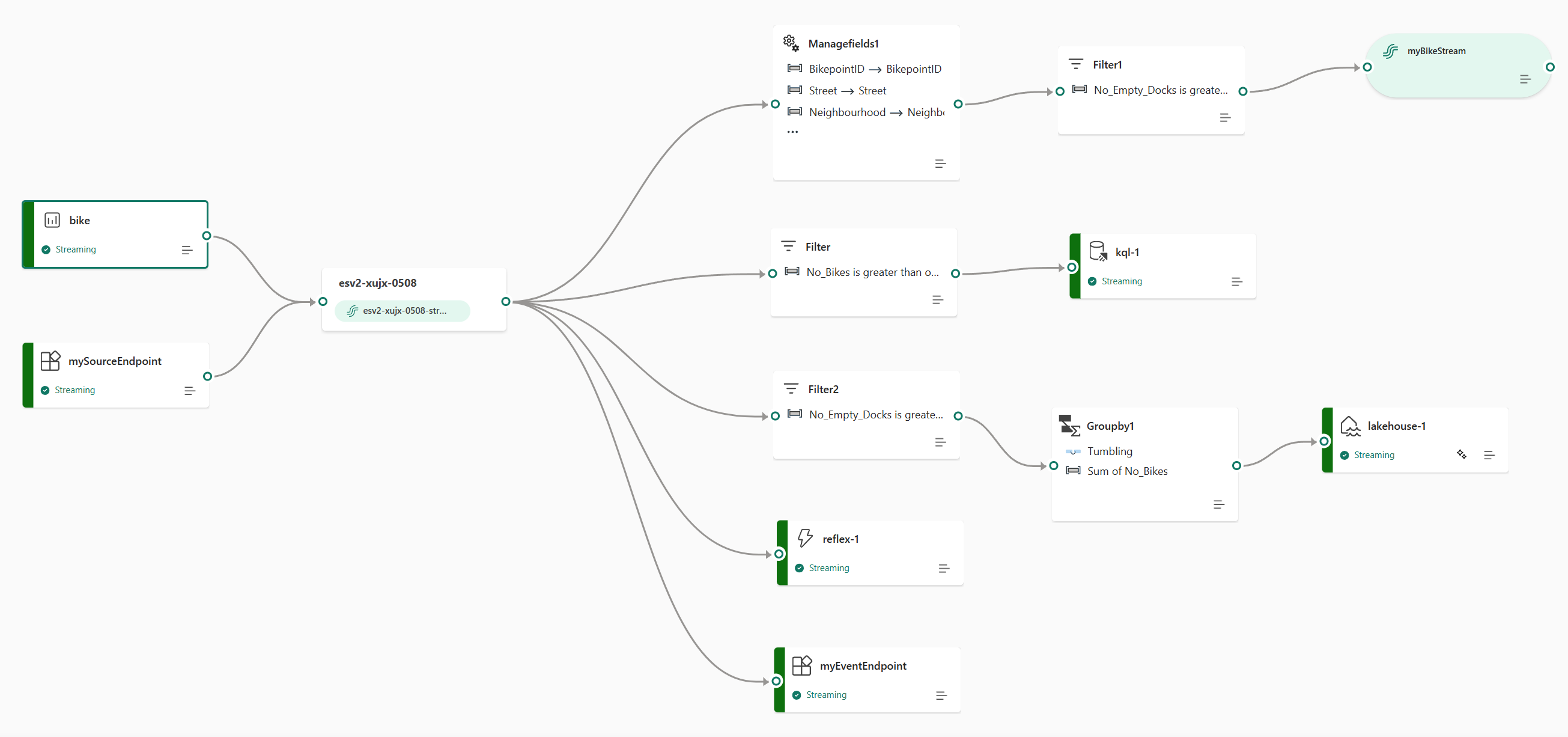
An end-to-end data flow diagram in an eventstream can give you a comprehensive understanding of the data flow and organization.
The event processor editor is a drag-and-drop experience. It's an intuitive way to create your event data processing, transforming, and routing logic without writing any code.
| Transformation | Description |
|---|---|
| Filter | Use this transformation to filter events based on the value of a field in the input. Depending on the data type (number or text), the transformation keeps the values that match the selected condition, such as is null or is not null. |
| Manage fields | Use this transformation to add, remove, change (data type), or rename fields coming in from an input or another transformation. |
| Aggregate | Use this transformation to calculate an aggregation (sum, minimum, maximum, or average) every time a new event occurs over a period of time. This operation also allows for the renaming of these calculated columns, along with filtering or slicing the aggregation based on other dimensions in your data. You can have one or more aggregations in the same transformation. |
| Group by | Use this transformation to calculate aggregations across all events within a certain time window. You can group by the values in one or more fields. It's like the Aggregate transformation in that it allows for the renaming of columns, but it provides more options for aggregation and includes more complex options for time windows. Like Aggregate, you can add more than one aggregation per transformation. |
| Union | Use this transformation to connect two or more nodes and add events with shared fields (with the same name and data type) into one table. Fields that don't match are dropped and not included in the output. |
| Expand | Use this transformation to create a new row for each value within an array. |
| Join | Use this transformation to combine data from two streams based on a matching condition between them. |
If you enabled Enhanced capabilities while creating an eventstream, the transformation operations are supported for all destinations. The derived stream acts as an intermediate bridge for some destinations, like a custom endpoint or Fabric Activator). If you didn't enable Enhanced capabilities, the transformation operations are available only for the lakehouse and eventhouse (event processing before ingestion) destinations.
Route events to destinations
The Fabric eventstreams feature supports sending data to the following supported destinations.
| Destination | Description |
|---|---|
| Custom endpoint (custom app in standard capability) | Use this destination to route your real-time events to a custom endpoint. You can connect your own applications to the eventstream and consume the event data in real time. This destination is useful when you want to send real-time data to a system outside Microsoft Fabric. |
| Eventhouse | This destination lets you ingest your real-time event data into an eventhouse, where you can use the powerful Kusto Query Language (KQL) to query and analyze the data. With the data in the eventhouse, you can gain deeper insights into your event data and create rich reports and dashboards. You can choose between two ingestion modes: Direct ingestion and Event processing before ingestion. |
| Lakehouse | This destination gives you the ability to transform your real-time events before ingesting them into your lakehouse. Real-time events are converted into Delta Lake format and then stored in the designated lakehouse tables. This destination supports data warehousing scenarios. |
| Derived stream | You can create this specialized type of destination after you add stream operations, such as Filter or Manage Fields, to an eventstream. The derived stream represents the transformed default stream after stream processing. You can route the derived stream to multiple destinations in Fabric and view the derived stream in the real-time hub. |
| Fabric Activator (preview) | You can use this destination to directly connect your real-time event data to Fabric Activator. Activator is a type of intelligent agent that contains all the information necessary to connect to data, monitor for conditions, and act. When the data reaches certain thresholds or matches other patterns, Activator automatically takes appropriate action, such as alerting users or starting Power Automate workflows. |
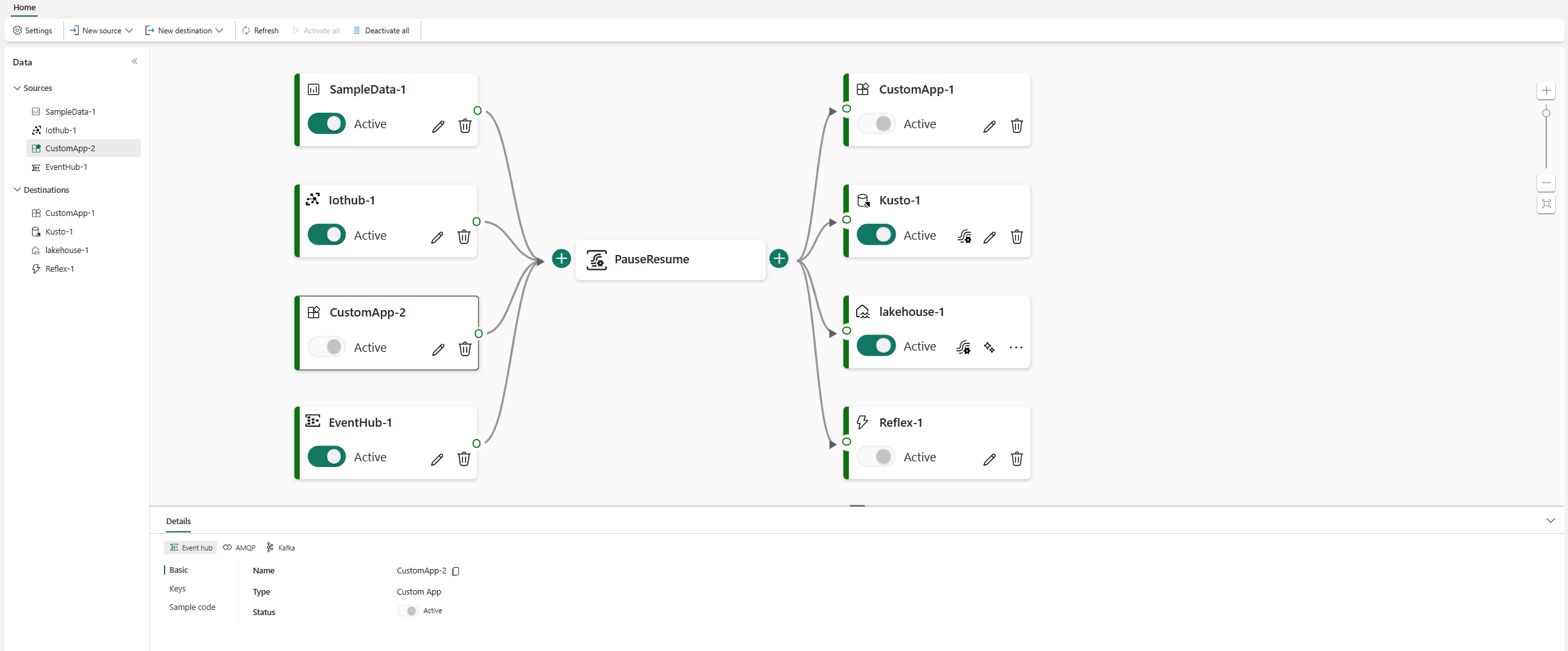
You can attach multiple destinations in an eventstream to simultaneously receive data from your eventstreams without the eventstreams interfering with each other.
Note
We recommend that you use the Fabric eventstreams feature with at least four capacity units (SKU: F4).
Apache Kafka on Fabric eventstreams
The Fabric eventstreams feature offers an Apache Kafka endpoint, so you can connect and consume streaming events through the Kafka protocol. If your application already uses the Apache Kafka protocol to send or receive streaming events with specific topics, you can easily connect it to your eventstream. Just update your connection settings to use the Kafka endpoint provided in your eventstream.
The Fabric eventstreams feature is associated with Azure Event Hubs, a fully managed cloud-native service. When you create an eventstream, an event hub namespace is automatically provisioned. An event hub is allocated to the default stream without requiring any provisioning configurations. To learn more about the Kafka-compatible features in Azure Event Hubs, see What is Azure Event Hubs for Apache Kafka?.
To learn more about how to obtain the Kafka endpoint details for sending events to an eventstream, see Add a custom endpoint or custom app source to an eventstream. For information about consuming events from an eventstream, see Add a custom endpoint or custom app destination to an eventstream.
Limitations
Fabric eventstreams have the following general limitations. Before you work with eventstreams, review these limitations to ensure that they align with your requirements.
| Limit | Value |
|---|---|
| Maximum message size | 1 MB |
| Maximum retention period of event data | 90 days |
| Event delivery guarantees | At least once |