Note
Access to this page requires authorization. You can try signing in or changing directories.
Access to this page requires authorization. You can try changing directories.
This article outlines the standardized process that teams must follow to build AI agents consistently across the organization. This guidance focuses on the governance and structural decisions required to support development teams, rather than the technical implementation of individual workloads. Understanding this process is the final component of the Build agents phase in the AI agent adoption process (see figure 1).
 Figure 1. Microsoft's AI agent adoption process.
Without a unified development process, organizations can experience uncontrolled agent sprawl, inconsistent architectures, and critical security gaps. These problems accumulate as technical debt and operational risk and can prevent the organization from scaling AI adoption effectively. Workload teams must integrate best practices from the Well-Architected Framework's AI workload guidance.
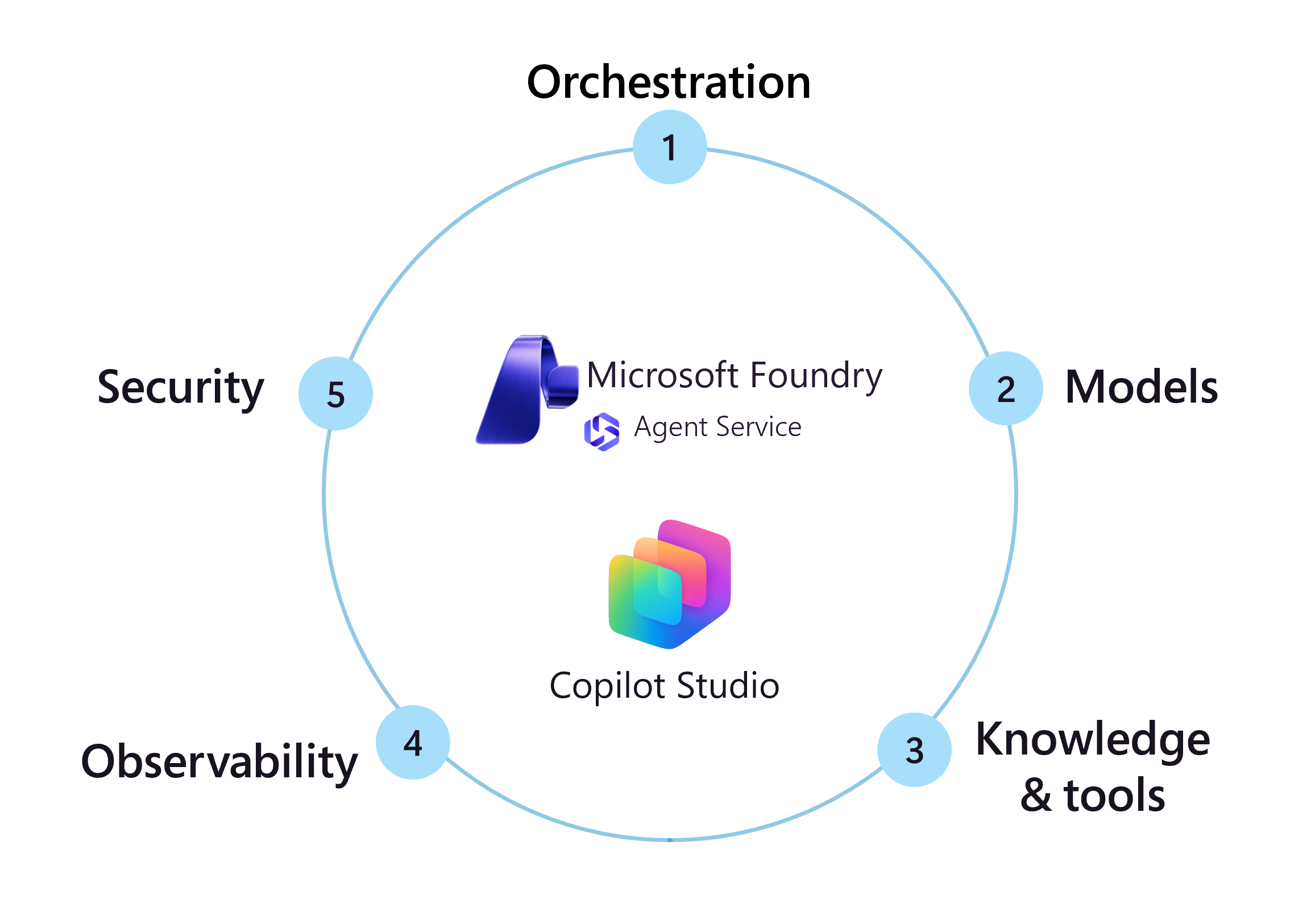
1. Agent orchestration
Strategic orchestration decisions determine how agents coordinate work, integrate with existing systems, and scale across the enterprise. These choices affect development velocity, operational complexity, and the organization's ability to maintain control as agent adoption grows.
Define the agent charter
Create governance artifacts that document agent boundaries and business alignment. The charter serves as the authoritative reference for what the agent system accomplishes and what it must avoid. This documentation prevents scope creep, ensures compliance teams understand system boundaries, and provides clear accountability when issues arise. Include system responsibilities that map to specific business objectives, agent roles that prevent functional overlap, and prohibited actions that establish compliance guardrails. Without clear charters, agents evolve beyond their intended scope, creating security vulnerabilities and regulatory exposure.
Orchestration strategy
Orchestration determines how agents coordinate, make decisions, and execute tasks. Organizations must define approved orchestration patterns to balance development velocity with operational control. Without standardized strategies, teams could build incompatible systems that are difficult to monitor, debug, and scale.
Select an orchestration approach. Choose between managed orchestration and code-first agent frameworks based on organizational capability and control requirements. Managed orchestration, such as the Foundry Agent Service, accelerates deployment and provides built-in security but limits customization. Code-first frameworks, like Microsoft Agent Framework or LangGraph, offer granular control and multicloud flexibility but require significant engineering investment and ongoing maintenance. Define criteria for when teams should use each approach to ensure consistency.
Define orchestration patterns. Establish standards for multi-agent coordination. Decide whether to chain agents sequentially or implement parallel processing patterns. Sequential chaining simplifies debugging and provides clear accountability but increases latency. Parallel processing improves response times but requires sophisticated coordination mechanisms and error handling. See AI agent orchestration patterns in the Azure Architecture Center for architectural decision guides.
Implement deterministic workflows. Enforce the use of deterministic workflows for critical business logic. Use workflows in Foundry and Microsoft Agent Framework to constrain agent behavior within fixed paths rather than relying solely on probabilistic model decisions. Multi-agent systems require workflows to control hand-offs and state management. Review workflow decision guidance for single agents and multi-agent systems.
Microsoft facilitation:
 Foundry: Use prompt-based agents for rapid development and workflows for visual, low-code design suitable for rapid prototyping. Use hosted agents to deploy custom agent frameworks on managed infrastructure.
 Microsoft Agent Framework: Use workflows to implement orchestration patterns in code.
 Copilot Studio: Set up agent flows for multi-agent systems with distinct roles and approval checkpoints. Configure agent behavior by orchestrating with generative AI.
Agent instructions
Instructions function as the operational logic for AI agents interpret intent and execute tasks. Treating instructions as configuration code, rather than ad-hoc text, enables version control, peer review, and rollback when issues arise.
Standardize instruction architecture. Consistent structures reduce behavioral drift and ensure compliance. Structure instructions to explicitly define:
Instruction component Purpose Example Identity and tone How the agent presents itself to users Professional, concise, helpful assistant Scope and boundaries What the agent must accomplish and avoid Do not access payroll systems; focus on customer support only Tool mandates Specific requirements for tool usage Use Knowledge Search tool for all answers; state "I don't know" if not found Citation rules Requirements for transparency and sourcing Every answer must provide citations from source material Enforce structured output formats. Use formats like JSON or XML for agent outputs to improve interoperability with downstream systems. Structured outputs reduce parsing errors in multi-agent orchestrations and enable programmatic validation of agent responses before they reach the user.
Implement version control and validation. Store instructions in source control repositories to maintain an audit trail of changes. Integrate automated validation steps where evaluation scripts or secondary agents verify that updates adhere to safety guidelines and formatting standards before deployment.
Microsoft facilitation:
Foundry: See System message design. Use the A2A tool and Foundry playground. Test and refine behavior using agent evaluators.
2. Agent model selection strategy
Model selection directly affects cost, performance, and compliance across your agent fleet. Organizations that default to the largest available models face unnecessary costs and quota limitations that constrain scaling.
Match model capabilities to task complexity. Smaller, optimized models handle routine tasks like summarization efficiently while controlling costs and reducing latency. Reserve premium models for scenarios requiring complex reasoning or multi-step analysis where the value justifies higher costs. This tiered approach prevents budget overruns while ensuring critical workloads receive appropriate resources.
Enforce quota and cost governance. High-end models impose stricter rate limits that can interrupt service during peak loads. Diversify model usage across workloads to prevent single points of failure. Implement cost allocation tags to track spending by department and use case, enabling data-driven decisions about model investments.
Mandate validation prior to deployment. Small-scale testing with representative queries documents performance trade-offs and validates compliance with governance standards. This validation prevents costly mistakes where teams deploy expensive models for simple tasks or undersize models for complex requirements.
Microsoft facilitation:
Foundry: Use model catalog and evaluate model options using model leaderboards to compare performance and cost trade-offs. For productivity and action agents, use the Model Router to dynamically optimize costs while maintaining quality. Review models' quotas and limits.
Copilot Studio: Choose a primary AI model or bring your own model from Foundry.
3. Agent knowledge and tools
Data access and tool permissions determine agent reliability, compliance posture, and operational risk. These policies establish boundaries that prevent unauthorized actions while enabling agents to deliver value. Follow all data governance and compliance policies.
Agent knowledge
Segment knowledge by role to minimize data exposure. Multi-agent systems require strict data boundaries where each agent accesses only information necessary for its function. This segmentation reduces attack surfaces and simplifies compliance audits by creating clear data access patterns. When agents connect to data sources, ensure retrieval occurs only from governed repositories with proper filtering and access controls. Review the Data architecture for AI agents to align integration strategies with security requirements.
Microsoft facilitation:
Foundry: Connect agents to Foundry IQ to combine multiple data sources behind an agentic retrieval engine while maintaining governance controls.
Copilot Studio: Use knowledge sources to connect agents to approved information repositories and connectors to integrate with enterprise systems securely.
Agent tools
Tools extend agent capabilities from passive information retrieval to active system engagement. This transition introduces operational risk, as agents can now modify data, trigger workflows, and interact with external APIs. Establishing a rigorous governance framework for tool usage ensures that agents operate within defined safety boundaries and adhere to security standards.
Define explicit tool boundaries. Agents interacting with external systems require strict governance to prevent unauthorized modifications. Specify in the agent's system message exactly when a tool should be invoked and mandate human-in-the-loop confirmation for high-impact actions like database writes or financial transactions. This control prevents autonomous errors and ensures accountability for state-changing operations.
Isolate integration endpoints. Expose system capabilities through narrowly scoped APIs rather than direct database or system access. Enforce strict input validation on these endpoints to reject malformed data generated by the model before it reaches backend systems. Apply the principle of least privilege to authentication tokens, ensuring the agent holds only the permissions necessary for the specific task.
Validate actions in isolated environments. Test agent tool use in sandboxed environments that mirror production but cannot impact live data. Verify that the agent handles API failures or unexpected payloads gracefully without exposing system internals to the user. Configure logging to attribute every action to the specific agent instance and conversation ID, creating a traceable audit trail for debugging and compliance.
Microsoft facilitation:
Foundry: Use tools and tool best practices. Use an AI gateway for tool governance.
Copilot Studio: Add tools and triggers.
Agent memory
Agent memory transforms stateless model inference into stateful business processes. Across the enterprise, memory requirements vary from transient session context to persistent historical recall. Without a unified strategy, ad-hoc memory implementations create vectors for data leakage, privacy violations, and unmanaged storage growth. Organizations must establish governance models that treat conversation history as sensitive enterprise data.
Align persistence models with agent function. Differentiate memory architecture based on the agent's role. Use ephemeral, session-based memory for transactional agents to minimize data retention risks. Implement long-term, persistent memory only for advisory agents where historical context is critical for personalization or complex reasoning. This segmentation prevents unnecessary data accumulation and aligns storage costs with business value.
Externalize state storage. Decouple memory from the inference engine. Store conversation history and context in managed data systems where you can apply enterprise security controls, backup policies, and access auditing. This approach ensures data remains under organizational control regardless of the underlying model and enables the application of standard compliance policies to agent interactions.
Enforce strict isolation boundaries. Prevent context leakage between users, tenants, and agent domains. Ensure that memory retrieval mechanisms strictly respect the authenticated user's identity and permissions. In multi-agent architectures, explicitly define which memory segments can be shared between agents to prevent privilege escalation or data spillage across boundaries.
Automate retention and disposal. Apply data lifecycle policies to agent memory storage. Configure automated deletion for conversation logs based on regulatory requirements and business utility. Implement mechanisms that allow users to view and delete their specific memory history to ensure compliance with privacy regulations.
Microsoft facilitation:
Foundry: Use memory to store conversations. For your own storage, see standard agent setup, Azure Cosmos DB, and Azure Cosmos DB integration.
Microsoft Agent Framework: Use serialization and deserialization of thread state and agent memory.
Copilot Studio: Analyze agent effectiveness to identify optimization opportunities. Review user questions by theme to discover patterns and refine responses.
4. Agent observability
Observability provides the visibility needed to maintain reliable agent operations, optimize performance, and ensure compliance with organizational standards. Early implementation of monitoring and telemetry enables proactive issue detection and continuous improvement.

Implement tracing. Configure traces that capture execution paths, decision points, and interaction patterns. This visibility enables rapid diagnosis when agents produce unexpected results or experience performance degradation. Establish baselines for latency, cost per interaction, and success rates. Alert teams when metrics deviate from expected ranges to enable investigation before users notice issues.
Standardize evaluation frameworks. Create shared evaluations that measure quality, safety, and reliability consistently. Store evaluations in a central catalog to ensure all teams apply the same standards. Integrate evaluations into CI/CD pipelines to catch issues before production deployment. This systematic approach prevents quality drift as agents evolve and new versions deploy.
Extend security testing. AI agents face unique threats that conventional security testing might miss. Implement dedicated AI red teaming that tests for prompt injection vulnerabilities, attempts to extract training data or system prompts, and validates guardrails against adversarial inputs. Regular security assessments ensure agents remain resilient as attack techniques evolve.
Microsoft facilitation:
Foundry: Use the Microsoft Foundry Control Plane for unified visibility and governance across your agent fleet.
Agents and workflows: Configure traces for execution visibility. Configure monitoring for Foundry instances and all projects. Use agent evaluators to measure quality. See Agent Monitoring Dashboard.
Models: Monitor models and use evaluations to measure AI response quality.
Evaluations: Build and store evaluations in the evaluator catalog. Have teams use continuous evaluation. Integrate evaluations into CI/CD pipelines using GitHub Actions or Azure DevOps. Use dedicated AI Red Teaming Agent to scan applications.
Copilot Studio: Use analytics and connect to Azure Application Insights for centralized telemetry. Create test sets for evaluations, Security and governance guidance, automatic security scans, and verify agent runtime protection status.
5. Agent security
Security controls embedded throughout the agent lifecycle prevent harmful outputs, protect against attacks, and ensure compliance with organizational standards. These safeguards operate across multiple layers to create defense in depth.
Deploy guardrails at multiple intervention points. Effective guardrails operate throughout the interaction lifecycle rather than at a single checkpoint. Filter user inputs to block malicious prompts or sensitive data before processing. Validate tool calls to prevent injection attacks when agents interact with external systems. Inspect tool responses for compliance and safety before agents process the information. Apply content moderation and plagiarism checks to final outputs before delivery to users. This layered approach ensures no single failure point compromises the entire system.
Maintain centralized blocklists for consistent enforcement. Blocklists prevent prohibited terms, sensitive patterns, or unsafe content from entering or leaving the system. Centralize blocklist management to ensure all agents and models apply consistent standards. Update lists regularly based on emerging threats, new compliance requirements, and lessons learned from incidents. Combine static blocklists with dynamic detection methods to achieve comprehensive coverage while maintaining performance.
Microsoft facilitation:
Foundry: See Guardrails and control overview. Apply guardrails at different intervention points. Use an AI Gateway to control model endpoints and enforce secure access. Use Microsoft Defender for Cloud's AI protection and Gain application and end-user context for AI alerts.